YR Plugins

● ARCHIVED · READ-ONLY
Started by YoraeRasante 318 posts Page 15 of 16 View original ↗
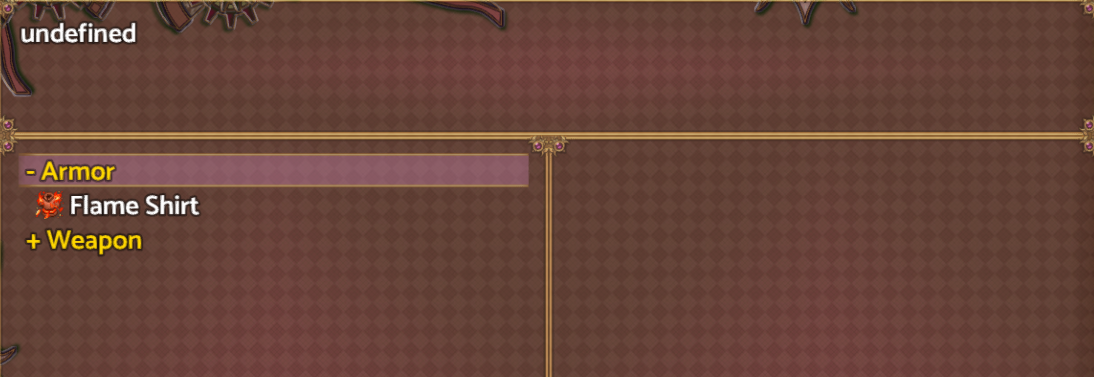
  1. Hi, @YoraeRasante is there a way to remove the word "undefined" in the description category? I already change it to ' ' or " " in plugin code, but it still said "undefined".
    Plugin: YR_ItemCrafting
    1657087976647.png
  2. Did you try "<br>" ?
  3. Boonty said:
    Did you try "<br>" ?
    tried it, but still no change
  4. Arf..

    Maybe displaying the empty icon with "\i[0]" will do the trick?
  5. Boonty said:
    Arf..

    Maybe displaying the empty icon with "\i[0]" will do the trick?
    not working :hsad:
  6. Hey, sorry for the time away.
    My computer... was not working well, let's just say.

    ShadowDragon contacted me about this issue, and as said on the other thread it is already fixed.
    For those curious, it was an incompatibility issue with YEP_MesageCore, when dealing with descriptions of the Categories.

    And as a bonus, the fix also adds Masked Descriptions, that is, a description for the item when it was not crafted at least once first. Closing the trilogy together with Maked Name and Masked Icon.

    The link is... the same as before. It is a dropbox link.
  7. YoraeRasante said:
    Item Craft


    An Item Craft plugin, made as a combination of Yanfly's and MrTrivel's. Its main differences are the disciplines from MrTrivel, more than one recipe for the same item, and being able to use Yanfly's independent items into the ingredients, something even Yanfly himself didn't add to his yet.
    Hi, I added your crafting plugin to my project, but when I try to open the crafting menu with the plugin command "CRAFT START Craft" I get the following error: "TypeError Cannot read property 'discBackground' of undefined". I tried to upload a background with the name 'discBackground' to solve this but I still get the error. Do you know why I get that error?
  8. Marthanos said:
    Hi, I added your crafting plugin to my project, but when I try to open the crafting menu with the plugin command "CRAFT START Craft" I get the following error: "TypeError Cannot read property 'discBackground' of undefined". I tried to upload a background with the name 'discBackground' to solve this but I still get the error. Do you know why I get that error?
    hey there.
    did you create at least one Crafting Discipline first?
  9. YoraeRasante said:
    hey there.
    did you create at least one Crafting Discipline first?
    Hi, Thanks for the fast reply. I made one Discipline named "Alchemy" witin the Plugin manager. I also get the error when I open the main menu in the game. Should I first add recipes and items before testing it? discBackground.png
  10. Marthanos said:
    Hi, Thanks for the fast reply. I made one Discipline named "Alchemy" witin the Plugin manager. I also get the error when I open the main menu in the game. Should I first add recipes and items before testing it? View attachment 256082
    Ok, so...
    What exactly are you calling on the plugin command?

    You said it was "START CRAFT Craft", are you using the name or the number? Or name?
    Been a while since I touched this plugin so I don't remember if I set it so you can call a discipline by name.
    And I remember that I probably had made it so people used the list's numbers for calling the craft instead of the array number, so I think it may need to be "start craft 1" and would give an error if you called "start craft 0".
  11. YoraeRasante said:
    Ok, so...
    What exactly are you calling on the plugin command?

    You said it was "START CRAFT Craft", are you using the name or the number? Or name?
    Been a while since I touched this plugin so I don't remember if I set it so you can call a discipline by name.
    And I remember that I probably had made it so people used the list's numbers for calling the craft instead of the array number, so I think it may need to be "start craft 1" and would give an error if you called "start craft 0".
    I tried both on the plugin command. By calling the discipline by its number, the error is a little different. If I call "craft start 1" it results in Error "Cannot read property '0' of undefined". If I call "Craft start 2" The error is "Cannot read property '1' of undefined. It gives an error based on the number of discipline minus 1. Perhaps I forgot to add something to the disciplines themselves?
    error.png
  12. hmm... It is not a lack of disciplines, since you created one. And if you changed the event afterwards it made you save so it is not that you forgot to save after that either.

    I just made a project with no recipes, just the plugin, a discipline and an event to call the plugin command "CRAFT START 1", yet you said that gives you this error...

    Is your version the latest one? 1.08a, if I am using the right version to test it?

    Could you open the console for me? Press either F8 or F12 (I don't know why some people's playtests need one and others the other) and on the window that opens up go to the Console tab.
  13. YoraeRasante said:
    hmm... It is not a lack of disciplines, since you created one. And if you changed the event afterwards it made you save so it is not that you forgot to save after that either.

    I just made a project with no recipes, just the plugin, a discipline and an event to call the plugin command "CRAFT START 1", yet you said that gives you this error...

    Is your version the latest one? 1.08a, if I am using the right version to test it?

    Could you open the console for me? Press either F8 or F12 (I don't know why some people's playtests need one and others the other) and on the window that opens up go to the Console tab.
    I use the 1.08a . This is what the console tab shows. Thanks for all the help already.

    1678976611048.png
  14. there is your error @Marthanos ^^ what version of YEP_EngineCore do you use?
    can you screenshot your plugin database?

    the plugin works fine on my end though with 1 recipe, 1 discipline, nothing else.

    @YoraeRasante F8 is mostly for MV version 1.5.x while F8 and F12 can be used
    on MV version 1.6.x (which I use both). sometimes I use F12.
  15. @Marthanos yes, it is very likely @ShadowDragon got it.

    While there is no way to be sure without testing, my plugin is compatible with YEP_CoreEngine (it has to, since it is compatible with ItemCore), since your CoreEngine is having an issue that may be causing an error that my plugin is being blocked by.


    @ShadowDragon it may be that the differences were from before then, because I remember that in older projects at least mine did open with F8 but some from others I could only open with F12.
  16. I suppose it's indeed the YEP_CoreEngine. Because I used the plugin on a new project without any other plugins and there it works.
    @ShadowDragon Here's the screenshot of my plugins. I use version 1.13 of the YEP_CoreEngine.
    1678985307554.png
  17. I don't know how or why, but apparently I just had to start a new save. It only gives the error with saves made before I installed the plugin. @YoraeRasante Thanks for the amazing plugin and help and @ShadowDragon Thanks for the additional help.

    1678986682080.png
  18. @Marthanos YEP_CoreEngine I use is 1.30, it might be 1.32 that some use.
    but also, your YEP_Plugins are out of place, which can also give bad
    behaviours.

    YEP plugins are known for strange behaviours is a wrong order, so use
    Plugin Order Checker in my spoiler or check YEP plugin websight for the
    order as the order is very STRICT to behave the best way for compability.

    also saved game when installing new plugins never works (unless you patch it).
    and new game is mostly required to get things to work.
  19. MysteryKitten said:
    hello. i'm really sorry to bother you at this time, specifically regarding your previous comments about your life situation.
    i'm having an issue with the YR_DB_BattlerChange_X.js plugin. i'm using the actor party switch plugin by yanfly (seeing as the dragonbones battler change only works with this form of mid-battle party swapping) which DOES replace the dragonbones as i wanted, but causes the game to crash if i swap repeatedly between dragonbones battlers. i'm not entirely sure what to do here.View attachment 210015
    @YoraeRasante sorry for double asking but i just came back to this thread after two years lol
  20. Sorry, but I didn't even touch DragonBones since MZ was released.

    But... being honest, even before then I barely used it. And most of the times I did use it was... well, to make these dragonbone fixes plugins.

    I'm assuming by your question that you still need some my plugins when using Dragonbones then? I honestly thought they'd have fixed these issues after enough time passed, not like any of my fixes were for things no one would have complained to them about before.