YEP_X_ProfileStatusPage Image gets cut off by text?

● ARCHIVED · READ-ONLY
Started by JtheDuelist 16 posts View original ↗
  1. I am using Yanfly's Profile Status Page and Status Menu Core plugins, but when I check the text and profile image, this occurs:
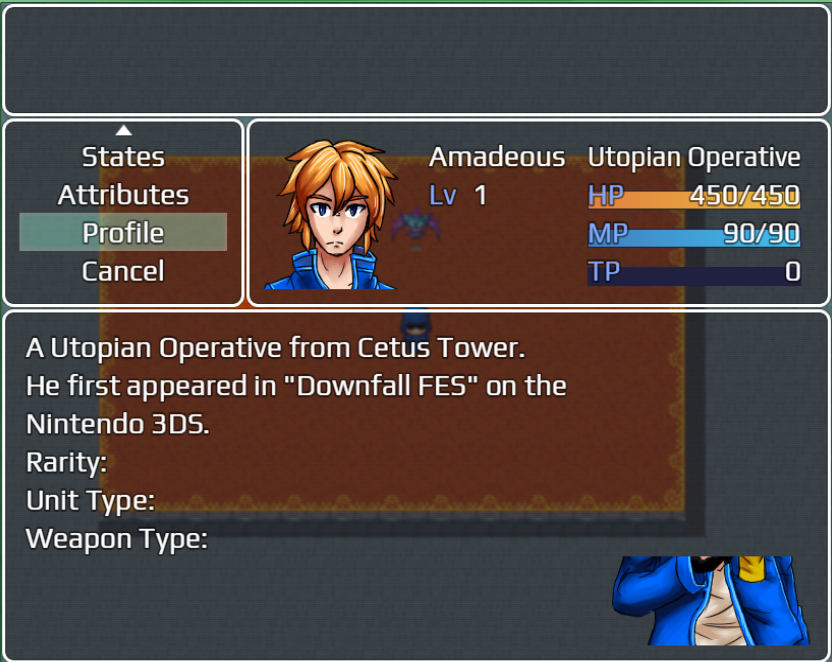
    error.png
    The text cuts off the top of the image. How do I fix this?!
  2. I have no idea since Im using the same plugins and it works fine for me. Do you use some random dudes super tools engine? Have you altered the parameters? Any conflicting plugins? Since I'm not having this problem, it will probably down to your system.
  3. @Alexander Hawksmoor The only SRD plugins I'm using are Alt Menu Screen: Icons and Copy Actors. Everything else is Yanfly or others.
  4. JtheDuelist said:
    @Alexander Hawksmoor The only SRD plugins I'm using are Alt Menu Screen: Icons and Copy Actors. Everything else is Yanfly or others.
    Try disabling both or one of those
  5. @Thomas Smith Disabling both did not fix it.

    EDIT: This is my plugins manager if it helps...DFESL Plugins.png
  6. @Thomas Smith Makes a FE-style battle system, sort of like LeCode's one (sorry if I butchered the name).
  7. JtheDuelist said:
    @Thomas Smith Makes a FE-style battle system, sort of like LeCode's one (sorry if I butchered the name).
    Got it. Did you see my edit?
    Thomas Smith said:
    EDIT: Show me the parameters for the YEP_X_ProfileStatusPage plugin.
  8. @Thomas Smith Will do when I get back from dinner.
  9. If we can't find a fix, I can go without the image.
  10. JtheDuelist said:
    If we can't find a fix, I can go without the image.
    I'd rather not resort to that, but it might be the only option...
    What are all the notetags for the plugin? Perhaps you set them up wrong or something.
  11. Did you find a solution for this? Just happened to me out of nowhere, and can't seem to fix it.
  12. @Almightypebble , please refrain from necro-posting in a thread. Necro-posting is posting in a thread that has not had posting activity in over 30 days. You can review our forum rules here. Thank you.