[YEP] Yanfly Engine Plugins

● ARCHIVED · READ-ONLY
Started by Yanfly 6167 posts Page 77 of 309 View original ↗
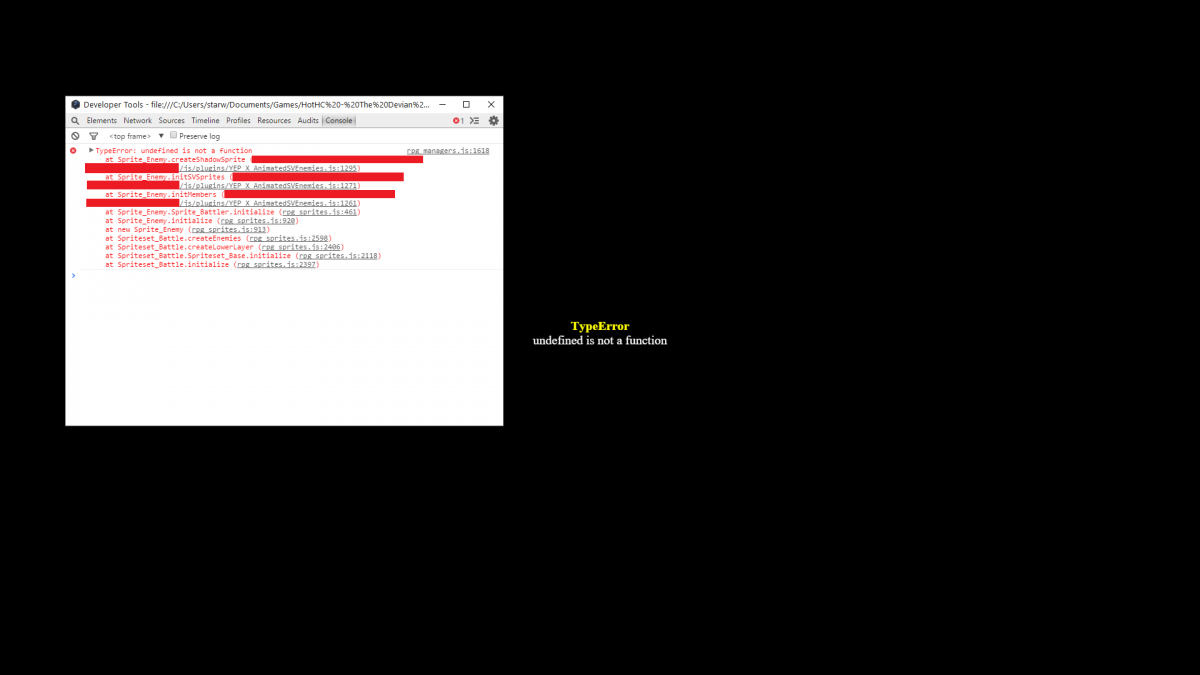
  1. Hey I'm having an issue with the sideview enemies plugin.

    The issue occurs after I set sprite smoothing to false.

    Error.png
  2.  

    StarWarrior00 said:
    Hey I'm having an issue with the sideview enemies plugin.

    The issue occurs after I set sprite smoothing to false.

     
    Not sure why you're censoring out the text there. That top censor is the very source of the error. If you don't show me it, I can't provide you an answer.
  3. OK, how about this? 

    Exactly WHY do you need to see my filepath anyway? I didn't think it was important.

    Error_Original.png
  4. Because sometimes the filepath doesn't extend all the way to the second line. By censoring it, it doesn't give me clear information on what's actually causing the error.

    I'll have this fixed by tonight.
  5. Yanfly said:
    Because sometimes the filepath doesn't extend all the way to the second line. By censoring it, it doesn't give me clear information on what's actually causing the error.

    I'll have this fixed by tonight.
    I'm not sure I understand but OK I'm not gonna ask questions. I shall wait for the fix.
  6. A problem with the party system that I justs discovered. So, if I have a main character who is removed for a while to have another character be playable, then later remove said character and add back the main character, the main character is placed in slot 2 instead of 1 by default with the another character taking the first slot. This kinda messes many of the cutscenes and makes locking the player impossible too.

    EDIT: I think I fixed this myself, it was matter of adding a follower first, removing the another character and then adding the player, to replace the now free "slot 1".
  7. I've found an issue when I updated to the latest battle engine core (works fine in 1.22).

    I've tested this in a blank project with just 2 scripts, core and battle core (both fully updated).

    Using a forced action on 'turn 0' causes every turn from that point to end prematurely.

    Basically after setting everyone to attack the fastest person acts then its back to selecting commands, fastest person acts, select, fastest...

    The turn seams to end after the very first action...

    This only happens in battles with a troop event on turn 0.
  8. ShadowHawkDragon said:
    I've found an issue when I updated to the latest battle engine core (works fine in 1.22).

    I've tested this in a blank project with just 2 scripts, core and battle core (both fully updated).

    Using a forced action on 'turn 0' causes every turn from that point to end prematurely.

    Basically after setting everyone to attack the fastest person acts then its back to selecting commands, fastest person acts, select, fastest...

    The turn seams to end after the very first action...

    This only happens in battles with a troop event on turn 0.
    Since I cannot reproduce the error, I'm going to ask you to do the following.


    1. Download all the newest updates of the plugin.

    2. Create a new project.

    3. Install -only- the affected plugins. If you're using non-YEP plugins, do NOT include them.

    4. Make sure they're in the right order listed on http://yanfly.moe/yep/

    5. Recreate the error.

    6. Upload the project online (do -not- deploy it).

    7. Post the link here and I'll take a look at it.


    Thanks for helping!
  9. Another great week of plugin polls!

    This week, I really want Skill costs Gold (I love skill costs items) and Event Chase Stealth to win! 

    Next up, my view on the new ones! Well, Item Disassemble, I'm not sure if it's neccisary, since 1) Its been done 2) More importantly, couldn't you use Item Synthesis to do so?

    Enemy Levels looks pretty cool, again already been done, but as always, thats not a bad thing, since every version of every idea offers something new! Also Poke-makers will love it, because they can become that little bit closer to making a true Pokemon-RPG!

    Battle Face Reactions, I think is super cool but... well... it would take FOREVER to make the resources needed to make that plugin work to it's fullest extent...

    Now my favourite of this week's newbies is Extended Message Options, since between Gab Window and with E.M.O( lol, emo :guffaw:  )  we would have the ULTIMATE control over Text and Messages, now THAT'S Lunatic!! Also, add Hime's Message plugins and a whole lot of good text, you can do almost EVERYTHING with your game!

    I personally hope Event Chase Stealth wins this time, but I'm sure everyone has their own opinions and I'd love to hear them! And as always, thanks Yanfly for what you do every day to benefit the community!  :thumbsup-left: BD :rock-right:

    On a day where the world lost their "Starman" you have brought some light, and for that I am thankful!  ;)
  10. killerfer said:
    @Yanfly

    I'm not sure if you saw my post in your site a couple days ago, but there is a graphical bug when you use CTB along with default item/skill windows in battle. In the Battle Engine Core parameters, Windows Settings, set the Lower Windows to “false”. When you open the skill or the item window in battle, the battlers faces from the CTB turn order stay on top of the skills/items names and costs/quantity.
    Feeling ignored ;_;

    Is there a way to check the element of the skill used against me in the buffs and states lunatic tags? I'm trying to make a state that makes my character immune to a single attack from a element, and I need to check if the skill used against me is from said element for me to negate the damage and remove the state. I'm trying to use it with the <Custom React Effect> notetag, but I have no idea what to put in the "if".
  11. Um I'm having an issue with the Gamepad config script. it's not showing up in the options menu. No error message or anything.

    Also a question, how do I change where the Keyboard Config option is located? I want to put it under SE Volume with Gamepad Config above Keyboard Config.

    For the main menu I would like to put Credits below Home Page.
  12. ShadowHawkDragon said:
    Sigh, for a minute I thought I'd solved it, looks like I just forgot to save after putting in the scripts... Still bugging out.


    https://www.dropbox.com/s/j1jekf3lg269nfj/dummy.7z?dl=0

    https://www.dropbox.com/s/j1jekf3lg269nfj/dummy.7z?dl=0

    Apart from pruning art and sound for a smaller file size the only real changes are adding YEP_CoreEngine and YEP_BattleEngineCore and adding a forced action (turn 0) to troop 1
    Thanks, I'll take a look.

    EDIT: Seems like I fixed it without knowing in the newest update. You can grab it here: :)

    http://yanfly.moe/plugins/en/YEP_BattleEngineCore.js

    killerfer said:
    Feeling ignored ;_;

    Is there a way to check the element of the skill used against me in the buffs and states lunatic tags? I'm trying to make a state that makes my character immune to a single attack from a element, and I need to check if the skill used against me is from said element for me to negate the damage and remove the state. I'm trying to use it with the <Custom React Effect> notetag, but I have no idea what to put in the "if".
    To check the element of the skill being used, you can use this:

    var elementId = this.item().damage.elementId;

    StarWarrior00 said:
    Um I'm having an issue with the Gamepad config script. it's not showing up in the options menu. No error message or anything.

    Also a question, how do I change where the Keyboard Config option is located? I want to put it under SE Volume with Gamepad Config above Keyboard Config.

    For the main menu I would like to put Credits below Home Page.
    The Gamepad config only shows up if you have a gamepad detected. As for the Keyboard config, the position is determined automatically. The same goes for Credits and Homepage so you'd have to create a separate plugin for that or change the code of the existing plugin for that. If you intend to do that, I suggest you ask here: http://forums.rpgmakerweb.com/index.php?/forum/128-jvscriptplugin-support/
  13. Yanfly said:
    To check the element of the skill being used, you can use this:

    var elementId = this.item().damage.elementId;
    Thanks a lot Yanfly, it works like a charm. I don't understand why you are not answering me about the bug report I made (about CTB icons and normal item/skill windows). I understand you have a lot of work and little time. If you don't plan on fixing this, it's fine by me, I just think I deserved a answer.

    Either way, I want to thank you for all the plugins, support and feedback you provide for us all. You are really awesome.
  14. killerfer said:
    Thanks a lot Yanfly, it works like a charm. I don't understand why you are not answering me about the bug report I made (about CTB icons and normal item/skill windows). I understand you have a lot of work and little time. If you don't plan on fixing this, it's fine by me, I just think I deserved a answer.

    Either way, I want to thank you for all the plugins, support and feedback you provide for us all. You are really awesome.
    I actually miss a lot of the posts sometimes since these threads go through such huge speeds. x_x

    As for the CTB Icons, I'll take a look at it
  15. Yanfly said:
    I actually miss a lot of the posts sometimes since these threads go through such huge speeds. x_x

    As for the CTB Icons, I'll take a look at it
    I completely understand that. Thanks for your reply. :)
  16. Yanfly said:
    EDIT: Seems like I fixed it without knowing in the newest update. You can grab it here: :)
    IT WORKS! Thank god it works, I can't believe how badly this screwed up my game.

    You're a life saver without even knowing it.
  17. I encountered yet another error with the Animated sideview battlers plugin this time after I applied the floating notetag to an enemy. 

    Error2.png
  18. StarWarrior00 said:
    I encountered yet another error with the Animated sideview battlers plugin this time after I applied the floating notetag to an enemy. 
    If you're going to use Floating, you need the Action Sequence Pack 2 plugin. If you have it, place it above the Animated Enemies plugin on the plugin list in this order: http://yanfly.moe/yep/