[YEP] Yanfly Engine Plugins

● ARCHIVED · READ-ONLY
Started by Yanfly 6167 posts Page 44 of 309 View original ↗
  1. ok here are a couple questions a lot of people using the CTB plugin might like to know the answers to.

    1. like in Mana Khemia can you make it where we have time set cards. An example is when Roxis uses Chrono Dive and it adds cards to line up so the attack will be used later.
    2. Can you also have it where we have some empty space cards also like Mana Khemia. I kinda like the fact that I could see empty cards so I could see where all possible time cards could end up.
    For a couple other questions that don't involve the CTB plugin.

    1. Far down the line in the future do you have plans to do your party team attack plugin. Maybe an extension like if you pull this character into combat they auto do some type of support skill and if they replace a certain character they do a special duo attack. 
    2. Also have a cool-down for when you can pull certain party members into combat instead of being able to rapidly switch them in and out.
    Both of the last two again kinda coming from Mana Khemia system. If you have not realized I was a Mana Khemia fan.
  2. Ah, I see. If you couldn't repro my bug, let me clarify. Here you go:

    1. Have two pieces of armor (for the same slot) that a character can wear.
    2. Open the menu and have him equip the weaker one. <- If you don't equip it in your current menu session, no repro!!

    3. Without closing the menu, select Optimize.

    4. Change that slot again.

    It's not a hard repro at all, so I was wondering why you said you needed the project. But that little note on #2 (you have to equip the weaker armor IN THE CURRENT MENU SESSION) I hadn't noticed.

    To clarify the Remove All (or Clear?) bug, you similarly have to actively change the slot in the current menu session. Then, after Remove All, you won't see that piece of equipment you had equipped the next time you select that slot in that session.)

    Equip Core is 1.06 (currently latest), for the record.

    So here's the project. Audio and img files have been removed: https://www.dropbox.com/s/8ybdsepmtu13stb/Project3.zip?dl=0
  3. Hello, Yanfly!

    I think I found a bug. I thought it was only in my project, but when i tried on the sample project, I had the same thing.

    For both ATB and CTB, when i switch the Turn Structure to 'true', my states with 'Auto-removal Timing: Turn End' never ends, and one of these states actually had Ex-Parameter MP Regeneration. And I never have any MP regenerated as well. So looks like the turn never came? I tried with the original Full Turn setting, and low/high numbers.

    Oh, and when i switch Turn Structure to 'false', everything works normally, states disappearing, MP regenerating, etc.

    To replicate what I did, simply change Turn Structure parameter to 'true' and add a state to an actor with 'Auto-removal Timing: Turn End' (i used 2 ~ 2 turns duration) with Ex-Parameter MP Regeneration (i used +10%). I used a spell to add this state to the actor.

    Hope that helps! :)

    - Riff
  4. Ctb does some funny things to turns
  5. SpellcraftQuill said:
    Two more things I'm interested in knowing about:

    1. For Message Core with a smaller message width, how may move the box to one corner?
    2. For Status Core, I just want the general section to display experience required and experience needed.
    Currently, the plugins do not have those features. I highly recommend you make a request for it here from another user: http://forums.rpgmakerweb.com/index.php?/forum/136-js-plugin-requests/ if you wish for it to be pushed out earlier as that's not my current focus.

    crowhound said:
    ok here are a couple questions a lot of people using the CTB plugin might like to know the answers to.

    1. like in Mana Khemia can you make it where we have time set cards. An example is when Roxis uses Chrono Dive and it adds cards to line up so the attack will be used later.
    2. Can you also have it where we have some empty space cards also like Mana Khemia. I kinda like the fact that I could see empty cards so I could see where all possible time cards could end up.
    For a couple other questions that don't involve the CTB plugin.

    1. Far down the line in the future do you have plans to do your party team attack plugin. Maybe an extension like if you pull this character into combat they auto do some type of support skill and if they replace a certain character they do a special duo attack. 
    2. Also have a cool-down for when you can pull certain party members into combat instead of being able to rapidly switch them in and out.
    Both of the last two again kinda coming from Mana Khemia system. If you have not realized I was a Mana Khemia fan.
    MV's structure makes it required that anything in an action list is tied to an actor. This means individual time cards wouldn't be able to exist yet. However, I am looking into ways to incorporate this.

    HeroicJay said:
    Ah, I see. If you couldn't repro my bug, let me clarify. Here you go:

    1. Have two pieces of armor (for the same slot) that a character can wear.

    2. Open the menu and have him equip the weaker one. <- If you don't equip it in your current menu session, no repro!!

    3. Without closing the menu, select Optimize.

    4. Change that slot again.

    It's not a hard repro at all, so I was wondering why you said you needed the project. But that little note on #2 (you have to equip the weaker armor IN THE CURRENT MENU SESSION) I hadn't noticed.

    To clarify the Remove All (or Clear?) bug, you similarly have to actively change the slot in the current menu session. Then, after Remove All, you won't see that piece of equipment you had equipped the next time you select that slot in that session.)

    Equip Core is 1.06 (currently latest), for the record.

    So here's the project. Audio and img files have been removed: https://www.dropbox.com/s/8ybdsepmtu13stb/Project3.zip?dl=0
    Thanks for the help! It appears to be a refreshing issue. No items got duplicated (which is good).

    I'm unable to test this currently, but this should fix it.

    http://yanfly.moe/plugins/en/YEP_EquipCore.js

    Riff said:
    Hello, Yanfly!

    I think I found a bug. I thought it was only in my project, but when i tried on the sample project, I had the same thing.

    For both ATB and CTB, when i switch the Turn Structure to 'true', my states with 'Auto-removal Timing: Turn End' never ends, and one of these states actually had Ex-Parameter MP Regeneration. And I never have any MP regenerated as well. So looks like the turn never came? I tried with the original Full Turn setting, and low/high numbers.

    Oh, and when i switch Turn Structure to 'false', everything works normally, states disappearing, MP regenerating, etc.

    To replicate what I did, simply change Turn Structure parameter to 'true' and add a state to an actor with 'Auto-removal Timing: Turn End' (i used 2 ~ 2 turns duration) with Ex-Parameter MP Regeneration (i used +10%). I used a spell to add this state to the actor.

    Hope that helps! :)

    - Riff
    This seems to have been a problem since I've fixed the issue with MV producing two turn ends due to forced actions. I'm unable to test these currently but it should fix it:

    http://yanfly.moe/plugins/en/YEP_X_BattleSysATB.js

    http://yanfly.moe/plugins/en/YEP_X_BattleSysCTB.js
  6. Hmm. 

    I've attempted to use Victor's Reflect Actions and Tsukihime's Counter After Hit plugins paired with your Battle Engine Core. However, it seems to make both attacks appear instantaneous rather than one after the other. Is there a way I can make the actions follow after each other rather than be played at the same time?
  7. Hey Yanfly!

    I just ran into some sorta bug. Nothing big or gamebreaking.

    It seems that if a character joins the battle halfway, it won't count towards their statistics, although the kills and assists they make during that fight are counted.

    I hope nobody already reported this.

    On the other hand, The JP NaN works perfectly now. Thank you for fixing it :D
  8. Yanfly said:
    Party System

    Features and How to Use


    This plugin replaces the "Formation" command found in the in-game menu with a new scene where the player can adjust the party he or she wants in a more comfortable way.

    Plugin: http://yanfly.moe/2015/11/20/yep-29-party-system/

    Happy RPG Making!
    Oh sweet God, I absolutely love this plugin, especially having the ability to lock party members!

    Thanks so much!

    CVrNf96WoAEY911.png
  9. Yanfly said:
    MV's structure makes it required that anything in an action list is tied to an actor. This means individual time cards wouldn't be able to exist yet. However, I am looking into ways to incorporate this.
    Ok so the only way I can think of doing them seems very hackish and sloppy but here it is and if it is wrong sorry I have not had a real chance to look into your scripts due to finals week.

    If I am thinking correctly then you will need the Party plugin, Action Sequence plugins, and CTB plugin, Damage Control Core for this.

    1. First for each time card spell you want make an actor. Have an empty alpha image for battler and everything else.
    [*]Make a skill that has the animation you want to play with damage set up using the damage control core tags.
    [*]Using Action Sequence keep all the party members in the position you want them to be in combat and put that into the action sequence.
    [*]Using Party formation increase the allowed party combatant number and then add the fake actor as a new member.
    [*]For the CTB card use the icon change command to give it the icon you want to show the spell.
    [*]Have it where when it is the fake actors turn use that skill automatically using  Action Sequence.
    [*]When the skills are done decrease the party size after taking out the fake actor.
    [*]That's it I think
    Well I am hoping this will work I will try to find a mock up way to due that. If I figure something out want me to post it.
  10. Annnnnd I think we have a bug in CTB.

    Possible Bug Found: 

    Under certain conditions, the turn order bar updates incorrectly when using an "Instant Cast" skill in the CTB Battle system.

    Steps to reproduce the error:

    This only happens when there is one enemy and one ally. Things work fine otherwise.

    What happens: 

    Actor that uses instant cast skill is shown moving towards the back of the turn order bar, but still gets the turn. This will repeat for every additional skill cast with "Instant Cast". 
  11. Event Mini Label

    Features and How to Use


    This plugin lets you place text above the heads of various events using a miniature label through a comment tag. The text used can also use text codes so text, icons, colors, etc. whatever it is, you can use it as a label!

    Plugin: http://yanfly.moe/2015/12/08/yep-40-event-mini-label/

    Instructions

    Spoiler
    Introduction

    This plugin lets you place text above the heads of various events using a miniature label through a comment tag.

    Comment Tags

    Comment tags are ‘notetags’ used within the lines of an event’s comments. The reason I’m using the comment tags instead of the notetags is because each page of an event can yield a different potential name.

    To use this, make a comment within the event you wish to make the mini label for and insert the following:

    <Mini Label: text>
    This will display the ‘text’ above the event. You can use text codes for this comment tag and it will create dynamic messages.

    <Mini Label Font Size: x>
    This will change the font size used for the mini label to x. If this tag isn’t used, the font size will be the default value in the parameters.

    <Mini Label Y Buffer: +x>
    <Mini Label Y Buffer: -x>
    This will adjust the Y buffer for the mini label by x value. If this tag isn’t used, the Y buffer will be the default value in the parameters.

    <Always Show Mini Label>
    This will make the mini label to always be shown, even when the plugin command to hide mini labels is used.

    Plugin Commands

    If you would like to shut off the Event Mini Label mid-game or turn it on, you can use the following plugin commands:

    Plugin Command:

    HideMiniLabel
    Hides all Event Mini Label.

    ShowMiniLabel
    Shows all Event Mini Label.

    Happy RPG Making!
  12. Myst Desdemona said:
    Hey Yanfly!

    I just ran into some sorta bug. Nothing big or gamebreaking.

    It seems that if a character joins the battle halfway, it won't count towards their statistics, although the kills and assists they make during that fight are counted.

    I hope nobody already reported this.

    On the other hand, The JP NaN works perfectly now. Thank you for fixing it :D
    Ah yeah. The counter is for the number of battles they've initiated:

    * Battles Initiated * How many battles the actor was present in the starting party and what ratio.
    crowhound said:
    Ok so the only way I can think of doing them seems very hackish and sloppy but here it is and if it is wrong sorry I have not had a real chance to look into your scripts due to finals week.

    If I am thinking correctly then you will need the Party plugin, Action Sequence plugins, and CTB plugin, Damage Control Core for this.

    1. First for each time card spell you want make an actor. Have an empty alpha image for battler and everything else.
    [*]Make a skill that has the animation you want to play with damage set up using the damage control core tags.
    [*]Using Action Sequence keep all the party members in the position you want them to be in combat and put that into the action sequence.
    [*]Using Party formation increase the allowed party combatant number and then add the fake actor as a new member.
    [*]For the CTB card use the icon change command to give it the icon you want to show the spell.
    [*]Have it where when it is the fake actors turn use that skill automatically using  Action Sequence.
    [*]When the skills are done decrease the party size after taking out the fake actor.
    [*]That's it I think
    Well I am hoping this will work I will try to find a mock up way to due that. If I figure something out want me to post it.
    Sounds like a lot of work. It's worth a shot though.

    thechancellor said:
    Annnnnd I think we have a bug in CTB.

    Possible Bug Found: 

    Under certain conditions, the turn order bar updates incorrectly when using an "Instant Cast" skill in the CTB Battle system.

    Steps to reproduce the error:

    This only happens when there is one enemy and one ally. Things work fine otherwise.

    What happens:

    Actor that uses instant cast skill is shown moving towards the back of the turn order bar, but still gets the turn. This will repeat for every additional skill cast with "Instant Cast". 
    Since I cannot reproduce the error, I'm going to ask you to do the following.


    1. Download all the newest updates of the plugin.

    2. Create a new project.

    3. Install -only- the affected plugins.

    4. Recreate the error.

    5. Upload the project online (do -not- deploy it).

    6. Post the link here and I'll take a look at it.


    Thanks for helping!
  13. That was the biggest derp I had today. Thank you for clarifying.
  14. I'm not sure if this is a bug but once new Actors are added to the party I can't see their equipment in the Item menu. Like where you can upgrade the equipment.

    As soon as I unequip and reequip the gear or simply hit optimize once, the equipment appears in the item menu as well. I noticed when I hit optimize the stats change a bit as well.

    Edit:
    I do not use Change Equipment event commands. The characters are initialized with their equipment on.
  15. Luxanna said:
    I'm not sure if this is a bug but once new Actors are added to the party I can't see their equipment in the Item menu. Like where you can upgrade the equipment.

    As soon as I unequip and reequip the gear or simply hit optimize once, the equipment appears in the item menu as well. I noticed when I hit optimize the stats change a bit as well.

    Edit:

    I do not use Change Equipment event commands. The characters are initialized with their equipment on.
    Huh. That's odd... Since I cannot reproduce the error, I'm going to ask you to do the following.


    1. Download all the newest updates of the plugin.

    2. Create a new project.

    3. Install -only- the affected plugins.

    4. Recreate the error.

    5. Upload the project online (do -not- deploy it).

    6. Post the link here and I'll take a look at it.


    Thanks for helping!
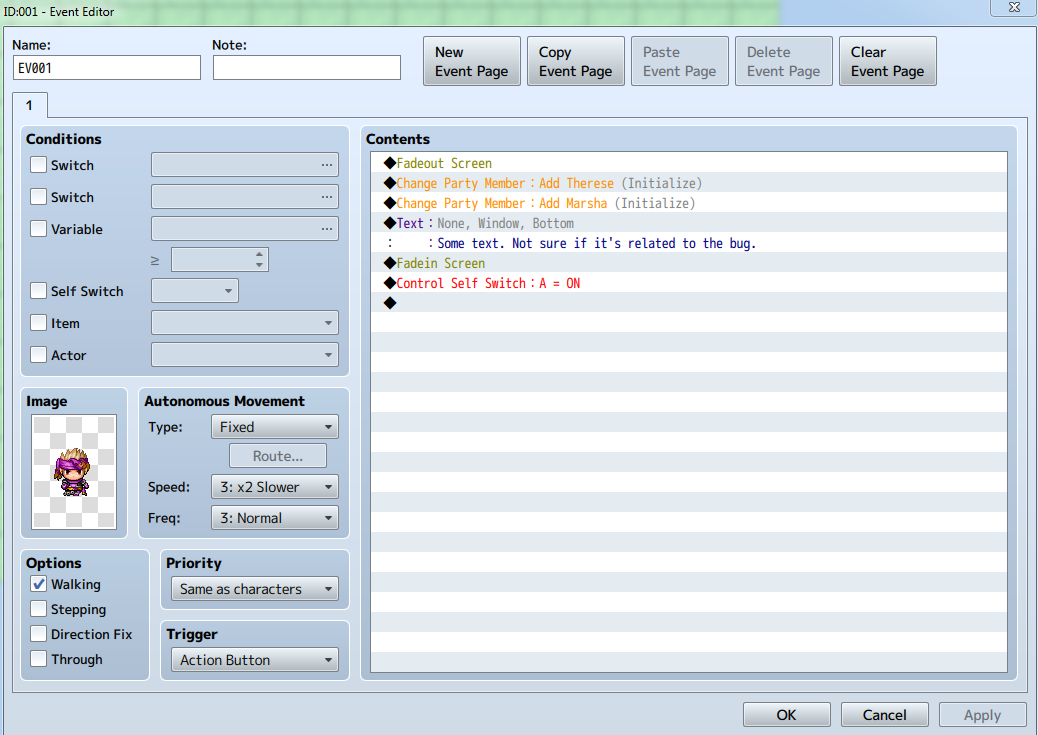
  16. I managed to reproduce it, I think.

    Try this exact setup:


    I think it's somehow related to Fadeout and Fadein Screen. Weird.
  17. Luxanna said:
    I managed to reproduce it, I think.

    Try this exact setup:

    axtnrhat.png

    I think it's somehow related to Fadeout and Fadein Screen. Weird.
    try putting a wait between the fadeout and each of the add members
  18. Hey Yanfly, the CTB Full Turn Count mechanic is still confusing for myself and others (judging from the feedback so far). Is it possible to make it so that turn counts are based on enemy and actor actions? Meaning each turn executed by an actor or enemy increases the Battle Turn Count by 1?
  19. thechancellor said:
    Hey Yanfly, the CTB Full Turn Count mechanic is still confusing for myself and others (judging from the feedback so far). Is it possible to make it so that turn counts are based on enemy and actor actions? Meaning each turn executed by an actor or enemy increases the Battle Turn Count by 1?
    In the default settings (which you shouldnt touch anyway), each 'tick' increases each battler's full turn gauge by their agi value. So higher agi battlers will have their turns come faster.

    If you turn Turn Structure to true, the value that you enter in the settings will be the number of 'ticks' to count as one battler turn.

    I was confused between these two initially, but you just need to see the difference. One is the full gauge value to hit one turn and the other is the number of ticks. :)

    CTB and ATB are very similar, except there is no wait in between the current and next battler's turns and you have bit more control on the battlers' turn.

    Hope that helps!

    - Riff
  20. Riff said:
    In the default settings (which you shouldnt touch anyway), each 'tick' increases each battler's full turn gauge by their agi value. So higher agi battlers will have their turns come faster.

    If you turn Turn Structure to true, the value that you enter in the settings will be the number of 'ticks' to count as one battler turn.

    I was confused between these two initially, but you just need to see the difference. One is the full gauge value to hit one turn and the other is the number of ticks. :)

    CTB and ATB are very similar, except there is no wait in between the current and next battler's turns and you have bit more control on the battlers' turn.

    Hope that helps!

    - Riff

    What you've explained is what I'm already aware of. In retrospect, I asked a horrible question. Haha. Let me clarify.

    What I would like is for a "Battle Turn" to pass each time a battler's Turn Gauge is full. Meaning, If I have a battle event set to trigger on Turn #4, I want that event to trigger after three battlers (doesn't matter which ones) take their turns. 

    In this plugin, Yanfly seperates the two. There are turns for the battle, and turns for actors/enemies. I'm asking if I can merge the two. Setting the values to identical numbers in the parameters doesn't have that effect. At least, for me it doesn't.

    My understanding is, setting a value for number of ticks to pass for a Full Turn count means that you can't set a number of battlers to act before something triggers. It'll always be random based on agility.