I downloaded it yesterday and it doesn't load when I press F10. I checked and everything is up to date so I don't know what's wrong with it
YEP Doodad plugin not loading
● ARCHIVED · READ-ONLY
-
-
Double check if it's loaded in plugin manager too. (We all have that moment one way or another)
-
Yeah its there I also have the Extended doodad pack
-
What version of RPG Maker are you using?
-
I'm using MV
-
Right. When you are in the editor, click the "help" tab along the top, then select "about" Tell me what version it says you are using (for example Version 1.6.1)
-
I was going to say that a while ago but I forgot its 1.6.1
-
Do you have the latest version of the Doodad's plugin off Yanfly's website?
nvm, I see you said it's up to date
I would suggest going through the steps again, check each one off and make sure you didn't miss one. I had issues getting it to work at first too, it's not as plug and play as some plugins, but it's totally worth the effort! : D -
I'm having the same problem :/
RMMV version is 1.6.1 (Up to date on steam), Doodads is version 1.9 (from Yanfly's website).
Installed the starter doodads pack, and the doodad.json file in the data folder. Clicking on F10 in-game doesn't bring up any menu :/ -
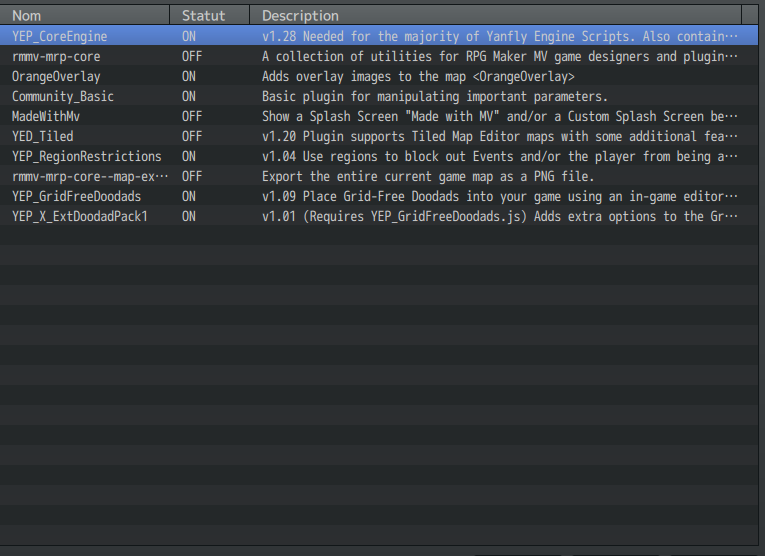
show screenshots of your plugin manager to see if there might be a conflict or wrong order
-
Mine is looking like this:
-
It's working now, huh.
...
I had another program running that used F10 as a hotkey too (a screencapture program), I guess there were a conflict going on. Changing that program's hotkey to F2 fixed it :D -
Ugh I've tried everything and it still doesn't work :kaosigh:
-
Did you try to close any other process that's running that might be hogging the F10 shortcut?
-
Yep the only things running are rpgmaker and chrome
-
@Hmichelle your yanfly plugins are in the wrong order.
Correct that to the order given on yanflys website, delete your old savegames and try again. -
Ok so the plugins are now in order but where do I delete the savegames? (sorry I'm kinda new to this so) :kaoswt2:
-
Just start new games. The old saves have become incompatible due to the reordering.
-
Alright I did that and didn't work either