Yanfly Quest journal plugin Problem

● ARCHIVED · READ-ONLY
Started by Marzanna 18 posts View original ↗
  1. Hi there, so I'm begginer in RPG Maker and java code, and usually I find the solution of my problem but with this problem I'm lost ~

    So, I use Yanfly Quest journal plugin, and when I want click on "Complete" window I have this message from java.


    I download the plugin in Yanfly website : http://yanfly.moe/2017/10/13/yep-152-quest-journal-system-rpg-maker-mv/

    Spoiler
    upload_2018-7-23_18-34-19.png


    When I open the console I'm on this message :

    Spoiler

    and this
    Spoiler
    upload_2018-7-23_18-36-7.png


    The problem stay even if all plugin are OFF,
    Spoiler
    upload_2018-7-23_18-39-56.png


    And I don't understand all java language, if someone can help me, that will be fine,.
    Thanks~
  2. It would help if you edited your post to include a link to the webpage where you got that plugin. That way if people need to check something in order to help you, they don't have to go hunting.
    Thanks.
  3. Ok, thanks, I updated it .
  4. From the console error message, it looks like it doesn't like the quest description.

    Can you share the settings you've made in the plugin and the description for the quest that is crashing?
  5. I didn't spot that this was in 'Plugin Requests'. That section is for when you are looking for a plugin, or wanting an existing plugin to be modified in some way. When you already have the plugin, and need help to get it to work the way you want, then it needs to be in 'Javascript/Plugin Support'.

    [mod]Moving to Javascript/Plugin Support[/mod]
  6. Yes sur,
    Spoiler
    upload_2018-7-23_23-7-7.png
    for the quest in the plugin I changed nothing for try.
    Spoiler
    upload_2018-7-23_23-7-41.png
    upload_2018-7-23_23-7-53.png
    upload_2018-7-23_23-8-5.png
    upload_2018-7-23_23-8-15.png
    Spoiler
    upload_2018-7-23_23-8-49.png
    upload_2018-7-23_23-8-59.png

    upload_2018-7-23_23-9-9.png


    so this is the script of my quest.
  7. Aloe Guvner said:
    and the description for the quest that is crashing?

    By this, I mean the "Description" field in the plugin parameters. If there are multiple Descriptions, only the one that causes the issue is relevant.

    I don't use this plugin myself but from reading the error message:
    Unexpected token u in JSON at position 0
    This error is occurring when the window is trying to display the quest Description. So, most likely, somewhere in the Description is the issue.
  8. No, we need to see the "Quest Description" that is causing the crash. This is what the error message is showing.

    Sorry for my bad drawing, I'm on my mobile. Only the Description that causes the crash is relevant.
  9. oh I see, sorry~
    Spoiler
    upload_2018-7-23_23-50-4.png
    upload_2018-7-23_23-50-19.png

    This is the description by default, but even If I change by "real sentence" I have this error.
  10. I'm sorry, I cannot help anymore, I don't see what's wrong. Hopefully someone else with experience in the plugin can see it.

    What we know so far is that the issue is with the Quest Description with an error message of:
    Unexpected token u in JSON at position 0

    When the plugin tries to execute JSON.parse() on the description contents.
  11. For future reference, it would be good if you could use spoiler tags for all those images. It's a lot of scrolling to do otherwise. :kaoswt:

    In my experience, the 'unexpected token u in JSON' error can occur when JSON.parse is given an unparseable input. Like Aloe said, though, the description looks OK.

    Your Yanfly plugins are disordered, though: move YEP_MessageCore so it is between YEP_X_CoreUpdatesOpt and YEP_QuestJournal in the Plugin Manager. Recommended order, for reference: http://yanfly.moe/yep/

    Marzanna said:
    The problem stay even if all plugin are OFF,

    View attachment 94951
    Do you mean the problem still occurs when all plugins are off, or (like shown in the screenshot) when most plugins are off? You should turn off the -MENU and ----------------- plugins since they're just to help visually divide up the entries in the Plugin Manager. =)

    If you created this project more than a month ago, your project files might be outdated and causing problems. See this announcement for instructions on how to update your project files: https://forums.rpgmakerweb.com/index.php?threads/rpg-maker-mv-v1-6-1-stable-release.96715/
  12. Thank you for you answer!

    Ok, So I clean the post with spoiler balise~

    I updated my project, and use only yanfly plugin: Yanfly Engine Plugins, YEP_MessageCore, YEP_X_CoreUpdatesOpt, YEP_QuestJournal
    but this error stay =/
  13. Did you ever figure it out? I think I know what your problem may be, try moving your quest plug-in below the core engine, as far as I know the core engine should be right at the top.

    I just installed this plug-in myself and I am not having the exact same problem as you, I can't even get the Quest Journal to show up in my Menu. I followed all the instructions 100%. I even tried leaving the whole quest on default and still the quest journal continues to not show up.

    So this issue may be out of your hands, could be a problem with the coding right now.
  14. I can get the quest journal to show up OK and it seems to work with a default quest, including Plugin Commands to set stages and completion. I literally changed nothing in the plugin parameters except to add a new quest with default values.

    I'm unsure what could be causing your problems if you have tried all the steps I suggested (including putting your Yanfly plugins in order).

    From the screenshots your plugins seem to be up-to-date but I guess you could also try re-downloading them just in case that helps?

    Edit: ditto for @Tacticss.
  15. caethyril said:
    I can get the quest journal to show up OK and it seems to work with a default quest, including Plugin Commands to set stages and completion. I literally changed nothing in the plugin parameters except to add a new quest with default values.

    I'm unsure what could be causing your problems if you have tried all the steps I suggested (including putting your Yanfly plugins in order).

    From the screenshots your plugins seem to be up-to-date but I guess you could also try re-downloading them just in case that helps?

    Edit: ditto for @Tacticss.

    I actually deleted the plug-in yesterday and downloaded it again and it worked. So I must have accidentally did something. It is all working great now, so that is probably the best bet for @Marzanna as well.
  16. First, sorry to rebump this 2 year old thread but I found the solution to fix that ! Maybe other people using Yanfly's quest plugin will enjoy this help if they encounter this same error.

    I've got the same error, but the "u" was "O".
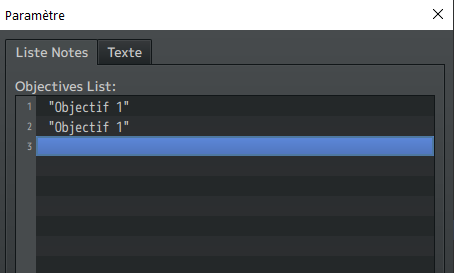
    1588721906953.png
    My problem was on my objectif text zone (I just find a string which begin in "O" to seek the element which create the error)

    Initialy, I wrote this on Text Mode :

    JavaScript:
    ["Objectif 1","\"Objectif 1\""]

    The first string of the array is wrongly read by the engine and it return the error "Unexpected token". The reason is pretty weird : you have to put quote symbole at the beginning and the end of each string of the array ! This is the correct code :

    JavaScript:
    ["\"Objectif 1\"","\"Objectif 1\""]

    To obtain the quoma symbole, you have to put anti slash character : \" (AltGr+8 on your keyboard)

    When I do that for the only string in all my parameters of the plugin which doesn't have this symbole, it works well !

    Hope I can help you !
  17. @Marzanna , I might have run into the same issue you did with a problem in the quest description, so I thought I would share it in case it might help you or other people who are reading this thread.

    My game was also crashing when I was trying to do what you were doing.

    The problem for me was that like in your game you use the Plugin Command to enter the command: Quest 1 Change Description Entry 3 . However, I forgot to type anything in the Quest Description 3 position, so it was basically a blank line or null. After I typed something into the third line or entry 3 of the the quest description I no longer encountered the error anymore.

    So I think the problem based on what I read in this thread is that JSON.parse() cannot process a empty line or a null value, and that in turn causes the game to crash when the game is trying to display the entry 3 description.

    I think you might have the same problem because when the problem was being triaged you showed us screen shots of your quest description 1 and description 2, but did not show us the description 3 entry. So based on this I am guessing you maybe left the 3rd line blank like I did.