@Panthus
No, unfortunately not-- at least, not with the vanilla way this plugin is set up. It's a minigame, so there's not a lot of mechanics-based configuration. Sorry about that...
You can try looking into using events and choices and variables to make your own rock paper scissors minigame with images. I tried to look a bit for MV plugins for rock paper scissors, but I guess mine is the only (legal??) one. Apparently there was Soul's Rock Paper Scissors EX but that got taken down because he plagiarized a lot of people & tried to sell their work as his own.
To be honest though, it's probably not too hard to release a tweak of this to be RPS. I could try to put that on my to-do list and code it up if I don't see it being a thing sometime 'round January.
Wuxing Minigame
● ARCHIVED · READ-ONLY
-
-
@mjshi Okay, no worries. I've tried to figure out myself with variables and such, since many people recommend using that for creating a rock paper scissors mechanic - but I'm simply to stupid to create something like that x) An idea I got tho was, what if I could just create Rock Paper Scissors + 2 other "weapons"? Then it would fit the minigame you've created. But it's a headscratcher for sure haha. Yeah, don't worry about it - I'm stubborn and I'm gonna try and fix this! Thanks for your answer, very much appreciated!
-
I really like this mini-game. However, I am having one minor difficulty. The player's "big element" keeps appearing way off to the right and half off the edge of the screen. I've tried tinkering with the settings, but it seems to only control the computer's. Is there a way to correct the positioning?
-
Rock, paper, siccors, lizard, spock :)
-
I really like this mini-game. However, I am having one minor difficulty. The player's "big element" keeps appearing way off to the right and half off the edge of the screen. I've tried tinkering with the settings, but it seems to only control the computer's. Is there a way to correct the positioning?
You should be able to reposition the player's big element with the parameters under "---Big Element---". Make sure the element widths are also correct (with whichever image you choose to use).
If you know a bit of coding, you can mess around with the numbers on line 752, in the function Scene_WuxingMG.prototype.initializeBigElements to more precisely position it how you want. -
Hi mjshi,
Thank you for the amazing plugin. I have a quick question - is there a way I can change the name of the elements (fire, wood, etc.) to something else?
Thanks! -
Hello! Amazing plugin. Thank you for that.
Quick question - is it possible to change the name of the elements? For example to change Fire to another name. -
On line ~353ish, there's a "Configuration" section where you can change the names of the elements, as well as what displays when they win/lose against other elemental matchups.
-
Thank you very much! It worked.On line ~353ish, there's a "Configuration" section where you can change the names of the elements, as well as what displays when they win/lose against other elemental matchups.
-
Hi! So beautiful plugin... but I can't download. Would you please renew the link?
I'm making my own rmmmv game and your mini-game is that I was looking for! Help me please... The links with demo and alt graphics are alive but the main link is out of date... -
So the plugin-assets button does not take you to github?Hi! So beautiful plugin... but I can't download. Would you please renew the link?
I'm making my own rmmmv game and your mini-game is that I was looking for! Help me please... The links with demo and alt graphics are alive but the main link is out of date... -
It's loading, loading and loading again. But then there's nothing. Can you help me please?So the plugin-assets button does not take you to github?
Because all other links are working properly. -
Try a different browser, because it's just your computer. The site works fine.It's loading, loading and loading again. But then there's nothing. Can you help me please?
Because all other links are working properly. -
Thank you so much!
-
Sorry to bother you again, guys. But I can't find where to customize elements names like Water, Earth, etc. There is no such text in the plugin file and in the params. Maybe, this plugin simply has not such a option?
-
I solved this problem. But now after choosing elements by me and by computer the error occures saying, Type Error. Cannot read property '0' of undefined. Could it be the solution?
-
Seems to me there is no chance of changing elements names...
-
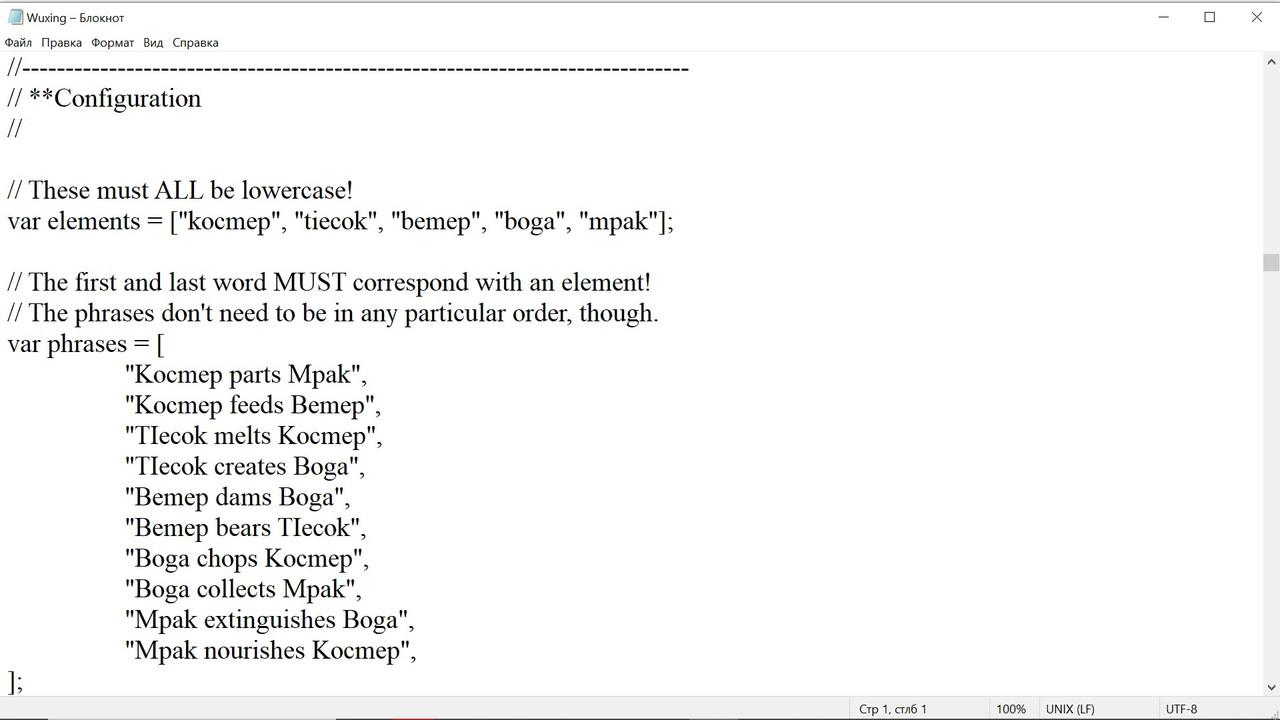
That's how I change elents names. As long as icons names. And the error occurs. In case of returning the original names all works perfectly. Can anyone help? -
Found solution. Thanks.
-
I have the same problem. What was your solution? Thanks!Found solution. Thanks.