Hello, it's a very nice script you have here to recreate the Window class.
I have some issues with it and I don't understand why they are happening.
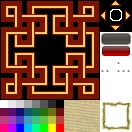
I wanted to use your script as a basis to change the behavior of the cursor, so I was aiming to use the default windowskin structure, for the sake of testing, I changed the windowskin to have a more obvious background:
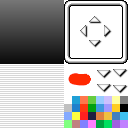
(Here is my modified version, I just put an ugly red potatoe in the cursor)
Then I changed the settings of the script to follow the default windowskin:
Ruby:module Wnd
# Skin file.
# name of the custom skin, in the Graphics/System folder.
# windowskin default is nil
Wnd_File = nil#"skin2"
# Background rectangle.
# Position and size of the background texture on the custom skin.
# windowskin default is nil
# Back_Rect = Rect.new(X,Y,Width,Height)
Back_Rect = nil#Rect.new(64,100,36,32)
# Tile the background texture.
# True to tile the texture, False to stretch the texture.
# windowskin default is false.
Back_Tile_Rect = false#!true
# Draw texture overlay.
# True to draw grill overlay on top of background.
# windowskin default is true.
Back_Draw_Overlay = true#!true
# Background overlay rectangle
# Position and size of the overlay texture on the custom skin.
# default is nil
# Back_Overlay_Rect = Rect.new(X,Y,Width,Height)
Back_Overlay_Rect = nil#Rect.new(100,100,32,32)
# Tile the overlay texture
# True to tile, False to stretch.
# windowskin default is true.
Back_Tile_Overlay = true#false
# Window border default rectangle.
# Square used when the windowskin border maintains the default square structure.
# windowskin default is nil.
# set to Rect.new(X,Y,Width,Height) when using a custom square
Frame_Rect = nil#Rect.new(64,64,64,64)
# Hash containing the border rectangles when the border uses a custom structure.
# Overrides Frame_Rect if set.
# default is nil
Frame_Rect_Hash = {}
#Frame_Rect_Hash[:tpl] = Rect.new(0,0,48,48) #top left
#Frame_Rect_Hash[:tpm] = Rect.new(48,0,4,48) #top mid
#Frame_Rect_Hash[:tpr] = Rect.new(52,0,48,48) #top right
#Frame_Rect_Hash[:mdl] = Rect.new(0,48,48,4) #mid left
#Frame_Rect_Hash[:mdr] = Rect.new(52,48,48,4) #mid right
#Frame_Rect_Hash[:btl] = Rect.new(0,52,48,48) #bottom left
#Frame_Rect_Hash[:btm] = Rect.new(48,52,4,48) #bottom mid
#Frame_Rect_Hash[:btr] = Rect.new(52,52,48,48) #bottom right
# Size of the border in pixels
# default is 16
Frame_Size = 16#48
# Tile the frame border.
# True to tile the border texture, False to stretch it.
# For custom skins with solid/pattern borders. Doesn't affect corners.
# default is false
Frame_Tile_Border = false#!true
# Margin size
# Controls the indentation between the background and the frame.
# Only relevant if using transparent or tiled irregular frames.
# window default is 4
Margin_Size = 4#9
# Cursor border rectangle on the window skin
# Minimum size of each side is 4 + 4 + 4 (corner + middle + corner)
# windowskin default is nil
# default is square
Cursor_Rect = nil#Rect.new(110,9,12,12)
# Draw cursor background texture
# windowskin default is false (uniform, transparent)
Cursor_Draw_Back = false#!true
# Cursor background texture position and size
# windowskin default is nil
# Cursor_Back_Rect = Rect.new(X,Y,Width,Height)
Cursor_Back_Rect = nil#Rect.new(64,100,36,32)
# Tile the cursor background texture
# True to tile, False to stretch
# default is false
Cursor_Tile_Back = false
# Override default opacity
# window default is nil
Opacity = nil
# Override background opacity
# window default is nil
Back_Opacity = nil
# Override contents opacity
# window default is nil
Contents_Opacity = nil
# Override border opacity
# window default is nil
Frame_Opacity = nil
# Pause arrow animation
# Position and size of the rectangle containing the pause animation
# windowskin default is nil
# default arrangement is square
# default frame size is 16x16
Pause_Sprite_Rect = nil#Rect.new(100,57,32,16)
# Pause sprite layout
# Size of the sprite internal grid
# windowskin default is 2x2
Pause_Sprite_W = 2
Pause_Sprite_H = 2
# Direction arrows
# Position and size of the rectangle containing the arrows.
# windowskin default is nil
# default arrangement is square
# default sizes are 8x16 and 16x8
Arrow_Sprite_Rect = nil#Rect.new(100,0,32,32)
# Color palette
# Position and size of the color palette
# windowskin default is nil
# Palette_Rect = Rect.new(X,Y,Width,Height)
Palette_Rect = nil#Rect.new(0,100,64,32)
# Color palette layout
# Size of the palette grid
# windowskin default is 8 wide by 4 high
Palette_W = 8
Palette_H = 4
# Skinned health bars enable
# True to use skinned health bars
# Ace default is false
Health_Bar_Skin = false#true
# Health bars rectangle
# Position and size of the health bars skin, when using custom bars.
# default layout is top = border/background, bottom = fill color.
# default arrangement is (1+width+1)x(1+height+1+height+1)
# default structure of each block is [4 + 22 + 4] width, stretch height.
Health_Bar_Rect = Rect.new(100,32,32,25)
# Override Window_Base's palette
# set to true if you want to change the system colors while
# using custom palettes or custom health bars.
# windowskin default is false
Custom_Palette = false#true
# Custom color override
# Set each color index on the custom palette when enabled
# Not used unless enabled by Custom_Palette
# values = 0 to [(palette width x palette height) - 1]
TextColor = 0 #normal color
SysColor = 3 #labels color
CrtColor = 14 #HP critical color
KOColor = 15 #Actor down color
HPColor = 31 #HP bar fill color
MPColor = 26 #MP bar fill color
TPColor = 29 #TP bar fill color
MpCost = 18 #MP cost label color
TpCost = 21 #TP cost label color
UpColor = 21 #Stat up color
DnColor = 23 #Stat down color
end
And from what I observed (from an empty project outside of your script):
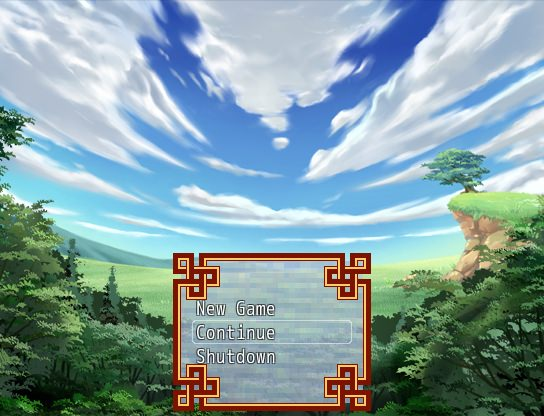
-the cursor is drawn
above the contents of the window (unlike the rgss version of Window): but the sprite is supposedly instantiated before the contents so it should be drawn below, right?
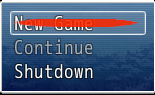
With your script
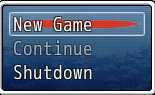
Without it (RGSSx Window)
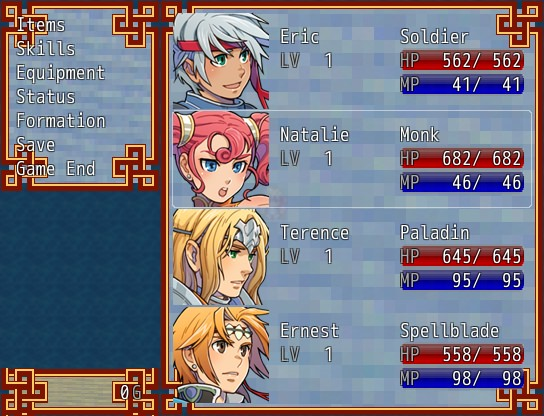
-the gold window in the menu and the messages are not colored but the gold window from the shop menu is colored properly.
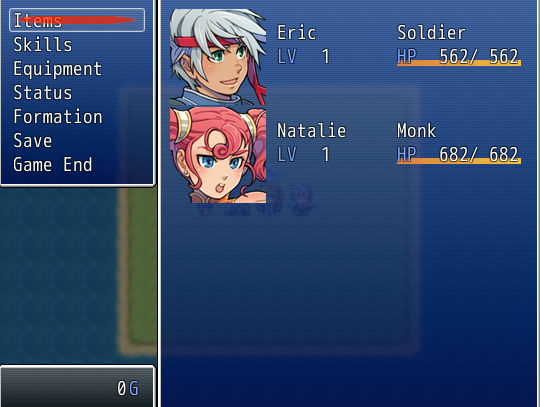
Menu gold
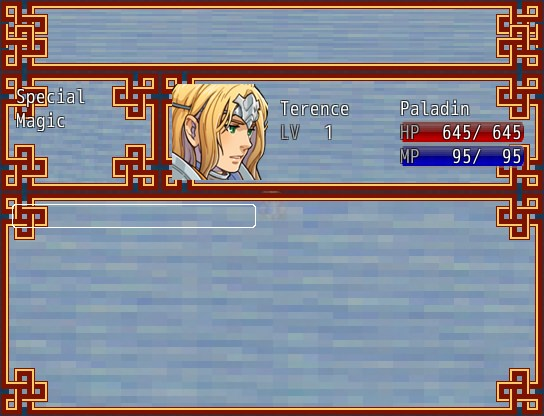
Message gold

Shop gold
I was wondering if you've experienced similar things, maybe I did something wrong in my setup.
EDIT:
Okay so the issue with the cursor was because of line 801 of the script (at the end of method
updateCursor):
Ruby:crs.move(cnt.x + @padding + x, cnt.y + @padding + y, cnt.z + 4)
Replacing the
+4 with a
+2 will put the cursor below the contents.
EDIT2:
Okay so the gold windows are not colored because they don't get their viewport set to the scene's viewport, so the refresh of the windowskin tone probably happens only when the viewport is set.
EDIT3:
Alright, here is a bugfix to put below this script for anyone using this script until it's updated
:)
Ruby:class Window
#fix for cursor: it was displayed above contents unlike RGSS Window
alias tim_fix_updateCursor updateCursor
def updateCursor
tim_fix_updateCursor
cnt = @windowSpriteContainer
crs = @windowCursorSprite
x = cursor_rect.x - self.ox
y = cursor_rect.y - self.oy
crs.move(cnt.x + @padding + x, cnt.y + @padding + y, cnt.z + 2)
end
#fix for gold window tone in Scene_Menu and Window_Message
alias tim_fix_updateTransform updateTransform
def updateTransform
@windowBackSprite.tone = self.tone
tim_fix_updateTransform
end
end #Window