Dude... He wasn't asking for a compatible patch. He was simply telling you that something is weird with your codes. It's all good now, so not that this is important anymore.
Right, we all know you're not responsible for the problem. People ask for help because you're the creator, not that the blame is on your team in any way.
VisuStella Sample Project & MZ Core Plugins
● ARCHIVED · READ-ONLY
-
-
Dude... He wasn't asking for a compatible patch. He was simply telling you that something is weird with your codes. It's all good now, so not that this is important anymore.
Right, we all know you're not responsible for the problem. People ask for help because you're the creator, not that the blame is on your team in any way.
I didn't mention a compatibility patch.
I mentioned that we don't provide compatibility support for plugins made outside of our library even if they came with the official software. -
Sorry if it looks like I was asking for a compatibility patch, that was not the case, I was just merely recounting how I got to my conclusion that you probably should add checks in your code for the "x is not a function" javascript type error, given the method I described and that you use...asuming that you did that on purpose and is not part of your obscuring process. In the end it's your product and your code and you can choose to ignore me or take into account my suggestion. While I might be an experienced professional programmer, javascript is not really my area of expertise, you and your team surely beat me in that area. Maybe you and your team already have those checks in the code and I'm simply unable to deduce that due to the obscuring and my lack of experience and knowledge with the programming language.I didn't mention a compatibility patch.
I mentioned that we don't provide compatibility support for plugins made outside of our library even if they came with the official software. -
The array you're seeing is how the obfuscation works. It's not done on purpose to make things intentionally incompatible if that's what you're trying to imply.Sorry if it looks like I was asking for a compatibility patch, that was not the case, I was just merely recounting how I got to my conclusion that you probably should add checks in your code for the "x is not a function" javascript type error, given the method I described and that you use...asuming that you did that on purpose and is not part of your obscuring process. In the end it's your product and your code and you can choose to ignore me or take into account my suggestion. While I might be an experienced professional programmer, javascript is not really my area of expertise, you and your team surely beat me in that area. Maybe you and your team already have those checks in the code and I'm simply unable to deduce that due to the obscuring and my lack of experience and knowledge with the programming language.
The problem you're encountering is due to the ChangeEquipOnBattleMZ plugin instead and is likely to pop up again for anyone who also happens to be using plugins that alter the equip scene layout, not just VisuStella MZ.
Now as you state that you are a professional programmer, I'm sure you will understand the following despite your level of expertise in JavaScript:
1. Scene_Equip and Scene_Battle are two very different scenes.
2. One scene's functions do not necessarily exist in another's.
3. By looking at the code for ChangeEquipOnBattleMZ, you will see it is trying to run Scene_Equip functions inside Scene_Battle.
Fair, right? Here's the thing: Core Engine has created checks for specific functions inside Scene_Equip to determine layout compositions. These layout compositions are unique to Scene_Equip and the functions used to determine those layout compositions do not exist in Scene_Battle for obvious reasons. They're not left out intentionally on purpose because adding them in like that is extra baggage. You cannot take a car engine and expect it fit for a jet. -
May I suggest to remove the ATB bar in Victory Aftermath.. the ATB bar stays in the screen and it's kind of annoying... I hope we can also change the font style or use image for Victory text. :)
-
Disregard.. it seems like you need to turn on the Reposition so that it won't appear in Victory AftermathMay I suggest to remove the ATB bar in Victory Aftermath.. the ATB bar stays in the screen and it's kind of annoying... I hope we can also change the font style or use image for Victory text. :)
-
Sorry, I didn't try to imply that it is done to create incompatibility, just that I wasn't sure if the array was part of the obscuring process or an intentional design for coding purposes. Things sometimes get lost in translation, especially when you are thinking in one language but understand the issue in another.The array you're seeing is how the obfuscation works. It's not done on purpose to make things intentionally incompatible if that's what you're trying to imply.
I would say it does make sense, unless they are static methods from static classes, which I don't think so, I don't even know if javascript can have static classes or methodsThe problem you're encountering is due to the ChangeEquipOnBattleMZ plugin instead and is likely to pop up again for anyone who also happens to be using plugins that alter the equip scene layout, not just VisuStella MZ.
Now as you state that you are a professional programmer, I'm sure you will understand the following despite your level of expertise in JavaScript:
1. Scene_Equip and Scene_Battle are two very different scenes.
2. One scene's functions do not necessarily exist in another's.
3. By looking at the code for ChangeEquipOnBattleMZ, you will see it is trying to run Scene_Equip functions inside Scene_Battle.
Fair, right? Here's the thing: Core Engine has created checks for specific functions inside Scene_Equip to determine layout compositions. These layout compositions are unique to Scene_Equip and the functions used to determine those layout compositions do not exist in Scene_Battle for obvious reasons. They're not left out intentionally on purpose because adding them in like that is extra baggage. You cannot take a car engine and expect it fit for a jet.
The interesting part is that Core code actually executes correctly "Scene_Equip.prototype.mainAreaHeight.call(this)" but in a particular method, of which I don't know the name because it's obscured, a check expects it to return as a method, but Core already has executed it and returns, in this case, a number, that's the reason that "x is not a function" type error is thrown by javascript, in other words, Core code correctly executed "Scene_Equip.prototype.mainAreaHeight.call(this)" and returned the value from that execution, but the check expect it to be returned as "mainAreaHeight()", meaning as a method. I can asume that this is javascript messing stuff when probably shouldn't, meaning that in any case, I blame javascript and not the developer. Given that your plugins allow to inject javascript code sometimes, this might eventually become an issue, probably not now, probably not tomorrow, and probably you already have checks for that and I simply can't deduce that they are already there. Call it residual paranoid thinking from years of working as a programmer in the Financial Industry (it's was hell), were I had to add checks even for events with infinitesimal probability of happening in code. If it seemed like I was expecting you and your team to add a check, that was not the case, just a mere suggestion regarding this.
In the end, you can take the suggestion or disregard it, I really appreciate that you take the time to answer the question, even if it comes from a javascript rookie probably asking stupid questions, regardles of my years of working as a professional programmer.
Oh, by the way, I already did the compatibility patch for the person who had the issue, nothing fancy, just a small rewrite to the method in ChangeEquipOnBattleMZ and it worked.
Regards. -
This is an incredibly late reply, but I was just having the same problem myself + found a way to get rid of it! Since your question was never answered beyond it getting mistaken for a bug report, I wanted to share my solution for anyone else frantically googling like I was + share it to you if you still need itHello!
First of all, thank you for all the work!
Then, I have a question (sorry if it's not the place for that),
So I use the MessageCore plugin.
I resized the window in the plugin's settings but I also wanted to put the window a little higher on the screen (to keep place under it for some UI) I didn't find any setting for that so I ended up using the \WindowMoveTo command and managed to do what I needed.
However even with a duration of 0 for the move, there is still a little "jump" of the message window each time I display one.
It's not gamebreaking or anything, but it bother me a little ^^'
Is there an option that I missed in the plugin or is there just no option to do what I want natively?
If there is no possibility to do what I want (other than what I already do) It's okay, I just want to know if I missed something :)
Set the message window's background to transparent when you're making it. Then, start your message with that pesky \WindowsMoveTo command, and immediately use the \NormalBG command right after it (or \DimBG, if that's what you were doing instead).
The window will be completely invisible during that little "jump", so you won't see it happen and your players will never even know it's there!
Edit: Okay, so today this method decided to just. Totally stop working on me. Either that, or it never worked to begin with and I just didn't notice somehow. Disregard the above BUT the good news is, I submitted a full bug report to VisuStella on this problem last night right after posting this, so hopefully they will be able to do something to address it soon. -
I downloaded your plug in but im not really sure how to use it the way I want to, if I explained it do you think you could help me with it? It would be a huge help to my game!
-
I'm sure someone on this thread will most likely be able to help, but we need to know what you need.I downloaded your plug in but im not really sure how to use it the way I want to, if I explained it do you think you could help me with it? It would be a huge help to my game!
-
@WilsonE7 I would like to lock some of the menu options(or make them invisible if that's possible) until a certain point in the game but I'm not sure how to do it
-
I'm not sure how you'd do that, actually. My first thought was to look at Main Menu Core, but there's nothing there about disabling menu options. If you don't get a more helpful response, put it in Yanfly's suggestion box. Maybe they'll implement it later.@WilsonE7 I would like to lock some of the menu options(or make them invisible if that's possible) until a certain point in the game but I'm not sure how to do it
-
@WilsonE7 thanks anyway I'll look for their suggestion box could you point the way good sir?
-
Here's Yanfly's site.@WilsonE7 thanks anyway I'll look for their suggestion box could you point the way good sir?
It's at the top right corner. Choose the one for plugins, not graphics, obviously. -
@WilsonE7 I would like to lock some of the menu options(or make them invisible if that's possible) until a certain point in the game but I'm not sure how to do it
I'm not sure how you'd do that, actually. My first thought was to look at Main Menu Core, but there's nothing there about disabling menu options. If you don't get a more helpful response, put it in Yanfly's suggestion box. Maybe they'll implement it later.
You need JavaScript knowledge. Alter the entry's JS: Show for it. If you're unfamiliar with JavaScript, I recommend asking in the JS forums on this site for help on it.
---
---
We are on Weekly Update #37!
View the Changelog here: http://www.yanfly.moe/wiki/VisuStella_MZ_Changelog
Sample Project Version here: https://visustella.itch.io/visumz-sample/devlog
---
If you've encountered a bug, don't report them to this thread.
Instead, report the bug you've found to this link: http://www.yanfly.moe/wiki/Troubleshooting_Plugins_RPG_Maker_MZ
---
If you have suggestions for plugins and/or graphics for the VisuStella team, we'd like to hear them. Keep in mind this does not mean we're guaranteed to create it (as our time is very limited) but we're interested in hearing what you have to suggest:
Graphics: https://forms.gle/c9pbrqGbJCzWETC97
Plugins: https://forms.gle/73bPT3nfXZFRn6BNA
---
Have a good weekend, everybody! -
I tried to create a little notetag using the Visustella Skills and States.
I need one notetag that only enables a skill if there is someone DEAD in the party.
I hate that MZ allow you to cast revive spells on alive members.
I know that would be something like this:
if(SOMETHING.isStateAffected(1)
But I don't know what would work, I tried $gameParty.members but it didn't worked. -
Does anyone know how to make the shop look like their example. I can not figure it out:
Example:
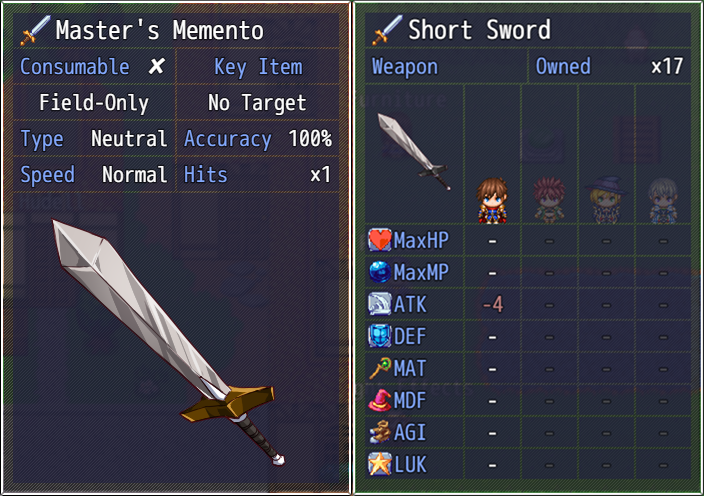
Link:
April 30, 2021 Update - Update #37 - [VisuStella MZ] Sample Game Project by VisuStella, VisuStellaMZ, Archeia -
Could anyone help me out. I have Javascript Aphasia (being funny here)but would like to make it where certain items, armors, weapons, etc. are only used by a single actor using the Notetag:
<JS Item Enable>
code
code
enabled = code;
</JS Item Enable>
So if I just want Actor 1 to be able to use a certain armor and not the other 3 actors, how could I use the above to make that possible.
Thank You for helping! -
Yeah, Idk if I'm missing something here.Does anyone know how to make the shop look like their example. I can not figure it out:
Example:
Link:
April 30, 2021 Update - Update #37 - [VisuStella MZ] Sample Game Project by VisuStella, VisuStellaMZ, Archeia
The shop scene in the demo doesn't seen ready for this.
I tried adding the notetags on the Short Sword to see if it would somehow trigger a different behavior, but no luck.
EDIT: Oh, I think I got it. You have to mess around with the notetags to position the image where you want it. It's not set by default on the demo. -
Would you mind sharing your notetags so I could see how I might be able to see how to set it up as well.Yeah, Idk if I'm missing something here.
The shop scene in the demo doesn't seen ready for this.
I tried adding the notetags on the Short Sword to see if it would somehow trigger a different behavior, but no luck.
EDIT: Oh, I think I got it. You have to mess around with the notetags to position the image where you want it. It's not set by default on the demo.