Victor engine battle status window font

● ARCHIVED · READ-ONLY
Started by Quanee 11 posts View original ↗
  1. Hi guys,

    I'm using Victor engine to play around with my battle window customization. The only thing I can't figure out is how do I change specific attributes fonts (HP, MP etc.). I know where the option is, but whenever I try adding a new font I get an error saying "(fontname) is not defined". I have tried it with few fonts, they are all located in my fonts folder in .ttf extension. Below I'm attaching screen with the error.
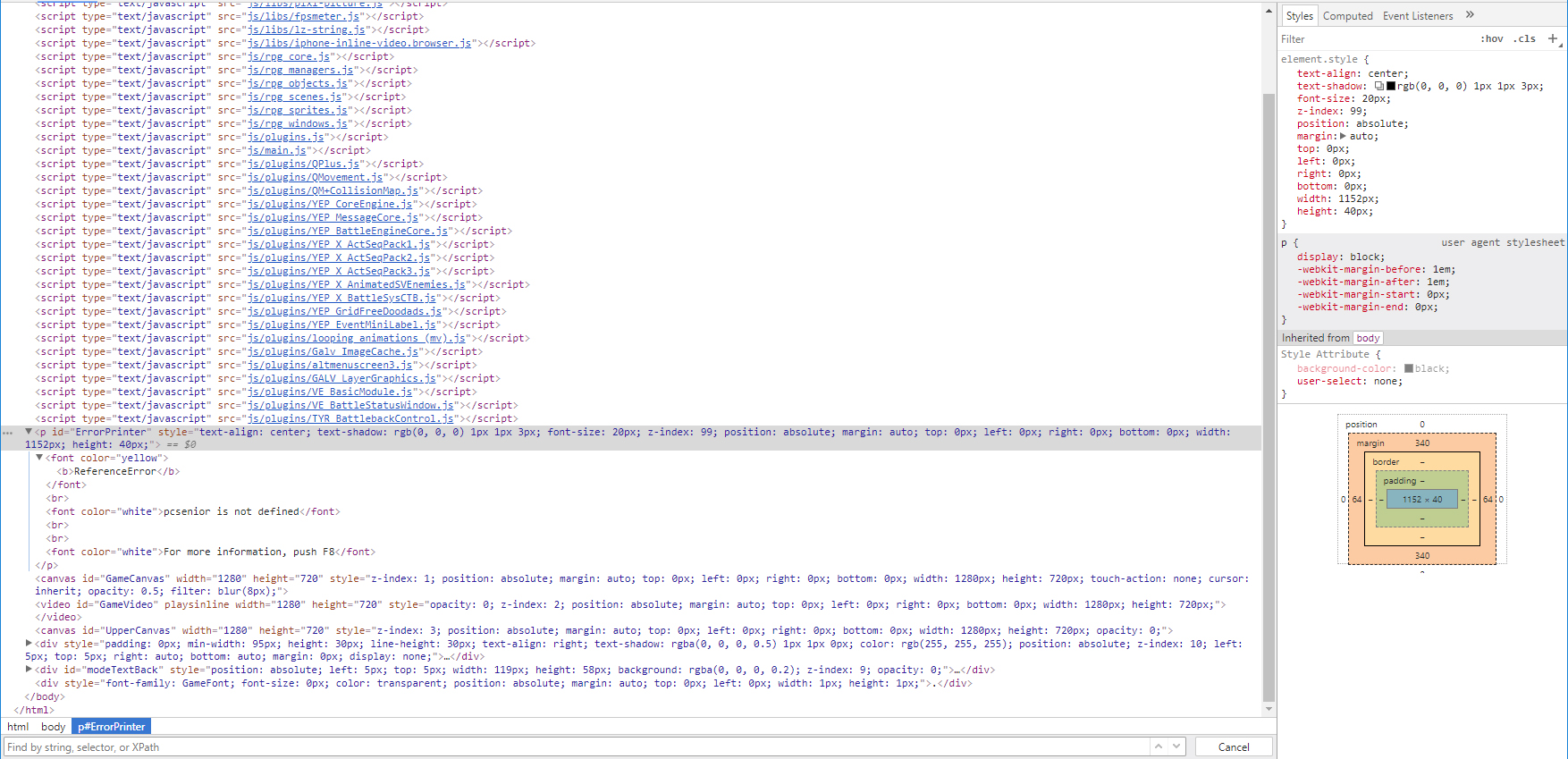
    Untitled-3.jpg
  2. Could it be that you mixed up fontname and fontfilename in your configuration? Those are usually not the same...
  3. I just type in font's name right into this window. Untitled-3.jpg
  4. @Quanee
    that is not what I meant, and from your answer I'm not sure if you even understand the difference.

    Have you typed in the font's name or the font's filename?
    Can you tell both for the font you're using, and have you tried both to see which one that option requires?
    And please give a screenshot of what exactly you typed in there.
  5. I've typed in the font's filename, which is literally called pcsenior. So how does it work with the fonts? Do I need to somehow import it into the game before using it?
  6. no, the font's filename is NOT the font's name - and that isn't a filename either.
    The filename if the name you's see in the windows explorer, the one that ends on ttf as an extension (short for true type font)
    The fontname is what you get if you doubleclick the font's file in windows and windows opens the font viewer with it.

    and yes, if you use a font that is not installed in windows you'll need to provide the fontfile when deploying the game as well.
  7. All right, so the actual font's full name is PC Senior. As I type it in, I get a Syntax error:1.jpg 2.jpg
  8. Because RPG Maker is browser-based, fonts are loaded through CSS. Have you ensured that the font is actually loaded into your game? (there are some threads/tutorials around here on how to do that)

    Can you please also include a link to the plugin, so people don't have to go searching to help?

    EDIT:
    @Quanee
    Additionally, for the error message, instead of showing the "Elements" tab, please show the "Console" tab and it will be helpful.
  9. Aloe Guvner said:
    Because RPG Maker is browser-based, fonts are loaded through CSS. Have you ensured that the font is actually loaded into your game? (there are some threads/tutorials around here on how to do that)

    Can you please also include a link to the plugin, so people don't have to go searching to help?

    I haven't, I was pretty sure all I needed to do was put my font into the fonts folder, thanks a lot, I will check some tutorials on that.
  10. I read through the Victor plugin, and have some more information for you. First, is this instruction within the Victor plugin which is small and easy to miss:

    * - HP Text Fontface
    * The parameter 'HP Text Fontface' defines the font name for the hp text
    * display.
    * You can use script codes that returns a string with the fontname se the
    * value for it.
    (the bold part is my emphasis). The parameter must actually be a Javascript formula. In the plugin, Victor is using 'eval' to evaluate the formula (bad design because it leads to poor performance, in my opinion, but that's how he wrote it).

    So you have to write a Javascript formula to give the font-family, but fortunately, it's very easy. Notice how I emphasize font-family, which is *not* the name of the font file.
    For example open the "gamefont.css" file in the "fonts" folder. This is what gets loaded into the game.

    standard_font.png

    Normally, this file only lets you use 1 font in the game (taken from the file described in the "src" line). If you want to use multiple fonts, you have to first make sure all fonts are loaded into the game. One way is to use Yanfly's Load Custom fonts plugin. The video also helps explain the difference between the font-family and the filename of the font (which is what Andar was also explaining).

    Let's say you add a new font with a filename of:
    my_new_font.ttf
    And it has a font-family of:
    PCSenior

    In the Victor plugin, your font parameter can be:
    Code:
    String('PCSenior')
    It has to be like that because of the "eval" that I mentioned earlier and I recommend to not have any spaces in the font-family.
  11. Aloe Guvner said:
    I read through the Victor plugin, and have some more information for you. First, is this instruction within the Victor plugin which is small and easy to miss:


    (the bold part is my emphasis). The parameter must actually be a Javascript formula. In the plugin, Victor is using 'eval' to evaluate the formula (bad design because it leads to poor performance, in my opinion, but that's how he wrote it).

    So you have to write a Javascript formula to give the font-family, but fortunately, it's very easy. Notice how I emphasize font-family, which is *not* the name of the font file.
    For example open the "gamefont.css" file in the "fonts" folder. This is what gets loaded into the game.

    View attachment 94471

    Normally, this file only lets you use 1 font in the game (taken from the file described in the "src" line). If you want to use multiple fonts, you have to first make sure all fonts are loaded into the game. One way is to use Yanfly's Load Custom fonts plugin. The video also helps explain the difference between the font-family and the filename of the font (which is what Andar was also explaining).

    Let's say you add a new font with a filename of:
    my_new_font.ttf
    And it has a font-family of:
    PCSenior

    In the Victor plugin, your font parameter can be:
    Code:
    String('PCSenior')
    It has to be like that because of the "eval" that I mentioned earlier and I recommend to not have any spaces in the font-family.

    Thanks a lot, this is huge help for me ^^