MV - use Sprite_StateOverlay on MapEvents?

● ARCHIVED · READ-ONLY
Started by dopan 14 posts View original ↗
  1. i would like to play "Sprite_StateOverlay" (which are the default State Animations) on events outside of Battle..

    Spoiler shows where the Functions is located, but i am not sure how the Function get triggered when SV battle happens..

    rpg_sprites Plugin
    Screenshot_4.png

    I think there is a function that disables the "Sprite_StateOverlay"-functions outside of SV Battle.
    (yep battleEngineCore)

    I got no idea how to script this, i would like a script that allows me to Display The StateOverlay based on The Event Id
    (to be displayed over the Event similar how it would be displayed on SV battlers)

    The Unit Events that i will use have also a "battler"-part but i couldnt figure out ,how to use that to play the StateOverlay Animations on these UnitEvents..

    -> any hints or Ideas are welcome! thx
  2. These are added as child sprites to instances of Sprite_Actor and setup when a battler is assigned:
    Sprite_Actor > createStateSprite (rpg_sprites.js)
    JavaScript:
    Sprite_Actor.prototype.createStateSprite = function() {
        this._stateSprite = new Sprite_StateOverlay();  // <- initialised
        this.addChild(this._stateSprite);  // <- added as child
    };
    
    Sprite_Actor.prototype.setBattler = function(battler) {
        Sprite_Battler.prototype.setBattler.call(this, battler);
        var changed = (battler !== this._actor);
        if (changed) {
            this._actor = battler;
            if (battler) {
                this.setActorHome(battler.index());
            }
            this.startEntryMotion();
            this._stateSprite.setup(battler);  // <- setup
        }
    };
    In this case, "setup" just means telling the overlay sprite who to reference (e.g. actor 1) so it knows what frames it should be showing. After setup, the sprite updates itself. (This is how most of RMMV's sprites work.)

    Map events have their walking sprites stored in the map's spriteset:
    Spriteset_Map > createCharacters (rpg_sprites.js)
    JavaScript:
    Spriteset_Map.prototype.createCharacters = function() {
        this._characterSprites = [];
        $gameMap.events().forEach(function(event) {
            this._characterSprites.push(new Sprite_Character(event));
        }, this);
    // ... //
    So by default I think the sprite for event ID x is stored under the spriteset's _characterSprites array at index x-1 (because indexing starts at 0).

    So if you have a battler for each of these events, you could try something vaguely like this (untested):
    Init, add, and setup state sprite
    JavaScript:
    var spriteset = SceneManager._scene._spriteset;
    var eventId = 9;
    var battler = $gameActors.actor(11);
    var sprChar = spriteset._characterSprites[eventId - 1];
    sprChar._stateSprite = new Sprite_StateOverlay();  // init
    sprChar.addChild(sprChar._stateSprite);            // add
    sprChar._stateSprite.setup(battler);               // setup
    Could probably be done a lot more neatly in an appropriate context; this is just a hopefully-functional example to explain what I'm talking about~ :kaoslp:
  3. caethyril said:
    So if you have a battler for each of these events, :kaoslp:
    at the moment i still didnt figure out all of your posting but thx anyway i will work with that
    (but i am trying to give more information ,perhaps that might help somehow)

    well the UnitEvents contain a battler aswell as an actor OR enemy ID..
    perhaps using these Actor/Enemy IDs would be better=?
    ->the problem on enemy IDs is that, several Enemys can be a cloned version (same id),.. that doesnt happen on Actors..
    => however thats why i thought event ID is the best way to go..

    Also i will probably need to use a "If condition" to ask about if the Unit is affected?
    -> or is this handled with the state setup, where i can choose the overlay for a state..?

    EDIT// it will always trigger the state overlay with the state that has the highest priority
    => i wanted to use a script that checks all events if they are "actor/enemy".. this script can adress both types.. the map event aswell as the battler..

    here the Script to adress those events for better understanding:
    JavaScript:
                    //0U_Add Test: THIS IF FOR TESTING NEW FUNCTIONS "this.allUxTest();"
                    Game_Interpreter.prototype.allUxTest = function() {
                        // this below checks all Events on Map
                        for (var i = 1; i <= $gameMap.events().length; i++) {
                        // this below is the battler part
                        var battleunit = $gameSystem.EventToUnit([i]);
                        // this below is the mapEvent part
                        var eventunit = $gameMap.event([i]);
                        // this below checks if Battler and Event are the same Unit,and
                        // If the Unit is an Actor or Enemy    ,..and
                        // if the Unit is not death
                        if (battleunit && eventunit && (battleunit[0] === 'actor' || battleunit[0] === 'enemy') && (!battleunit[1].isDead())) {
                            // <-insert test code here
                        }
    
                        }
                        return true;
                    };
    Example IMGs for an EventUnit. This one use Event ID 9 and stores the Actor(img1),which stores the battler(img2) at the bottom
    Screenshot_1.png--
    Screenshot_2.png
    ---
    Another approach..
    i dont know if that is helpfull but there is also allready a function that display char frame over the normal event char frame.. in order to add the turn end sprite
    (i edited that function to be able to use more frames without conflicts,, basicly by changing the loaded img..)
    Screenshot_3.png
    Screenshot_4.pngScreenshot_5.png

    But i think this is different because it uses the char animations and not the system state img
  4. Globally, it looks like $gameSystem.EventToUnit([eventId])[1] might work for the battler reference? Remember to replace eventId with the event's ID (or use it as a local var like I have done in my example). :kaophew:

    Edit @Dopan: this "add state overlay sprite" stuff would have to be done when arriving on the map, either via a Script command in an event or a plugin. I'm not concerned about the enemy thing...they must be separate battler instances otherwise you'd have problems with them sharing HP etc. :kaoslp:
  5. JavaScript:
    var spriteset = SceneManager._scene._spriteset;
    var eventId = 9;
    var battler = $gameActors.actor(9);
    var sprChar = spriteset._characterSprites[eventId - 1];
    sprChar._stateSprite = new Sprite_StateOverlay();  // init
    sprChar.addChild(sprChar._stateSprite);            // add
    sprChar._stateSprite.setup(battler);               // setup
    @caethyril
    i tried this, but it seems my main Problem is, that the "_spriteset" part is "undefined" outside of sideview battle..
    (using "SceneManager._scene._spriteset" in F8 console will return undefined because the scene wont have it outside of SV)
    => using "SceneManager._scene._spriteset" while a sideview action is active will show all related data in console..


    I think i have to figure out how to make the "_spriteset"-Part active on Map.. but perhaps that might provoke other problems .. idk
    edit // the reason was , i used "scene menu" before opening the console.. more info in the next post
  6. Dopan said:
    i tried this, but it seems my main Problem is, that the "_spriteset" part is "undefined" outside of sideview battle..
    I just tested in a project without plugins, and on the map SceneManager._scene._spriteset returns an instance of Spriteset_Map, as expected. It's the container for all character sprites (player, followers, events, vehicles) etc.

    I'm guessing you either mistyped when checking the console, or one (or more) of your plugins completely overhauls all of that...? :kaoswt2:
  7. caethyril said:
    I just tested in a project without plugins, and on the map SceneManager._scene._spriteset returns an instance of Spriteset_Map, as expected. It's the container for all character sprites (player, followers, events, vehicles) etc.

    I'm guessing you either mistyped when checking the console, or one (or more) of your plugins completely overhauls all of that...? :kaoswt2:
    deleted old post
    edit
    edit 1 (old)
    my bad, it was because i always go to scene menu before i open console f8 ..
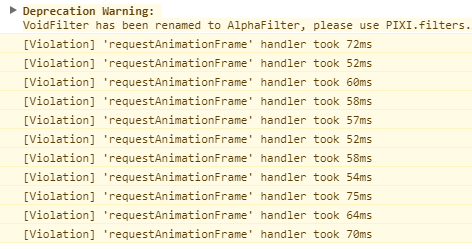
    ( i am doing this to avoid "request animationFrame" issue.. info img)
    Screenshot_1.png

    thx for double checking with an empty/clean project

    @caethyril
    you are a Genius!
    , your code works fine.. i tried this without going in "scene menu" & ignoring the "violation" info..:
    JavaScript:
    var spriteset = SceneManager._scene._spriteset;
    var eventId = 9; // in my testing project each actor ID is the same like the event ID..
    var battler = $gameActors.actor(9); //.. i used event placeholders to make that sure
    var sprChar = spriteset._characterSprites[eventId - 1];
    sprChar._stateSprite = new Sprite_StateOverlay();  // init
    sprChar.addChild(sprChar._stateSprite);            // add
    sprChar._stateSprite.setup(battler);               // setup
    so actor 9 with event ID 9 will indeed display the poison State if affected!
    (after puting your code in console and closing console)

    .. I am pretty sure i can do that on all Units without help..
    Proof Info
    Screenshot_1.png

    The only issues left (no real Issues):
    1.
    This will always just display the state with the highest Priority,there are Plugin requests for rotate trough states or display several states, but i couldnt find a plugin that does it^^
    (not even for the default SV battles)

    2.This will Stop/End as soon the "Scene menu" was opened.. and has to be refreshed after going back to "map Scene"..
    (i am not sure why, but that should be no problem, i can refresh the function..)


    about 1:
    i think the best way would be to add a rotation betwen the states, but i think thats not so easy because i couldnt find any plugin that does that.. even not for SV.
    Or using StateNote tags that decide if this state is a "rotation state" or a "parrallel state".. without StateNote it would be a "Default state" that only shows up if its the highest priority
    (i got no idea how this could be solved , i think i can use normal animations as walkaround for "special states" like "aura".. also i think displaying to much states could get laggy.. i already tried that with animations for all states and rotation via CE.. instead of using state overlays)

    about 2:
    I think when i make a function that "returns true" on battlemap whenever active.. i can easyly refresh it whenever its "NOT true" outside of "scene menu" on Battlemap.
    ( i am pretty sure i can figure this out myself.. aswell as adding all Units on map to the Function.. not just actor 9 )

    *Battlemap means , when SRPG battle is active.. which is the same like "map scene" but only with the battle modus active.. where Events become Units ect..

    Edit the 3rd
    i think i solved "about 2"
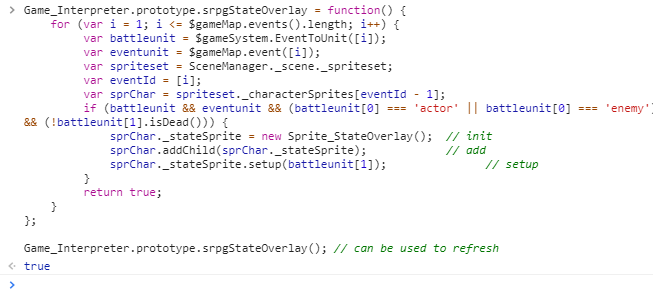
    here is my test function which can be used for SRPG projects

    js code
    JavaScript:
    Game_Interpreter.prototype.srpgStateOverlay = function() {
        for (var i = 1; i <= $gameMap.events().length; i++) {
             var battleunit = $gameSystem.EventToUnit([i]);
             var eventunit = $gameMap.event([i]);
             var spriteset = SceneManager._scene._spriteset;
             var eventId = [i];
             var sprChar = spriteset._characterSprites[eventId - 1];
             if (battleunit && eventunit && (battleunit[0] === 'actor' || battleunit[0] === 'enemy') && (!battleunit[1].isDead())) {
                 sprChar._stateSprite = new Sprite_StateOverlay();  // init
                 sprChar.addChild(sprChar._stateSprite);            // add
                 sprChar._stateSprite.setup(battleunit[1]);               // setup
             }
             return true;
        }
    };
    
    Game_Interpreter.prototype.srpgStateOverlay(); // can be used to refresh
    i tried to use a Game battler prototype at first to get the event id of every Unit, but that didnt worked well..

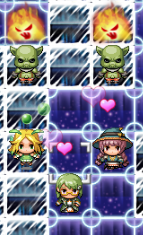
    Here the proof that it works on All Units Now^^
    (enemys have "enemy state" , actors have "friend State", actor9/nymphe has "poison state" with higher priority)
    works on all Units
    Screenshot_3.png
    --
    Screenshot_2.png
    hearts = friend state
    fireface = enemy state
    green bubbles = poison state (higher priority)

    This thread will be reported as Solved,..to be closed
    if "about 1" should be solved or needs more questions,.. this can be made in an Extra Thread
  8. :kaojoy: Good to hear it's working! For your questions:
    1. By default the state overlay sprite gets its row index from the battler's stateOverlayIndex method:
      Game_BattlerBase > stateOverlayIndex (rpg_objects.js)
      JavaScript:
      Game_BattlerBase.prototype.stateOverlayIndex = function() {
          var states = this.states();
          if (states.length > 0) {
              return states[0].overlay;
          } else {
              return 0;
          }
      };
      As you can see, it simply returns the overlay index of the first state in the list, which will be the one with highest priority (because the states get sorted by priority when a new one is added). You could alias or override this in a plugin to change the behaviour. If you want it to cycle through, one option would be to also create an alias/override for the overlay sprite's update method:
      Sprite_StateOverlay > update (rpg_sprites.js)
      JavaScript:
      Sprite_StateOverlay.prototype.update = function() {
          Sprite_Base.prototype.update.call(this);
          this._animationCount++;
          if (this._animationCount >= this.animationWait()) {
              this.updatePattern();
              this.updateFrame();
              this._animationCount = 0;
          }
      };
      It already counts frames, to update the column of the overlay sheet it is referencing. You could simply add another counter in a similar way for "state index", to change the row when appropriate.

    2. When you leave the map scene, it and all its elements (sprites, etc) are unloaded to make way for the next scene (e.g. menu or battle): that's simply how the SceneManager works, one scene at a time. The map data, e.g. character locations, is stored in $gameMap, which is preserved.

      If you added the overlay sprites in a plugin it could be a non-issue. Perhaps by aliasing the setCharacter method of Sprite_Character? Untested example:
      Suggested alias
      JavaScript:
      (function(alias) {
        Sprite_Character.prototype.setCharacter = function(char) {
          alias.apply(this, arguments);
          var battler;
          if (char instanceof Game_Player) {
            battler = $gameParty.leader();
          } else if (char instanceof Game_Follower) {
            battler = char.actor();
          } else if (char instanceof Game_Event) {
            /* if (event is a map enemy) {
              battler = enemy reference     // THIS PART NEEDS EDITING
            } */
          }
          if (!battler) return;  // don't add overlay unless appropriate
          this._stateSprite = new Sprite_StateOverlay();  // init
          this.addChild(this._stateSprite);               // add
          this._stateSprite.setup(battler);               // setup
        };
      })(Sprite_Character.prototype.setCharacter);
  9. caethyril said:
    :kaojoy: Good to hear it's working! For your questions:
    1. By default the state overlay sprite gets its row index from the battler's stateOverlayIndex method:
      Game_BattlerBase > stateOverlayIndex (rpg_objects.js)
      JavaScript:
      Game_BattlerBase.prototype.stateOverlayIndex = function() {
      var states = this.states();
      if (states.length > 0) {
      return states[0].overlay;
      } else {
      return 0;
      }
      };
      As you can see, it simply returns the overlay index of the first state in the list, which will be the one with highest priority (because the states get sorted by priority when a new one is added). You could alias or override this in a plugin to change the behaviour. If you want it to cycle through, one option would be to also create an alias/override for the overlay sprite's update method:
      Sprite_StateOverlay > update (rpg_sprites.js)
      JavaScript:
      Sprite_StateOverlay.prototype.update = function() {
      Sprite_Base.prototype.update.call(this);
      this._animationCount++;
      if (this._animationCount >= this.animationWait()) {
      this.updatePattern();
      this.updateFrame();
      this._animationCount = 0;
      }
      };
      It already counts frames, to update the column of the overlay sheet it is referencing. You could simply add another counter in a similar way for "state index", to change the row when appropriate.

    2. When you leave the map scene, it and all its elements (sprites, etc) are unloaded to make way for the next scene (e.g. menu or battle): that's simply how the SceneManager works, one scene at a time. The map data, e.g. character locations, is stored in $gameMap, which is preserved.

      If you added the overlay sprites in a plugin it could be a non-issue. Perhaps by aliasing the setCharacter method of Sprite_Character? Untested example:
      Suggested alias
      JavaScript:
      (function(alias) {
      Sprite_Character.prototype.setCharacter = function(char) {
      alias.apply(this, arguments);
      var battler;
      if (char instanceof Game_Player) {
      battler = $gameParty.leader();
      } else if (char instanceof Game_Follower) {
      battler = char.actor();
      } else if (char instanceof Game_Event) {
      /* if (event is a map enemy) {
      battler = enemy reference // THIS PART NEEDS EDITING
      } */
      }
      if (!battler) return; // don't add overlay unless appropriate
      this._stateSprite = new Sprite_StateOverlay(); // init
      this.addChild(this._stateSprite); // add
      this._stateSprite.setup(battler); // setup
      };
      })(Sprite_Character.prototype.setCharacter);
    about 1
    thx i will look into that,..perhaps that might be helpfull for more Plugin Functions

    about 2
    I think thats not needed because SRPG has Phases and Subphases that tell me where we are..
    i can use them to make "if conditions" which controll when a refresh should happen
    ( to be honest .. again i dont understand half of it yet anyway^^ but i will look into it anyway to learn more^^)
    => i allready solved most of it.. shown in the "3rd Edit" in the posting above^^

    Thank you very much for all the help! @caethyril
  10. This thread is being closed, due to being solved. If for some reason you would like this thread re-opened, please report this post and leave a message why. Thank you.

  11. Reopened at @dopan's request.

  12. Thanks for re-opening!

    so i finaly figured out the best way to do that .. also followed the advice from

    caethyril.. about using "Sprite_Character.prototype."​

    instead of game Interpreter..

    my Plugin is for SRPG only but the code is pretty simple and could be usefull for anybody with JS skills who is working on ABS engines, and wants state overlay for maps aswell..
    In such case you only need to replace my definition of the srpg battler(=>"battleUnit"), with your definition of the ABS battler..

    Note: i didnt add any option to use more states or to switch betwen all affected states, but there are already plugins for that, And i guess they should be compatible, or atleast show what is needed to add such functions..
    (i might add such functions later if other plugins are not compatible, but i dont think they need to be shown here)

    Here is the final code of my Plugin
    JavaScript:
    //=============================================================================
    // SRPG_MapStateOverlay.js
    //=============================================================================
    /*:
     * @plugindesc v1.0 Adds <SRPG_MapStateOverlay> adds the default StateOverlay to SRPG MapBattleMode
     * @author dopan
     *
     *
     *
     *
     *
     * @param SOSanchorMX
     * @desc anchorX of StateOverlaySprite on MapScene
     * @type
     * @default 0.5
     *
     *
     *
     * @param SOSanchorMY
     * @desc anchorY of StateOverlaySprite on MapScene
     * @type
     * @default 0.8
     *
     *
     * @param SOSanchorBX
     * @desc anchorX of StateOverlaySprite on BattleScene
     * @type
     * @default 0.5
     *
     *
     *
     * @param SOSanchorBY
     * @desc anchorY of StateOverlaySprite on BattleScene
     * @type
     * @default 1
     *
     *
     *
     *
     * @help
     *
     * adds the default StateOverlay to SRPG MapBattleMode
     * Anchors can be changed ,related to SV & MapBattleMode in the Plugin Param
     *
     * -> plug & play !
     *
     * Credits : Caethyril for helping me to understand how to do that^^
     *
     * ============================================================================
     * Terms of Use
     * ============================================================================
     * Free for any commercial or non-commercial project!
     * (edits are allowed but pls dont claim it as yours without Credits.thx)
     * ============================================================================
     * Changelog
     * ============================================================================
     * Version 1.0:
     * - first Release 30.12.2020 for SRPG (rpg mv)!
     */
     
    (function() {
    
      // Plugin param Variables:
    
      var parameters = PluginManager.parameters("SRPG_MapStateOverlay") || $plugins.filter(function (plugin) { return plugin.description.contains('<SRPG_MapStateOverlay>'); });
    
      var _SOSanchorBX = Number(parameters['SOSanchorBX'] || 0.5);
      var _SOSanchorBY = Number(parameters['SOSanchorBY'] || 1);
      var _SOSanchorMX = Number(parameters['SOSanchorMX'] || 0.5);
      var _SOSanchorMY = Number(parameters['SOSanchorMY'] || 0.8);
    
      var _checkSOS = false;
    //-----------------------------------------------------------------------------------------
    
        // overwrite the default Anchor of StateOverlaySprite
        Sprite_StateOverlay.prototype.initMembers = function() {
            this._battler = null;
            this._overlayIndex = 0;
            this._animationCount = 0;
            this._pattern = 0;
    
            //Dopan INFO=> stuff above is the default Content, stuff below checks the Scene and sets the Anchor
    
            if (SceneManager._scene instanceof Scene_Battle === true) {
            this.anchor.x = _SOSanchorBX; // 0.5;
            this.anchor.y = _SOSanchorBY; //  1;
    
            };
    
            if (SceneManager._scene instanceof Scene_Map === true) {
            this.anchor.x = _SOSanchorMX; // 0.5;
            this.anchor.y = _SOSanchorMY; //  0.8;
    
            };
        };                                                   
    //--------------------------------- Sprite_Character:
    
            // create Overlay
        Sprite_Character.prototype.createOverlay = function() {
            if (!this._stateSprite) {
                var battleUnit = $gameSystem.EventToUnit(this._character.eventId());
                this._stateSprite = new Sprite_StateOverlay();
                this._stateSprite.setup(battleUnit[1]);
                this.addChild(this._stateSprite);
            }
        };
    
            // update Overlay
        var _SRPG_Sprite_Character_updateCharacterFrame = Sprite_Character.prototype.updateCharacterFrame;
        Sprite_Character.prototype.updateCharacterFrame = function() {
            _SRPG_Sprite_Character_updateCharacterFrame.call(this);
    
            if ($gameSystem.isSRPGMode() == true && this._character.isEvent() == true) {
                var battleUnit = $gameSystem.EventToUnit(this._character.eventId());
                if (battleUnit) {
                this.createOverlay();
                }
            }
        };
    
    //--------------------------------- can be used to check the overlay in console F8
    
    //SceneManager._scene._spriteset._characterSprites[eventID - 1]._stateSprite
     
    //---------------------------------but the "eventID" must be added..


    //--End:
    
    })();
    about License: all my Plugins are under MIT License,..
    so free 2 use and edit in any kind of project.
    (credits are always welcome)


    .. so i guess this can be closed again ,thank you very much caethyril
    (i also added you into the Plugin Credits, because i could not have done that plugin without your advise, ..)
  13. Oh man, I wish I found this thread earlier...too tired now, but I'm definitely gonna reread this in the morning! Hopefully, I can adapt this for LeTBS.
  14. Oh, for some reason I didn't see @dopan's post earlier. You're welcome, nice to see you got it working! :kaohi:

    This thread is being closed, due to being solved. If for some reason you would like this thread re-opened, please report this post and leave a message why. Thank you.