Unlocking the Potential of Skills
Written by: gcook725
Introduction: "Simple enough for a child; powerful enough for a developer."So, I've decided to write this tutorial for two reasons. The first is that it is all-too-often that I find RM developers not using skills to their potential. This isn't always their fault: The database itself, while it allows for the creation of more complex, doesn't exactly give you any such examples or give you any ideas as exactly how to do it in the first place. Its here that the motto for RPG Maker seems be both its blessing and its curse.
"Simple enough for a child; powerful enough for a developer."
The other main reason as to why I'm writing this tutorial is because it has some basic knowledge within it that's required for another tutorial I'm planning for creating complex Boss Encounters.
What will you learn?
This tutorial is written to teach intermediate RM'ers the basics of creating skills that do more than what the database's skill tab implies can be created. This tutorial will include 3 example skills which should do just that. Those skills are:
- A skill that hits more than 4 random targets
- A skill that hits 3 random targets with each hit having a different element
- A skill that prevents the user from acting
A note: This tutorial expects the reader to at least have a basic knowledge of how eventing works, how to use common events and basic knowledge of how to use the database. In addition to this the user is expected to have read at least rudimentary knowledge of how to use formulas to their fullest potential. There is an amazing tutorial by Fomar0153 that does just this and then some. Some basic knowledge of programming logic is helpful as well for understanding how to make more complex events and skills, but isn't exactly required for this particular tutorial.
Another note: Some -- if not all -- of the effects that require common events in this tutorial can be done using the formula bar itself, but its not as modular as common events and it can be difficult to keep track of all the commands in the formula bar itself.
How do I create the skills?
There are a few steps I would recommend you to use when creating a skill. Mostly planning really. These are the steps I go through when creating every skill that might require using more than just the Skills tab of the database.
- Plan out the skills. What should the skill do? Get crazy here.
- Decide what is required to make the skill work the way you want it to. Does it need special states? Common events? Multiple skills? How many variables and/or switches?
- Actually create the skill. That is create the skills in the Skill tab and any other parts you will need in the other tabs of the database. Get it generally working
- Test the skill. Give it to a random character without any costs to the skill itself. Debug it to death. Find where the skill fails and fix it. Once you get it actually working, start balancing the skill's costs and effects.
The Examples
Okay, now for the examples I promised earlier. The first skill is designed to teach you how to use common events in your skills. Lets go through the steps:
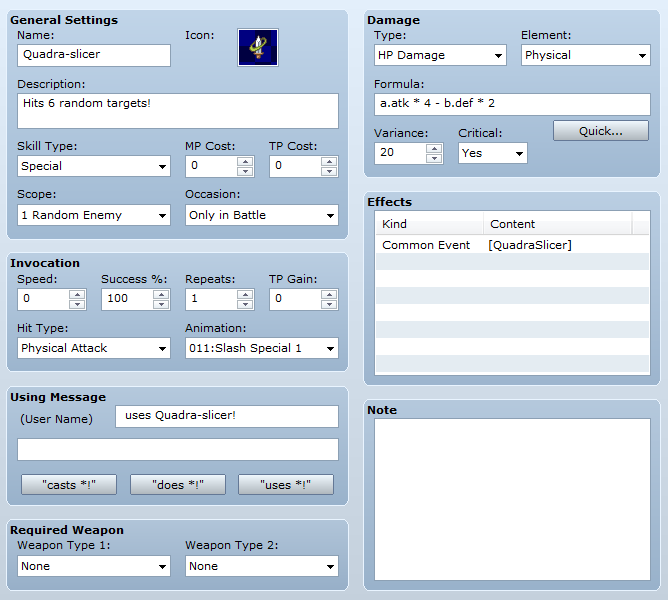
- Plan the skill: This skill is going to hit 6 random enemies.
- What's needed? The skill will require one skill that targets a random enemy. Since the maximum for the scope to hit random targets is 4, we will also need a common event to repeat the skill. We will need a switch to prevent re-initialization of the skill and a variable to keep track of the number of times the skill is used.
- Create the skill.
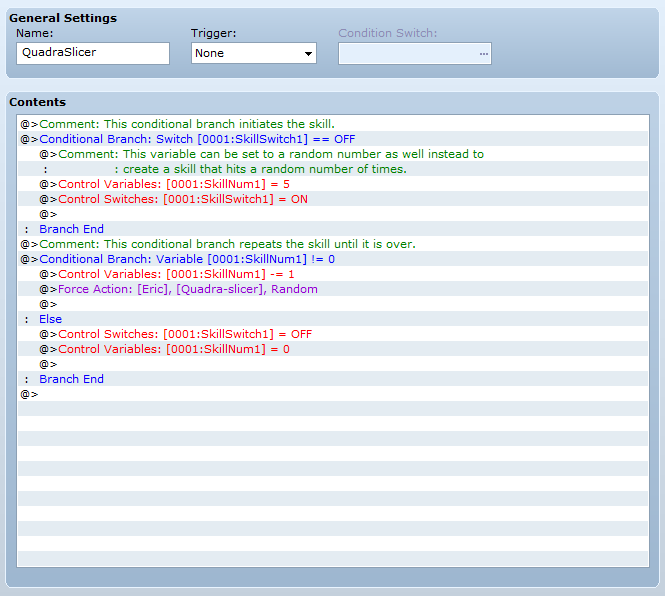
After creating the skill itself, we're going to move on to the common event. The first part of the event holds a conditional branch that will initiate our variable that acts as our counter for the skill. For this example we have set it to 5 because then it will repeat five more times after its first effect, however you can set this to any number, be it randomized (think of a double-slap from pokemon) or another variable from somewhere else. The switch is turned on here so that the variable is not re-initialized until the effect is finished. The second conditional branch just makes sure that our counter is not equal to 0. If its true then it subtracts one from the variable and uses the skill again. This effectively works as a loop for the skill since it'll call this common event as part of the effect of the skill itself. If the counter is equal to zero however, it doesn't use the skill again (breaking the loop) and instead resets the switch and variable for future use.
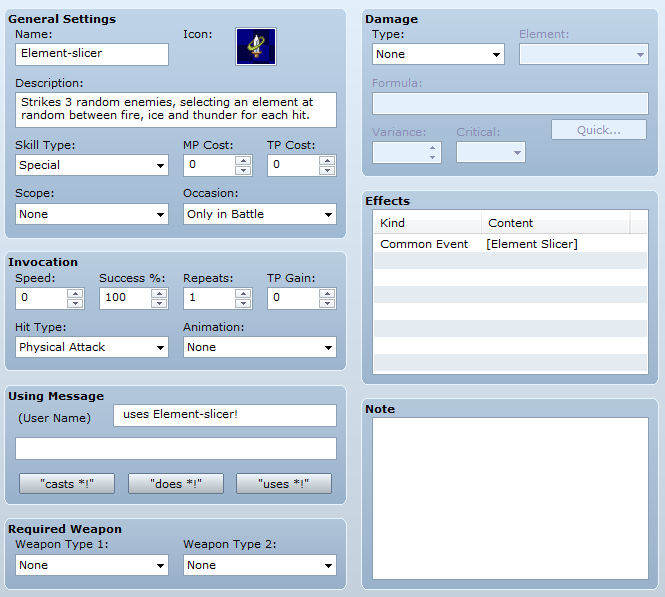
The second example is designed to teach you how to use multiple skills for a single overall effect. Again, lets go through the steps:
- Plan the skill. This skill will strike 3 random targets, each hit dealing damage with a different, random element. Possible elements are Fire, Ice, and Thunder
- What's needed? This skill will need a total of 4 skills to work: 1 to start the effect and 1 for each elemental effect. It will also need one common event with 2 variables; 1 variable to be used as a counter and 1 variable to be used to determine which effect to use.
- Create the skill.
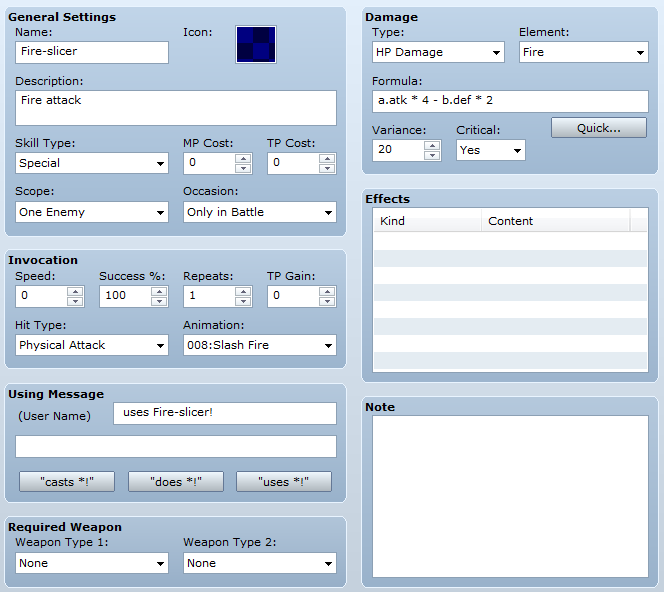
The other skills follow the same format for this example. They are the portions that actually do damage. Because the player never has to select or see these skills really, the name, description, and skill types are unimportant and can really be whatever you want. What is important here is the effects, formula, and potentially the using message. These skills don't call the common event because the loop is built into it this time, rather than using Force Action on the skill to create an artificial loop by calling the skill that calls the common event.
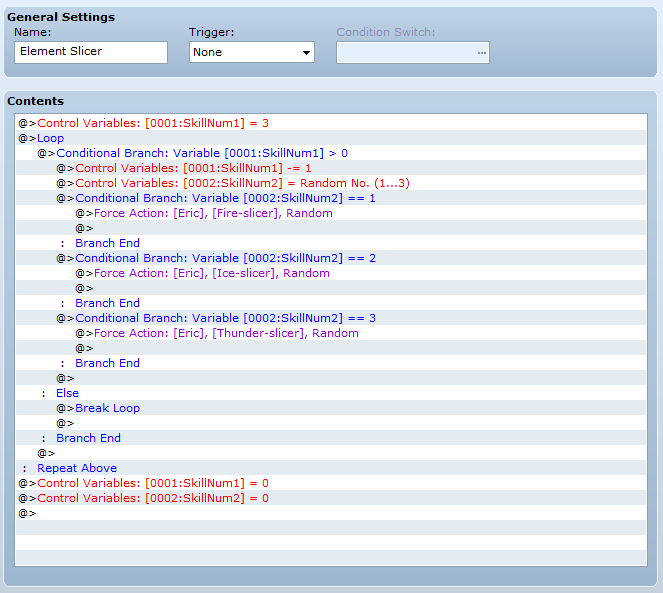
Next we're going to create the actual common event. We start the event by initializing out counter then calling a loop. The conditional branch inside of the loop merely makes sure that the counter isn't zero yet; if it is true then it goes on with the effect while if its false it breaks the loop and the event resets all variables for 0 for future use. The effect of the skill basically subtracts one from the counter and then randomizes a second variable with numbers between 1 and 3. Each number will correspond with a different skill from before: 1 for fire, 2 for ice, 3 for thunder. The three conditional branches after basically just checks the randomized number to see which action should be forced.
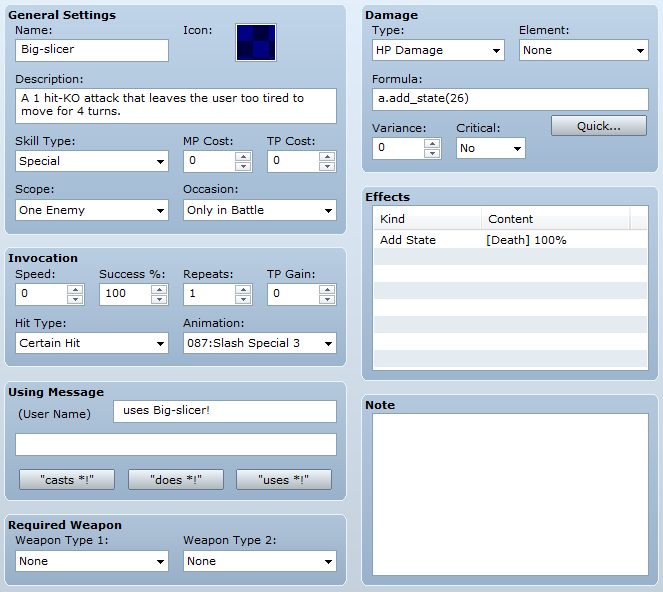
Our final example is a quick one, but shows how to use states to create different effects and penalties on the user. Basically, this should be easy to figure out how to do if you read Fomar0153's tutorial. Even then some people might struggle to think of a practical application. The steps:
- Plan the skill. This skill will instantly kill a single enemy, but it will also cause the user to lose four turns.
- What's needed? The skill itself that adds the death state to an enemy and a state that is added to the user by the skill that causes them to lose 4 turns.
- Create the skill.
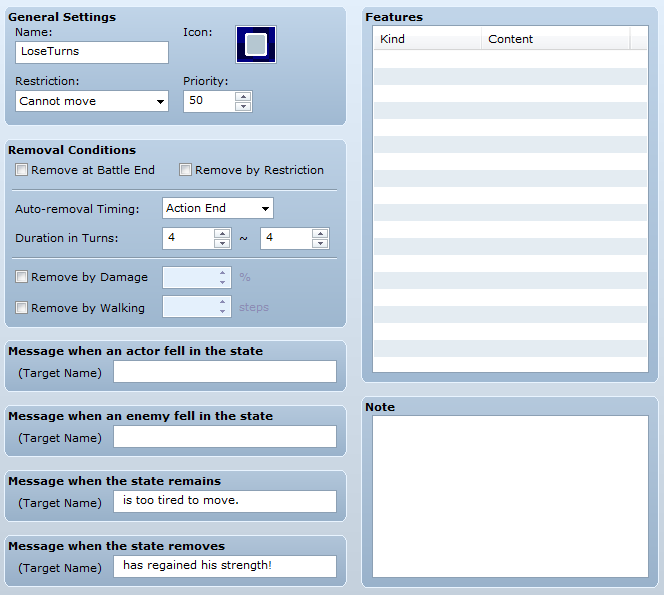
Finally, we're going to create the state that causes the character to be unable to act. The state itself is effectively a duplicate of Death with different messages and removal conditions. A note here is that I made a mistake in the screenshot and demo: The effect should automatically be removed at Battle End as well. Also of note is that you could easily alter a skill like this to instead of restrict movement, seal the skill that causes the effect to create a cooldown.
Conclusion
You can download the demo with all of these examples here. If you have any particular types of skill that use different methods than those detailed here and that you think should be included, post in this topic asking about them and I'll see about getting them included with the examples above. I hope you found this tutorial helpful in perhaps teaching you some new methods to create complex skills. All comments are welcome, so please post away!