Understanding Tile Regions

● ARCHIVED · READ-ONLY
Started by Tsukihime 6 posts View original ↗
  1. In this article we go over the "Region" property in your tiles.


    It explains what a region is, how you can use them, what RPG Maker uses them for by default, how you can manipulate it for your own purposes, and finally a sample list of what other scripters have been using regions for.


    What is a Region


    It's just a number. Really. Take a look at the following diagram:
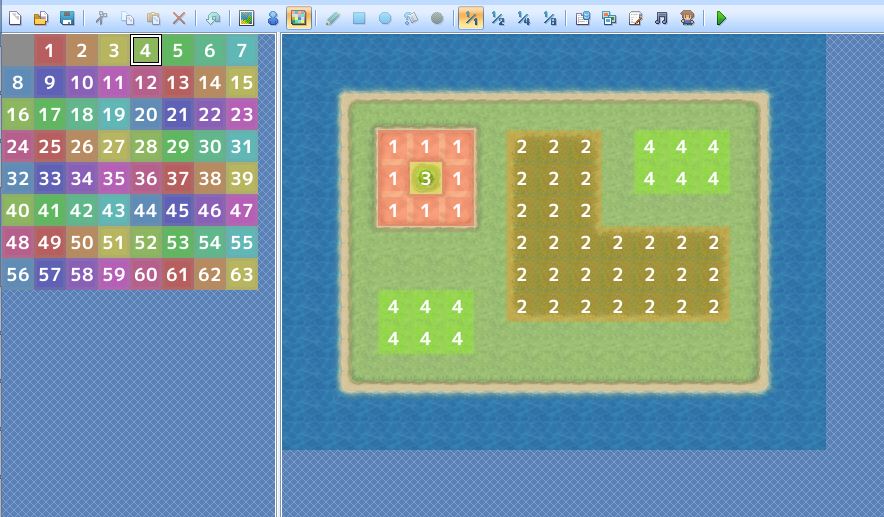


    Working with Regions


    The map editor allows you to edit tile regions. To access the region editor, press F7, or press the colourful icon in the toolbar.


    You will see 64 different regions available to colour your map with (63 numbered regions, and the Zero-Region which is not numbered).


    By default, any tile that does not have a region, is the Zero-Region, with a region ID of 0.


    To set a region, simply pick a region from the palette and spread it over your tiles.


    Regions and Encounters


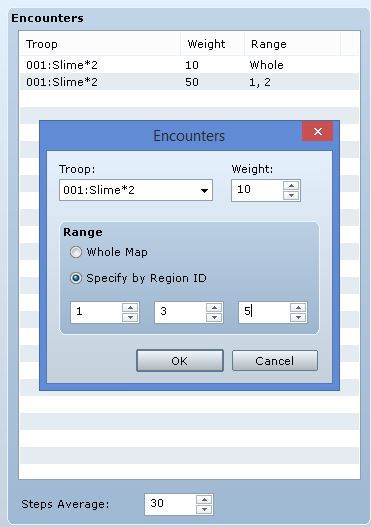
    A built-in use case for regions is in the map encounter system, which you can access from map properties.


    From here, you can choose which regions an encounter will appear in.


    For example, maybe certain troops only appear in water, or only appear in grasslands. Some troops may be encountered more frequently in certain regions, and less frequently in other regions.


    Tile Regions and Events


    You can use tile region information in your events. While conditional branches do not support checking a tile's region event directly, you can accomplish this using variables...


    Read the rest at HimeWorks!
  2. Hi, I want to say firstly that your tutorials are great & informative, and you create very useful scripts.

    I may be misunderstanding your implication, but I'd just like to inform you that conditional branches can check a tile's region by using the following script call:

    For checking if the player is on x region

    - $game_player.region_id == x

    For checking if an event[id] is on x region

    - $game_map.events[id].region_id == x
  3. You're right, it can be done via script calls.


    It was mainly a scenario that I've set up to demonstrate the purpose of "Get Location Info" since someone that might not know much about scripting would look through the conditions and not see a condition for regions.


    I've added an extra section to the tutorial to mention the script calls.
  4. One thing to be careful of is that you only get one region per tile. That means you might run into trouble if you start using region IDs for multiple different things.

    For example: some scripts use region IDs for collision properties. If you also use region IDs for encounters, you'll start running into trouble when you want to use them both at the same time to convey different properties (say. you have one ID for "snow" and another for "impassable to players but not to events" - what do you do when a tile needs to have both properties?). This is probably not a very common scenario, but it's something to keep in mind!

    I love the region ID feature, but I do wish they were bitflags instead, so you could add several unrelated flags to the same tile independantly.
  5. In a case like that, if it becomes too much for a region ID to handle on it's own, I'd suspect that a person can start mixing in terrain tags, tileset passability, event 'through ON/OFF' and map events into the picture.

    But I digress. I apologize for straying from the topic.
  6. One solution I had was to introduce multiple regions.

    But then this requires all of the scripts to change the way they check a region, and the editor doesn't provide any way to support it so it doesn't make any sense.

    For general purpose flags, it can be done in a reasonable way given two things

    1. A format that will store custom tile properties per tile

    2. An external grid editor that allows you to load up a map and then set whatever properties you want for each tile. Preferably, it would export to the format mentioned above

    And now you can just create custom attributes easily.

    We can generalize such a tool to become a general tilemap property editor, where you can set the passage settings (orthogonal, diagonal, one-way, etc), and all of the different attributes.

    The format could look something like this

    { [1,1] : { up: false down: false left: false right: true // you can only move right on this part of the map up-left: false ... poison-damage: 20% custom-attr: blah }}The tool itself can be written in any programming language and only needs to generate a suitable text format.The tool itself sounds straightforward to write for the most part: have a panel, load a picture over it, create a 32x32 grid, create a bunch of tile objects, add some event handlers, create a stack of options, ...

    This is NOT a map editor. You do not create maps. You simply create tile properties. It can be turned into a map editor, but then you risk someone thinking they might as well go and create a full game engine and not release anything like a couple large map editor projects from before.