Event overview
Here’s a general idea of what you have to work with in events
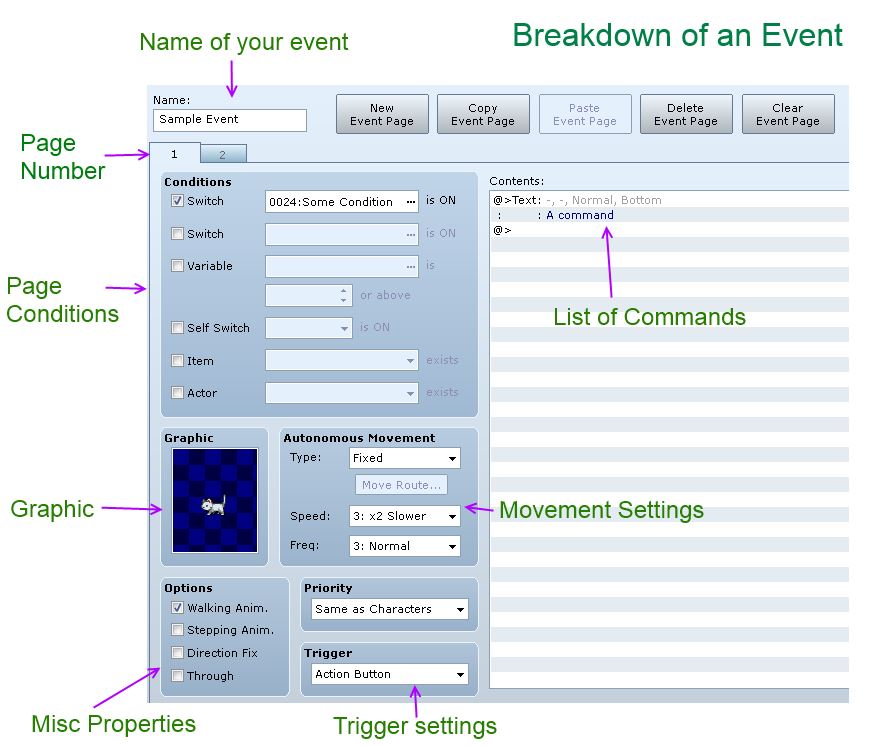
What we are interested in are the event pages.
Checking whether a page is active
For an event, at most one page is ever active at any time. In this example, page 1 has a graphic of a kitty, and page 2 has an empty graphic. When page 1 is active, you will see a kitty. When page 2 is active, you will not see a kitty.
A page is active if all of the page conditions have been met. So in our kitty page, there is one condition: Switch 24 must be ON. If the switch is ON, then the condition is met, and the page will be activated. If it is not met, then the engine looks at another page and checks whether it can be activated.
Pages are checked in reverse order
This is probably the most important thing you have to remember.
In our kitty event, the engine starts by checking page 2 first, and then it checks page 1. In general, it starts by checking the last page, and then works its way backwards. This means that if the last page has no conditions, then it will be activated, even if the first page has no conditions.
Do not forget the order of page checking.
Read the rest at HimeWorks!