Turning off all self-switches does not reset the event?

● ARCHIVED · READ-ONLY
Started by Xenphir 20 posts View original ↗
  1. Hello again everyone. So a new problem.. xD I go through an event with 5 pages. The first page having no requirements, and pages 2-5 have self-switches A, B, C, and D in that order. on the fifth page, when the player does the action required, it turns off all switches in order, with D being last because thats the page it is on. Well, this erases the event entirely, instead of going back to the first page, and I am not sure why.
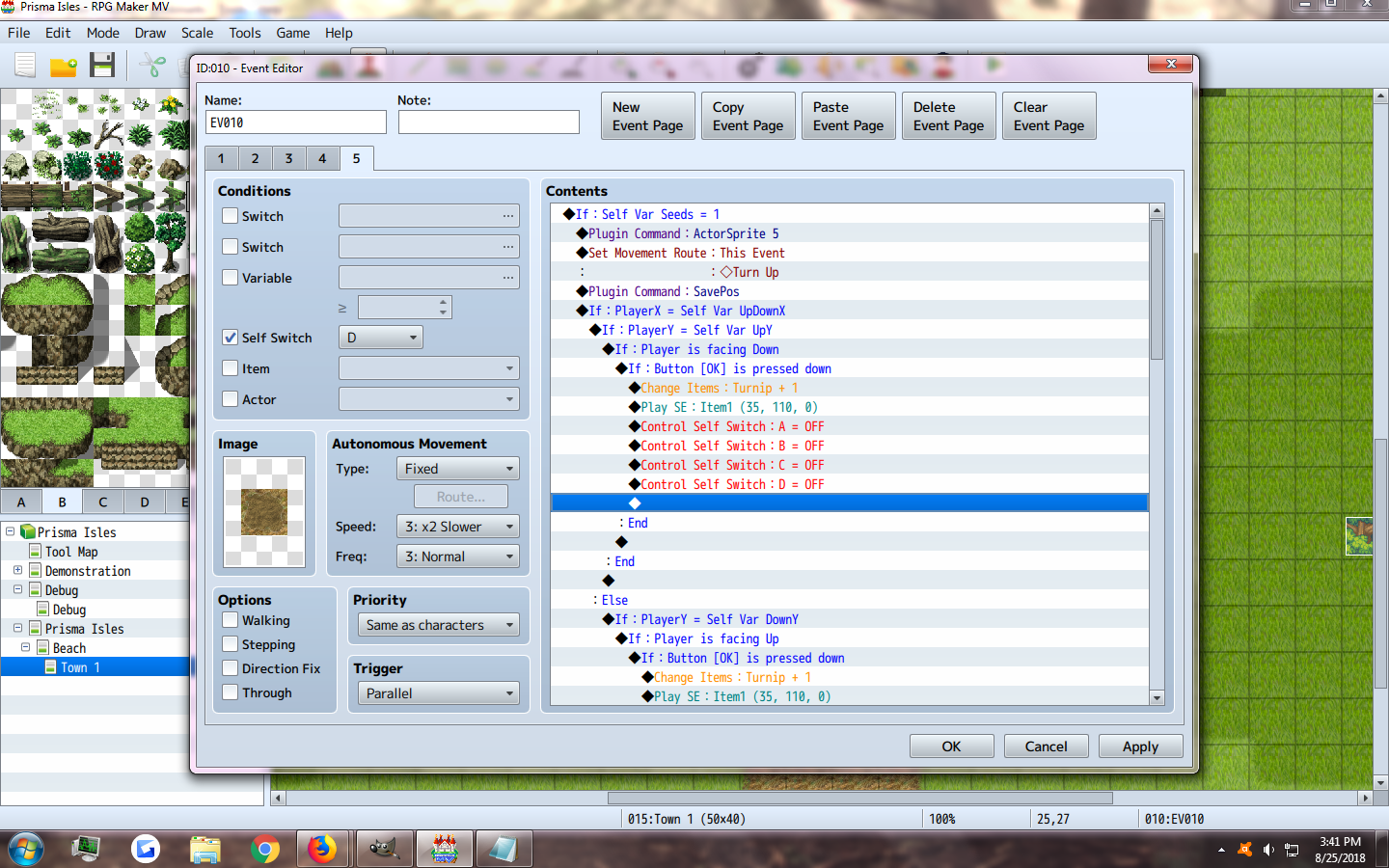
    image
    upload_2018-8-25_15-41-9.png
  2. Impossible to tell without the other pages, particularly the first one. Is there a condition on page 1?

    And how does the rest of this page go? What happens if the conditions aren’t met?
  3. SwiftSign said:
    Impossible to tell without the other pages, particularly the first one. Is there a condition on page 1?
    Ah sorry. here are the rest. There are no conditions for Page 1.
    Images
    upload_2018-8-25_15-44-27.png

    upload_2018-8-25_15-44-39.png

    upload_2018-8-25_15-45-7.png

    upload_2018-8-25_15-45-17.png
  4. I have a feeling that page 5 either isn't going into this branch or there's an Erase Event at the end that wiping this out.
  5. Frogboy said:
    I have a feeling that page 5 either isn't going into this branch or there's an Erase Event at the end that wiping this out.
    There is no erase event on any of the pages at all. Also it does go into this branch because when player faces the event and presses OK button, it gives the player 1 turnip and then the event disappears
  6. Is there something below that could be activating afterwards? Could we see the rest of page 5?
  7. It's possible the event is being called out of order and/or you have more pages then needed. I ran into this very same problem with an event I was building. I had to do several passes to get it just right :-/

    What is the event supposed to do exactly and why does it need 5 pages?
  8. SwiftSign said:
    Is there something below that could be activating afterwards? Could we see the rest of page 5?

    Raths Rants said:
    It's possible the event is being called out of order and/or you have more pages then needed. I ran into this very same problem with an event I was building. I had to do several passes to get it just right :-/

    What is the event supposed to do exactly and why does it need 5 pages?

    Ah sorry, I didn't think it necessary since the rest of Page 5 is just a repeat for the other directions. What this event does is first page, it only activates when I use a specific tool marked with collision ID that is listed, which is a Hoe. The second page shows a tilled soil and will only activate on collision IDs for seeds. I know these are not the problem as I have another event with a collision ID on page 1, and it cycles just fine after turning off all switches. Depending on what seed tool was used, it changes the "seed" variable. Page 3 checks this variable and will change the event's self-variable to the corresponding number. Page 4 runs a common event that simply checks what seed it is (If its a turnip right now, but in the future I can add more like grapes, already tested to work.) and if the plant is wet by checking the self variable (Wet) is 1 or 0. All this event does on this page is detect these variables plus the self-var growth stage to decide which picture the event will be. (This is what makes it so I can have all crops with all their seeds, mid-growth, and watered varieties on one page.) All of this works just fine and all of these pages switch to the next with ease. After self-var growth gets down to 0 it switches to page 5 which has to run as a parallel event to check the image for whatever crop it is that is growing in that plot. That is why there is extra code for the player facing the event and using the action button. Once they face the crop and use the OK button, the crop is harvested, players get +1 Turnip, but that is when the event disappears entirely.

    images
    upload_2018-8-26_9-14-48.png

    upload_2018-8-26_9-15-2.png
  9. This is a brain teaser...

    Current theory: at the beginning of P5 you make that event "Turn Up". Is it possible that's a blank graphic and its staying glitched on that page? (As in, the fourth row of that character file is blank)

    Why is P5 a parallel process by the way? If it wants you to face it and press the action button shouldn't it be an action button event?
  10. Maybe try changing it from Parallel to Action Button. Add a closing text box that states they received +1 Turnip. Then on the first page add another text box to the player has to click on to ensure the event is working.
  11. SwiftSign said:
    This is a brain teaser...

    Current theory: at the beginning of P5 you make that event "Turn Up". Is it possible that's a blank graphic and its staying glitched on that page? (As in, the fourth row of that character file is blank)

    Why is P5 a parallel process by the way? If it wants you to face it and press the action button shouldn't it be an action button event?

    Raths Rants said:
    Maybe try changing it from Parallel to Action Button. Add a closing text box that states they received +1 Turnip. Then on the first page add another text box to the player has to click on to ensure the event is working.

    It had to be parallel to check the self variable seed without player interaction to set the image of the correct crop as I stated in my last post. There is no blank graphic as the set i am using as all four slots filled and then the walking animations are still set to the original actors.
  12. Xenphir said:
    It had to be parallel to check the self variable seed without player interaction to set the image of the correct crop as I stated in my last post. There is no blank graphic as the set i am using as all four slots filled and then the walking animations are still set to the original actors.

    Sorry I'm at a loss then! Been staring at this for a while and there doesn't seem to be anything wrong with the event. If its giving you a Turnip then it should be resetting fine and its not clear why it should delete/go invis/no graphic/whatever is happening for you at the end.
  13. SwiftSign said:
    Sorry I'm at a loss then! Been staring at this for a while and there doesn't seem to be anything wrong with the event. If its giving you a Turnip then it should be resetting fine and its not clear why it should delete/go invis/no graphic/whatever is happening for you at the end.
    Don't worry about it. Thanks for trying at least :3
  14. I am stumped myself. Only thing that sticks out to me is an open "ELSE" statement under "If : Self Var Seeds = 1" and when player is facing up it only checks "If : PlayerY = Self Var DownY".

    You might try putting in a wait timer and/or using a Label to Jump to for the last option instead of having all the checks under each "IF" statement. Do a jump to Label after "If : Button [OK] is pressed down". I would also try and "Exit Event" to add to that.

    I'm not using the plugin you have. However, it doesn't look like a plugin issue.
  15. okay for some reason I changed the way the pictures change (Which doesn't work for what I need, but I thought I could do it temporarily while troubleshooting) and at the very end of page 5, the event changes to this? Its in the same actor sheet as the picture but its the up-direction
    walk picture on the lowest left part of the actor walk sheet. I'm not sure but it appears the event tried to walk forward and then glitched?


    upload_2018-8-26_15-10-41.png
  16. I noticed that there's no wait I'm this parallel process. Try adding a small 3-5ms wait at the end. I've had issues before where similar strange behaviors happened where certain commands just plain didn't get executed.

    In my puzzle game, when a player dies, the game over command would get called after the game would run through some evented code. For some reason, it wouldn't reliably execute the game over command and would get stuck in the loop.

    I solved this by setting a flag when the event entered the branch that was calling the game over and have that flag skip all of the logic in this event page. It seems that there is sometimes a delay in when a command gets queued and when it gets executed and it can get bogged down by continuously adding more and more to the queue. So here's some psuedo code that I hope will solve your issue.
    • Set switch stopExecute to false
    • If stopExecute is false then
      • All of your event logic
      • Set stopExecute to true when you turn off your Self Switches.
    • End if
    • Wait 5

    This should allow your event to get a chance to catch up and execute properly, I hope.
  17. Frogboy said:
    I noticed that there's no wait I'm this parallel process. Try adding a small 3-5ms wait at the end. I've had issues before where similar strange behaviors happened where certain commands just plain didn't get executed.

    In my puzzle game, when a player dies, the game over command would get called after the game would run through some evented code. For some reason, it wouldn't reliably execute the game over command and would get stuck in the loop.

    I solved this by setting a flag when the event entered the branch that was calling the game over and have that flag skip all of the logic in this event page. It seems that there is sometimes a delay in when a command gets queued and when it gets executed and it can get bogged down by continuously adding more and more to the queue. So here's some psuedo code that I hope will solve your issue.
    • Set switch stopExecute to false
    • If stopExecute is false then
      • All of your event logic
      • Set stopExecute to true when you turn off your Self Switches.
    • End if
    • Wait 5

    This should allow your event to get a chance to catch up and execute properly, I hope.
    Ill try the wait but I am unsure what your psuedo code means. xD
  18. okay so I redid the event and only took out the parts with the ActorSprite, and it works. So something about using the plugin command ActorSprite messes with the graphic too much, and glitches out if you try to run any event page that does not set ActorSprite.
    So what this plugin does is allows me to use plugin command "ActorSprite (x)" to set the event's image to whatever number actor I call on. So I need some kind of script that either sets the event image back to its original one or, using Shaz save event position plugin, allow the event to change image with the normal ways. However it did not update the image using the usual set movement route plus Save Position, x,x
  19. Here's what I was talking about earlier. Set up one of your pages (1-4) to have a switch (or extra self switch/variable) set to false like so.

    snap1.PNG

    Then wrap your parallel process in an IF statement so that your switch has to be off in order to execute all of the code within like so. Make sure you turn the switch ON when the code you want to execute (1 time) runs.

    snap2.PNG

    What this will do is stop executing the code over and over in the parallel process's loop once it fires. The reason you want to do this is because RPG Maker can bug out sometimes if it has commands that should take you somewhere else (another map, game over, quite possibly another event page) but the loop comes back around and reruns your code before it can make this transition. This technique runs the code you're looking to run once and then shuts it down if the loop runs again. While the example above is pretty straight forward and would likely work without shutting it down, you're issue might be being cause by the fact that 4 self switches need to be turned off. They might not all be turning off in time. It's weird but I've run into this kind of behavior before.
  20. Frogboy said:
    Here's what I was talking about earlier. Set up one of your pages (1-4) to have a switch (or extra self switch/variable) set to false like so.
    I've tried it like this because the event works as is up until this point. It still leaves an empty spot on the map that the player cannot pass through. So it must still be getting stuck on page 5 somehow. ALso I did add a 5 frame wait after this and it didn't work with that either.

    Images
    upload_2018-8-26_19-38-52.png

    upload_2018-8-26_19-40-40.png


    I tried doing it with just movement and Shaz save event position plugin, but that just makes a whole ton of other bugs like only showing seeds on page 4, when normally it shows seeds, grow stage 2 (small plant) grow stage 3 (Turnip pokes out of the ground) and then switches to page 4. With just movement routes it only shows seeds and for some reason on page 5 it shows the not-fully grown stage of the turnip and then after clicking the event, the event moves into a weird walking image but instead of moving its just completely still as if it read the image wrong.