TileD Plugin (Version 1.3.0+ Released)

● ARCHIVED · READ-ONLY
Started by Archeia 471 posts Page 24 of 24 View original ↗
  1. WortX said:
    Archeia, I followed the instructions, but if I start the Project the map is just black. Any thoughts About this?
    I had this problem at one point and I can't quite remember how I fixed it, but make sure of four things:
    1. in Tiled, when you import a tileset make sure to click EMBED IN MAP
    2. Put the Tiled plugin at the bottom of your plugin list
    3. Make sure the JSON file is named correctly and in the correct spot
    4. Make sure you're using Tiled v 1.0.3. The latest version of Tiled won't work with the plugin, although I'm not sure that the black screen is the error you'll get.
    If the issue isn't any of those things, then I dunno. The above is what worked for me, iirc.
  2. Ill light a candle for you. It was the first item of your list :D . You can't imagine how glad I am Right now. Thank you very much!
  3. @ashikai are you upto testing the new plugin that has the latest JSON format supported?
    The bad thing is that old maps made with old Tiled will not work.
  4. @Archeia Yeah, I'm game for testing it. Just point me in the right direction (which Tiled version and plugin version) and I'll give it a go.
  5. ashikai said:
    @Archeia Yeah, I'm game for testing it. Just point me in the right direction (which Tiled version and plugin version) and I'll give it a go.

    I'll PM you.
    Just the latest Tiled version should work.
  6. Looking Forward to the release. Now that I finally got it working I love mapping with TileD.
  7. I'm sorry, but I can't seem to find that YED_tiled.js file to install in the js folder in RPGMV. I looked and looked and I don't understand what I'm seeing. I'm sorry.
  8. @tower727 in the first post, it's the giant DOWNLOAD link. It says "DOWNLOAD RMMV v1.3" etc. Click that for the zip.
  9. ashikai said:
    @tower727 in the first post, it's the giant DOWNLOAD link. It says "DOWNLOAD RMMV v1.3" etc. Click that for the zip.
    Oooooh it goes in the PLUGINS folder, not the JS folder. Thanks for the help!
  10. Hi
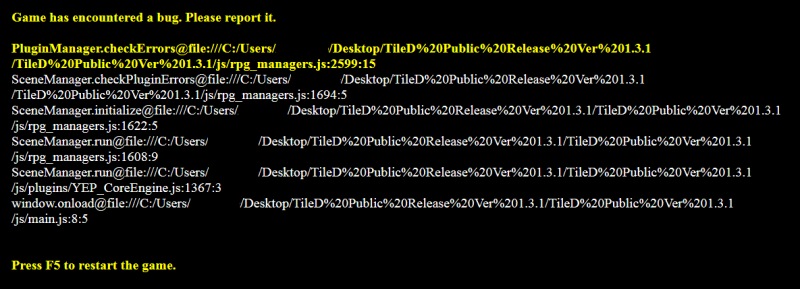
    i have tryed to start the RMMV Version 1.3.0+ with YEP_CoreEngine.js (newest) and got a lot of error´s bug.png
    i looked into the pluginlist via VSC and aktivated only the tiled and yanfly core engine
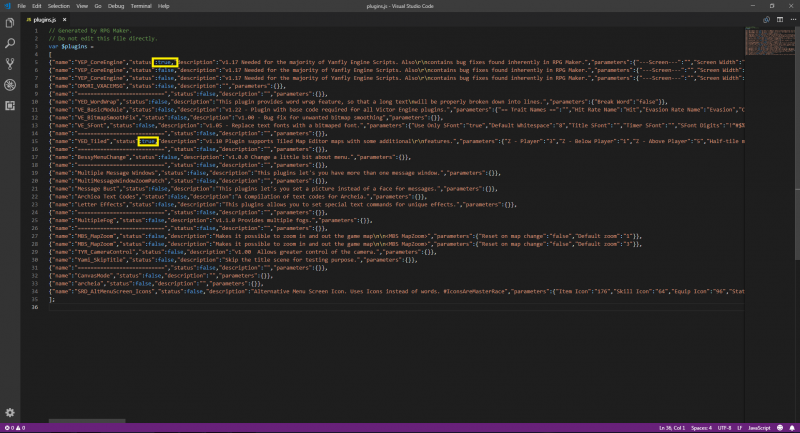
    VSC_plugin.png

    now i got the endless loading screen... fanwood.woff (under fonts) was missing

    -start menue appear:)thumbsup-right::thumbsup-left:) yähhh happy

    data/Map001.json Failed to load resource: net::ERR_FILE_NOT_FOUND
    maps/Map1.json Failed to load resource: net::ERR_FILE_NOT_FOUND

    ok...

    i made an ground map in tiled and placed it in the maps folder... step bye step added tileset´s char.. nessy.png is missing..

    i saw all possible tutorials read the docs and so on... the base 1.3.0+ should run as an working exemple (in my opinion) i have and give a lot respect for all plugin game maker and also plugin writer... but these is frustrating til the end. A working exemple (minimized) would be awsome. i plan to use the tile maker with 24x24 setting on new project.

    The other part is the Engine downgrading:dizzy: i can live with 1.6.1 and get all my stuff run, without penetrating ppl. So pls make the plugin working on 1.6.x.

    Thx for reading and maybe a helping hand!
  11. The plugin works with 1.6.1 I'm using it there right now.
    From what I can tell, I uploaded a version of the demo with missing files, so you just have to replace all those graphics @linus85

    Also you didn't read the pdf on how to use tiled? Based on the map error anyway.

    I'll work on it later I guess, I'm just busy right now with my own stuff.


    NEW THREAD HERE.