Hi so I just got Mv about a hour ago, made so sprites, and yeah everything was going good....BUT I saw this "icon" button I was like, "Oh I should go make a Icon everyone can look at be like oh woooooooooooooow so cewl" but it keeps showing the normal icon....please help!
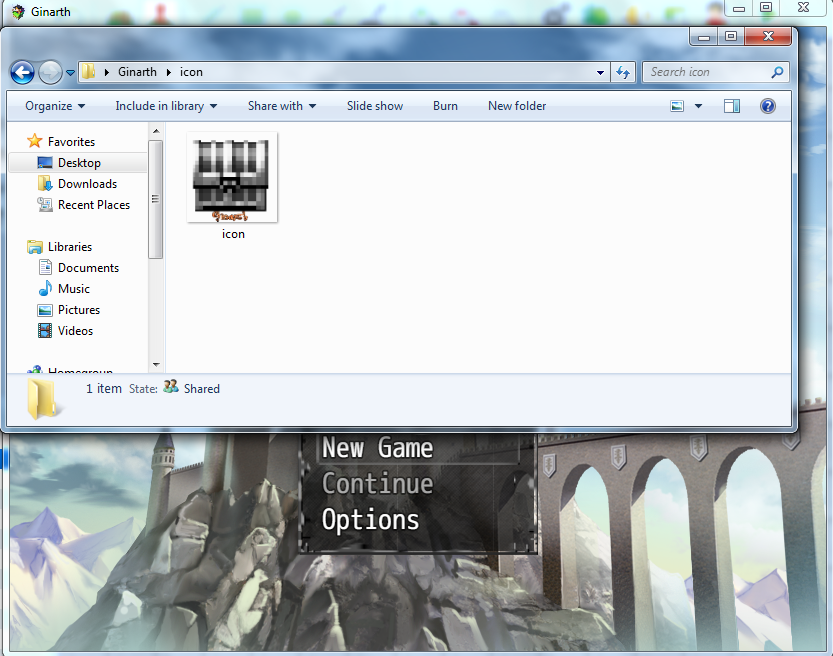
The icon isn't changing :(
● ARCHIVED · READ-ONLY
-
-
You need to insert it into your icons file using the photo editing software you used to make the chest.
-
is there like a video? I don't really understand what you are saying :(You need to insert it into your icons file using the photo editing software you used to make the chest.
-
The old icon could possibly be cached in the game. Try opening the developer console (Press F8), going to the Network tab, and checking the box for "disable cache". Then press ctrl + r to reload the game.
If that doesn't work, try editing the index.html file, find the <link rel="icon" href="icon/icon.png" type="image/png"> on the 8th line, and change 'href' to "icon/icon.png?2"
If neither of those work, I got no other ideas :( -
There's a file with all of the weapon and item icons on it in your project folder, you need to edit the chest into the file.is there like a video? I don't really understand what you are saying :(
-
where is the "index.html file"? also how do you people know so much about mv?!??!?!?!
EDIT: ms, hoppy... I was doing that and wanted to know why it didn't work....... :( -
Index.html is in the same folder as the RM MV project file. So, for example, if my project is located in C:\Users\Zalerinian\Documents\RMMV\projects\test, the index.html file is in that same folder.where is the "index.html file"? also how do you people know so much about mv?!??!?!?!
I've had MV for about a month now, so I've had a lot of time to learn about it :) That, and the client is also based on a stripped-down version of Google Chrome, so I know that web browsers tend to keep copies of commonly used files so it doesn't have to be redownloaded all the time. -
okay I found it....but another problem :(
it just says this
"Error
Failed to load: data/Actors.json" -
Did you delete anything? Because that issue is entirely separate from what were trying to do. It sounds like something got changed in the data folder, which is also in the same place as your project file. Please make sure you didn't remove or rename any of the files in there, as the engine expects them to be named as they originally were.
-
I'm a soooooooooooo sad....JUST WORK GAME!!
-
Nitpick... Chromium is what Chrome is based on. It's more fair to say that Chrome is a "Google-ized" version of Chromium with all the non-free parts compiled in. The Rpg Make MV Game client is literately the Node-Webkit , which is basically a Chromium without most of the UI. You can essentially just download Node-Webkit from the site, drop it into the deployment directory and it will work without changing anything.Index.html is in the same folder as the RM MV project file. So, for example, if my project is located in C:\Users\Zalerinian\Documents\RMMV\projects\test, the index.html file is in that same folder.
I've had MV for about a month now, so I've had a lot of time to learn about it :) That, and the client is also based on a stripped-down version of Google Chrome, so I know that web browsers tend to keep copies of commonly used files so it doesn't have to be redownloaded all the time. -
@KisaiTenshi
Wow, just stay calm and don't be so reactive.!
You tend to spoke like you are smarter than everyone.
There are difference between speaking technically and speaking for making something easy to understand.
Not everyone know or care about Google Chrome being based on Chromium which itself is based on Webkit which previously is part of Apple Safari rendering engine which took code from KHTML which originally was part of KDE Project and improving it.
By mentioning Chrome that is more famous than Chromium, it will make the explanation more accessible for many people.
Just a note for you, currently the name is not Node Webkit, but nw.js due to the fork of Webkit become Blink innChromium. This is indicate that the development of nw.js is following the development of Chromium, instead of Webkit. -
did you double click the index.html or test in the editor?okay I found it....but another problem :(
it just says this
"Error
Failed to load: data/Actors.json" -
Yes, chromium is the base of chrome, which can also be referred to as a stripped-down chrome, because that's what it is, Chrome without some of the features.Nitpick... Chromium is what Chrome is based on. It's more fair to say that Chrome is a "Google-ized" version of Chromium with all the non-free parts compiled in. The Rpg Make MV Game client is literately the Node-Webkit , which is basically a Chromium without most of the UI. You can essentially just download Node-Webkit from the site, drop it into the deployment directory and it will work without changing anything.
-
I did it in the folder.did you double click the index.html or test in the editor?
-
Press CTRL+R in the RPG Maker editor after you've made changes like Zalerinian said (<link rel="icon" href="icon/icon.png?2" type="image/png">).
-
i've replaced the default icon with my own. (naming it the same icon.png) when you launch from editor it still shows the default
when you deploy the exe shows a strange new icon. when you launch it does use the correct icon in the tray and title bar. But the game Exe remains incorrect. -
The icon might be cached in your computer... This happened to me back in Ace when I was using some method to change the exe icon. On my comp it shows the old icon but on every other computer it showed the correct one
-
nah its not a caching issue as I made a deployment to see how it would look in that. that icon was the wrong one.
-
Did you try it on another comp?