Or if you have an older version of MV that doesn't have the ShaderTilemap class,
Download old version from pastebin
I would like to add to this plugin - it works, but it's pretty bare.
Currently it allows you to do the following:
Ignore a tile when checking passage settings
Ground cover and ground decoration tiles mostly have a O passage setting so you can walk over them.
If you draw a cliff and you use one of these tiles against the right/left/top edges, it causes the passability of the cliff to be ignored, and you can walk across the cliff edge.
This flag lets the ground cover/decoration tile be ignored when checking passability, so the settings of the tile below - the cliff, in this case - are applied.
Set a tile to act like a counter
Sometimes you want a tile that is not a counter to act like a counter (eg - talk to an NPC on the other side of a fence or small [1-tile-wide] stream).
Using the real counter flag on some tiles causes them to be drawn differently (tables extend several pixels below the grid tile - try setting a counter flag on a fence tile and drawing with it - yuck!).
This flag lets the tile ACT like a counter but not LOOK like a counter.
Offset tiles vertically
Hate how you have to have your pictures lined up along the bottom of the wall or the top of the wall, unless you want to assault the tileset and make it overlap 2 tiles?
Using the Offset Terrain tag lets you specify tiles that can be drawn X pixels higher than the grid, allowing you to adjust things vertically without having to modify the tileset itself.
Note - the passage setting still applies to the tile in the editor, so you may need to adjust passage settings in the tileset if you don't want a great big gap. Also, negative numbers don't work - you can only display a tile higher than its editor position, not lower.
See how it works:
Spoiler
Spoiler
The tiles on the left have no terrain tags. The tiles on the right have terrain tags 3 and 5. In the editor, they all appear vertically aligned.
The plugin parameters are set to move tiles with terrain tag 3 up by 16 pixels, and tiles with terrain tag 5 up by 32 pixels.
How much nicer do the tiles on the right look when playing the game?! Remember - no changes have been made to the tileset, so you're not taking up 2 tiles for a 1-tile image.
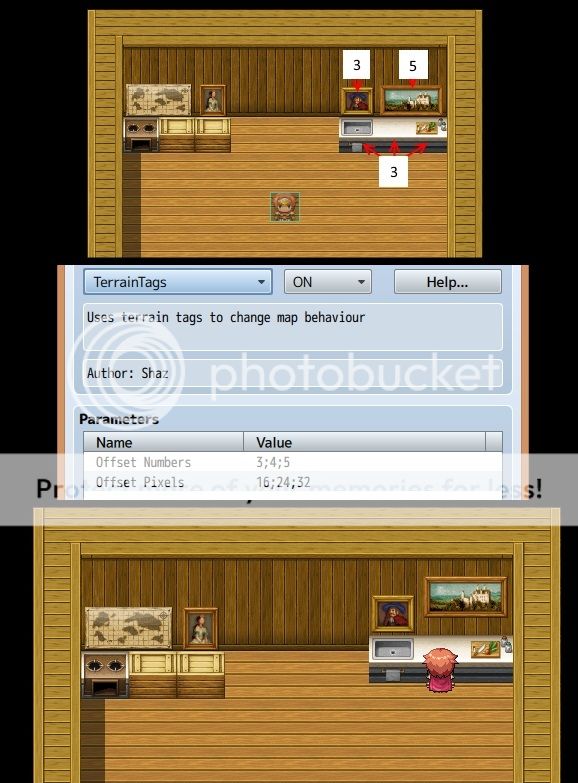
The tiles on the left have no terrain tags. The tiles on the right have terrain tags 3 and 5. In the editor, they all appear vertically aligned.
The plugin parameters are set to move tiles with terrain tag 3 up by 16 pixels, and tiles with terrain tag 5 up by 32 pixels.
How much nicer do the tiles on the right look when playing the game?! Remember - no changes have been made to the tileset, so you're not taking up 2 tiles for a 1-tile image.
Draw tiles below shadow
When you draw something with an auto-shadow (or add a shadow yourself using that tool), B-E tiles placed at the same location are drawn on top of the shadow. Sometimes this is okay (trees), but sometimes you want the shadow to cover them as well (like a pile of wood or a small shrub at the side of a house).
Using the Under Shadow terrain tag lets you specify B-E tiles that should be drawn under the shadow.
Just be careful using it - if you have a shadow as well as 2 B-E tiles on the same location, any with this terrain tag MUST be drawn first, or it won't work.
Please let me know if you have any other suggestions. I am considering:
- terrain tag that causes you to slide until you hit something
- terrain tag that lets you walk over/under a bridge