I have a problem with SRD's Camera Core plugin.
If the zoom is set between 0 and 1 (so it unzooms the game), it creates a margin all around my plugin's (LNM Lighting and Time editor) rectangle. If I increase the size of the rectangle, it will fill the right and bottom, but not the left and top. To avoid that problem, I tried to move the Sprite with negative coordinates, but even if it is supposed to fill it, it will leave an empty space (as shown on the image, I moved my sprite a lot to the top left, as you can see).
Spoiler
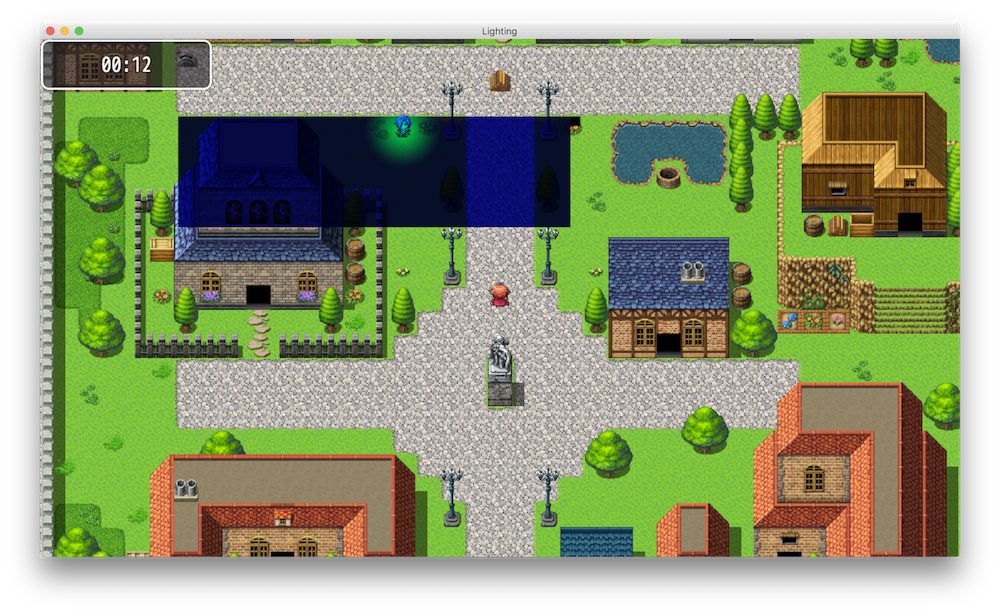
So I wondered if anyone could help me find a way to solve that? It would be highly appreciated, as it's now been months I started thinking about how to solve that problem.
Here's my code, FYI:
Code:
//-----------------------------------------------------------------------------
// Spriteset_Map
//
// The set of sprites on the map screen.

Spriteset_Map.prototype.createLowerLayer = function() {
    Spriteset_Base.prototype.createLowerLayer.call(this);
    this.createParallax();
    this.createTilemap();
    this.createCharacters();
    this.createShadow();
    this.createDestination();
    this.createLighting();
    this.createWeather();
};

Spriteset_Map.prototype.update = function() {
    Spriteset_Base.prototype.update.call(this);
    this.updateTileset();
    this.updateParallax();
    this.updateTilemap();
    this.updateShadow();
    this.updateLighting();
    this.updateWeather();
};

Spriteset_Map.prototype.createLighting = function() {
    $gameLighting.clear();
    this._lightingTexture = PIXI.RenderTexture.create(Graphics.width, Graphics.height);
    this._lightingSurface = new LightingSurface();
    this._lightingSprite = new PIXI.Sprite();
    this._lightingSprite.texture = this._lightingTexture;
    this._lightingSprite.blendMode = PIXI.BLEND_MODES.MULTIPLY;
    this._lightingSprite.alpha = 1.0;
    this.addChild(this._lightingSprite);
};

Spriteset_Map.prototype.updateLighting = function() {
    this._lightingSurface.update();
    Graphics._renderer.render(this._lightingSurface, this._lightingTexture, false);
};

//-----------------------------------------------------------------------------
// LightingSurface
//
//

function LightingSurface() {
    this.initialize.apply(this, arguments);
}

LightingSurface.prototype = Object.create(PIXI.Container.prototype);
LightingSurface.prototype.constructor = LightingSurface;

LightingSurface.prototype.initialize = function() {
    PIXI.Container.call(this);
    this._width = Graphics.width;
    this._height = Graphics.height;
    this._createSurface();
};

LightingSurface.prototype._createSurface = function() {
    this._surface = new Sprite();
    this._surface.bitmap = new Bitmap(this._width, this._height);
    var color = GameEditor.rgbToHex($gameTime.tint(0), $gameTime.tint(1), $gameTime.tint(2));
    this._lastColor = color;
    this._surface.bitmap.fillRect(0, 0, this._width, this._height, color);
    this.addChild(this._surface);
};


LightingSurface.prototype.update = function() {
    var color = GameEditor.rgbToHex($gameTime.tint(0), $gameTime.tint(1), $gameTime.tint(2));
    if (this._lastColor !== color) {
        this._surface.bitmap.fillRect(0, 0, this._width, this._height, color);
        this._lastColor = color;
    }

    this.children.forEach(function(child) {
        if (child.update) {
            child.update();
        }
    });
};
The plugin can be downloaded here.
I hope someone can help me find out how to solve that problem that starts to become a bit boring :(
Have a good day / evening / night :D