Finding an Alternate Solution
(or in other words: a compromise)
Originally this post was about trying to extend the lightmask of Terrax Lighting so that it could cover the whole map. Fortunastreet from the Community Lighting thread had suggested expanding the "resolution" of the lightmask through the parameters in the plugin settings. Though I explored this option briefly but didn't seem to get good results from it, I decided to shift my focus towards compromising with the problem.
If I can't elegantly expand the lightmask, then maybe I could briefly fade the lightmask (disable it) hiding the boundaries of the lightmask when zoomed out, then fade the light mask back in when the camera zooms in.
This can be executed by using the "light radiusgrow #xxxxxx" plugin command, and assigning the new radius to be much larger than the light mask. This effectively creates a gentle fade out as the radius enlarges, removing the light mask. Then when the camera zooms in, I also add the plugin command that returns the radius back to normal, which effectively returns the light mask as it once was.
The problem?
While this functionality is built into Terrax Lighting and Community Lighting, the speed at which the operation (growing or shrinking) is performed is...slow. Like...really, really, really slow.
So my new mission was to find out how to make the radiusgrow operation move faster. I'm a coding dummy, and this took a long time for me to figure out. (I am sure anyone with even mild understanding of Javascript could have figured this out really quick, but unfortunately I had to decipher these moonrunes myself. Yes, I'm a little bit salty that this actually had such an easy solution to it that no one took the time to help me, but I'll be a bitter crotchety old man about it some other time...)
The Answer:
You will need to open TerraxLighting.js plugin in an editor. I am using Notepad++ as my IDE.
On line 634 is the answer to the problem: Change the default value of 500 to a number lower to make it move faster or higher to make it move slower.
The code reads:
Code:
lightgrow_speed = (Math.abs(newradius - player_radius)) / 500;If you don't care for lengthy explanations, then that's it, problem solved! Have a nice day!
Why?
The reason this was confusing to me, as a coding dummy, was because of the declared variable
Code:
on line 624. I would slam that value up to 999999, or -999999 and nothing would change. Why?var lightgrow_speed = 0.0Because the variable is only simply being declared here, and is set with a default value that will get overrided later in the code. I feel so dumb not realizing it before. Now that we know that, it's so easy to see when the variable is called later in the script on line 634, we are assigning it's new value - the value that will actually be used in the game.
And there is your programming lesson for the day. If you too are a coding dummy like myself, then likely you learned something new today! Congratulations.
My original post has been stuffed into this spoiler tag. Feel free to open it to see exciting gifs, and even more gifs have been posted below!
Original Post
Hello,
Here's a tough one that I wonder if I will get an answer for or if this is another thing I'm going to have to commission someone to fix :rswt
So, for one of my puzzles, the player can control the location of a platform. For quality of life, I thought it effective to zoom out the map so the player can see the possible locations for the platform. I downloaded SRD's Camera Core, but ran into a problem with my lighting plugin, Terrax Lighting. Let's see if you notice the problem here...
Here's a gif with a special guest appearance from the Nvidia Geforce Experience (thanks Nvidia...)
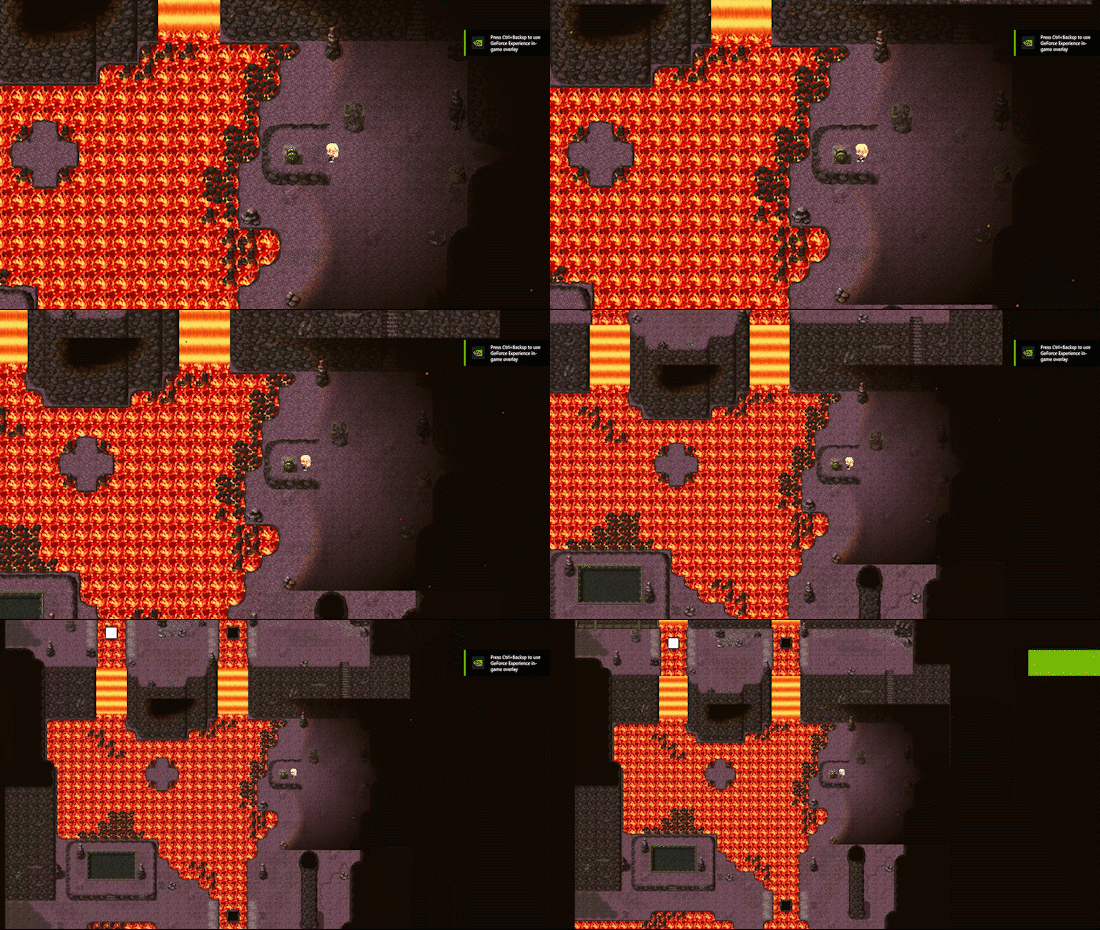
I am aware that Terrax is outdated and now there is the Community Lighting plugin to take its place, supposedly with backwards compatibility, but after upgrading to the Community Lighting Plugin, I found that the transfer was...not as smooth as the description made it sound, so I wound up going back to Terrax lighting simply due to the amount of work that would need to be completely redone due to the differences in Community Lighting and Terrax.
That said, I tried switching back to Community Lighting just to see if the lighting mask is either larger or could at least adjust itself according to the camera zoom...however, it too has the same problem.
If you are still unsure of what the problem is, here's a picture:
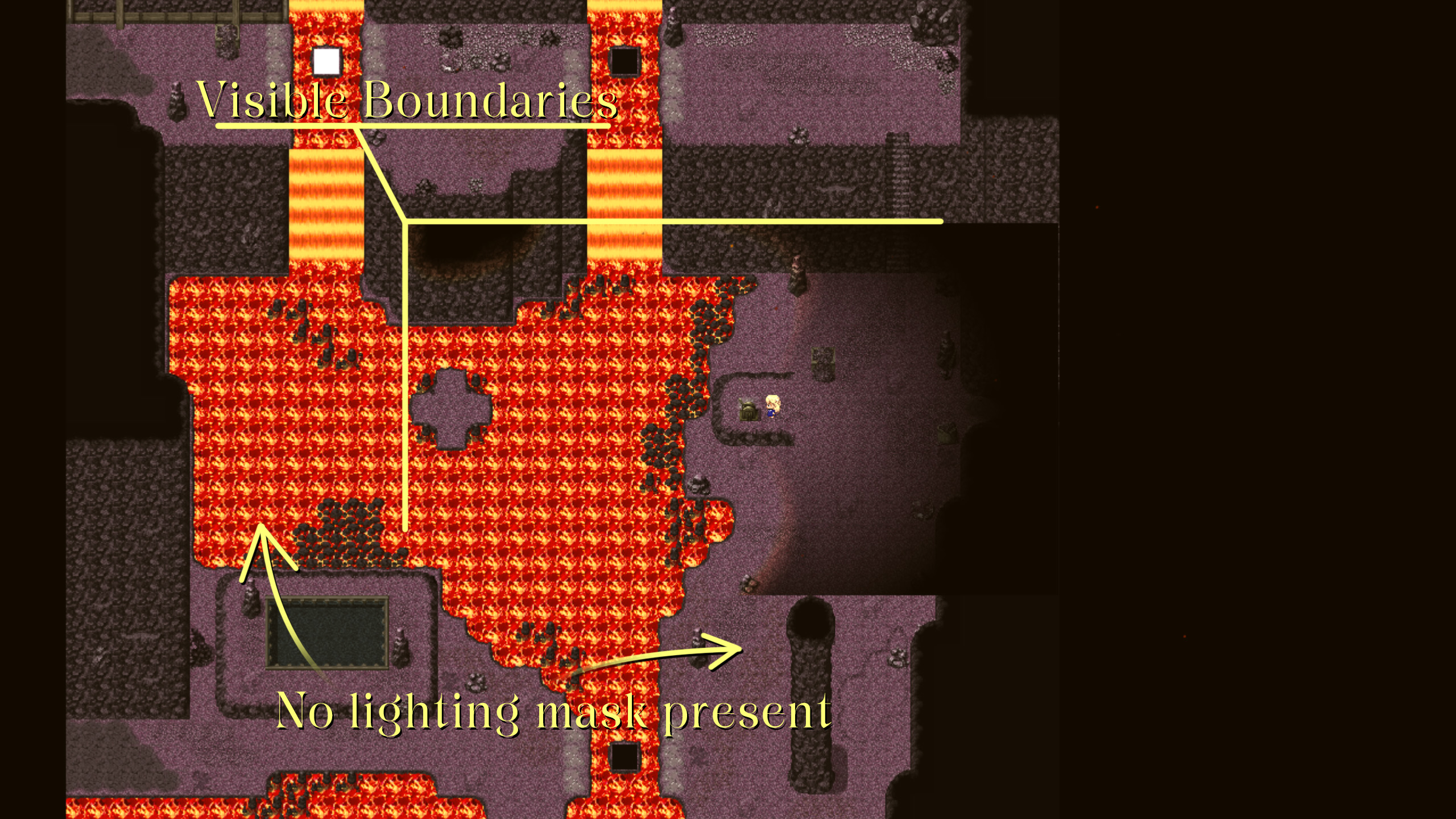
Because I would prefer not to have to redo a bunch of lighting work, I'd prefer a solution to this that utilizes Terrax's lighting plugin, but I'm pretty desperate to get this working right, so if there is a lighting plugin that can fix this, I'd be willing to use it.
I'll also share this thread on the community lighting thread in the event the dev there can add/fix this functionality.
Your help is appreciated, thank you :LZSsmile:
Here's a tough one that I wonder if I will get an answer for or if this is another thing I'm going to have to commission someone to fix :rswt
So, for one of my puzzles, the player can control the location of a platform. For quality of life, I thought it effective to zoom out the map so the player can see the possible locations for the platform. I downloaded SRD's Camera Core, but ran into a problem with my lighting plugin, Terrax Lighting. Let's see if you notice the problem here...
Here's a gif with a special guest appearance from the Nvidia Geforce Experience (thanks Nvidia...)
I am aware that Terrax is outdated and now there is the Community Lighting plugin to take its place, supposedly with backwards compatibility, but after upgrading to the Community Lighting Plugin, I found that the transfer was...not as smooth as the description made it sound, so I wound up going back to Terrax lighting simply due to the amount of work that would need to be completely redone due to the differences in Community Lighting and Terrax.
That said, I tried switching back to Community Lighting just to see if the lighting mask is either larger or could at least adjust itself according to the camera zoom...however, it too has the same problem.
If you are still unsure of what the problem is, here's a picture:
Because I would prefer not to have to redo a bunch of lighting work, I'd prefer a solution to this that utilizes Terrax's lighting plugin, but I'm pretty desperate to get this working right, so if there is a lighting plugin that can fix this, I'd be willing to use it.
I'll also share this thread on the community lighting thread in the event the dev there can add/fix this functionality.
Your help is appreciated, thank you :LZSsmile: