[Solved] Help with "Select Key Item" script call

● ARCHIVED · READ-ONLY
Started by CheerfulGoth 4 posts View original ↗
  1. Hello! I am fighting with a small, maddening issue.
    I am using the "Select Key Item" script call ($gameMessage.setItemChoice(var, n)) in a common event. And it works well!
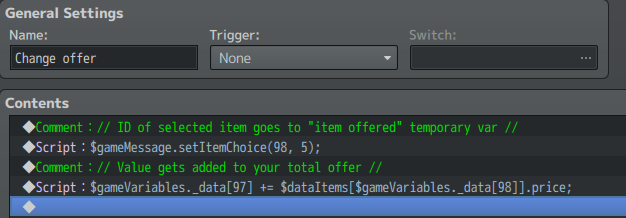
    upload_2018-9-12_21-57-58.png
    My issue: the event runs the second script before I have selected an item in my window, and therefore throws me a "hey, this is undefined" error. I can't figure out how to make RPG Maker wait before running the rest of my code.

    I believe this is happening because when you use the command instead of the script call, Game_Interpreter sets a wait mode, while my code doesn't:

    upload_2018-9-12_22-5-41.png

    I can't, however, find a function to manually set the wait mode myself.
    Any advice? Even hackey solutions are welcome. I just want this to work.

    Do you really need to use the script call instead of an event command?
    Yes!
    I made a custom category that shows me only certain items based on a variable. Can't really do this in any other way :V
  2. You've pretty much answered your own question - When you execute code from the Script Event Command, the value of "this" is actually the instance of the Game_Interpreter that is interpreting the event commands. So in the same script command as $gameMessage.setItemChoice you can execute:
    Code:
    this.setWaitMode('message');
  3. When you execute code from the Script Event Command, the value of "this" is actually the instance of the Game_Interpreter that is interpreting the event commands
    Oh! I am still a n00b scripter and had no idea about this.
    Works beautifully, thanks a lot!
  4. This thread is being closed, due to being solved. If for some reason you would like this thread re-opened, please report this post and leave a message why. Thank you.