[solved] Different auto-tile specs within a group?

● ARCHIVED · READ-ONLY
Started by Tsukihime 16 posts View original ↗
  1. Problem


    Got a report on my map screenshot script and while I was testing things I noticed this
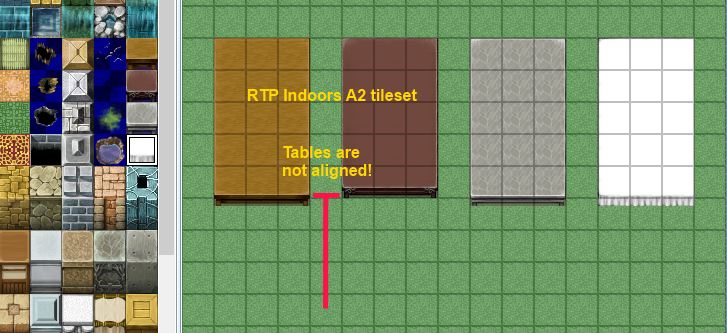

    mapScreenshotEx3.jpg


    Thinking maybe it's just the way the tileset was created, I went and made them the same
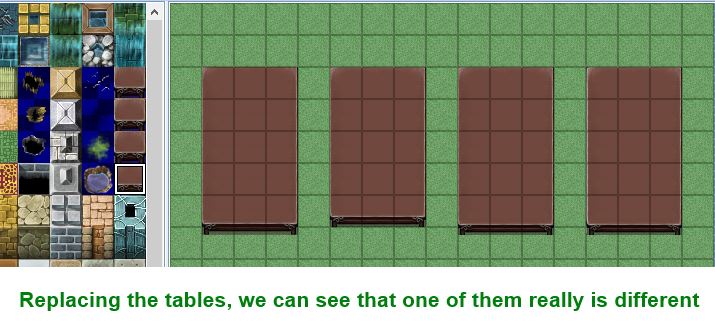

    mapScreenshotEx4.jpg


    It looks like some autotiles are rendered differently from other autotiles. And I'm not even looking at A1 vs A2; it's literally 2 adjacent auto-tile blocks in the same group.


    So then I went and did this
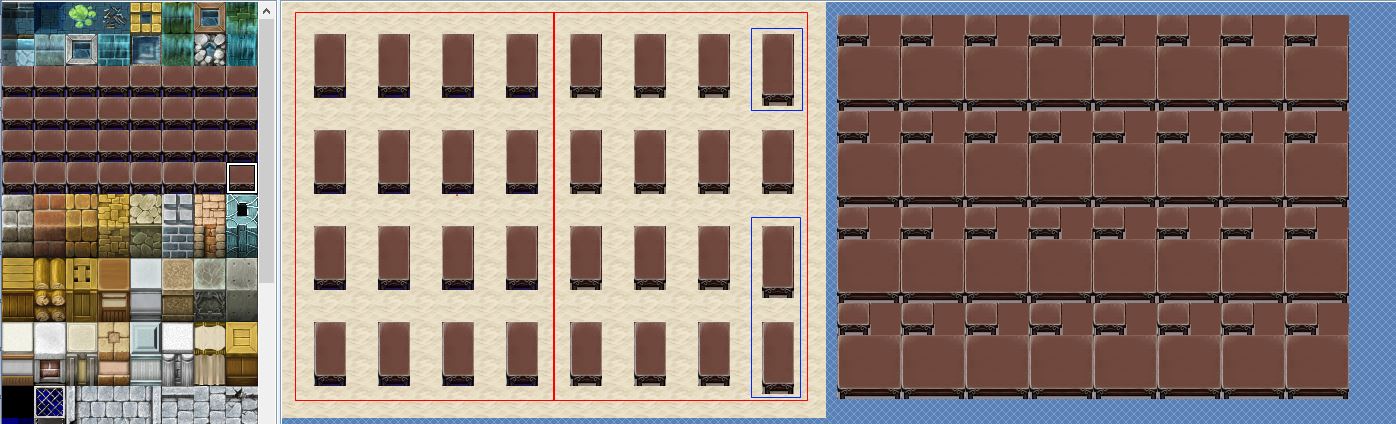

    mapScreenshotEx5.jpg


    And now it's pretty obvious there's something going on. The left-half don't seem to be applying alphas properly, and there are the ones on the right sticking out.


    Has someone already written a tutorial on this?


    Is this observed across other autotiles?


    Solution


    When you enable/disable the counter flag, it automatically changes the way those tiles are rendered.
  2. What happens when you read the tile IDs?
  3. The tile ID's follow the same math that you provided.

    It's just the way they are rendered is not as simple as "this is A1, this is A2, ..."

    As it is apparent that if you put your table in the top-left corner of the left half, you're not going to get a very nice table, but if you put it in top-right corner of the right half, you'll at least get to see the table legs, and if you put it on the very right (except the one on the second row) you'll get a wider table which looks better.

    Now, there are no extra ID's for the tables on the far-right with the irregular tile sizes. They will be the same as what you would expect if they weren't there.

    Maybe someone else can repeat the experiment in case I'm not looking carefully.

    I generated a 3x3 map using Map Creator (to make it simple) and then ran this script in a script call

    class Game_Map def print table = data 0.upto(data.zsize-1) do |z| p "layer %d" %z 0.upto(data.xsize-1) do |x| 0.upto(data.ysize-1) do |y| p [x, y, table[x,y,z]] end end end endendnf9yGvw.jpgThe non-zero ID in layer 1 is the table.
  4. Hime, this is just bizarre, so the engine finally beat you huh? 

    Seriously though, how is that even a possibility? Also your map SS script, does just that, take a blasted SS lol(but instead of just on the screen, It's the entire map, however It's still just a SS). How can it look one way on everyone's PC, but if you take a SS with your script, it looks different?

    Nevermind the fact like you said, every tile in a group, should be formatted exactly the same way.
  5. That's strange.

    I tried it here and the alignement is the same for all the tables.

    A2-alignement.png
  6. Zoltor said:
    Seriously though, how is that even a possibility? Also your map SS script, does just that, take a blasted SS lol(but instead of just on the screen, It's the entire map, however It's still just a SS). How can it look one way on everyone's PC, but if you take a SS with your script, it looks different?


    Nevermind the fact like you said, every tile in a group, should be formatted exactly the same way.
    My script doesn't take a screenshot. It goes through each tile, grab the ID's, and generates auto-tiles based on those ID's.
  7. Tsukihime said:
    My script doesn't take a screenshot. It goes through each tile, grab the ID's, and generates auto-tiles based on those ID's.
    Oh ok, I thought it went by the actual map file created, didn't realize it searched for each individual tile, to then reconstruct the map.
  8. cabfe said:
    That's strange.


    I tried it here and the alignement is the same for all the tables.
    Ok, I see what's going on now.


    The issue was addressed in a previous update, so users that had bought the product afterwards or applied all updates don't have this problem.
  9. So you are still using an old version?
  10. Tsukihime said:
    Ok, I see what's going on now.

    The issue was addressed in a previous update, so users that had bought the product afterwards or applied all updates don't have this problem.
    Are you talking about the RPG Maker version?

    I still use the 1.01a right from the download, no patch applied.
  11. No, the really old version released in 2011 when it first came out.


    The one where you had to know someone that could buy from japanese sites.
  12. Probably a stupid question, but did you remember to check if the tiles are labeled as Counters in the tileset database? It doesn't extend the table if it's not checked as a counter for the most current version I have (1.02a)
  13. Ah OK. I guess you're right then, it must have been fixed meanwhile.

    @Seita:

    My 1.01a has the same effect with the Counter unchecked. The table gets shortened too. Good catch.
  14. seita said:
    Probably a stupid question, but did you remember to check if the tiles are labeled as Counters in the tileset database? It doesn't extend the table if it's not checked as a counter for the most current version I have (1.02a)
    No.


    When I checked it, they are now aligned.


    Ok I guess this is a counter issue and not a version issue.


    So the counter flag automatically changes the tiles it seems, which makes it kind of annoying for the map screenshot since I'm not too sure how to draw it in this case...
  15. Counter seems to offset 8 pixels.

    I tried editing the A2 tileset for a carpet and it gets cut at that mark.
  16. Check the help file: RPG Maker VX Ace > Reference Material > Resource Standards > Tilesets > Group 2:

    The size is fixed at 512 × 384. As shown in the above figure, the tiles are comprised of combination of two block patterns arranged in four vertical sets. For this group only, specifications will vary according to the settings made in Mode for Tileset in the Database.


    When the counter attribute is applied to this group, it can be used as an auto tile for representing tables, and when placed on a map, the eight pixels at the bottom of the pattern are offset downward.