Hi there, I'm new to RPG Maker.
Is there any way to change a message's colour based on whether or not you own a skill, in an easy way without much branching?
I'm using Yanfly's Message Core.
My initial idea was to make it so that it was something like:
if MainCharacterName has learned "Sense Lie"
show a message saying "This is a truth. This is a lie."
else
show a message saying "This is a truth. \c[10] This is a lie."
end
which should look like:
"This is a truth. This is a lie." when you have the skill.
(And since I'm worried about people who are colourblind, if there's a way to strikethrough text instead, that would be helpful. I'm thinking about making a stricken-through font of the default font for this)
But then I realized that the more I did this, the more branches I would need to throw out until it ends in a horribly branchy mess, especially if I do it within choices.
Is there any way to do this without throwing conditional branch every time?
I can minimally code (though not in Javascript), but am willing to learn, to some extent if necessary to get this to work.
Thank you in advanced.
EDIT: Now that I'm thinking about it, the conditional branch method shouldn't be too bad as long as I'm careful with it...
[SOLVED] Changing message colour based on whether or not you have a skill
● ARCHIVED · READ-ONLY
-
-
You can use Yanfly's Extended Messages II plugin to have certain text appear when a switch is on or a variable is above a certain number. And might I make an suggestion? It's best to make unique text visually different then just giving it a different color. You could have the word be bolder or have a visual effect like a shaking or wave effect.
-
Other suggestion is you use the yanfly message macros.
There, you can put various code texts:
\V[2]\C[5]Fireball
And put a mscro for it \M[1]
So every time you type \M[1] the text codes of fireball will appear. -
Let me see if I am understanding this correctly.
Code:\caseEval{$gameActors.actor(1).hasSkill(1)?This is a truth. \c[10] This is a lie.:This is a truth. This is a lie.}
Let's pretend Actor1 is MainCharacter and Skill(1) is Sense Lie.
If I use Yanfly's Extended Messages II, then would that mean that, if I have Sense Lie, the text will show as:
This is a truth. This is a lie.
And if I don't have it, it will show as:
This is a truth. This is a lie.
?
And Eliaquim, I'm not sure how that helps my situation.
Also, regarding making text look different, I'm planning on making a stricken through font for the lies. For colourblindness reasons. -
Oh. Im sorry though. Maybe i dont understand you right :/
-
@Aridenus Unless you want to go through some weird workarounds with pictures you'll need a plugin to add strikes through text and there doesn't seem to be any for MV. You'll have to either commission one or use a different visual effect.
-
https://mega.nz/#!ftAS0aqS!aN_F5DeQWsvyAq7MFAT0hZRnqLhfWWmXnH2mHtUpYgs
To any future finders of this thread who need a striken-through otf font of RPG Maker MV's default, well, your link is right above.
I ended up making my own stricken-through version of the default RPG Maker MV font, but it requires the people who play the game to also need to install the font.
\caseEval{$gameActors.actor(1).hasSkill(8)?This is a truth. \fn<strikef> This is a lie.:This is a truth. This is a lie.}
With Yanfly's Extended Messages II, Skill8 as the DetectLie and the font name being strikef, I used this line in the message to create this effect. It's not perfect, but it works with what I do.
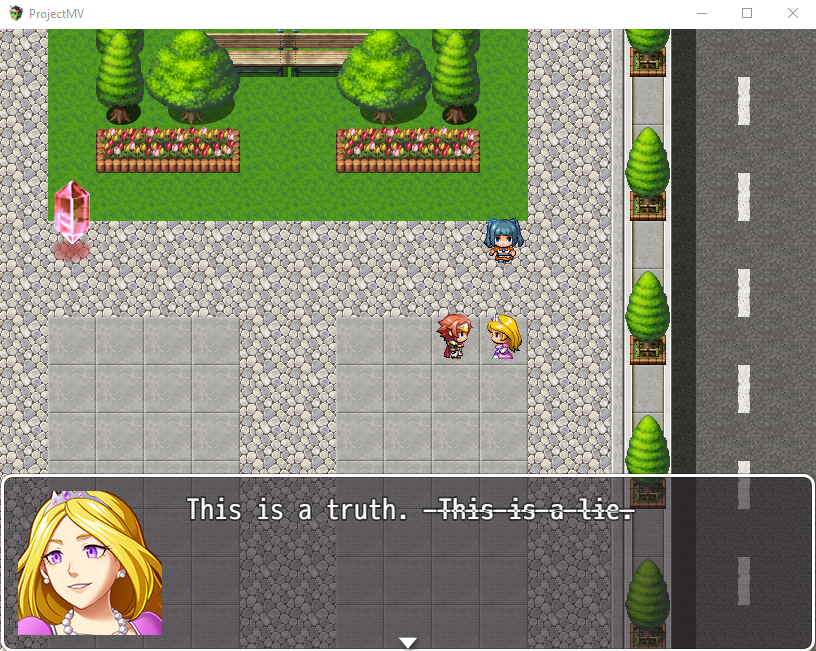
I don't know if there's any way to achieve this effect without installing the font or, barring that, to forcibly install the font. But this is as far as I got. I'd love if anyone knew a way to get past this. But, for now, I think this thread is Solved. -
This thread is being closed, due to being solved. If for some reason you would like this thread re-opened, please report this post and leave a message why. Thank you.