Skill Trees System

● ARCHIVED · READ-ONLY
Started by SomeFire 312 posts Page 8 of 16 View original ↗
  1. Also, I noticed that Icon Captions (https://forums.rpgmakerweb.com/index.php?threads/icon-captions.107806/) doesn't work for the icon within the skill tree, but works on the icons in the description window on the right. Why is this the case? Is there a difference in the way icons within the skill tree vs outside the skill tree are drawn?
    Tooltip.png
    The green circles are where my mouse cursor is at. For some reason the actual mouse pointer doesn't show up in screenshots but trust me, my mouse is hovering over the icon. As you can see, the tooltip works when hovering over an icon in the description window, but doesn't when hovering over an icon within the skill tree itself.

    This isn't a deal-breaker for me, but it'd be nice if I could get the tooltips to work within the skill tree.

    @SomeFire How's v1.9 coming along btw?
  2. Version 1.9:
    - Show YEP skill cooldown and warmup.
    - Add possibility to use SP and JP simultaneously.
    - Add confirmation button to learn skills.


    Guys, color of number for CD/WU was fixed.
    @Frostorm, I suppose it is because icons in skill tree are buttons, not pure icons.
  3. @SomeFire :kaojoy:

    Edit: Now that we can use both SP & JP, how do we define the cost of a skill in the config file? I'm referring to this:
    [cost(1)]
    Like if I want something to cost 1 JP & 1 SP what do I put? Or should I define it in the database via Yanfly notetags (for JP)?
  4. cost() for SP, jp() for JP.
  5. How do I give an actor X amount of SP to start with? Yanfly's <Class X Starting JP: Y> is for JP only right? Is there an equivalent for SP?
  6. Do you use single point pool or separate?
  7. Single

    I also fixed a tiny font color issue with the commas and numbers appearing after it:
    Sprite-0003.png
    In lines 1146, 1172, & 1180 of SkillTreeSystem.js you will find this line of code:
    text += ", ";
    To make the font color look like my "after" screenshot, change it to:
    text += "\\C, ";
  8. Use `actor.addTreesPoints(123)` to add points. Also, make sure 'Use Job Points only' flag is off.
    Thank you, idk how I didn't notice different color. But it should works, because I close color tag just after open.

    UPD: correct fix. Demo updated with fix.
  9. SomeFire said:
    Use `actor.addTreesPoints(123)` to add points.
    Hmm, where do you suggest I put it? I tried creating a common event for it but it didn't have any effect... How does it know which actor I'm referring to? I know there must be something obvious I'm forgetting.

    I also tried an event with the following script call:
    $gameActors.actor(1).addTreesPoints(3)

    No go...

    Edit: It's ok, I found a workaround. It seems decimals are acceptable so I'll just do this:
    1: skillTrees(1.5, [

    (I'm not sure why it doubles that figure but oh wells, as long as it works) lol...

    @SomeFire There's also an insignificant typo on line 285 & 308 of SkillTreesSystem.js:
    "ised" should be "used"
    Totally trivial, but thought you should know.

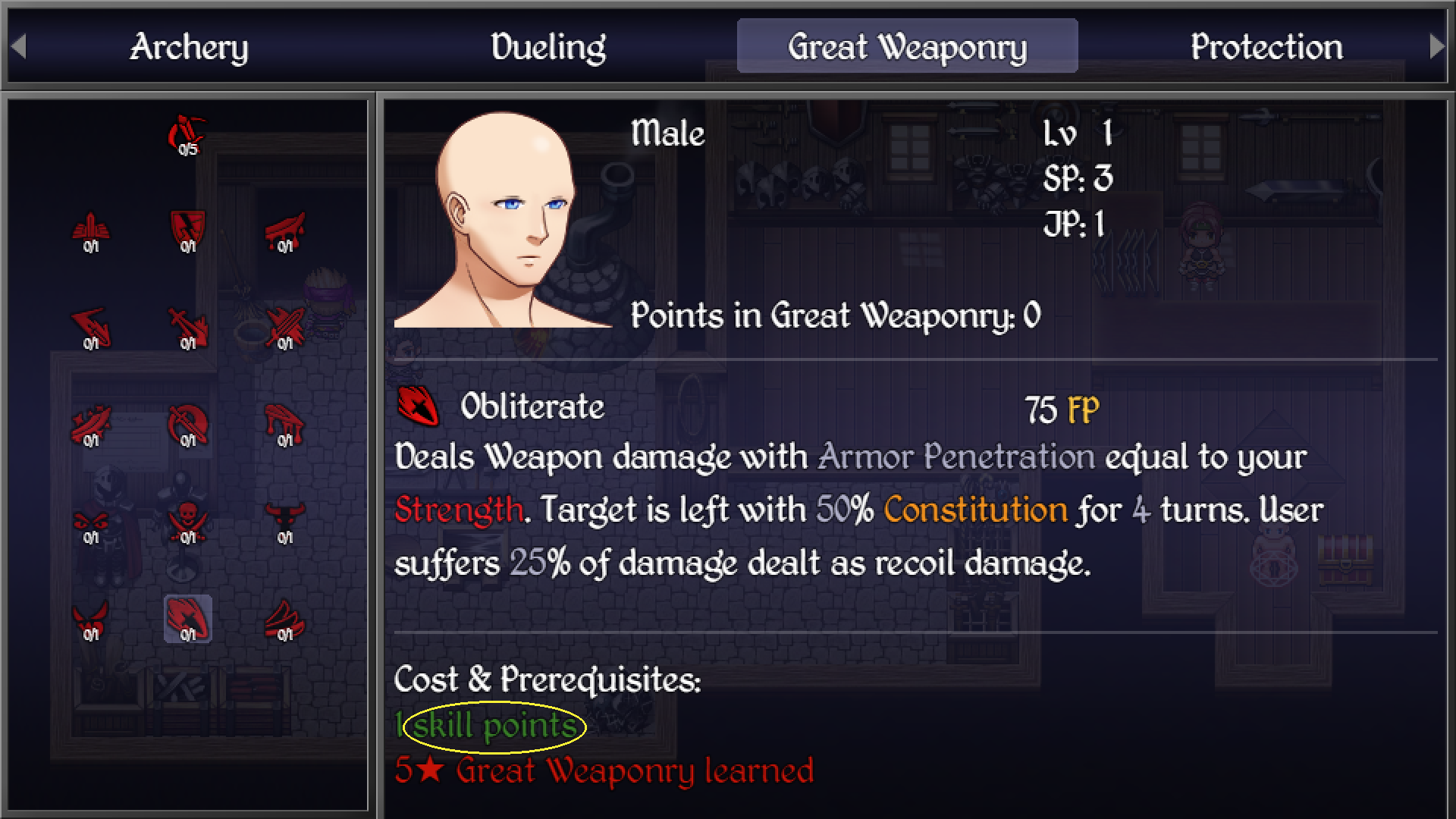
    Edit2: @SomeFire Could you direct me to the line(s) of code that controls how the words "skill points" is displayed? (such as if we want to name it something else)
    1594093943740.png

    Also, is there a way to get <Learn Cost Eval> to work with this? Or can you think of any way to get the same functionality? Basically I need to run code when a skill is learned.
  10. Frostorm said:
    Hmm, where do you suggest I put it? I tried creating a common event for it but it didn't have any effect... How does it know which actor I'm referring to? I know there must be something obvious I'm forgetting.

    I also tried an event with the following script call:
    $gameActors.actor(1).addTreesPoints(3)
    There are different ways to get actor, so, it depends on where you need him. Add points whenever you want (quest reward, as effect from potions, etc. or us plugin configuration to setup amount of points per lvlup).

    Frostorm said:
    Edit: It's ok, I found a workaround. It seems decimals are acceptable so I'll just do this:
    1: skillTrees(1.5, [

    (I'm not sure why it doubles that figure but oh wells, as long as it works) lol...
    Do you use both `actor2trees` and `class2trees`? Their starting points are summed up.

    Frostorm said:
    @SomeFire There's also an insignificant typo on line 285 & 308 of SkillTreesSystem.js:
    "ised" should be "used"
    Totally trivial, but thought you should know.
    Fixed.

    Frostorm said:
    Edit2: @SomeFire Could you direct me to the line(s) of code that controls how the words "skill points" is displayed? (such as if we want to name it something else)
    SkillTreesConfig.js:553.

    Frostorm said:
    Also, is there a way to get <Learn Cost Eval> to work with this?
    What?
    Frostorm said:
    Or can you think of any way to get the same functionality? Basically I need to run code when a skill is learned.
    I made it aldready. Look at SkillTreesSystem.js:1440. combatReflexes2 have 3 levels with 1 requirement and 1 on learn action per level. You can create your own on learn action. I made 2 examples: `OnLearnChangeVariable` and `OnLearnCommonEvent`.
  11. Thank you so much for taking the time to answer my plethora of questions lol.:kaoswt:

    Just to be sure, Line 553 is: Window_Command.prototype.select.call(this, index);

    I basically just want to change "skill points" to "skill point" (singular) since all my skills cost 1 point.
  12. SkillTreesConfig, not SkillTreesSystem.
  13. @SomeFire How do I save an actor's # of free (available) SP as a variable?
  14. `actor.getTreesPoints()`, see SkillTreesConfig.js (API section).
  15. FINALLY!!! Been looking for one of these!
  16. Yea, @SomeFire's skill tree is the best one out there imo! Just keep in mind it requires a bit of setup at 1st, but it's so worth it.
  17. OK this is a stupid question but how can I acquire the plugin?
  18. Is it possible to display character's skill point value in messages?
  19. Currently, there is no short way to do it. You can use game variable to show points, just call actor.getTreesPoints(tree) to put points into variable before showing text.

    Or you can create messages in scripts, thus no need to use game variable.