MV - Shora's Lighting Incompatible With Yanfly's Party System

● ARCHIVED · READ-ONLY
Started by Pearsona 23 posts Page 1 of 2 View original ↗
  1. So, I tried to add Shora's Lighting to my project and found that whenever I launched the game, this error would occur:

    IMG_2971.jpg

    (Sorry about the phone pic, screenshots weren't working for some reason)

    I have a lot of plugins in my project, so I decided to try turning them all off (besides Shora's Lighting) and turn them all back one one-by-one to see which one broke the game. After running that test all the way through, I've figured out that, of all things, it's Yanfly's Party System that breaks the game!

    Does anyone have any idea on how to fix this?

    (Also, a random question I might as well post here so I don't end up making a whole other post once I figure this issue out, how do I make it so the lights/shadows of Shora's plugin only appear on certain maps? I just want dungeons to be dark, the rest of the game can be bright lol)

    EDIT: Now I'm even more confused. I decided to turn off everything except Shora's Lighting and Yanfly's Party System, and now it works? I'll do more testing.

    EDIT 2: Apparently, it's not an incompatibility with Yanfly's Party System, it's an incompatibility with both that AND Yanfly's Item Core, but only when they're both active. If it's just one or the other, Shora's Lighting works fine. But when it's both, the whole thing falls apart. Good lord, what did I do to this poor game to break it so badly???
  2. This doesn't appear to have anything to do with the Lighting plugin - not only should lighting not have anything to do with initializing an actor, you can see it's not even in the stack list.

    I would first double check the order of your Yanfly plugins. Go to the Yanfly Engine Web site and use that order in your plugin manager - any plugins out of order can cause random weird glitches like this.

    Once you've made absolutely sure they're all in order, save your project and start a new game.

    If you still get this same error, let us know.

    The error is saying that a function in the code is calling itself, creating an infinite loop. That does not happen with the Party System and Item Core naturally.
  3. ATT_Turan said:
    This doesn't appear to have anything to do with the Lighting plugin - not only should lighting not have anything to do with initializing an actor, you can see it's not even in the stack list.

    I would first double check the order of your Yanfly plugins. Go to the Yanfly Engine Web site and use that order in your plugin manager - any plugins out of order can cause random weird glitches like this.

    Once you've made absolutely sure they're all in order, save your project and start a new game.

    If you still get this same error, let us know.

    The error is saying that a function in the code is calling itself, creating an infinite loop. That does not happen with the Party System and Item Core naturally.
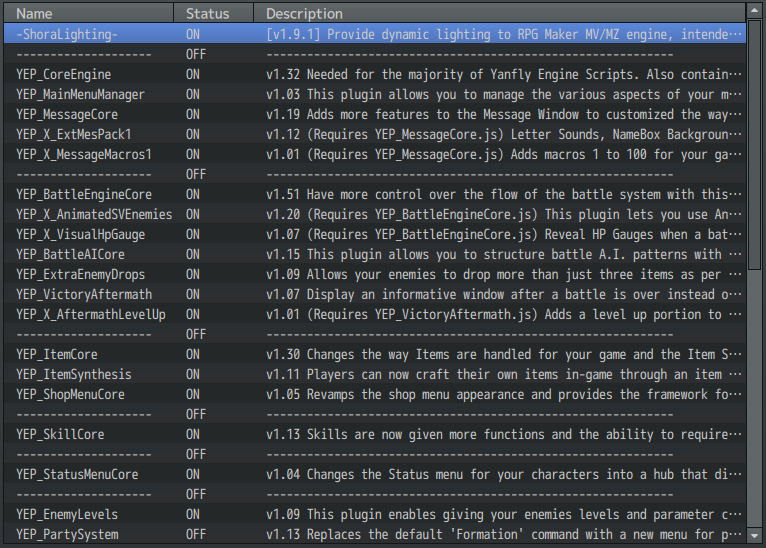
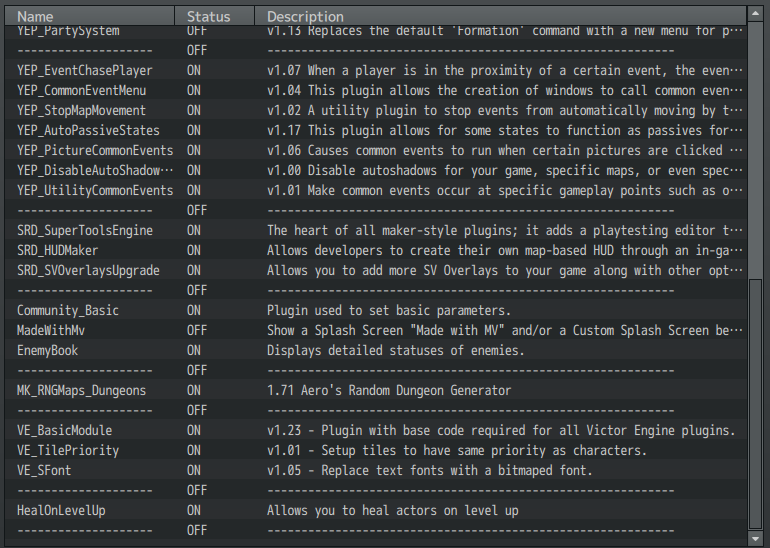
    I'm about 99% sure my plugins are all in the right order, but here's a screenshot of them all just in case:

    0c9e5eef941af8ad622c3201695fe49e.png
    94358108e6660c37d9c5a803a927e444.png
  4. They're not.
  5. ATT_Turan said:
    They're not.
    Ah, figures. What's out of order? I'm double-checking them against Yanfly's list and I must be blind, I'm not seeing anything.
  6. I'm not going to go through a list of dozens of plugins to compare the order to the Web site - you can do that just as well :stickytongue:

    But at an immediate glance, there's no way Passive States should be near the bottom.

    You might also double check (unless you got them all at once from the itch.io pack) that you're using the current version of everything.
  7. ATT_Turan said:
    I'm not going to go through a list of dozens of plugins to compare the order to the Web site - you can do that just as well :stickytongue:

    But at an immediate glance, there's no way Passive States should be near the bottom.

    You might also double check (unless you got them all at once from the itch.io pack) that you're using the current version of everything.
    Fair enough. I’ll have to really analyze the YEP page and figure out what went wrong…

    Thankfully, they are all from itch.io! So that’s one problem out of the way.
    I’m just amazed that this has nothing to do with Shora’s plugin, considering it was all working fine until I installed that. Not that I don’t believe you. I completely do! It’s just mind boggling how ridiculous programming can be sometimes, lol.
  8. I haven't looked at the code from the lighting, so I'm not saying definitively it has nothing to do with it.

    But from what's going on and the error message, I'd have no reason to believe it is related. The fact is, you need to get your Yanfly stuff perfect before you can suspect any other plugin has a conflict.
  9. From that photo, it looks like the game is crashing when "New Game" is chosen from the title menu, is that correct? Or is it actually crashing on boot?

    To be super sure: the error does not occur if you turn ON all plugins except Shora's, right?

    For YEP load order: Item Core & Party System look correct, so if it really is happening with only those two (and Shora's) active, and you're not trying to test from a previous save, then I suspect load order isn't the (main) problem. Unless...have you tried loading Shora's after Yanfly's?

    No idea if it's the same issue, but I recently ran into something similar-looking when coding a lighting system for MZ: if you look up an actor's $gameActors record in their refresh method (e.g. to check their equips), it causes an endless loop. That's because when a new Game_Actor is created, they refresh before they are actually added to $gameActors. (In my case I ended up redesigning...it was to check trait objects for notetags.) :kaoslp:

    Technical: if a longer stack trace is needed to properly identify the loop, that may be possible using breakpoints (F8/F12 -> Sources), either manually (click margin) or using e.g. a debugger; statement in a plugin that patches a relevant method.
  10. caethyril said:
    From that photo, it looks like the game is crashing when "New Game" is chosen from the title menu, is that correct? Or is it actually crashing on boot?

    To be super sure: the error does not occur if you turn ON all plugins except Shora's, right?

    For YEP load order: Item Core & Party System look correct, so if it really is happening with only those two (and Shora's) active, and you're not trying to test from a previous save, then I suspect load order isn't the (main) problem. Unless...have you tried loading Shora's after Yanfly's?

    No idea if it's the same issue, but I recently ran into something similar-looking when coding a lighting system for MZ: if you look up an actor's $gameActors record in their refresh method (e.g. to check their equips), it causes an endless loop. That's because when a new Game_Actor is created, they refresh before they are actually added to $gameActors. (In my case I ended up redesigning...it was to check trait objects for notetags.) :kaoslp:

    Technical: if a longer stack trace is needed to properly identify the loop, that may be possible using breakpoints (F8/F12 -> Sources), either manually (click margin) or using e.g. a debugger; statement in a plugin that patches a relevant method.
    Yeah, it'll load to the title screen then crash when I hit 'new game'. If I try to load a save file, it just... doesn't. It freezes for a second, then plays the error sfx I chose for this project, then goes back to the load menu.

    And yep, that's how I've been working on other things while figuring out this issue. Everything works fine without Shora's plugin. I haven't tried putting Shora's after Yanfly's yet, though! I'll give that a shot soon. I don't know if that'll work, but everything's worth an attempt.

    If it does end up being the problem you described, with the infinite loop of refreshes, what can I do to fix that? Do you have any suggestions?
  11. Pearsona said:
    If it does end up being the problem you described, with the infinite loop of refreshes, what can I do to fix that?
    First, identify the cause of the loop. A solution will likely involve a code edit/patch; if that's not feasible (e.g. requires a major redesign) then you'll need to find alternative plugin(s).

    To figure out where the loop is, you can try using breakpoints in the Sources tab of the dev tools window (F8/F12 during test). Pick one of the methods mentioned early in the known trace, e.g. Game_Actor.prototype.setup in YEP_PartySystem, find that method in the Sources tab (it supports Ctrl+F), and click the margin where it is defined to set a breakpoint. In this example, that looks like line 500 of YEP_PartySystem.

    Once you've set your breakpoint(s), trigger the error. When the game hits a breakpoint, it will pause and focus on the Sources tab of the dev tools window. Here, you can see the Call Stack on the right: a list of methods that have started but not yet completed. If you find any pattern there like "Game_Actor.setup, ...other stuff..., Game_Actor.setup", that's a recursive call, which might be an endless loop. In that case, it could be helpful to share a screenshot of that part of the call stack, to see if anyone can figure out why it's happening.

    With this particular example, you'd expect 1 setup call per starting actor.
  12. caethyril said:
    First, identify the cause of the loop. A solution will likely involve a code edit/patch; if that's not feasible (e.g. requires a major redesign) then you'll need to find alternative plugin(s).

    To figure out where the loop is, you can try using breakpoints in the Sources tab of the dev tools window (F8/F12 during test). Pick one of the methods mentioned early in the known trace, e.g. Game_Actor.prototype.setup in YEP_PartySystem, find that method in the Sources tab (it supports Ctrl+F), and click the margin where it is defined to set a breakpoint. In this example, that looks like line 500 of YEP_PartySystem.

    Once you've set your breakpoint(s), trigger the error. When the game hits a breakpoint, it will pause and focus on the Sources tab of the dev tools window. Here, you can see the Call Stack on the right: a list of methods that have started but not yet completed. If you find any pattern there like "Game_Actor.setup, ...other stuff..., Game_Actor.setup", that's a recursive call, which might be an endless loop. In that case, it could be helpful to share a screenshot of that part of the call stack, to see if anyone can figure out why it's happening.

    With this particular example, you'd expect 1 setup call per starting actor.

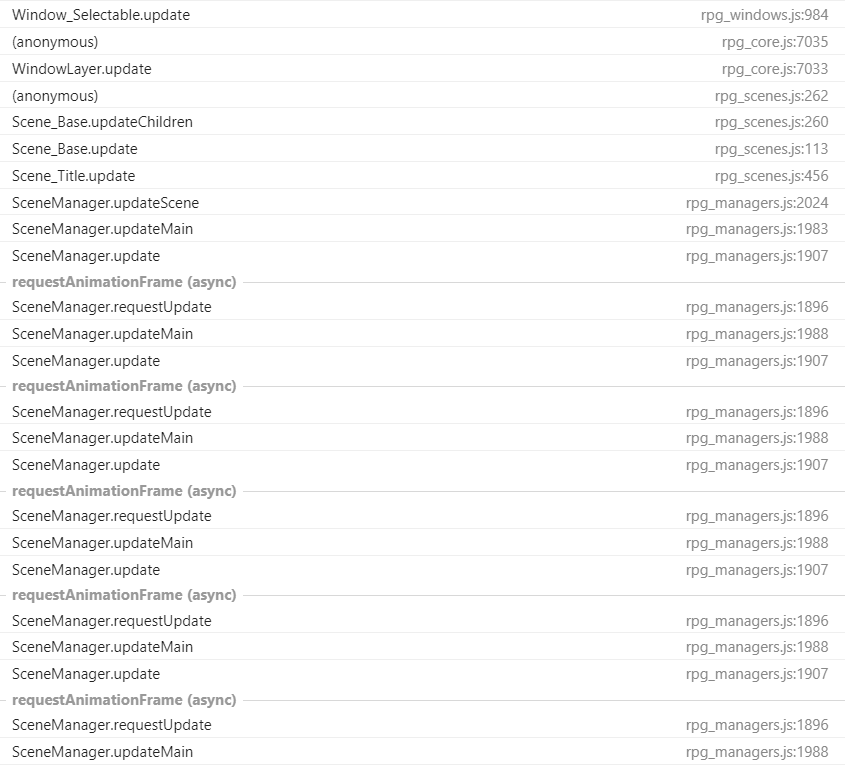
    I finally got a chance to test this, and I'm baffled. I set the Game_Actor.prototype.setup in Yanfly's Party System as the breakpoint and let the error rip and while I can find the Game Actor setup from the Party System, I can't find it anywhere else. It's just miles and miles of SRD's HUDMaker/Super Tools Engine calling the same scripts over and over again... so is it actually SRD's scripts? I'd take a screenshot, but we're talking hundreds of script calls. I keep hitting 'show more' and I can't reach the bottom.

    45b2d4cbfa12e061d3a3d66eaf9c079a.png

    It's just this over and over again.

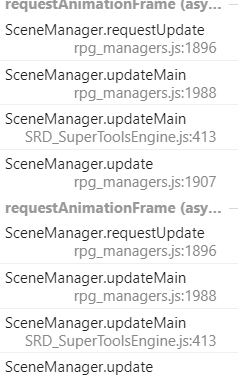
    EDIT: I tried turning off SRD's plugins to see what happens. The error still occurs, just without his stuff getting mixed in. Here's what's looping now:
    cdb8995464ac978c47fa82815ae88e3c.png
  13. As usual, the testing should be done with the minimum plugins necessary to cause the error. So yes, turn off everything else including SRD's stuff.

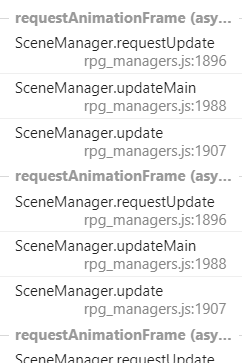
    You're looking in the right place. requestAnimationFrame is a queued frame update: you shouldn't need to go any further than the first one of those, since an endless loop will stall the game.

    It looks like the breakpoint is triggering correctly. Apologies, but I forgot to mention that it will need to be triggered twice, otherwise there's no way it can appear twice in the Call Stack. You can resume script execution by clicking the blue "play" button at the top of the panel. Click that button once, then check the Call Stack, from the top down to either the first requestAnimationFrame or the second Game_Actor.setup, whichever comes first. :kaohi:

    If you like you can also click+drag to resize that panel, so that every stack entry can display on 1 line.
  14. This is a little extreme, but have you tried turning on all of the plugins one at a time until you find the one that isn't playing nice? Back when I was using more plugins from more developers, that's how I found a few that were loading out of order or overwriting the same bits of core.
  15. caethyril said:
    As usual, the testing should be done with the minimum plugins necessary to cause the error. So yes, turn off everything else including SRD's stuff.

    You're looking in the right place. requestAnimationFrame is a queued frame update: you shouldn't need to go any further than the first one of those, since an endless loop will stall the game.

    It looks like the breakpoint is triggering correctly. Apologies, but I forgot to mention that it will need to be triggered twice, otherwise there's no way it can appear twice in the Call Stack. You can resume script execution by clicking the blue "play" button at the top of the panel. Click that button once, then check the Call Stack, from the top down to either the first requestAnimationFrame or the second Game_Actor.setup, whichever comes first. :kaohi:

    If you like you can also click+drag to resize that panel, so that every stack entry can display on 1 line.
    Alright, sorry it took me a minute to get back to you. I got busy. Today I was able to run more tests.

    After turning off every plugin besides Shora's Lighting, Yanfly's Party System, and Yanfly Item Core, the initial error message upon the game crashing changed to just this:

    0e0257eadbc5508731255926c23430ab.png

    Not sure if that change means anything, but I wanted to make a note of it just in case.

    Anyways, after putting down both instances of Game_Actor.prototype.setup (one from Item Core, one from Party System) as breakpoints, I hit 'new game'. Here's the result:
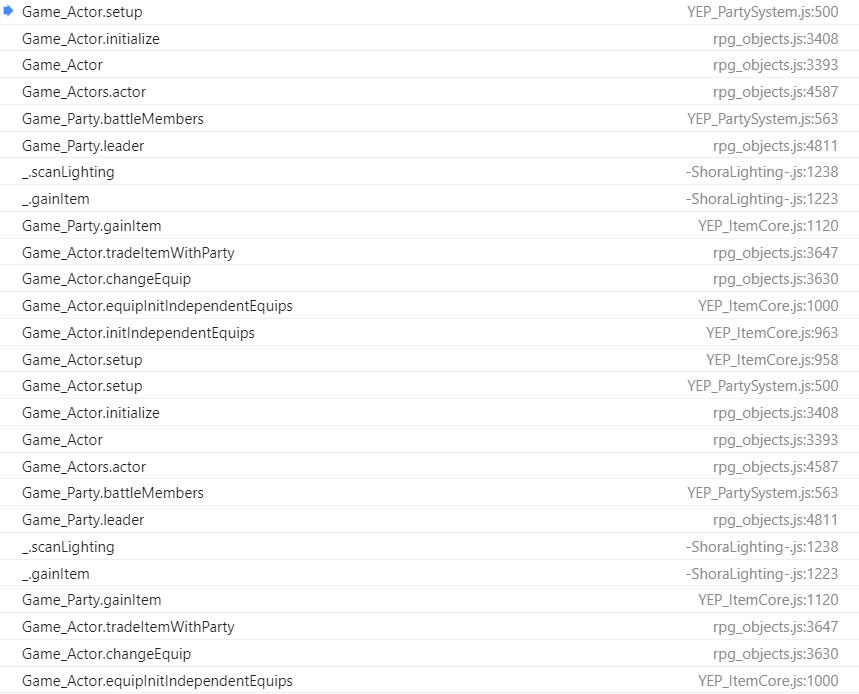
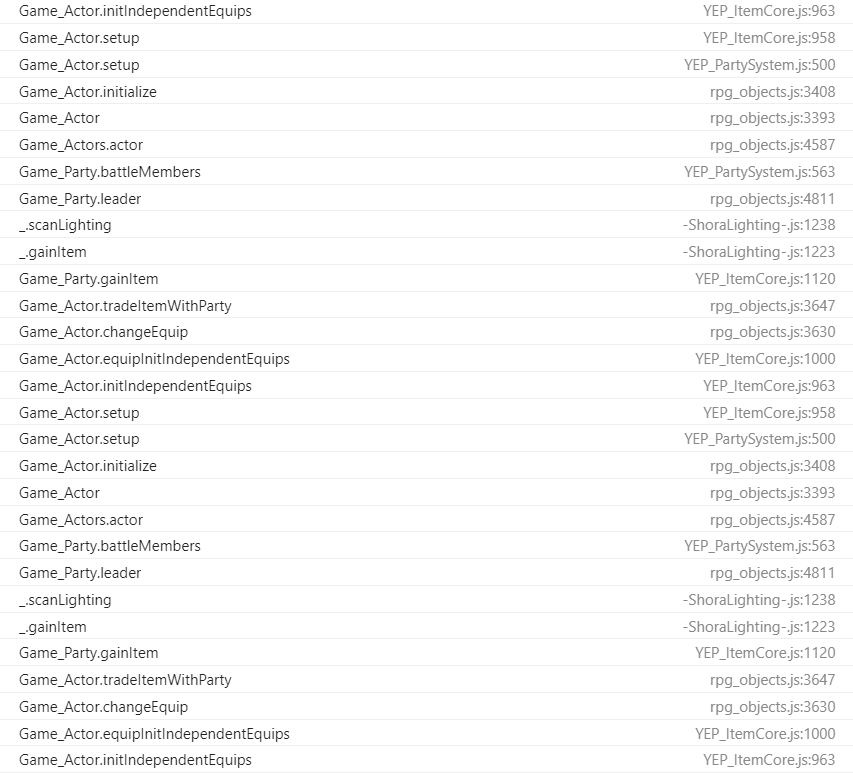
    44e8b81c9f8d6650c8fc71205449328e.png
    cbc63fa26decacfa729dde6272864525.png

    It goes on further than that, but I think we've both seen enough, lol.

    What's interesting, though, is that the loop (while it goes on for awhile) does eventually end. So where does that leave us? Well... right back where we were before:
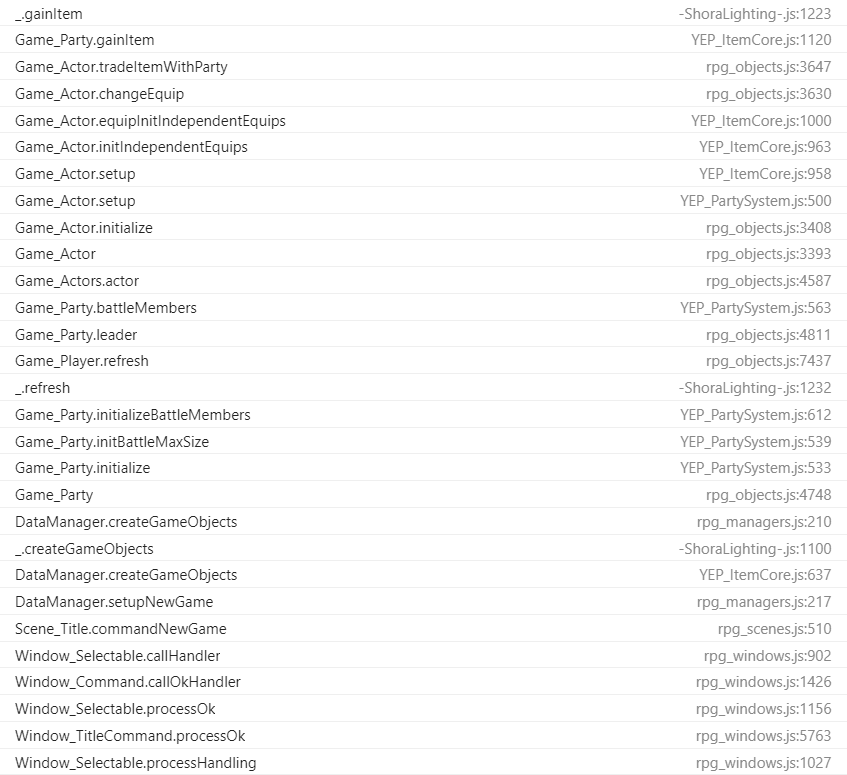
    fb54e3f19b30b3236b6f1b5b42386d5a.png
    a8ccd5c01ace0c9c4d6ac71621816ae6.png

    This is where my lack of programming skill bites me. I really just have no idea what's going on here to make everything screw up so badly. Still, thank you for helping me out so far, I really appreciate everyone weighing in. Hopefully either you or someone can look at this and figure out what's going on...

    I'd have just cut one of these scripts from the project by now, but it's not that simple, sadly. All three of these scripts are necessary for the game I'm making. The Item Core plugin is essential for the in-game crafting system, the Party System is necessary to A: prevent the player from just kicking the MC out of the party and screwing up cutscenes and B: make managing a cast of 8 playable characters less of a headache. Then, Shora's Lighting is necessary because dungeon exploration is like... boringly easy when you can just perfectly see where you're going (and while there are other MV lighting scripts, Shora's is the one I've found with the most recent updates, the others seem very outdated).

    I really hope we can figure this issue out, because finding alternatives for any of these plugins is gonna be pretty difficult D: I guess I'm open to suggestions on that front, though...
  16. Just to cover my bases, I tried moving Shora's Lighting around a little. Putting it in-between Item Core and Party System does this:
    07df1e59c93ed7d11a1d16bb1a60c1da.png
    And then putting it below both Item Core and Party System gives the same error.

    Then I tried moving Shora's Lighting to just right above Item Core, so it'd be below all of the YEP Core plugins, and the error just repeats normally.
  17. OMGPockets said:
    This is a little extreme, but have you tried turning on all of the plugins one at a time until you find the one that isn't playing nice? Back when I was using more plugins from more developers, that's how I found a few that were loading out of order or overwriting the same bits of core.
    Yep, that's what I did. That's how I discovered that it's not just an incompatibility between Party System and Shora's Lighting, it's an incompatibility that exists only when Item Core is also thrown into the mix. If it's just 2/3 plugins, the game runs fine, but when it's all three everything falls to pieces.
  18. I can't contribute much to this, it's out of my league, but first:
    In4mods: Don't double (or the rare TRIPLE!) post. Just click the edit button if you have more to say.

    Second:

    Pearsona said:
    (and while there are other MV lighting scripts, Shora's is the one I've found with the most recent updates, the others seem very outdated).
    So what? Just because it's getting regular updates doesn't mean the ones that aren't getting regular updates don't work.
    Community Lighting is a well support lighting system that is far, far more basic than Shora's. The result is a much more lightweight codebase, so less prone to conflicts and errors (but also not as pretty, of course)
    And Community Lighting is actually a fork of Terrax Lighting which is no longer supported. However, Terrax Lighting is what I use in my game because I find some of the subtle fringing around lights pleasant and more "natural" looking (as natural as a black bitmap with a hole punched in it can be). I also wasn't aware of community lighting until I had already made extensive use of Terrax Lighting and though they promise easy conversion from Terrax to Community Lighting...I had some errors that just weren't worth trouble shooting.
    Anyways, point is; A: Just because it's not being updated doesn't mean that it doesn't function. B: However, I also understand not wanting to change if changing means redoing a lot of work. Here's to hoping you find a solution, but if not...well redoing work is just part of game making.
  19. TheAM-Dol said:
    I can't contribute much to this, it's out of my league, but first:
    In4mods: Don't double (or the rare TRIPLE!) post. Just click the edit button if you have more to say.

    Second:


    So what? Just because it's getting regular updates doesn't mean the ones that aren't getting regular updates don't work.
    Community Lighting is a well support lighting system that is far, far more basic than Shora's. The result is a much more lightweight codebase, so less prone to conflicts and errors (but also not as pretty, of course)
    And Community Lighting is actually a fork of Terrax Lighting which is no longer supported. However, Terrax Lighting is what I use in my game because I find some of the subtle fringing around lights pleasant and more "natural" looking (as natural as a black bitmap with a hole punched in it can be). I also wasn't aware of community lighting until I had already made extensive use of Terrax Lighting and though they promise easy conversion from Terrax to Community Lighting...I had some errors that just weren't worth trouble shooting.
    Anyways, point is; A: Just because it's not being updated doesn't mean that it doesn't function. B: However, I also understand not wanting to change if changing means redoing a lot of work. Here's to hoping you find a solution, but if not...well redoing work is just part of game making.
    Community Lighting does seem very promising. I don't need complex lights or anything, just something to darken the space around the player when traversing dungeons. I'd really like to make Shora's work (partially because at this point, I feel like this spectacular collapse of function with my current plugins might be a sign of other problems in my game's code) but I'll keep that one in mind!

    (And thanks for the heads up, I figured spamming wasn't allowed but I wasn't sure what the limit was. Funny considering how long I've been a member here lol)
  20. Pearsona said:
    Alright, sorry it took me a minute to get back to you.
    No worries! :kaohi:

    Pearsona said:
    Anyways, after putting down both instances of Game_Actor.prototype.setup (one from Item Core, one from Party System) as breakpoints, I hit 'new game'. Here's the result:
    The first screenshot shows a repeating pattern:
    1. Game_Actor.setup
    2. Game_Actor.initialize
    3. Game_Actor
    4. Game_Actor.actor
    5. Game_Actor.battleMembers (YEP Party System)
    6. Game_Party.leader
    7. _.scanLighting (Shora Lighting)
    8. _.gainItem (Shora Lighting)
    9. Game_Party.gainItem (YEP Item Core)
    10. Game_Actor.tradeItemWithParty
    11. Game_Actor.changeEquip
    12. Game_Actor.equipInitIndependentEquips
    13. Game_Actor.initIndependentEquips (YEP Item Core)
    14. Game_Actor.setup
    It looks like a conflict between Item Core and Shora's Lighting: Item Core uses gainItem during initialisation, but that happens before the actor has been added to $gameActors, so Shora's plugin does not see the leader, and the engine tries to initialise them...causing a loop.

    It's a bit odd that Item Core apparently initialises the items in inventory and then equips them...usually they get initialised directly (Game_Item#setEquip). Like TheAM-Dol says, a different lighting plugin may stand a better chance of being compatible.

    What's interesting, though, is that the loop (while it goes on for awhile) does eventually end.
    The Call Stack is in reverse order: the top is the most recent call, the bottom is the least recent. So you're actually seeing where the loop starts. Maximum stack size exceeded is where it ends: the engine can tell something is wrong at that point so it just throws an error instead of continuing.