MV - Save/Load/Defeat - extra features (Auto Save, etc)

● ARCHIVED · READ-ONLY
Started by ZephyrAM 35 posts Page 1 of 2 View original ↗
  1. Updated! 8/30/2022
    New Version out!
    Version 1 will remain as is, with Version 2 carrying forward a new save style!​
    Both versions will still receive fixes and updates to their individual setups.​
    Reasoning for the split being that there's just too much interconnecting work in the 2.0 style to add optional on/off toggles. The new features may seem few, but the MV save system does not like change! *laughs*​
    Version 1
    This expands on the default aspects of saving, loading, and how gameover is handled in game. Specifically, it adds:​
    • Quick save
      • Saves to last used, non-AutoSave slot
      • Auto detects first empty save slot if no manual save exists
      • Optional reserved Quick Save slots
    • Auto save - Plugin command or Auto options on:
      • Scene Change (customizable)
      • Map Transfer
      • Battle End
    • Reserved auto save slot(s)
    • Quick load
      • Loads last used, non-AutoSave slot
    • Continue after gameover
    • Play Common Event on -
      • Save
      • Load
      • Gameover
    • Play Script for above (for writing code chunks)
    • Delete save file
    Quick save and Delete are tied to keybinds, Auto Save slot and Gameover Continue can be toggled off, and Common Events assigned in the plugin settings.
    • Quick save = ` (right beside 1 on the number bar) / keycode - 192 (Not 196. Sorry!)
    • Quick load = - (top right corner of numpad) / keycode - 109
    • Delete = delete / keycode - 46

    Save folder path settings are explained a bit in the plugin description/help section. The default save path - if you toggle the option to use a different path - would put the saves (on Windows) in:
    C:/Users/(username)/(folders you set)/(gametitle)/save/(all .rpgsave files)
    Pulling up the console in game (F8) will show the current save path on game load.

    Plugin Placement:
    - Compatible with Yanfly Save Core.
    - Conflicts not fully tested, thought it's designed to work outside of menu configurations as much as possible.

    Requires:
    - ZephAM_Core (Also in test. Mainly behind the scenes effects) No longer requires Core.


    Version 2
    Everything Version 1 has!
    One hitch currently:
    - Yanfly Save Core (YEP_SaveCore) is not currently compatible.
    I intend for that the be a temporary problem. Just have to work through the connections again.

    Compatible with Yanfly Save Core again! There's a couple 'not quite right' bits in the save/load menu's, but nothing crashes, and I'm working those bits out!


    New Features
    Auto/Quicksave slots are now linked to the base save slot. So if you create a save in slot 1, create an autosave there, then make a new save in slot 2, you'll only see the autosave from 1 with 1 selected in the File menu.
    That means 'every' basic save slot can have it's own auto and quick slots!
    If you don't use the reserved slots in your project (meaning you auto/quick save over the base slot itself), then nothing here will change for you - and you're probably better off using the simpler Version 1.
    Auto/Quick saves will self delete if you remove the base save they're attached to, but carry over if you save over the same slot with the same playthrough. They don't carry over to a different slot if you save the same playthrough on different slots though - they're attached to the slot that spawned them.

    A new file will be found in your save folder - SaveTracker.rpgsave
    DO NOT DELETE this file, as it will screw up the linking explained above.
    Also, you may need to delete all saves and the global save for this to work properly (Config is fine). If you're deep in testing those saves, they could be manipulated to work - certainly not a lost cause, but it'll be cleaner to start from scratch!

    If you're already using Version 1 and want to switch over, just remove the _V2 from the file name and it'll carry over all the same plugin settings you were already using easiest way to save your settings would be to open the plugins.js file and add the _V2 to the end of the existing ZephAM_SaveLoadDefeat name (some fuss now, turns out just changing the file name wasn't enough). No fuss - there's actually not a single new plugin setting from Version 1.

    Working on getting some warning windows in regarding the deleting of files and such, but that's a minor development problem, and one likely replaced with the devs own menu system. Same with the highlighting in File selection.

    Speaking of - I 'highly' suggest not using the default MV menu system to make use of this. It's functional, and can be improved, but will never be great under the limitations. I didn't mess with any of that largely because custom systems will vary in every way. Modifications will be needed, but I'm here to help with those bits!


    Good luck then, and enjoy the plugins!

    Terms of Use:
    - Free for use in all commercial and non-commercial projects, so long as credit is given.

    ZephAM_SaveLoadDefeat_V2.js
    ZephAM_SaveLoadDefeat.js
    ZephAM_Core.js
    (Updated. Version 0.35)

    Version 2
    Updates: (2.11 Newest)
    Spoiler
    ~ Version 2.11 ~
    • Fixed deployment issue with title search.
    ~ Version 2.1 ~
    • Fixed issue allowing saving from the title screen.
    • If saving is disabled, Auto/Quick saving are also now disabled.
    ~ Version 2.0 ~
    • New Auto/Quick save linking setup.
      • Alt save types link to base save. Can only select after choosing a base save.
      • Alt saves deleted when base save is deleted.
      • Alt saves carried over if saving in the same slot during same playthrough.
    • Added global file 'SaveTracker.rpgsave'. DO NOT DELETE.
    • No longer compatible with YEP_SaveCore (for now)

    Version 1
    Updates: (1.49 Newest)
    Spoiler
    ~ Version 1.49 ~
    • Fixed deployment issue with title search.
    ~ Version 1.48 ~
    • Fixed issue allowing saving from the title screen.
    • If saving is disabled, Auto/Quick saving are also now disabled.
    ~ Version 1.45 ~
    • Fixed Save Delete window wrongly linked to Quit command usage
    ~ Version 1.4 ~
    • Fixed plugin always using different directory, regardless of setting option
    • Added safeties against illegal folder/file names
    • Linked plugin text to my TranslationEngine for optional use
    • Added time-based auto saving. Set on/off toggle and time period in settings
    • Small 'Defeat feature usage' help section added in notes
    ~ Version 1.3 ~
    • Re-implemented option to set save folder path. Customizable now. Multi-OS capable.
      • Starts from base profile folder. (C:/Users/(username) on Windows)
    • Unbound dependence on ZephAM_Core. That plugin is no longer required.
      • Added Quit menu option to this plugin.
      • Added plugin specific keybinds here. Set in settings by key codes.
        • Setup compatible with QInput keybind style.
    • Slightly altered how Auto/Quick game saves are named.
      • Now 'File(saveId)_Auto(autoSaveId).rpgsave'
      • Preparation for linking those to specific manual save slots.
    • Rearranged some of the plugin settings for better clarity.
      • Changed some of the defaults. Won't change projects in progress.
    ~ Version 1.1 ~
    • Fixed Auto Saving. Now toggles on properly after game start.
    • Removed option to set game save path. May re-implement later.
    • Added safety for creating the /save folder if it doesn't exist.
      • This is mostly for use with things like Enigma Virtual Box.
    ~ Version 1.0 ~
    • New Parameter: Auto Save Common Event
    • New Parameter: Quick Save Common Event
      • Save Common Event now only applies to when manually saving
      • Split onSave Common Event into three for different save types.
    • New Plugin Command: Enable/Disable Auto Save during play
      • AutoSave off at start. Use plugin command to enable after intro.
    • No longer Auto Saves immediately after loading a save
    • Removed Auto Tint from onSave Common Event
    • Optimized 'Auto Save on map transfer' code
    • Added plugin settings for x/y position of save/load notify window
    • New game save slot selection now accounts for quick slots
    ~ Version 0.95 ~
    • Added screen text displaying 'Auto/Quick Saved' when occurring
    • Added toggle for 'Auto/Quick Saved' text & window skin
    • Fixed Common Event/Script on Save for Auto and Quick saves
    • Now pushes the player back to the Map scene after manual saving

    ~ Version 0.9 ~
    • Added reserved Quick Slot toggle
    • Added selectable amount of Quick Slots
    • Added file renaming to web saves
    ~ Version 0.85 ~
    • Window creation error 'Cannot read property call of undefined' fixed
    ~ Version 0.8 ~
    • Now compatible with Yanfly Save Core!!
    • Added options to change name of the saved game folder and files
      • Plugin toggle for folder name change
      • Toggle for save file name change
      • Setting to assign name to use
    • Fixed save slot/quick save slot detection when more then 1 auto slot
    • Fixed Auto Save repeating if multiple slots enabled
    ~ Version 0.7 ~
    • Added settings for automatic Auto Save triggers
      • Scene change, Map transfer, Battle end options
    • Quick Load set to keybind for player use
    • Added multiple Plugin settings
      • Set number of Auto Save slots
      • New Quick Load keybind
      • Set Scene's for Scene Change auto save
    • Renamed Auto Load to Quick Load
    • Fixed BGM not saving/loading right with Quick Save/Load
    • Changed where Map transfer auto save triggers.
  2. this sounds amazing (if it works)!
  3. Yitzi Litt said:
    this sounds amazing (if it works)!
    Make sure to let me know if it doesn't!

    I'm also going to add some ways to make Auto Save automatic for the developer, so you don't need to keep track of putting those in manually. Should just be a few days!

    Edit: Done with the above!

    ~ Zephyr
  4. New update, now compatible with Yanfly Save Core (as I'm sure this could be an issue for many!)
    Other fixes included.

    Still need testing with many other plugins to check for conflicts! I'll be looking around for other 'Save Core' style plugins, but let me know of any you might use!

    ~ Zephyr
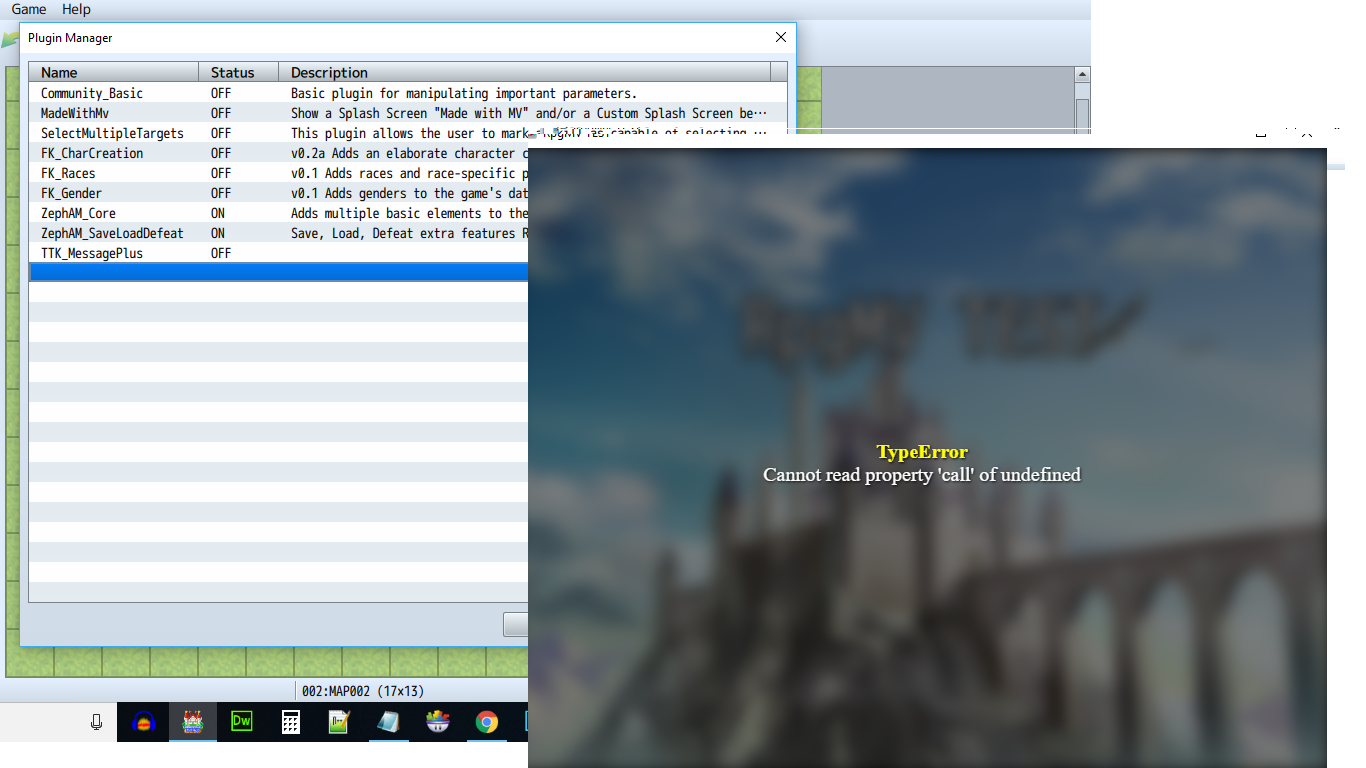
  5. cannot read property call of undefined error.... i installed in a new MV and tried to test...
  6. Raggon said:
    cannot read property call of undefined error.... i installed in a new MV and tried to test...
    Could you give me a bit more detail?
    If you could copy or screenshot the error from the console log(F8) that would help immensely. Also, if you're using any other plugins, that would be helpful to know as well.

    And as a 'just in case' reminder, this plugin does require my Core plugin to work - and Core does need to be above my other plugins in the list.
  7. error.png

    thats the error and the plugins i have are all off its just a test new rpg mv project.
  8. Alright, found and fixed the issue - something I created while making the plugin compatible with Yanfly's SaveCore. New version is uploaded. Let me know if you run into any more problems!

    ~ Zephyr
  9. nice thanks for fix! so far so good. gonna test on mobile see if it still works :aswt:
  10. hi
    can I request some altinate quick save
    to use a certain fixe slot that player can’t use
    because the last save for me as a player it’s kind of importan save for decision or any later backward
  11. pasunna said:
    hi
    can I request some altinate quick save
    to use a certain fixe slot that player can’t use
    because the last save for me as a player it’s kind of importan save for decision or any later backward

    If I understand right, you want an auto save slot that the player can't save over?

    Plugin will already do that. In the plugin settings, under Usage Toggles, make sure the first option 'Reserve Slot for Auto Save' is set to 'true'. That will prevent the player from being able to manually save in those slots - though they can still be deleted. The auto save slots are always the at the top of the saves list.


    Edit:
    Nevermind - you said Quick Save, not Auto Save XD.
    Yes, I'll look into that!


    Done! Quick Save slot implemented similar to Auto Save slot.
  12. Hey Zephyr, thanks for bringing your plugin to my attention. I'd like to use it in place of Yanfly's autosave plugin because it has designated autosave slots, but the only feature it's missing that I'd really like is the little text popup that occurs when it autosaves successfully.

    I tried creating a common event, but it didn't seem to trigger on autosaves. Any help there would be appreciated.
  13. Working on that right now, since I noticed you mentioned it in your request thread.

    I've been working on getting the notification to pop up in plain text, and it does that, but the words tends to blend into a busy background, especially if it happens during the menu. This is without a background - maybe I'll put a toggle in for with/without the window skin.

    I'd prefer something better, but haven't yet worked out what that might be.

    Although... now that I re-read your last sentence, that's a thought. I'll enable the common event for Auto and Quick saves so you and others can make their own popup, if they wish. And a toggle for the plain text.

    Edit:
    Alright! Got all of that implemented and up o_O.
    Give it all a go and let me know any other problems you run into. I've got a couple other minor enhancements in mind, but nothing drastic. Coming up on version 1.0, initial release ^_^
  14. ZephyrAM said:
    Working on that right now, since I noticed you mentioned it in your request thread.

    I've been working on getting the notification to pop up in plain text, and it does that, but the words tends to blend into a busy background, especially if it happens during the menu. This is without a background - maybe I'll put a toggle in for with/without the window skin.

    I'd prefer something better, but haven't yet worked out what that might be.

    Although... now that I re-read your last sentence, that's a thought. I'll enable the common event for Auto and Quick saves so you and others can make their own popup, if they wish. And a toggle for the plain text.

    Edit:
    Alright! Got all of that implemented and up o_O.
    Give it all a go and let me know any other problems you run into. I've got a couple other minor enhancements in mind, but nothing drastic. Coming up on version 1.0, initial release ^_^
    Hey again, I've been messing around with this plugin and I like the functionality, but one oddity is that it plays the save common event when I start up a new game. It doesn't play anything when I load a save (which is good, because I don't have a common event set for that).
  15. Drunken Paladin said:
    Hey again, I've been messing around with this plugin and I like the functionality, but one oddity is that it plays the save common event when I start up a new game. It doesn't play anything when I load a save (which is good, because I don't have a common event set for that).

    Well I'm glad it doesn't play the load one since one isn't set. That'd be weird XD.

    But the save common event on new game actually makes sense now that I think of it. If Auto Save is set to save on Map transfer (which I'm guessing it is in yours), then it would perform an Auto Save right when you start a new game, and thus run the Common Event. This is the problem with running the CE with Auto Save when it's triggered rather than activated at set times. I'll definitely have to put a toggle in to enable/disable the CE on AS and QS (two toggles of course). Changed my mind. Ability to set a different CE for AS and QS - or use the same - is better than a toggle.

    What would be a good solution for this though for when you do want it active with Auto Save...

    I'm not sure if I can restrict Auto Save on Map Transfer down to only when the player actively moves from one map to another, but I'll look into it. Let me know if there's a different method you can think of. Would something as simple as preventing the CE from running on that very first Auto Save work?
  16. ZephyrAM said:
    I'm not sure if I can restrict Auto Save on Map Transfer down to only when the player actively moves from one map to another, but I'll look into it. Let me know if there's a different method you can think of. Would something as simple as preventing the CE from running on that very first Auto Save work?

    It might actually be that simple. Otherwise, you're stuck with an "autosaved" popup during your game's intro cutscene.
  17. I'm considering ways to enable/disable auto save during play. The most straightforward solution is to give the Game Dev control - so you'd turn off AS when starting a cutscene and back on when finished - but I'd prefer another, more automatic option. I'll add a Plugin Command for Dev control regardless I think. It's really the best way if used properly.

    Will look into auto methods with more time in a few days.
  18. Somewhat bafflingly, I've also just discovered that this plugin totally disables Yanfly's Message Core functionality. :(
  19. Drunken Paladin said:
    Somewhat bafflingly, I've also just discovered that this plugin totally disables Yanfly's Message Core functionality. :(
    ... That is an interesting conflict. I'll be sure to fix that.

    Edit:
    I'm not actually running into that problem, so either I fixed it sometime between your version of my plugin and the in progress one, or something else is causing it.
  20. ZephyrAM said:
    ... That is an interesting conflict. I'll be sure to fix that.

    Edit:
    I'm not actually running into that problem, so either I fixed it sometime between your version of my plugin and the in progress one, or something else is causing it.
    I'm using the Message Core to enable word wrap and change the number of lines. When I toggle the autosave plugin on, word wrap becomes disabled and the lines are back to the default 4. I thought maybe the core plugin was a more likely conflict, but that doesn't seem to be the case--only this plugin causes the issue.