So, I am trying to make a mechanic where if the player presses a button or triggers an event, he is able to see a more darker version of the world for a period of time. Sort of like the game "Fran Bow". So, for example, if the player presses "X", he gets transported to a different world but in that exact place that he was in the other world. So if the player presses X at (23, 57) he gets transferred to the other map to (23,57). Does anybody know of a current plugin that does this? Or is this already an in-game mechanic that I just can't seem to find? Thanks, and all help is much appreciated!
Same Coordinate Transportation
● ARCHIVED · READ-ONLY
-
-
Not sure I get what you want, but basically you want the player to move to another map to the same coordinate when he presses X?
If so, you can do that with events alone:
1) Insert a parallel process event with a conditional branch.
2) Set the condition to script and enter this: Input.isTriggered("cancel")
3) Inside the conditional branch (which just checks if the player presses X), add a script command and copy/paste this:
Code:$gameVariables.setValue(10, $gamePlayer.x); $gameVariables.setValue(11, $gamePlayer.y);
** The previous code sets the player current x to the variable 10 and y to the variable 11. If you want to change the variable number, just change it inside the script command.
4) Set the id of the map you want the player to be transfered to in a variable.
5) Add a transfer player command and set its parameters with the variables that were used previously.
6) Test and Done! -
Thank you so much! I will test this out real quick!
-
So, when I press X, the transfer occurs, but I end up just in a black space... Anything I could possible be doing wrong here?
-
Check the id of the map you're getting transfer to, or if the x and y position is within the limit of the map.
-
Check the id of the map you're getting transfer to, or if the x and y position is within the limit of the map.
I have checked both of those and they are both valid IDs, and the correct ones as well... -
Can you move your character on the new map? Can you open the menu (if so check the tint of the screen)? Double check you variables' value (maybe add a message telling you the variables' value before transfering the player in the event).
-
Okay, so I can move the player around, and there is no tint in the pause menu. Here are a couple screenshots though:
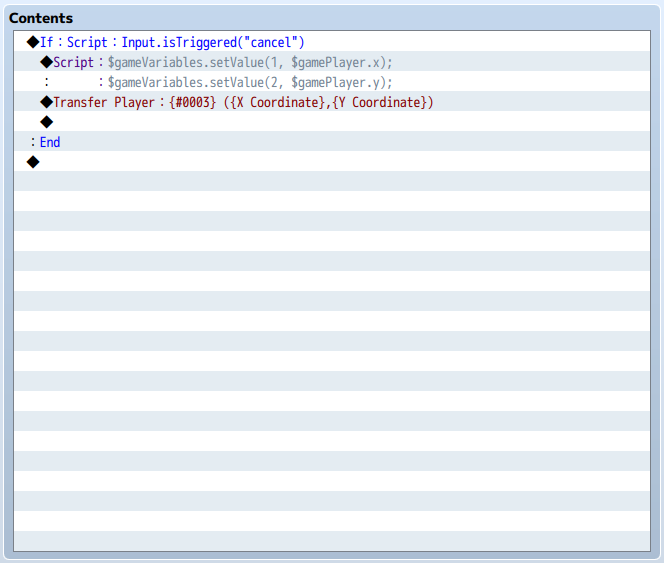

The first one is the event, the second one is the map i'm trying to teleport to. (The "X Coordinate" and "Y Coordinate" are variables 1 & 2, I just renamed them for simplicity) -
What is variable 3 set to?
You don't need to use a script call or plugins to do this. Use Control Variables > Game Data to get the current map id (Other) and the player's coordinates (Character). Then use the current map id in the variable to determine what map the player SHOULD teleport to. When the player releases the button, teleport back to the same location using the same variables - make sure nothing changes them in the meantime.
Also, you've used variables 1, 2 and 3. Be aware that any plugins that use variables will likely have one or more of those as a default, so if you add any plugins you're going to have to make sure they don't use those variables. I suggest you name variable 3 so you also don't use it for something else accidentally. -
Basically what @Shaz said.