Running your game using a custom launcher

● ARCHIVED · READ-ONLY
Started by Tsukihime 20 posts View original ↗
  1. Game launchers are pretty useful, but one problem that I've had with RM launchers is the fact that players can choose not to use it, but instead just run Game.exe, effectively bypassing your launcher.

    Here's a simple demo with a custom launcher that demonstrates how to set up your project to use custom launchers.

    When you run the game normally, you'll get an error-message (in other games, it may not even say anything and just immediately close)

    If you run the game using the RMLauncher, you can then start the game.

    This is the source code for the game launcher (Java) if anyone wants to build it themselves.

    public class RMLauncher { public static void main(String[] args) throws Exception { String[] cmds = {"Game.exe", "CUSTOM_LAUNCHER"}; Runtime.getRuntime().exec(cmds).waitFor(); }}You can see that it is a very simple technique. Can it be improved?For those that don't want Java, here's a C# version with a simple GUI. It is built on .NET 2.0, so unless you're using a dinosaur version of OS like win95 or something you should be able to run it without installing anything.

    https://www.dropbox.com/sh/sz6mpw5n2d6zxi2/pgqp4xzR9e/Library/RMLauncher_C%23.zip

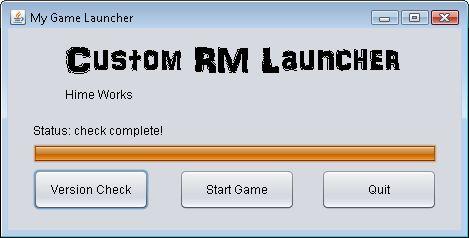
    It features the default form with a single button to launch the game.

    The launcher is then minimized while your game runs.

    When the game finishes running, the launcher runs some clean up processes (in this case, renames Audio to Audio2, if it exists), and then exits.

    Source:

    Spoiler
    Code:
    using System;using System.IO;using System.Windows.Forms;using System.Diagnostics;namespace RMLauncher{    public partial class Form1 : Form    {        public Form1()        {            InitializeComponent();        }        private void button1_Click(object sender, EventArgs e)        {            this.Visible = false;            this.ShowInTaskbar = true;            ProcessStartInfo procInfo = new ProcessStartInfo("Game.exe", "CUSTOM_LAUNCHER");            Process proc = new Process();            proc.StartInfo = procInfo;            proc.Start();            proc.WaitForExit();            try            {                Directory.Move("Audio", "Audio2");            }            catch (IOException)            {            }            Application.Exit();        }        private void Form1_Load(object sender, EventArgs e)        {        }    }}
  2. so this blocks the user from using the Game.exe directly? that's neat
  3. The files don't open for me. The game launcher doesn't work. Is there a readme file somewhere? I looked and found none.

    I might have done something wrong... x_x help?
  4. You need Java installed to run the launcher.


    I chose java because it was what I had on my machine at the time, and most windows machines should come with java already installed.

    Engr. Adiktuzmiko said:
    so this blocks the user from using the Game.exe directly? that's neat
    Pretty much.
  5. Ah. it uses a script check for a command line argument. I guess better tell people that they need the script, else they might just copy the RMLauncher.jar and think it would work correctly
  6. One thing about game launchers is that they usually provide an options menu before the game is actually played. (Pressing the "Play" button on the launcher) These options are usually graphic/resolution-based that would normally expect a re-opening of the game in order to change.

    If you don't really have anything like this (especially for an RM title which most likely wouldn't) then there isn't really a point for a launcher in the first place.

    Oh and another thing is for DLC/file patching and updating, which RM also mainly does not use or support.
  7. RM supports file patching out of the box, if you don't encrypt that is...


    anyway, I think this is just a starting method where people can base their launchers from, not the final form of the launcher...
  8. Well I guess the file-patching is a legit enough reason to use a launcher. However creating and coding a patch system is the real part. I would suggest Microsoft Visual Basic? To make both the launcher and it's windows, the file-patching system/server, etc.

    I should really go back to learning Visual Basic.
  9. Depends on how you want the patching to work... if it's just gonna look for a single patch file and maybe check time stamps to determine if the file is needed to be downloaded then run, then I think it's quite easy to do in VB... for example we can upload a patch.txt that contains the patch version and make the VB launcher check it, then if it's more updated than the current one, it begins downloading the patch...


    I long wanted to use a custom launcher but never got on how to "lock" game.exe so that it cannot be run... now that we know how to get the command line arguments thanks to Hime, it becomes easy to do now.
  10. Hooray for advancement in RM technology!  I believe this is a nice breakthrough. (unless it's been done already and we just never heard of it!)

    *Grabs a cup of cranberry juice since I can't have wine* Cheers!
  11. I'm thinking this would go along nicely with the audio encryption and the command line args scripts being discussed.

    There are screen resolution scripts out now, so that could be an opening option. Ditto for sound volume, that's easy enough event to a variable. If you're going to have 'difficulty levels', that would be a good place to put those as well. With a bit of work, you could probably have different player profiles as well, so two people could play the game while keeping their save games separate.
  12. I've added a C# version with a simple GUI as proof of concept. Details in first post.


    People that had issues with the java version should be able to run this one since it's more...Windows-y?

    Mouser said:
    I'm thinking this would go along nicely with the audio encryption and the command line args scripts being discussed.
    Yes, the post clean-up processes that couldn't be done because RM doesn't support exit hooks natively can be done through the use of a launcher.


    Though, there are still issues like what happens if they kill the launcher process directly, or if their machine crashes.


    Not sure if there are ways to handle those.

    kerbonklin said:
    Well I guess the file-patching is a legit enough reason to use a launcher. However creating and coding a patch system is the real part. I would suggest Microsoft Visual Basic? To make both the launcher and it's windows, the file-patching system/server, etc.


    I should really go back to learning Visual Basic.
    Fortunately now you have the option of pulling up standard and proven techniques rather than re-inventing everything just to make it work with RM.


    It is also not difficult to modify the encrypted archive and re-build it on the fly, since the algorithm is already released publicly by whoever reversed it.
  13. Looks neat, so that's how we force them to use the launcher... :)
  14. The download link for the C# version is dead. Could you reupload it please? :(
  15. Just wanted to double check since i saw a post about custom launcher probably not being legal for commercial use. Would this one be ok? It doesn't seem like any changes were made that would make it illegal since it seems to be coded frm the ground up and only calls for the game to launch. (I could be wrong tho since Im still learning about the engine)
  16. This is okay since it doesn't run the game library from a custom file, it still runs it from the default game.exe
  17. Sweet! And i saw that there's a way to drm your game using this launcher too! But I'm not sure how i can do .exe. heck im not sure how to do the jar either. Do i need a program fir it? I have only coded css3 n html5 (takin java nxt semester so no exp on that yet) >.> n some basic ruby n lua but i used notepad++. Im not familiar at all with creating a .jar or the language you can create .exe. Would it be hard to learn?
  18. lexietanium said:
    Sweet! And i saw that there's a way to drm your game using this launcher too! But I'm not sure how i can do .exe. heck im not sure how to do the jar either. Do i need a program fir it? I have only coded css3 n html5 (takin java nxt semester so no exp on that yet) >.> n some basic ruby n lua but i used notepad++. Im not familiar at all with creating a .jar or the language you can create .exe. Would it be hard to learn?
    Not really. The first things you'd learn is how to build a program.


    The java source code is available in the first post (5 lines) and if you're using an IDE all you say is "build project" and it builds a jar.
  19. d461d9c9c91422fe30377045efaff995.png

    I thought I was the first one to do a launcher haha, It sure is a good idea!