RPGMV Corrupted Files

● ARCHIVED · READ-ONLY
Started by Sinsun1 17 posts View original ↗
  1. I'm honestly just getting fed up with this. Spend $80 on a software that is throwing out 20+ hours of work. This is the third project I've been working on where I can no longer load it up to work on it. What the hell is wrong with RPG Maker MV? I never had this problem with VX Ace or XP. But now every project I put through MV, after a few 3-5 hour sessions, the project crashes completely next time I try to open up. Saying it cannot read the Game file or the plugins java script file. It alternates between them on different projects.


    This is obviously something going on between closing my project and reopening it where it gets corrupted. I'm losing countless hours of work due to this and am really considering asking for a refund, because this is obviously not getting patched like community help is saying "it will be patched in the next update". This has been happening for over two months now and I'm just done with putting time into a project and having the entire thing corrupted.
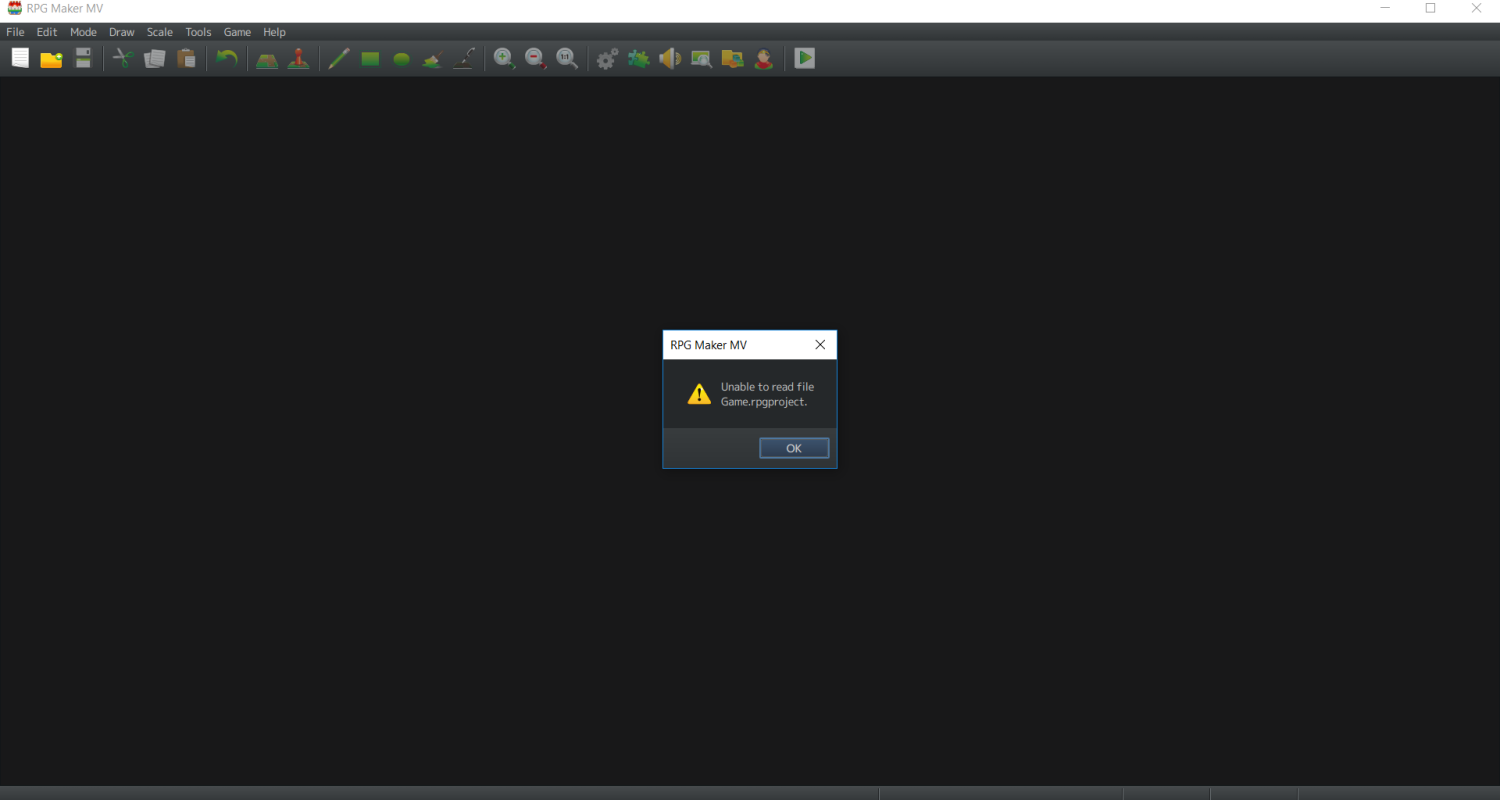
    Capture.PNG
  2. i save 80000000000000 times per project, and backup those saves constantly, what if you do that? is there something you are doing like adding files or moving files or something? are the maker and drive on separate hard drives? what happens if you open a new project and then load this one? is there a plugin or something that is messing with your system? would a reinstall fix it?
  3. Is something accessing your files while your trying to save? Are you trying to save on a flash drive? Did it crash while you were working?
  4. The problem is not with MV, but with your windows - and it was always the same with older makers. If your older makers didn't have that problem, then only because your windows has become more instable since then.


    Files get corrupted if either Windows crashes while they're open, or if the shutdown procedures are interrupted shortly after they're closed.


    All makers are more susceptible to this than regular games, because they need to have their files open while working in the editor.


    To solve this, you need to find out what part of your windows causes those files to be damaged - it could either be an instable windows or a problem with a background program like anti-malware scanners. But you need to find that cause on your computer, because it is not a problem in the editor itself.
  5. Step by step what I'm literally doing.


    Open Game > Work on Project > Save > Close RPG Maker MV > Log Off > Log On > Open RPG Maker MV > Does not automatically load last game so go and manually open it > "Cannot read Game.rpgproject".


    The only thing I did between the save earlier and this one was continue using the default tiles to create another room... Then I save it, log off, come back and BAM. Entire game is unopenable. Every hour in it is lost.


    If this was a one-off issue, I could accept that. But this is garbage and the sad part is, I have not once seen anyone suggest a way to recover the project. Meaning this bug is a project fatal one and should be put on high priority.
  6. @Sinsun1


    again, that does not happen to anyone else - you would have a lot of topics with the same if that would happen to everyone. So it is a problem on your computer and not in the Editor program itself, so Degica can do nothing to solve that problem (other than helping you find the cause on your computer).


    That said, it looks like a background conflict on your computer - something prevents the maker from saving correctly.


    There have been a few cases like that, and in all those cases it was either a problem with folder ownership/access rights or a background antivirus/anti-malware program.


    You now need to check what on your computer specifically causes those problems - like checking the antivirus logs if there is any entry "prevented virus from saving in path project xy"..


    If you do not know which programs you have to check, post a screenshot of the list of installed programs from windows system properties and we can check for you.


    EDIT: and by the way, there are several dozen topic on how to recover a project partially after a windows crash, please search for them.
  7. @Andar


    It wouldn't be my anti-virus since I do not run it when I'm working and there never is a pop-up about it. AVG is good with files.


    The only thing I can think of that might interfere with it is Steam itself.
  8. 1) steam can't be responsible unless you're manually saving the project into the steam cloud - because the steam cloud has been disabled for MV projects after the problems it cause with Ace (Steam cloud never was intended for large folders, only for small save files)


    2) There are dozens of possible background programs that can cause this, not only antivirus (and there have been several cases where people claimed it cannot be their antivirus until they accidentally found out that most antivirus have several components and the block came from a different component than the one they regularyl checked).


    So if you don't know which program might cause this, give us the screenshot and we can compare it with known causes.
  9. Sinsun1 said:
    Step by step what I'm literally doing.


    Open Game > Work on Project > Save > Close RPG Maker MV > Log Off >

    There's the problem. You're logging off too fast, and it is interrupting the saving process. Windows does NOT save files right away, but instead caches them to be saved later when it thinks there is some free processes.


    To avoid this, save and close RPGMaker then wait a couple minutes before logging off. That will give windows time to process all save commands sent to it.


    Incidentally, you can run into this error with any program if you save then log off. It's existed since the 90's back in DOS (I had some DOS saves get corrupted because I was saving then powering off, not knowing it didn't save the file immediately).
  10. These are all the background applications running (and would be everything if not more than what runs when I am working on projects.

    1.PNG

    2.PNG

    3.PNG

    4.PNG
  11. @bgillisp If that is the cause of the problem, then indeed his windows is already damaged (or at minimum malconfigured).


    Because the log-off procedure by default is programmed to wait until the harddrive confirms that storing of the cache has been completed.


    However, that could be overridden by "speedup-programs" that speed up the shutdown procedures (and don't tell the user that this speedup results in an increased risk of loosing data), or it could be ignored by damaged windows files (for example if there have been too many crashes and windows files themselves have been damaged) or simply caused by cutting power manually before shutdown is complete (the surest way to destroy your computer - other than throwing it into water - is to use a power-switch for cutting power to several large power supplies like computer and monitor at the same time)
  12. Are you logging off before RPG Maker is completely done saving and closing? Are you letting it finish shaving before you close it? Things like this can break things. Windows doesn't often care what other programs are doing and will force them to drop, and some programs are set up to prioritize the close command above all else, including saving.


    If you want a way to recover your project, requesting one is a good idea instead of saying "everything is corrupted." If you say this, we assume you have checked and that everything really IS corrupted.


    Additionally, the plugins.js file is what tracks your plugin settings and which plugins you're using it. Losing it is a pain in the tail, but not project-ending.

    1. Create a new project.
    2. Close RPG Maker MV.
    3. Copy the new project's Game.rpgproject into your existing project.
    4. Note that there may be some project configuration issues in doing this.
    5. Open the new Game.rpgproject

    Alternate:

    1. Create a new project.
    2. Remove any files your old project was using.
    3. Copy files from your old project - be sure to exclude those you know are corrupt.
    4. Note that there may be some project configuration issues in doing this.
    5. Open the new Game.rpgproject.

    Manual verification of files:

    1. Go to http://jsonlint.com/
    2. Open your project's data folder.
    3. Open a .json file in Notepad++ or Notepad.
    4. Copy all text from the file and paste it in the box at the website linked in step 1.
    5. Click the Validate JSON button.
    6. If it validates, the file is not corrupted. If it does not, or the file is empty, the file is corrupted.
    7. Repeat steps 3 through 6 on all .json files.
    8. Verification of audio and image files must be done manually through listening and observation.

    Lastly...

    1. Backup your project
    2. Backup your project
    3. Backup your project
  13. @bgillisp


    Actually I think he found the problem right there. I'm recreating the scenario in my head. But he has a point if I remember correctly (and it may be the source). When I was packing up I did shut down my laptop within about 10 seconds of closing RPG Maker MV. So if it didn't prioritize the save when I Ctrl+S it then I may be shutting off my laptop too early for the file to finish closing before Windows shuts everything down for the log off.


    Though I will try Taarchnia's method. I've tried it before under a similar fashion when it happened the first time. But will try those steps exactly and see if I can save either of the projects. Heck, saving one right now would be worth it.
  14. Sinsun1 said:
    When I was packing up I did shut down my laptop within about 10 seconds of closing RPG Maker MV. So if it didn't prioritize the save when I Ctrl+S it then I may be shutting off my laptop too early for the file to finish closing before Windows shuts everything down for the log off.

    And if I had known you were talking about a laptop, then I would have guessed what really happened.


    In most laptops, closing down the display automatically triggers a BIOS-based memory dump as a variant of a powersave.


    However, that memory-dump is intended to be use when windows is running so that launching the laptop after that gets back to operational status without a regular (and lengthy) windows launch.


    In my experience, closing the display and forcing a memory dump while windows itself is shutting down increases the chance of data loss - because Windows already gave the data control commands to the HDD and stopped its own memory guard, but the BIOS-override to the memory dump does not care about chache status of the HDD.


    And that doesn't even take into account that it often increases the time for the next launch, because when the display is opened again and the bios-memory-reload is triggered, the resulting state is the shutdown process that needs to be completed before Windows can launch again.


    So if you have a laptop that can be configured for a memory dump and powersave on closing the display, don't use both at the same time - if you initiate a windows shutdown, you need to wait until that is complete before closing the display.


    Or simply close the display without shutting down windows, if your laptop has that powersave option.


    Only both at the same time increase the chance of data loss a lot, because that are two similiar operations interfering with each other.
  15. Thanks guys. Not gonna lie. It was getting to me because it doesn't happen with other stuff I used and when I do it so often without problems, I don't think about it as being a problem. Then the fact it was only happening to projects I've been working on for a long time to come back to not being able to open it... It gets to you. A lot.


    So I guess I should save the file and keep laptop open for 1-3 mins before initiating shut down and then allow it to shut down properly instead of packing it away.


    Also I managed to save my maps!!!


    So if you guys come across anyone else with this problem of losing their files. Try telling them these steps.


    Start new project > Create maps = maps from lost project > Copy/Paste JSON files over. > SAVE!!!! > Close RPG Maker > Open RPG Maker


    That seems to have fixed it for me. It even kept the events on the map for me. This is a lot of work saved. If I try to copy any other JSON files over though it claims to not be able to read it. But other than that... it seems to keep everything I put down on the map! But it means any Common Events I use (such as door open animation)  or any special stuff I put in for the actors/items will still be lost. Luckily I didn't get TOO far into that stuff yet (as I have 2 more buildings left to complete for interiors before the map is fully "created").


    You don't know how happy I am right now just to have my maps saved. Put way too much time into them for me to want to go back and redo every single building interior + outside.

    1.PNG
  16. @Sinsun1...


    Two tiny tips, if I may..? Firstly, after having Saved your work, and before quitting RPG Maker, Close the Project. This will ensure that all has been completed by the software, and enables one to open different Project files with no possibility of mix-up. For my part, I usually launch RPG Maker by clicking on a Project, rather than launching RPG itself. No great shakes, but I find that it keeps things nice and neat to Close all, then Open what I need myself next time.


    Secondly, concerning back-up. It takes only a couple of minutes, once RPG MAker is closed, to copy your entire Project folder to another location (preferably another disk...). By doing this, all of your work is saved, not only the Maps, but BGM, graphics, plugins; the whole works. With a bit of luck, you'll never need to access this backup, but on the rare occasion that it's required, it's worth all the (tiny...) effort. A a 'bonus', I make a copy of the whole project every time there's been enough work to merit a version change (just about daily, during conception and development...) and rename each copy with that version number. I accumulate, therefore maybe a few dozen, or more, successive duplicates, and send often a copy to the Cloud for extra precaution. The older ones become redundant, and I'll erase or archive them once the Project is finalised, but meanwhile, I lose nothing but a minute or so and a couple of Gigas of disk space. Again, this is of no use whilst there's no problems, but when a hard drive goes 'flaky', or the PC packs up completely (or is stolen, or flooded; whatever...), it's good to have a means of recovering all of those hours/days/weeks of work.


    Just sayin'; hope this helps.
  17. Holy Taarna. THANK YOU SO MUCH. This just happened to me, I had a backup, but had just done something major.
    By the way, my friend is wondering if this works with VX Ace