RPGMaker MV - Yanfly Iconset recolor request

● ARCHIVED · READ-ONLY
Started by Zortik 18 posts View original ↗
  1. This Iconset is hosted by Yanfly and, while it is openly available to commercial or non-commercial users, it does heavily use icons from the RPG Maker VX ACE engine. More information on this can be found on Yanfly's website where I acquired this image.
    http://yanfly.moe/2015/10/23/freebies-mv-ready-ace-icons/#comment-2290
     
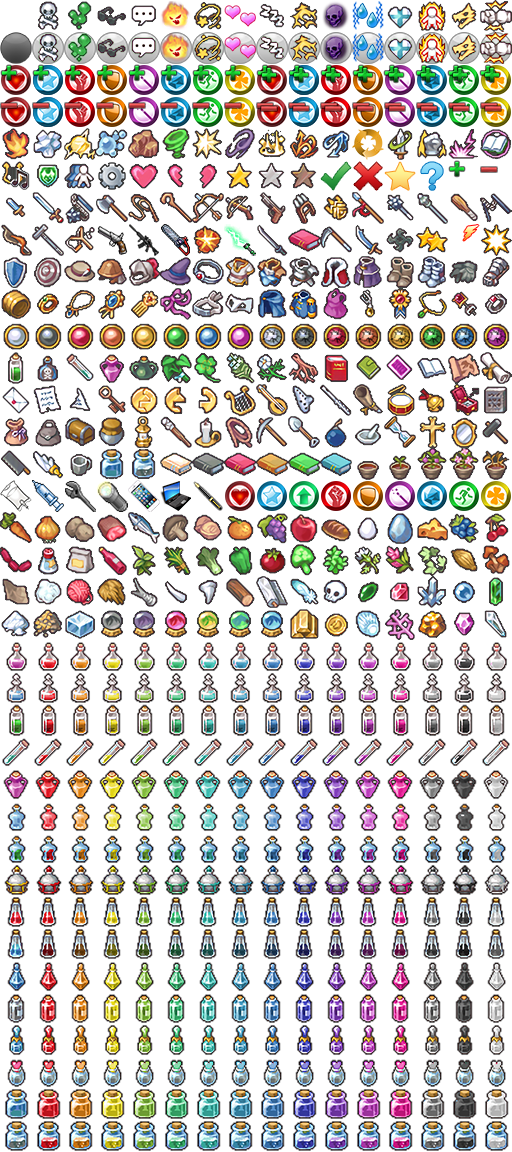
    Yanfly recently introduced a large number of recolors for potion icons (glorious!). I was wondering if someone would be willing to take on the request of expanding on this iconset even further with more recolors!
     
    Iconset image for convenience.
     

    Spoiler
    IconSet1.png
    Let's get a bit specific though...
    1) I really liked the color spectrum used by Yanfly and I'd like to maintain that spectrum. Within the image above you can see 16 colors of the potions and my request is that each weapon/armor thus have 16 color variants (like the potions...).
    2) In a perfect situation, it would be wonderful if you could recolor each of the weapons and armor pieces here to be similar to the 16 color choices Yanfly used. I realize the scope of what I'm asking though and understand if I am simply asking too much... which leads me to number 3.
    3) What if you listed the gradient / color scheme / whatever... you used and just recolor one weapon or armor and post the image here? Maybe if a bunch of capable artists take on just a few, a final request could be to put them onto a single template.
    In the same breath, if someone wants to take on this herculean task by themselves then please feel free to chime in.
    4) I'm open to other suggestions for how to approach this request. Colored Aura rather than carefully recoloring the item itself? I'm not as much of a fan of a colored box for a background color... but I guess it might be an option? A tiny elemental symbol in a corner might be too hard to see and thus not be worthwhile... again though, food for thought as an alternative?
    5) I'd really prefer whomever works on this be comfortable with this becoming a free to use resource (provided they have RPGMaker VX Ace) that can be shared in this community and also shared back with Yanfly to host on her site.
    6) If you also want to add in any MV Icons that aren't represented in this Iconset and give them the same treatment, that would be super and I'm sure there will be much rejoicing.

    Thank you.

    Reason for the request:
    I would like to emphasize elemental properties in weapons and equipment for overcoming / planning for resistances and weaknesses. Having an associated color seems like a fun way to add variety. Not to mention it also opens up the possibility for other enthusiasts to associate their weapons with a type of ore used to make it.
  2. Didnt know yanfly made icons... Those are pretty nice. :)
  3. I assume that you are looking for a little more than simple change in gradient for each layer?

    For example:

    mpooYtG.jpg
  4. @Sinweaver
    Actually, that's about the extent of what I was hoping for. I gave the colors of the potions that are on the Iconsheet from Yanfly as an example because it not only had a broad spectrum for color, it also had a solid black and solid white as well.
    Looking at your example, I see a lot of neon/bright colors, it would be appreciated if the red and green were a bit darker (the blue, silver, and bronze are good)

    Call me out if I'm not being clear enough... I struggle with giving constructive nitpick feedback on art :C
     
  5. Ah don't worry, those aren't mine, and yes, they are too bright for my taste.

    Just making sure that is not what you want before I even attempt it lol
  6. Thanks! I certainly hope that you're willing.

    I had the same notion as you that it would be much nicer to carefully recolor segments of the icons rather than, as you pointed out, just doing a global recolor of the entire object. I'm glad that you feel the same away about the brightness.
  7. How do you find these? The background is just so that you don't see the annoying gray/white blocks from photoshop background

    1.jpg
  8. Absolutely Awesome!

    This is exactly what I was looking for! I'm assuming you'll take the same treatment to the other armor/weapons where you take the most likely 'piece' for a color variation while leaving the original color alone? If so, I'm all on board. You've got the right idea for sure.
  9. Thanks. Yeah, slowly working my way up there.. There are like 60+ icons to cover and 15 variations for each, so it is going to take awhile.

    The first icon in each row is the original untouched version
  10. No problem. I understand it'll take a while and I won't be chasing you down or anything :)

    I really appreciate that you're taking any time at all to help with this. So, cheers!
  11. Just updating on the progress

    With transparent/white background:

    Spoiler
    iXUdZ5G.jpg
    With a grey background.. something similar to MV's default:

    Spoiler
    bcchhEv.jpg
    Edit: well, not exactly MV grey, but oh well...
  12. You've made some solid progress. It's looking nice!

    I prefer it without the background. The darker grey makes it a bit hard to see the the dark blue and blacks. :)
  13. The background is just there for the looks :p

    Hit and got over a few roadblocks along the way, I have never disliked white this much in all my life.

    Same goes for pink, which I already dislike in the first place lol

    There is a problem that I have not yet been able to get over... the row of armor with 2 colors underneath the cloth shirt.

    I am scratching my head about how am I supposed to recolor it.. which part do i recolor.
  14. I say leave the shoulder pads and neck guard alone. Recolor just the silver part.
  15. Very cool recoloring Sinweaver, it's like smart recoloring. Honestly makes things look twice as realistic.
  16. Thanks.. using this opportunity to practice playing with colors.. learnt a few things that I previously overlooked as well.

    IconSet1_zps9aykcs9v.png

    Some icons did not get properly resized and has pretty rough edges.. i smoothed out a few but there might be some left..

    Edit: forgot to recolor one of the uniform
  17. Sin,

    Thank you very much for taking on this request. Please add it to your "Little bit of everything" topic, I'll request this thread to be solved/closed. I'll send a PM to Yanfly and let her know where it's hosted on this forum and give her a chance to toss it up on her website as well.

    You're awesome!
  18. This thread is being closed, due to being solved. If for some reason you would like this thread re-opened, please report this post and leave a message why. Thank you.
