Thanks again, I left the image of the files i was given, as an attached file :)
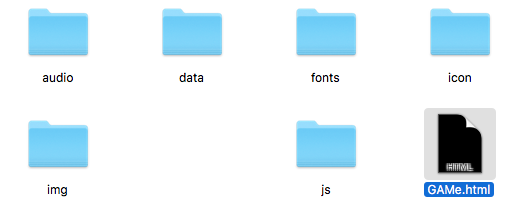
RPG Maker MV In Dropbox
● ARCHIVED · READ-ONLY
-
-
You need the entire folder and not only the index.html for the game - but dropbox is a very bad hoster to play your game on the web. It's a filesharer, and a limited on top of that - which means it is not optimized for web display and additionally, even if you play the game there, it will count against your transfer limits and shutdown your entire access if the limit is passed.
Better use a true webhoster that allows you to upload a website there, that will be perfect for a HTML game. -
It's better to host it in a site (say, Gamejolt) rather than Dropbox since a) you may have to pay to be able to access direct urls and b. it may cause issues.
-
It's better to host it in a site (say, Gamejolt) rather than Dropbox since a) you may have to pay to be able to access direct urls and b. it may cause issues.
How Do I Upload To Gamejolt? -
How Do I Upload To Gamejolt?
After you make a developer account and added the game, do this:
1. Select Builds and Files and Add Package:
SpoilerSpoiler

Name the package, in case you upload multiple files. Click add package button on the bottom.
2. Add a new release:
SpoilerSpoiler

Set a version for the release (say 1.0.0-web). Click on the Add Release/Save Release.
SpoilerSpoiler

3. Click New Build. Select Browser and select HTML5. Upload the game as an archive (.zip file).:
SpoilerSpoiler

(Make sure that you only uploaded the files from the www folder.)
Set the resolution (width and height) and click on the upload build.
After uploading, it should work.
Make sure to set up the game's page before releasing it to the public. -
It's better to host it in a site (say, Gamejolt) rather than Dropbox since a) you may have to pay to be able to access direct urls and b. it may cause issues.
I've used Dropbox for years with it installed on my computer (and laptop) and never ran into any such issues.
@MSMPokeGamer if you haven't, try installing the Dropbox client onto your computer and just place your game files into the folder on your computer, thus eliminating any need for websites. -
I've used Dropbox for years with it installed on my computer (and laptop) and never ran into any such issues.
How many other people have you download your files from dropbox?
There was a time when several scripters of this community tried to use dropbox for distributing their scripts. A few months later, dropbox blocked their access due to traffic being beyond the allowed limit. Simply because too many thousand people in this community downloaded from there.
And playing uses up a lot more traffic bandwidth than just downloading scripts... -
Adding up to what @Andar said, you can customise the features of a website, while Dropbox does not. On itch.io, you have the option to open community forums for the game (which is pretty useful, depending on how you'll use it).
-
@Andar @AceOfAces_Mod I'm under the impression he's using it for personal use, not uploading it for other people to download. Obviously he's going to run into issues such as what Andar stated. But like I said, I've never run into any issues with Dropbox installed on my computer for the past five years I've used it for personal (RPG Maker-wise) use.