RMMV Pro Map Editor

● ARCHIVED · READ-ONLY
Started by Jonforum 20 posts View original ↗
  1. RPG MAKER MV PRO MAP EDITOR
    Credit (jonathan Lepage, jonForum, djmisterjon)
    License Agreement: ©M.I.T, ©Pixi, ©spine
    Dependency Dev WorkFlow:
    *pixi.js

    *pixi-display
    *pixi-spine
    *
    pixi-light
    *pixi-heaven
    *izitoast
    *bootstrap

    *node v8.6> (rmmv1.6)

    WorkFlow Compatibility:

    *texturePacker Pro
    *spriteilluminator
    *Spine2D
    *dragonBones

    *Spriter pro
    *tiled
    *afterEffects
    *photoShop || gimp

    Presentation && target
    A map editor allowing to add in real time sprites and rendered animation objects.
    Works with a full custom optimized layer system as well as a property editor for professional.
    Easy Auto detect library folder and category.
    Easy Auto detect spriteSheets format .JSON type: (spine,sprite,tileSet,texturePacker,...)
    more..


    Preview
    V1.1.7a
    [embedded media]
    v0.99a light and shadow module

    Spoiler

    v0.8.a fully integrate
    Spoiler

    v0.7.a
    Spoiler

    v0.1.a

    Spoiler


    Features and Targets

    • Ultra game performance (over 600 sprites index in map)
    • ECMAScript 6 performance.
    • Auto localStorage session save, (avoid losing editor setup).
    • Live map editor with Auto Z-Index
    • Live layers selector
    • Live animation for sprites Obj
    • Super tiles editor (textures)
    • Live play game and debug
    • Custom Tool for edit specific or SpritesLots property.
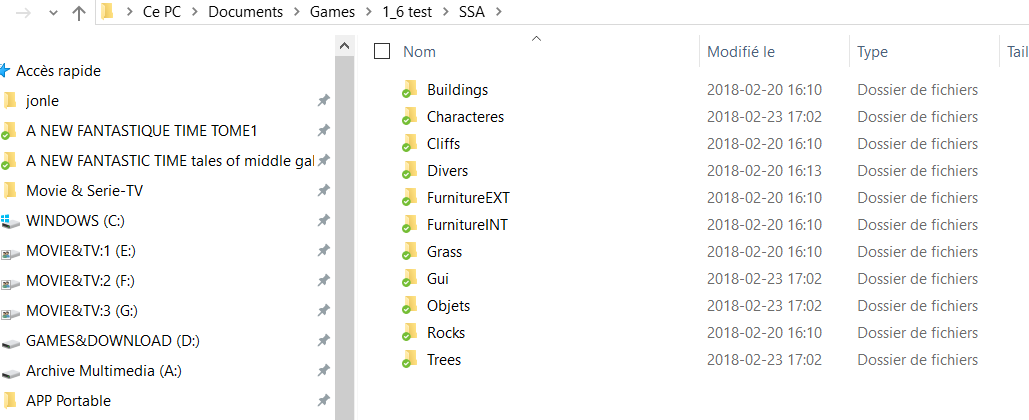
    • Automatic library filters by custom folder name see example=>
      example custom folder library name
      UEDpxyjq_o.png

    • Auto detect .Json sprites type in folder library. (spine,texturePacker,tilesSet, sprite)
    • Export all sprites OBJ to a custom JSON for map load
    • Export a full SNAP screenMap parallaxe for the event rmmv editor.
    • Export multiLayers png for import to photoshop.
    • Edit, remove, add ID sprites and custom property.
    • Filters for find atlas and spriteSheets
    • Simple tile editor mode from textures spriteSheets
    • Editor GUI data for custom Obj property
    more..

    Tutorial
    ...soon

    Download
    pixiMapEditor.js v0.99A
    note: you can not use my graphics sources for your comercial game, it only for demo.

    DEV:
    https://github.com/djmisterjon/PIXI.ProStageEditor


    MORE VIDEO PREVIEW
    performance test over 400 event spine
    test with rmmv events x400+spine2D+easing library+interactivity+playerFakePhysic.
    Events can be a spine animation object with assign name in editor.
    this is a very old test video
  2. WOW, it is sounds good! I'll keep a watch on this topic... What I love about this new Maker is this "features" that we can create. And, of course, the main and super Pixi.
  3. Kvothe said:
    WOW, it is sounds good! I'll keep a watch on this topic... What I love about this new Maker is this "features" that we can create. And, of course, the main and super Pixi.
    thank you, especially I try to find as many ideas as possible and especially to master all features from spine and pixi-display .
    These a prototype but it works very well for the moment.
  4. This looks really cool! Shame that it is not compatible with spriter pro.
  5. fully integrate v0.8a demo
  6. Is photoshop(because of formats or something )necessary or gimp can do all that too?
  7. elpeleq42 said:
    Is photoshop(because of formats or something )necessary or gimp can do all that too?
    yes , i say photoshop because i use it, but it export layer in .png
  8. May I ask one more things about it?That extra performance you talk about, is it ingame performance or editor? Also for what things does it improve performance?Images/animations only or everything?

    Also, is it possible(Not a request, even though that would be amazing, just asking) to make a complete editor outside MV? Like, something where I could create and control events, map creation(not edition, creation),etc?
  9. elpeleq42 said:
    May I ask one more things about it?That extra performance you talk about, is it ingame performance or editor? Also for what things does it improve performance?Images/animations only or everything?

    Also, is it possible(Not a request, even though that would be amazing, just asking) to make a complete editor outside MV? Like, something where I could create and control events, map creation(not edition, creation),etc?

    The editor does not have too much good performance because it is a complementary module that having lot of huge library.
    The editor simply allows you to generate a JSON file and then upload it to your project.
    The performance is simply that most of the rpg maker codes are simply removed and have instead used a running engine with most pixi modules.
    The loader make a huge cache of all textures and work mostly with gpu rendering.

    The map need to be created in photoshop like a parallaxe or gimp.
    I'm doing this plugin because I have some complications during the development of my project and therefore this editor should solve my problems.
    Related issue:
    https://github.com/pixijs/pixi-display/issues/23
  10. v0.9A
    SpriteSheets from rmmv are now compatible , also icon for identify what kind of sheet .
    SpriteSheets Mode will allow to apply textures from the atlas.
    It will allow to add simple texture to map without animation.
    And allow to know if map need load the spritesheet in game.
    Also a isane map scroll , like pro software can do, based on tiker.
    PHP:
    const editorTiker = new PIXI.ticker.Ticker().add((delta) => {
    document.title = `(mX: ${mX}) (mY: ${mY}) | (dX: ${~~dX}) (dY: ${~~dY})`;
    if(scrollAllowed){
    let scrolled = false;
    (mX<20 && (dX-=scrollF) || mX>sceneX-20 && (dX+=scrollF)) && (scrolled=true);
    (mY<20 && (dY-=scrollF) || mY>sceneY-20 && (dY+=scrollF)) && (scrolled=true);
    scrolled && (scrollF+=0.01) || (scrollF=0.01) ;
    }
    $gameMap._displayX += ((dX-$gameMap._displayX)/20)*delta;
    $gameMap._displayY += ((dY-$gameMap._displayY)/20)*delta;
    
    });
    0THvWE01_o.png

    R2oAxEjI_o.png
  11. This is became more and more beutiful! Great work!
  12. little preview from camera mode and also the tileEditor.
    preview tileMode editor from v0.9A.
    I love how my camera turn.
    This should enhance a lot the workflow.
  13. I'm have problems with your plugins, they all seem not to work properly also de demos (error plugin or missing parts). Idk if it's too difficult or i'm just stupid.
  14. RocketKnight said:
    I'm have problems with your plugins, they all seem not to work properly also de demos (error plugin or missing parts). Idk if it's too difficult or i'm just stupid.
    lol ??? demo, i not have released the plugin!, i will release only when i will achieve v1.0.
    i don't know where you get a demo?
  15. you can now control darker and lighter tint.
    cool for control shading in game.
    Here example a easy wait for reverse Dark and white and apply a red tint on the reverse. !
    upload_2018-3-23_6-31-5.png
  16. i change my approach for get a more powerful tint controller for Shader.
    I think it a better idea to use sliders for darker and lighter.
    Slider can be hide or show.
    upload_2018-3-23_16-33-48.png
  17. testing hold click with a object will allow auto Anchor and pivot.
    But will not affect the session saved configuration of the obj inside the spriteSheets.
  18. hold click when have a obj will show a fastMode option.
    hold+move right: active rotation with mouseXY.
    hold+move left: active scale with mouseXY.
    hold+move Up: active pivot with mouseXY.
    hold+move dW: active skew with mouseXY.
    the fastMode affect only the current sprite hold and not the obj session data.

    This mode are cool if you need to very fast adjust a property, without setup the obj.

    upload_2018-3-27_21-37-3.png
  19. build a house workflow with editor.
    compute and understand layers.