I'm creating a potion making system in my game confined to a single event tile. It's going to allow the player to select anything from key items to add into the cauldron, whether or not it's the correct one in the correct order to make a specific potion. I'm using Select Key Items for this with a variable "KEY ITEMS", so I've got conditional branches for Variable [0053:KEY ITEMS] == ## removing the item numbered.
But then I hit a snag when I realized I can't just focus on the correct item being chosen if I'm giving the player the ability to choose any item. If they choose the wrong item it still needs to be taken from the inventory. I figured I could do this with the same variable system, say Variable [0053:KEY ITEMS] == 10 removes item #10, but then I'd have to have 19+ conditional branches shoved into every time a choice prompt to put in an ingredient comes up.
I don't know if there's any easier way to do this in the program, I'm assuming it would need a script.
Removing item from inventory based on variable?
● ARCHIVED · READ-ONLY
-
-
I'm going to move this to Script Requests, since you seem to think it will need one. But I'm wondering if it can't be solved by eventing, in which case, it might get moved again to Ace Support.
-
No need script, just script call
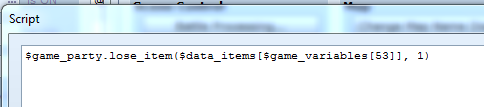
Code:$game_party.lose_item($data_items[$game_variables[53]], 1)
Edit: fixed the code -
I'm going to move this to Script Requests, since you seem to think it will need one. But I'm wondering if it can't be solved by eventing, in which case, it might get moved again to Ace Support.
I'm sorry, I was sure I had posted this in script requests already.
No need script, just script call
Code:$game_party.lose_item($data_items[$game_variables[53]], 1)
Thank you! Do you have any advice as to how to implement it? What does the 53 refer to? After all these years scripts of any kind are still very confusing to me. -
Well you were using variable id 53 for storing item ID soThank you! Do you have any advice as to how to implement it? What does the 53 refer to? After all these years scripts of any kind are still very confusing to me.
-
Well you were using variable id 53 for storing item ID so
Woooow I'm dense.
Anyway, I tried to implement it but it gave me an error message and crashed the game whenever I tried to add an ingredient.
Here's where I added it in, right after the prompt to pick an item.

But as soon as any item is picked, the game shows this:

-
Do not put it as separate line, use single line. Or are you unable to use single line?
-
Do not put it as separate line, use single line. Or are you unable to use single line?
I pasted the script in directly as you had written it for me. The program automatically split it into two lines.

The box for the script input is too small. -
So anyway, can you put it in a single line or not?
Or are you not having this wide script box?
If not we can go into an alternative, like
Code:item = $data_items[$game_variables[53]] $game_party.lose_item(item, 1) -
So anyway, can you put it in a single line or not?
Or are you not having this wide script box?
If not we can go into an alternative, like
Code:item = $data_items[$game_variables[53]] $game_party.lose_item(item, 1)
Maybe we're using different versions of RMVXA? Because my script box is not at all that width. But yes it works now thank you so much! -
You might be using an old version of VXA, which has smaller script box.Maybe we're using different versions of RMVXA? Because my script box is not at all that width. But yes it works now thank you so much!
Maybe you can try to redownload VXA for the newest version. -
You might be using an old version of VXA, which has smaller script box.
Maybe you can try to redownload VXA for the newest version.
I'm always nervous it'll do something weird to my game, like something will suddenly be incompatible. -
you can also use this script :
https://forums.rpgmakerweb.com/index.php?threads/crafting-script-v3-8-updated-2-26-2015.17560/
done by venka its a crafting script and looks realy nice. -
Honestly it's just MV stigma lol. VXA is safe.I'm always nervous it'll do something weird to my game, like something will suddenly be incompatible.
-
you can also use this script :
https://forums.rpgmakerweb.com/index.php?threads/crafting-script-v3-8-updated-2-26-2015.17560/
done by venka its a crafting script and looks realy nice.
Thank you so much! I actually already created a suitable event for what I needed, took me like 6 hours and it is functional so I'm content with it. But this will definitely be useful in any future games I make!
Honestly it's just MV stigma lol. VXA is safe.
What do you mean MV "stigma"? -
MV tend to break your game when u update the program. VXA does not. Or even if it breaks, it should be easy to fix.What do you mean MV "stigma"?