I found the RPG Maker franchise back in 2000 and it greatly peaked my interest but I was too young 'n' dumb to do anything with it, so I ended up leaving it alone. Present day: I'm older and a little less dumb (heh) so finding RPG Maker VX Ace on Steam was neat, better yet it's half-price until the 8th of March. However, I know very little about the flexibility of the tool and I am hoping the community can help answer some of my questions. My two main concerns are "if X can be done/changed" and "if X can be done/changed without knowing a great deal about scripting". Bear in mind I have no programming knowledge and - while I'm eager to learn - I don't get on very well with new languages.
If some of these questions are silly/obvious then I apologise but if I don't ask then I won't know!
1) I have heard the window resolution is 640x480 or something similar. Is it possible to expand this so you can view more on screen? One of the projects I have in mind requires a lot of spacial awareness and being able to see more of the surrounding world without shrinking the details would be great,
2) Can every texture, background, sound effect, character bust, etc be replaced by resources brought in from outside of the tool (such as your own artwork and sprite animations)?
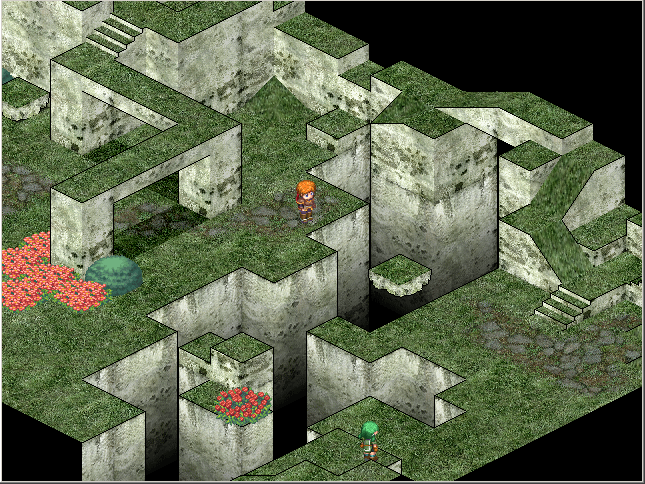
3) Is it possible to make an isometric RPG instead of the almost-top-down RPG that is showcased in the trailer/screenshots?
4) One thing which I dislike about a lot of 2D RPGs is that the top of a building - despite being what should be high in the air - stops the characters moving behind the building because it acts like a solid lump on a single level/plane. Is it possible to change it so that a character can move behind a building and the building becomes transparent so the player can see what is going on behind it? Hopefully that made sense.
5) I am not 100% sure on how this stuff works and it's probably a stupid question but... Would it be possible to port a game created via RPG Maker to a mobile device such as an Android tablet?
6) Is there a (realistic) file size limit for projects or can the game be as large as you want?
7) Is there any limit to the amount of events you can have on a single map?
I'd appreciate any answers, thank you.
Questions about the flexibility of RPG Maker VX Ace
● ARCHIVED · READ-ONLY
-
-
1 - I don't think it is possible to increase the resolution. If so, you would need to have a script or something along those lines.
2 - Everything can be changed out for a custom resource if you would like. The RTP makes it easier to get into developing.
3 - RPG Maker VX Ace doesn't have support for isometric maps. I'm sure with scripting something might work for this also.
4 - This likely is to be possible with eventing and semi-transparent graphics. Depending on the size of your map this could slow down with the need for many events. As far as walking behind the building you can under the tileset tab in the database and change the roofs to reflect a O not a X or a star and your character will walk under the roof or tile set.
5 - This isn't possible due to a restriction on how RPG Maker is designed. It is a windows only application. -
The resolution can be increased by scripts, but it's still far smaller at mac than conventional modern PC games. The full screen will always be some kind of magnification of the real resolution, so graphics are a bit blurry but that's just how enterbrain does things. A hacked DLL can make this a non issue but those are not allowed in the end user license agreement.
-
1 - I don't think it is possible to increase the resolution. If so, you would need to have a script or something along those lines. Darn, this was one of the important factors.
2 - Everything can be changed out for a custom resource if you would like. The RTP makes it easier to get into developing. Awesome, that's good to hear.
3 - RPG Maker VX Ace doesn't have support for isometric maps. I'm sure with scripting something might work for this also. Would have been nice but not too fussed that it's a slim possibility.
4 - This likely is to be possible with eventing and semi-transparent graphics. Depending on the size of your map this could slow down with the need for many events. As far as walking behind the building you can under the tileset tab in the database and change the roofs to reflect a O not a X or a star and your character will walk under the roof or tile set. Sounds promising, I hope this can be done as that is another important factor for me.
5 - This isn't possible due to a restriction on how RPG Maker is designed. It is a windows only application. Fair enough.
I have 1 more question:The resolution can be increased by scripts, but it's still far smaller at mac than conventional modern PC games. The full screen will always be some kind of magnification of the real resolution, so graphics are a bit blurry but that's just how enterbrain does things. A hacked DLL can make this a non issue but those are not allowed in the end user license agreement. That's a shame, being able to increase the resolution is a big deal for me, even if it was only bumped up to 800x600. Is there no way to increase the magnification (aka "stretch" the width and height by roughly 50%) without blurring the game visuals or is that an impossible task?
6) Is there a (realistic) file size limit for projects or can the game be as large as you want?
Thanks for the responses so far. -
For magnification without blurring, you might need to talk to someone experienced with Ruby. It's possible that the program is just strictly incapable of creating a window that large, though, even if its resolution is technically lower.
Projects can get as big as you please, as far as I know. The big ones tend to hover around 200 to 300 MB, but there's no indication that they couldn't get even bigger if necessary. Some people might gripe, but a few hundred MB is nothing these days. I can knock that down in under five minutes. -
Without the RTP, I have seen between 100mb to 400mb depending on non-RTP content. If there is a size limit to a finished project, I am not aware of it.
-
1. The screen size can be increased to arbitrary resolutions if you are using a modified dll in conjunction with a script call. Whether you are legally allowed to do this in your projects is unclear.

3. Yes, there is an isometric map script, but whether it is sufficient for you is a different issue.
http://save-point.org/thread-4046.html
6. The largest RM Ace game I've seen is a little over a gig. It was fully voiced and text-heavy, which explains the size. -
Awesome news about the lack of file size restrictions, I like having room to create and add as much as I desire.
I'm still on the fence about buying this product (I think my lack of programming skills is putting me off slightly, plus the resolution size is frustrating) but I have another day to make my mind up so I will sleep on it.1. The screen size can be increased to arbitrary resolutions if you are using a modified dll in conjunction with a script call. Whether you are legally allowed to do this in your projects is unclear.
That looks perfect! Well, aside from the legality issue (since posting I did some more research and read that it's against the ToS that you agree to abide by before using the programme). Why are the RPG Maker creators so against larger resolutions? Without going against rules there is no way to increase the resolution past 640x480, correct?
3. Yes, there is an isometric map script, but whether it is sufficient for you is a different issue.
http://save-point.org/thread-4046.html
That looks rather neat, I will look into it further, thank you. -
You can download the full version and try it for 30 days, with no restrictions. Or you can download the Lite version which is free to use, has no time limit, but it does limit how many maps you can make, how many events on each map, how many slots you can add to each database tab (enemies, skills, weapons, items, etc), and you can't use scripts.
But either of those should be enough for you to get your hands dirty and judge its potential, for yourself, without relying on others understanding your needs. -
It says in the RPG maker help file about a filesize 'limit'Awesome news about the lack of file size restrictions, I like having room to create and add as much as I desire.
I'm still on the fence about buying this product (I think my lack of programming skills is putting me off slightly, plus the resolution size is frustrating) but I have another day to make my mind up so I will sleep on it.
Its not expressly a limit, but it is at this point that the compressor gets a bit buggy. Thanks to patching scripts, though, you may be able to still develop farther.Note that the Compress Game Data command may fail with game projects exceeding approximately 2 GB.*
*This value is merely a guideline. It will vary depending on the PC hardware and OS you are using and the game you are creating. -
1. Yes, but you will find that many scripts (even the default ones) hard code pixel based display parameters, meaning things sometimes look funky and no longer display correctly. It can be fixed, but you have to know what you're doing.I found the RPG Maker franchise back in 2000 and it greatly peaked my interest but I was too young 'n' dumb to do anything with it, so I ended up leaving it alone. Present day: I'm older and a little less dumb (heh) so finding RPG Maker VX Ace on Steam was neat, better yet it's half-price until the 8th of March. However, I know very little about the flexibility of the tool and I am hoping the community can help answer some of my questions. My two main concerns are "if X can be done/changed" and "if X can be done/changed without knowing a great deal about scripting". Bear in mind I have no programming knowledge and - while I'm eager to learn - I don't get on very well with new languages.
If some of these questions are silly/obvious then I apologise but if I don't ask then I won't know!
1) I have heard the window resolution is 640x480 or something similar. Is it possible to expand this so you can view more on screen? One of the projects I have in mind requires a lot of spacial awareness and being able to see more of the surrounding world without shrinking the details would be great,
2) Can every texture, background, sound effect, character bust, etc be replaced by resources brought in from outside of the tool (such as your own artwork and sprite animations)?
3) Is it possible to make an isometric RPG instead of the almost-top-down RPG that is showcased in the trailer/screenshots?
4) One thing which I dislike about a lot of 2D RPGs is that the top of a building - despite being what should be high in the air - stops the characters moving behind the building because it acts like a solid lump on a single level/plane. Is it possible to change it so that a character can move behind a building and the building becomes transparent so the player can see what is going on behind it? Hopefully that made sense.
5) I am not 100% sure on how this stuff works and it's probably a stupid question but... Would it be possible to port a game created via RPG Maker to a mobile device such as an Android tablet?
6) Is there a (realistic) file size limit for projects or can the game be as large as you want?
These are the only questions I can think of right now, I'd appreciate any answers, thank you.
2. Yes.
3. Yes, but it is more advanced and you're not going to pull it off as a beginner.
4. Yes,it is of course possible, but you would have to event it or have someone create a script for you.
5. No, I wrote a sticky on this at the top of the support forum.
6. Not really. There may be a 2GB limit for compression.
plus the resolution size is frustrating) but I have another day to make my mind up so I will sleep on it.
Is it? You're talking about a pixel based, 2D rpg engine here. You don't *want* super high display resolution (i.e., more pixels, not actual resolving power), you would see far too much of the map at once IMO. -
The need of deciding today is because the 50% reduction on Steam is ending in 9 hours and I did not had enough time to trial the tool this week, hence the questions.
I wouldn't want a huge display but having the option to bump the resolution up to 800x600 would be amazing. Similarly (but for different reasons) it would be great to keep the default resolution and increase the window size to magnify the content by 1.5x or something similar, just to fill the computer screen a bit more.
Ignoring the previous paragraph and after hearing that transparent buildings when walking behind are a plausible thing I am pretty much sold on RPG Maker VX Ace. I will probably buy it later this afternoon but I do have one last question:
7) Is there any limit to the amount of events you can have on a single map? I'm assuming no but worth an ask. -
Yes, there is a limit - but I don't know which it is.
There is a comparison between japanese and english versions of Ace and Ace lite which gives the exact number of allowed events per map (10 for lite, much higher for the full version).
I've seen this comparison chart a few days ago, but I don't remember where it was linked (it wasn't official but in a forum post, made by a gamer) and a quick search just now didn't turn it up...
It's either 99 or 999 or something like that if I remember correctly, and I don't think you'll reach 99 in any regular map (of several demos I checked, the map with the highest number of events got about 30 or so. That was a rather cluttered map and most of those events were only eye candy (animations), not functional events. -
Thanks for the reply. I had a quick search before making that post and found nothing myself.
99 seems small to me but then again I have odd plans for my maps, ha! If it is that figure then it might be an issue for my transparent buildings concept. It seems I will require an event for every object that requires transparency so I will have trouble forming areas with a lot of view-obscuring things (such as forest mazes, market streets filled with over-hang canopies, a bustling town with lots of people and things going on, etc). I can down-size the plans so it's not a huge deal if the limit was 99 but still.
EDIT: Found the answer on the Steam page after a CTRL+F search on there.
"Simply upgrade to RPG Maker VX Ace, and have even more power with your game creation. Including: unlimited events per map, a scripting system, and much more!"
..."unlimited events per map"...
That's a relief! -
The editor will only load up 999 maps but your project can have more than 999. It just means you will need to find creative ways to develop the other maps, which is not really an issue either if you organize your maps so that the first 999 don't have anything to do with the next 999, and so on.
Think about older games that were split across multiple discs: there was some duplicate data across each disc but for the most part it worked out fine. -
There is a practical limit. If you attempt to shove 900+ events onto a map you will experience a lot of lag.
-
If you just want to take up the screen a bit more you can always play in full-screen mode.
-
I decided to buy it last night and I look forward to getting stuck in. Thanks for the help everyone.