I am getting the following error messages and was wondering if some error messages are alright and should be ignored or are they all bad?
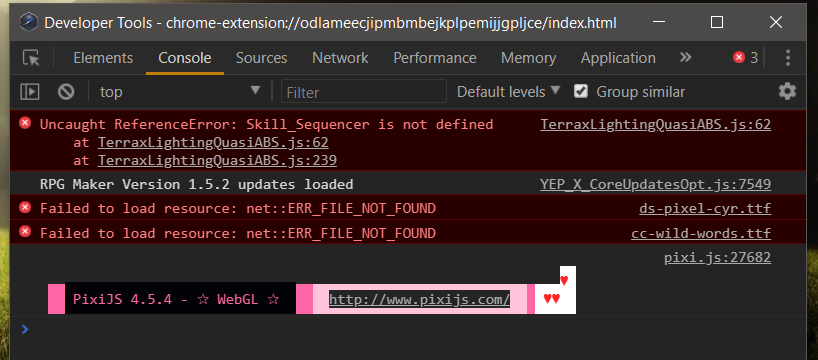
Question about console error messages
● ARCHIVED · READ-ONLY
-
-
Generally, if it's flagged as an error, you want to fix it.
The Yanfly message is just a notification (no error icon), but the other three definitely need to be looked at. Your TerraxLightingQuasiABS plugin either won't work at all, or won't work as expected, and it looks like you've used 2 new fonts that it's not able to load, so wherever those fonts are used, the text will not display as you intended. -
After taking a second look at them I surmise that quasi abs is another plugin that I am not using and the reason for the error is probably because I am using a patch without its master file. As for the other two errors regarding fonts... I have no clue. I haven't personally changed anything unless its being caused by a plugin somewhere along the way.
-
If you have any message system plugins, see if they have default settings for fonts that you haven't changed, and need to.
Adding plugins and expecting them to be plug-n-play is a common mistake. If the plugin has parameters, you need to go through each one and make sure you know what it's for, and that you want it to behave the way it's set up by default, or change it as necessary. Most of the problems around not checking/changing plugin parameters are usually related to switches and variables, when you are using them for one thing and the plugin is using them for something different.
Those two fonts are not standard, so you must have something that uses them. In plugin parameters, or plugin code. Perhaps open your plugins.js file in notepad and search for ds-pixel-cyr or cc-wild-words to see if it's a parameter somewhere, or do a search for those strings in the /js/plugins folder. Make sure you don't save the files, in case you accidentally made any changes. -
Alright, I'll check it out now, thanks.
Edit: Is it possible to find and DL the fonts? o_O
Edit: The plugin causing it is YEP_LoadCustomFonts.js. Go figure. -
If you are not using custom fonts, why do you have that plugin?
-
as adviced in another topic to your question there, you should ONLY use plugins when you know you need them.
remove all OFF-plugins from your plugin manager unless you know that you'll need them later (not guess, know).
additionally, remove all plugins that are active but that you do not have a use for - like the load custom fonts plugin if you don't have a custom font.
And if there is a plugin that you want to use, check its configuration now, before doing anything else. As Shaz said you cannot add plugins without configuring them correctly as that will cause problems. Not only error message but also wrong behaviour - especially yanfly's plugins have several functions each and you need to tell them to activate or deactivate some of their functions depending on what you want.
Best example are his item/equipmen plugins - that core has several functions, including one to make equipment have a variable value. A lot of people have then searched for the "bug" that their equipment has wrong and random values before they learned that this was not a bug, but a wrong configuration they ignored when adding their plugins. -
If you are not using custom fonts, why do you have that plugin?
Well originally I just went down the yanfly list and installed each of his updates in a "learning" project game. After checking the customfonts page on yanflys site I found the DL links to the two fonts used by that plugin.
@Andar
I'll keep what you said in mind, it just kinda seemed like most of Yanfly's plugins were meant to work together with a few exceptions like the ATB-CTB plugins. For the most part I am only using yanfly's plugins, the MogHunter plugins I am running are mostly cosmetic (menu screens and such).