Hello!
I've been using the PV Games resources for MV for a few weeks now, and I'm loving them.
I had more of a general question, I was wondering what you guys were doing for icons? The RTP ones don't really match at all so I wanted to know if you guys had found some that worked or if you were doing your own.
Thanks :)
PVGames Resource Pack Tips and Tricks
● ARCHIVED · READ-ONLY
-
-
Hello!
I've been using the PV Games resources for MV for a few weeks now, and I'm loving them.
I had more of a general question, I was wondering what you guys were doing for icons? The RTP ones don't really match at all so I wanted to know if you guys had found some that worked or if you were doing your own.
Thanks :)
Yanfly's icon generator for me. Its not great but its better than nothing.
http://yanfly.moe
If you don't like those you could make the backgrounds there and than use Jesse's free set on the pv website pasted on top. It will mean a bit of resizing though.
http://www.pioneervalleygames.com/free-resources.html -
-
This is just a general trick but definitely could be useful for these resources:
Is there any way for me to add this function at the moment?
If a mod feels this belongs in plugin support, please inform me.
EDIT: I resolved it and have the code if anybody wants it. In rpg_sprites.js, find the line Sprite_Actor.prototype.updateMotionCount = function() { and where the "else if statements are" add -
@BloodletterQ - You just left us hanging dude haha...
-
Because I saw that Jesse was making topics about icon placement in battle and the likes, I figured I'd start to add some tips to the opening post.
-
Are you guys using a different set of the balloon icons with PV's resources? And if so, which one?
-
I wonder, do you think a front view battle system works with PV assets? I'm planning to make game with just one actor and it feels very awkward to me to use a sideview battle system. I'd use an ABS if I could, but I can't, because I am not a good graphicist to animate attacks from different directions.
-
@Poryg I'm using a single actor system, too. I agree that it feels kinda wonky. I managed to get it feeling a bit better by using a few Yanfly plug-ins (mainly the active turn plug-in), but it still feels slightly off. I was hoping that the Free Turn system would've been converted to MV from Ace, but it hasn't. :( You could try the Linear Motion Battle System by Mog. All of the animations and what not are side-view, so it should be somewhat easier to work with.
-
I'm building a custom built engine, so suggesting plugins is useless, since 98% of them will be incompatible with my game.
As for linear motion battle system, I'm not entirely sure about that. I thought about that, but it looks kind of stupid due to the serious context of the game. -
Ah. Fair enough.
The main reason I'm not using LMBS is because I wanted my battles to be a bit slower, and require more thought. -
Yeah.
And doing stuff like Might & Magic (in other words a 3D world) completely kills the purpose of PVAssets... -
I disagree, Poryg.... these assets do look decent in other overhead 3d engines. Especially in Blender Game Engine, as it works well as a 2d billboard sprite. They dramamtically decrease the load time needed as they're only needed for a few triangulated faces vs. say even a 1000 faced low poly character.
The purpose of PV assets can still be easily maintained in a 3d environment. Remember Diablo II? so many 2d sprites on what was essentially a 3d plane. Also Before MV, I was already experimenting with the sprites in a low poly H-Mode and Marta by McGaladtogel and they looked perfect to the task. So many other engines will delving in to 3d environments, still use 2d sprites for their character bases... (Ragnarok Online, anyone?)
This is just my opnion though, I just feel that using 2d assets in a 3d heightmap world or even an isometric 3d game engine would be easily accomplished with PVAssets, and that with the wide range of angles for most of the sprite animations, they fulfill the purpose quite well.
As far as Battle Systems go though, yeah, not a big fan of the button mash, gotta make your stuff happen now now now... but in all honest? I'm not even a big fan of sideview battle systems... I actually am one of the few people who liked the front view battle systems of old. The enemies always felt larger, more immersive that way... -
After today's video, I'm kind of curious about parallax mapping with the water autotiles and how to make them look more natural and less blocky.
-
With auto tiles, you will always have some blockiness, it is just the way they are designed. RPG Maker typically wants to make things relatively "easy" for people so there can be a lower barrier of entry, but the trade off is very rigid limitations in many aspects of game-making, including map making. Even the best auto tiles with nice smooth curves instead of square chunks tend to be on the blocky side of things.
-
I can understand that. High Seas might be able to remedy that problem.
I'm a little stuck with interiors all because I want this corner to curve downwards and don't know which tile to use:
-
@jayray Actually, might & magic isn't an overhead 3d game, it's a 3d game from first person perspective. I know PV assets would work for something Diablo like, I've even thought about something Heroes of Might and magic like, since Sideview battlers would be more than enough.
But using them in a 3d first person would be difficult. -
Maybe I misunderstood your question... the idea OF PVAssets? layering? or the way they're set in 2/3 persepctive?@porygg Yeah.
And doing stuff like Might & Magic (in other words a 3D world) completely kills the purpose of PVAssets...
Several PV Assets are simply textures that can be applied in different ways to engines like the Layy Meta engine, the FPLE engine, and Mode 7... but yes, the 2/3 overhead view would not work for a FPLE engine...
Instead, you'd have to render a new type of sprite... the First Person layering sprite... *(Which is easier than you might think it'd be)
Just instead of up/down/left/right, you'd be doing face, 1/2 turn left, , turn left, turn away with 1/2 left, turn away, turnaway with 1/2 right, face right, face towards with 1/2 right, save as with the regular 8 directions, yeah, you'd have to render the shapes differently for an FP-RPG, but it can be done, It just depends on like I was saying in the other thread, Item occulsion and layering... layers would have to be split between the layers that are in front of a character and behind them.
For instance... and I'll just have to create a basic sprite to give you this idea.

(Avatars courtesy of Reallusion Iclone series G2)
Now, as long as Hans and Fonz here are facing you, the shield stays behind Fonz and the axe stays in front of Hans. However...
if they are turned away, well...

Now the shield is seen, and the axe is hidden... So, when creating a new set of PVGames like sprites, while it WOULD require a whole new perspective of rendering, it can easily be dealt with in the idea that well in this case, since you'd have NO idea what chothing layers someone's going to put on their character, they would need to have layers showing the weapon while it's behind a character, and the weapon or accessory while it's in front of a character, to ensure that no matter what, what is seem is not prematurely cutoff in the layers, and also doesn't overlay where it doesn't need to....
Let's look at both of these weapons now.

Regardless of whether the weapon is meant to be in front or behind, you can set up weapons and two accessories in two layers...
*Foreground + Left Handed Left Facing + Right Handed Right Facing
*Background + Right Handed Left Facing + Left Handed Right Facing
In each of these weapon sprites it would be important to kick out any rows that don't make sense to the character. So... if a character is using Executioner's Axe like Hans here. You'd want one layer of the background axe bits for when he's facing away from you, and one layer of the axe for when he's facing towards you. You'd place the background layers behind the sprite of him facing away, and the forgeround layers infront of the sprite for when he's facing toward you.
Things get a little more complicated in 8 direction, but for the most part we don't see 8-direction in first person unless it's a REAL first person like in ZDoom or Zduke... but as far as RMMV and say the MBS engine, or the older RPG makers and the FPLE engine, you should be fine with four directions. -
With auto tiles, you will always have some blockiness, it is just the way they are designed. RPG Maker typically wants to make things relatively "easy" for people so there can be a lower barrier of entry, but the trade off is very rigid limitations in many aspects of game-making, including map making. Even the best auto tiles with nice smooth curves instead of square chunks tend to be on the blocky side of things.
What I've found is it's almost always better to create Larger AutoTiles, and use THOSE to build seemless textures, walls and such, and using plugins like Doodads, and QMap Tools, space those supertiles out in a grid like pattern, of say 480x480... this way you can still have those low-resource grabbing images, while still having a HUGE parallax map fitting your 200x200 map pretty easily... 400 smaller bits, some repeating themselves, work perfectly - Games like Warlords III took advantage of this, by having several base elements of walls, corners, tight walkways, all with varied turns and twists. This allowed them to have much bigger maps than parallax mapping by itself would let them have, Since they'd definitely be using a lot of smaller images to create the larger image. You can also do this WITH the PVAssets to create tile-beds...
Tons of Tabletop games and even RPG video games do exactly this. That's why in games like Skyrim, you see the same curved room multiple times on mutiple dungeons. You know the kind right, the one that usually has a big statue in the middle hugging one wall? Autotiles aren't really necessary at all to be honest, when you have the ability to use doodads and the QMap Mats...
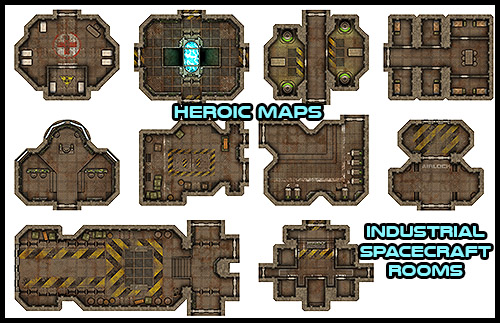
However, for such rooms, it might be better to create your own photoshopped rooms until you get a better feel for creating those rooms that best fit your situation. Me, i'm going to be taking all those decals from the Medieval sets, and converting them into seamless textures to paint with. -
What you are referring to as auto-tiles though are what others would refer to as "chunks", at least back in "the day" lol. If you look at an older RPG like Ultima 7, how they built a giant seemingly seamless world that could run on those old computers with exceptionally limited memory was by building some basic 1-square tiles, then using those tiles to create chunks (which I think were 4x4 tiles), then they used combinations of those chunks in a 4x4 pattern to create super chunks, which they used to create the world. So the world is basically just made up of the same handful of single tiles arranged cleverly into larger portions which are then arranged cleverly and repeated. The purpose of this method (and it is used by a great many RPGs up until hardware memory no longer became an issue and painted backgrounds or 3D landscapes could be used) was primarily to save memory while providing as much possible variation for the player.
But, the principle can still be used, and it is one that I use for my own resources and games. It is all about making templates basically to reduce the amount of time and effort required. Why build a river twice when you can just built it once and modify it a bit? I am not a big fan of reinventing the wheel, so I just try to do basically what you mentioned, and other people can as well. It saves time.
Autotiles for RPG Maker are a fair bit different, though. They are far more restrictive and specific to a very small size (basically 4 squares across, each square being a self-contained portion of the auto-tile with only 24 pixels to work with for MV, and that is a size increase over the VX Ace version...) It is not a lot to work with, especially considering the much larger scale my resources are. When VX Ace (and VX) went with their auto-tile scheme, they had a much smaller resolution to work within... ridiculously small. With MV, they kept the same principle, a tiny default resolution, so still a tiny amount of space to work auto-tiles with. But, of course, you can now use pretty much any resolution you want for you game, so most games go bigger, but the engine still will only use the really tiny auto-tiles. I would rather just pretend the auto-tile function doesn't exist, to be honest, because then it frees you to get more creative and make better maps. If they ever allowed for larger or adjustable dimension auto-tiles, then that would be far more worth exploring.