Problem with Transparency in RPM2k3

● ARCHIVED · READ-ONLY
Started by zxid 7 posts View original ↗
  1. I've got RPG Maker two days ago and probably this is due inexperience, but I've looked for tutorials and still can't solve this issue.

    room.png

    (The chipset is pretty basic because I've just wanted to practice)

    I've tried to set the fuchsia color as transparency and put it in the square the Help center marked, I assumed it would work since I've also used the default chipsets that come with RPG maker as ref but it didn't worked.

    This is what it looks in the Lower Layer

    0c74757be20a944f9a12ba3d1b675d33.png

    But this happens when I edit the upper layer (making my playable character also invisible unless he walks into certain objects)
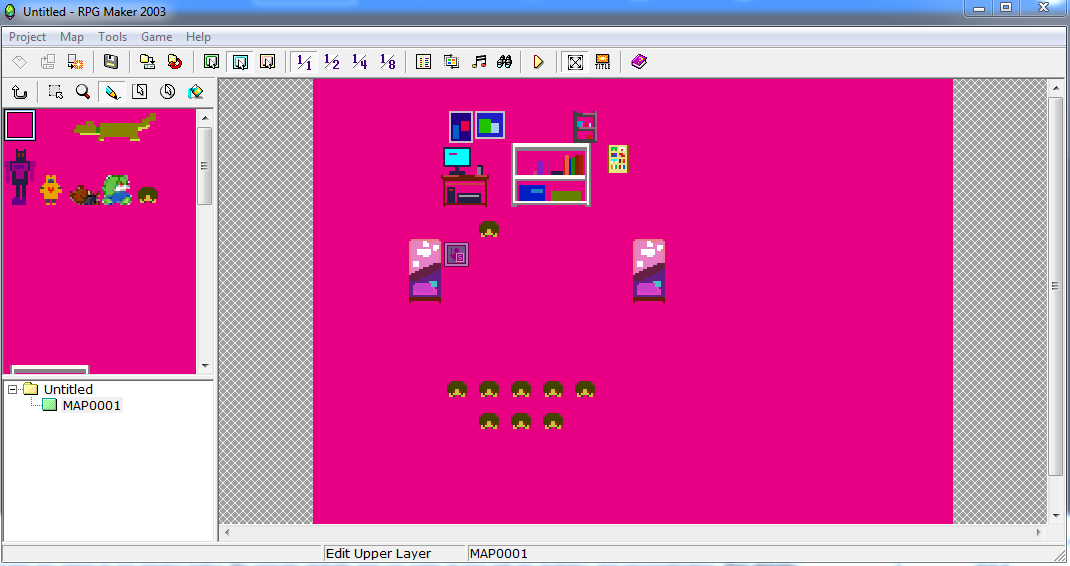
    1cf6436accb0d4fcc86e5355a2ae5507.png

    If someone can explain me how to fix this so transparency work I higly appreciate it! Thanks a lot!

    (As you might noticed English is not my first language, you can ask me to reword something, but otherwise i can read english fine so no need to limit youself explaining, also hablo español ^_^;; )
  2. RPG maker 2003 works with a 256 color palette and takes the first color to be transparent.
    I used to deal with this with a program called iDraw, since that program loads the image's palette.
  3. Simply use the same color for the higer level.
    I see in the chipset 2 pink/fuchsia tonalities, use one of them and the problem is solved.

    Poryg said:
    RPG maker 2003 works with a 256 color palette and takes the first color to be transparent.
    I used to deal with this with a program called iDraw, since that program loads the image's palette.
    And yes this part is very important.
  4. Thank you! I read the "first color to be transparent" before but because I'm turbo lost I didn't knew ow to figure /which/ was the first color (Spoiler, it was pitch black, but I figured this by accident).

    Also MS Paint let's you save with the 265 colors and I end up using that one xP.

    (The thread can be closed, I'm new so IDK how to contact mods, thanks a lot everyone)
  5. Pitch black is not the best color to be background xD I've had holes in my chars thanks to it.
  6. This also helped me alot! Though I've found a new issue where there's just these pixels that look like they're the same color as the pink, however they're not so they still show up which is annoying, Even worse it happens on every tile, even those I haven't even touched. No idea how to fix this problem.
  7. MsPaintNecronLord, please refrain from necro-posting in a thread. Necro-posting is posting in a thread that has not had posting activity in over 30 days. You can review our forum rules here. Thank you.