Pixel Movement

● ARCHIVED · READ-ONLY
Started by Tsukihime 19 posts View original ↗
  1. I started writing a pixel movement script, in the form of a dev log.

    You can read the first part here here.

    A WIP version of the script can be found here.

    Spoiler
    The script so far is about 20 lines:

    module TH module Pixel_Movement Pixels_Per_Step = 4 Tiles_Per_Step = Pixels_Per_Step / 32.0 endendclass Game_Map include TH::pixel_Movement def x_with_direction(x, d) x + (d == 6 ? Tiles_Per_Step : d == 4 ? -Tiles_Per_Step : 0) end def y_with_direction(y, d) y + (d == 2 ? Tiles_Per_Step : d == 8 ? -Tiles_Per_Step : 0) end def round_x_with_direction(x, d) round_x(x + (d == 6 ? Tiles_Per_Step : d == 4 ? -Tiles_Per_Step : 0)) end def round_y_with_direction(y, d) round_y(y + (d == 2 ? Tiles_Per_Step : d == 8 ? -Tiles_Per_Step : 0)) endendAnd it accomplishes "pixel movement".Now, there are two things that need to be addressed before this is considered market-ready:

    1. Improved collision detection (so it doesn't look like you're walking into a wall)

    2. Improved event trigger

    Both issues stem from the same thing: collision detection in RM is extremely simple based on a single check of the character's position.

    How can this be improved?
    Update: Oct 5, 2014

    The second part of the dev log series has been published: click here to read the full version.

    Spoiler
    I've added a few more lines of code on top of the script from part 1.

    class Game_CharacterBase include TH::pixel_Movement def map_passable?(x, y, d) delta = Tiles_Per_Step * 2 x_lo = x + delta y_lo = y + delta x_hi = x + 1 - delta y_hi = y + 1 - delta return false unless $game_map.passable?(x_lo, y_lo, d) return false unless $game_map.passable?(x_lo, y_hi, d) return false unless $game_map.passable?(x_hi, y_lo, d) return false unless $game_map.passable?(x_hi, y_hi, d) return true endendResults? DemystifyingCollisionDetection4.jpg
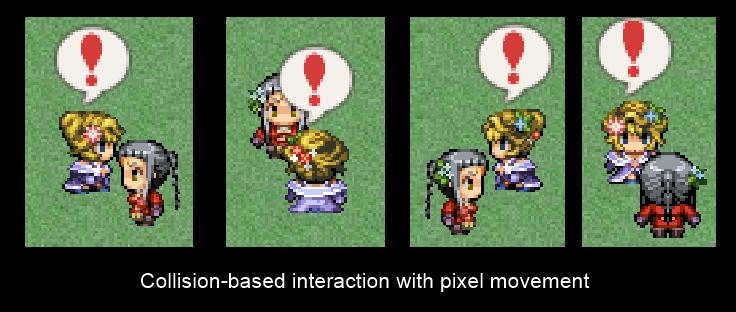
    Part 3: Event Interaction
  2. The only one I can think of is image mapping for collisions... :(
  3. Collision mapping can be done here


    A little add-on would be made to integrate my collision maps with it (which is basically some calculations to convert tile coords to pixel coords).


    Which isn't hard. If my position is currently (0.5, 0) in tile coords, then my pixel coord is (16,0), so I can just use that to check against the custom collision map.


    Though, even if we have pixel-perfect collision, there's still the problem of "character moving into wall because only the top-left corner of the sprite is used to check collision" lol


    A possible solution is to just use a bounding box, which would work out if you're using the default 32x32 sprites which are box-looking anyways.
  4. The way I did collision check for my projectiles was to have each event have a collision value (for both x and y axis) as well as the projectile having it's own collision value. Then I'd just check if their collision "boxes/circles" collide via simple calculations. I do the check from the sprite's center (or so I think)


    I'm not sure how to do it optimally for tiles though. and my calculations are only for boxes and circles (like box to box, circle to circle or circle to box) coz any other shapes are quite complex to check for collision
  5. I think for tiles it would not be much different.


    If your tiles are 32x32, then you basically check the box.


    If you have irregular shapes (such as if you're using a collision map), then you'd have to do some more checks. This is mainly because your sprite size is not the same size as the tiles...
  6. For a perfect solution, you would have to assign a "collision area" to the player and all moving events - especially if someone wants to use pixel movement with the High-Fantasy-Packs, where the spritesize is extended beyond the collision check even in the regular grid.


    That would be a lot more work than simple boxing, and I have no idea how much tweaking would be needed to make that work with the current engine...
  7. There's really only two places where collision comes in: checking whether a tile is passable, and checking whether two characters collide. I am not aware of anything else.


    I think if we were to implement that kind of fine-grained collision (perhaps introducing a DLL to optimize performance), we can roll out a proper collision detection system.


    And consequently, a simple pixel movement script that should be highly compatible since all it does is allow you to move less pixels per step.
  8. For irregular shapes you can use convex polygons to represent their collision area. Having a mix of bounding boxes where possible and otherwise convex polygons is a path you can consider. Note that the algorithms required are somewhat complex.

    *hugs*

     - Zeriab
  9. Just chiming in to say that surprisingly as I tried many different pixel movement scripts for XAS, this one works the best.
    Best of luck figuring out your method of doing collisions! Looking forward to seeing how they'll play out together!
  10. And how could we check if the player or event is at this X and Y co-ords with this?


    I tried to use many pixel movement scripts, but they all presented many compatibility issues (most with your party manager, and many other scripts which need to check player/event position, which means I can't use it >.>).


    I will subscribe and wait patiently for the completed script. :)
  11. Well, just make them check the pixels rather than the grid coordinates.. if ur making a game and using scripts from different persons, it might really cause some issues..
  12. Using different person's script can cause issues, yeah, but most of them can be easily fixed.


    And there are some rather complicated ones, which too could be fixed, but I am just not good enough for those yet.


    So, what should I check for then?


    '$game_player.x' and '$game_player.y' is not working anymore, not the right way, at least.


    '$game_player.screen_x' and '$game_player.screen_y' can only work if the map itself can not be scrolled anywhere, or else weird thing might happen at weird places. :D


    Or should I still check with '$game_player.x/y' and divide the real check's X and Y value with the value set at 'tiles_per_step' definition? Would that work?
  13. If you get the grid x/y, you could multiply it by the pixel count per tile which is by default 32 pixels per tile. that way you'd get the pixel position. Though it won't return correct for mid tile positions unless the .x and .y could return floats which I guess by default they don't (if .x and .y doesn't give the correct position, you can try .real_x and .real_y
  14. You basically cannot use single-point checks to properly check whether two objects have collided.


    Default sprites are 32x32, which corresponds to the 32x32 movement grid size. This is why single-point checks work.


    IF you have 32x32 sprites but your movement grid is 16x16, then you need to check at least 4 points (each corner of the box), otherwise two sprites that are adjacent to each other will overlap but no collision occurs.
  15. yeah, we would need to implement the idea of collision sizes.

    Assuming you're gonna use collision boxes or circles, then you would check if the distance between the center of the two sprites is within the bounds of their collision radius (meaning they overlap at some points)

    this is what I use for those calculations on the collision script of my projectile system

    Code:
      #for checking collision between a square and a circle  #dx,dy are the collision "radius" of the x and y plane respectively  #the square needs to strictly be the first set  def self.sq_cir(x1,y1,dx1,dy1,x2,y2,dx2,dy2)    dx = (x1-x2).abs    dy = (y1-y2).abs    return false if dx > dx1+dx2 or dy > dy1+dy2    return true if dx <= dx1 and dy <= dy1    corner = ((dx-dx1)**2) + ((dy-dy1)**2)    return corner <= dx2**2  end    #for checking collision between two squares  def self.sq_sq(x1,y1,dx1,dy1,x2,y2,dx2,dy2)    dx = (x1-x2).abs    dy = (y1-y2).abs    return (dx <= dx1+dx2 and dy <= dy1+dy2)  end    #for checking collision betweentwo circles  def self.cir_cir(x1,y1,dx1,dy1,x2,y2,dx2,dy2)    dx = (x1-x2).abs    dy = (y1-y2).abs    return (dx**2)+(dy**2) <= (dx1**2)+(dx2**2)  end    #for checking collision between a square and a point  def self.sq(x1,y1,dx1,dy1,x2,y2)    dx = (x1-x2).abs    dy = (y1-y2).abs    return (dx <= dx1 and dy <= dy1)  end    #for checking collision between a circle and a point  def self.cir(x1,y1,dx1,dy1,x2,y2)    dx = (x1-x2).abs    dy = (y1-y2).abs    return (dx**2)+(dy**2) <= dx1**2  end
  16. I have published the second part of the dev log series on pixel movement.

    Check the main post for a link to the article.

    class Game_CharacterBase include TH::pixel_Movement def map_passable?(x, y, d) delta = Tiles_Per_Step * 2 x_lo = x + delta y_lo = y + delta x_hi = x + 1 - delta y_hi = y + 1 - delta return false unless $game_map.passable?(x_lo, y_lo, d) return false unless $game_map.passable?(x_lo, y_hi, d) return false unless $game_map.passable?(x_hi, y_lo, d) return false unless $game_map.passable?(x_hi, y_hi, d) return true endendHere are the results:DemystifyingCollisionDetection4.jpg

    All I have implemented is integrating pixel movement with passage settings on your maps. It assumes your characters are 32x32 boxes (like how it's done by default). Note that I have fine-tuned it for 4-pixel movement grids. If you're using things like 8 pixels or more, it won't work without some edits to the calculations.

    It does not consider other characters at all, so you can literally move through another person right now.

    And of course, we still haven't even gotten to event trigger checks yet.
  17. Excellent work Tsuki! It's nice to see such a competent scripter tackle this!

    A fair question, as I will likely use this in cojunction with XAS when it's done. 

    Everything seems to be working fine, compatible. And I know you can't speak for Moghunter and XAS, but on the offchance you would know how or

    to acertain compatability, the placement of the "weapon tool" when you hit is placed much closer to the character. This seems true for evented enemies and the player. 

    I guess easiest would be to patch XAS to move the tool a bit.

    Looking forward to following the updates on this thread! And best of luck!
  18. The next part of the dev log series has been released. Click here to read it


    This time I focus on event interaction, including action trigger and touch triggers, including over-the-counter action triggers.


    pixelMovementEventInteraction3.jpg

    Mireneye said:
    Everything seems to be working fine, compatible. And I know you can't speak for Moghunter and XAS, but on the offchance you would know how or


    to acertain compatability, the placement of the "weapon tool" when you hit is placed much closer to the character. This seems true for evented enemies and the player.
    I have no idea about compatibility.
  19. That's really nice development. Though hopefully you can apply custom collision sizes :)