Hi all,
Wondering how people might do this with events or scripting? The flow seems simple enough, make a random roll, 1-4 then wait this long. After which, play sound effect, and loop again. This should be able to produce a fairly good background ambience for a dog barking in the distance. I wonder if scripts could even change the volume and pitch? Hmm..
Any help would be nice,
Thanks,
GC
Periodic timer for sound effect
● ARCHIVED · READ-ONLY
-
-
Well, I wouldn't use scripts to make the changes in volume or pitch, when you can edit the sounds in the game.
Seems to me you could have a random number generate from 1-4.
Have four options for the wait command,
Generate again.
Have four options for which SE you would play (some played back at different edited levels in-game-editor.)
Run that puppy as a parallel process, and off you go.
What I don't know is how this would run with BGM (background music) playing. -
Thanks Granma ;) Can you make good soup?Well, I wouldn't use scripts to make the changes in volume or pitch, when you can edit the sounds in the game.
Seems to me you could have a random number generate from 1-4.
Have four options for the wait command,
Generate again.
Have four options for which SE you would play (some played back at different edited levels in-game-editor.)
Run that puppy as a parallel process, and off you go. -
I love to make soup. My favs are my own take on minestone, and cream of potato soup (with cheese!)
But I love all kinds of soup. I have a good hot -n- sour soup recipe, and I make a good turkey soup.
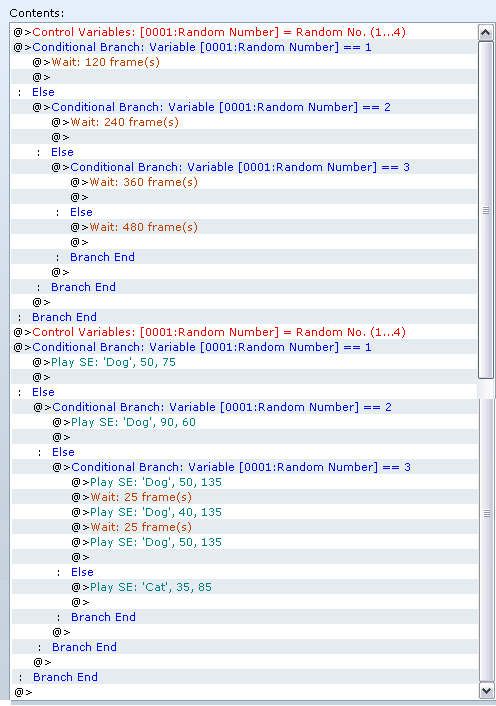
But here are your images. (I got interested.)
You will have to play with the volume a bit.

-
Oh NICE. Those soups all sound great. I also like Broccoli and Stilton soup. Thick, smooth and creamy!I love to make soup. My favs are my own take on minestone, and cream of potato soup (with cheese!)
But I love all kinds of soup. I have a good hot -n- sour soup recipe, and I make a good turkey soup.
But here are your images. (I got interested.)
You will have to play with the volume a bit.
Thanks for the images, I had guessed the process would turn out a little long winded. I wonder if a short script would make that a bit easier. -
Well, (I think!) you can use an event script call for the wait and save quite a few lines.
IDK the correct syntax, so you will need to check on this, but I think you can use
Wait($game_variables[1]*120)
To avoid the first conditional branch entirely.
(of course the [1] will have to be whatever variable you use.)