Perfect Status Screen

● ARCHIVED · READ-ONLY
Started by ?????? 20 posts View original ↗
  1. Perfect Status Screen

    Dekita


    psspage4.png

    pageone.png

    pagetwo.png

    outboundeleanstateinfop.png

    Introduction

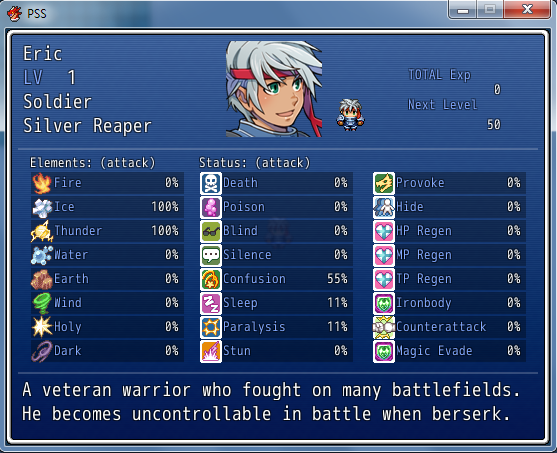
    This script is an add-on for my Perfect Stat Point Distribution System, it gives you all necessary information and a little more biggrin.png

    There is also a standalone version for those who may want it.

    Features

    - Display actors Elemental and state resistances

    - Display actors elemental and state attack rates

    - Display actors "Vitality", "Strength", "Dexterity" and "Magic" counters.

    - Add a second row of elements. (if you want)

    How to Use

    Paste this Script under "Materials" and above "Main" in your projects "Script Editor"

    Paste it under the "Perfect Stat Point Distribution System".

    SCRIPT:

    The most up-to-date version of this script can be found by following the link below.

    http://dekitarpg.wor...-status-screen/

    Credit and Thanks

    - Dekita
  2. Wow that's really nice man great job, looks clean and lots of stats.

    Not what i need but i just wanted to say thanks for your work on it.
  3. Justride66 said:
    Wow that's really nice man great job, looks clean and lots of stats.

    Not what i need but i just wanted to say thanks for your work on it.
    Thanks :D

    however the distribution script is just the start of the "Perfect Series" that i'm working on for my own project, with the add-on's that im currently working on it would really be a shame to not use this system :D

    I'll be releasing two new addon's next week (using the weekend for extencive testing)

    and this screen is going to be needed for those addon's
  4. Dekita said:
    Thanks :D

    however the distribution script is just the start of the "Perfect Series" that i'm working on for my own project, with the add-on's that im currently working on it would really be a shame to not use this system :D

    I'll be releasing two new addon's next week (using the weekend for extencive testing)

    and this screen is going to be needed for those addon's
    I might try it out, i really don't like the default screens, will you be adding any for a save screen or item menues?
  5. Justride66 said:
    I might try it out, i really don't like the default screens, will you be adding any for a save screen or item menues?
    im planning an inventory system that will modify the item menu i think, but havent started that one yet :D im currently adding a screen for random information into the hstatus screen called "page four" showing equipment and random information that the user can define e.g "hometown" "favourate food" "date of birth" whatever :D
  6. Ok cool, i wil lcheck back in the future then.
  7. @EVERYONE

    small update to the script to fix a lil bug and for compatibility with new addon's elements distribution and states distribution () can get the addons from my blog
  8. @EVERYONE:

    another small update to the script to give some controlable variable information.
  9. Dekita. Hey. Using the Stat Distribution and this script in my current project.

    I'm having problems with this particular script, as I'm having a difficult time on working on the 'info page', as I have to set the info for four different heroes.

    Another thing I've been having issue might be just the Stat Distribution script so I'm going post it there.
  10. what is the exact problem your having with the info page ?
  11. Hi there!

    I'm using the Craze's Script Asylum - Elemental Booster v1.01 for create states that boost elemental damage.

    I'm very interested to show information about that on my game, but your script doesn't show the boost.

    Can you help me, please?

    Thanks yor your work and efforts!
  12. Jhin said:
    Hi there!

    I'm using the Craze's Script Asylum - Elemental Booster v1.01 for create states that boost elemental damage.

    I'm very interested to show information about that on my game, but your script doesn't show the boost.

    Can you help me, please?

    Thanks yor your work and efforts!
    il have a look at that.

    also i updated this script , looks much better but i couldnt be bothered dong the screenshots lol
  13. hello Dekita.

    i seem to be having problems with this script.

    i have this one, and the 'perfect core' script but when i go to playtest my game it says.

     ​
     ​
    script 'perfect core' line 1330: syntaxerror occured​
     ​
    unexpected Tconstant, expecting $end​
    p 'loaded : DPBz - core​
     ​


    can you or anyone tell me what i'm doing wrong?

    please use simple english; i'm not a computer master like others here.

    error.png
  14. i would reccomend using THIS script instead, its my new version.

    I will however look into that issue, let me know if you end up using the new script isntead of this one :p
  15. ugggggggg.

    tried using the new script and got this error.

    (see attached picture)

    could another script be messing with it?

    i did use the latest core.

    error.png
  16. could you also provide a link to the newest CORE version

    maybe i didn;t get the right one.
  17. If you are using the New status screen i done ( with item disp color  - the error your getting )

    then that is not part of my old perfect script series, its in the new $D13x Engine..

    Link to Latest $D13x Core
  18. no change. i still get the error.
  19. Very Strange.

    Could you send me a copy of your project for me to try fix the error your having, as i cannot replicate it on my end :(
  20. Dekita said:
    Very Strange.

    Could you send me a copy of your project for me to try fix the error your having, as i cannot replicate it on my end :(
    sure.

    heres a DL link.

    http://rapidshare.com/files/3721671659/game.rar

    you scripts are tittled

    (status core)

    (status screen)

    just open any save and try to open the status screen.

    sorry i know i'm being a big pain in the butt.