ozu_File – Create and manipulate files from within the game itself!

● ARCHIVED · READ-ONLY
Started by ozubon 22 posts Page 1 of 2 View original ↗
  1. ozu_File 1.2
    by ozubon

    Introduction

    Using Node.js' file system module can be a hassle. Getting it to work both in playtest and after deployment seems to be something people are having trouble it. This aims to give some easy to use functions as tools for manipulating the game folder's files using Node.js – both for people who've tried implementing the .fs module and failed and for anyone with basic script call knowledge who wants to play with files.

    Does not work on mobile!

    Features
    This plugin allows you to do things with your game files and folders from within the game itself.
    • file.exist will check whether a file exists or not
    • file.write will write or overwrite a file with the text you enter
    • file.append will add text to an already existing file
    • file.read will read a file and output its contents as text
    • file.rename will rename a file to the filename you enter
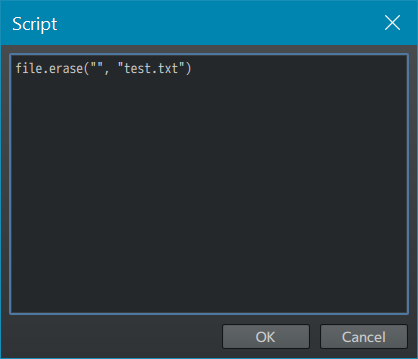
    • file.erase will permanently delete a file
    How to use
    file.exist
    file.exist
    Checks if a file in your game folder exists or not.
    Intended for the conditional branch script box.
    Code:
    file.exist("path", "file.type")
    "" for path means the main game folder, "" for file checks if folder exists

    These all return TRUE:
    Code:
    file.exist("", "index.html")
    
    file.exist("data", "")
    
    file.exist("img/system", "Window.png")


    This returns FALSE unless it exists:
    Code:
    file.exist("asdf/gh", "jkl.txt")


    Screenshot example:
    index.php
    file.write
    file.write
    Writes a new file with the desired data.
    Intended for script calls.
    Code:
    file.write("path", "file.type", "stuff")
    "" for path means the main game folder, the rest is required.

    Some examples:
    Code:
    file.write("", "tanoshindekudasai.txt", "Arigato gozaimasu")
    Code:
    file.write("data", "test.json", "Can it write to JSON?")


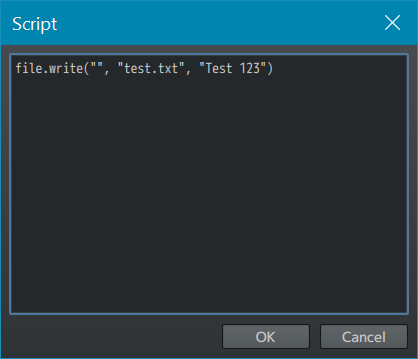
    Screenshot example:
    filewrite.png
    file.append
    file.append
    Same as file.write but writes to the end of an existing file instead of overwriting it.
    Intended for script calls.
    Code:
    file.append("path", "file.type", "new stuff")
    "" for path means the main game folder, the rest is required.

    Some examples:
    Code:
    file.append("", "tanoshindekudasai.txt", "!!!")
    Code:
    file.append("data", "test.json", " Yes.")


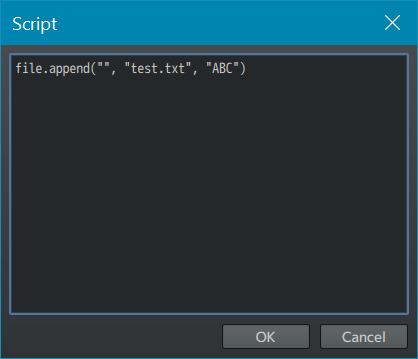
    Screenshot example:
    fileappend.png
    file.read
    file.read
    Reads a file and outputs a string of what's in it.
    Intended for conditional branches and setting variables.
    Code:
    file.read("path", "file.type")
    "" for path means the main game folder, the rest is required.

    This will return TRUE in a conditional branch (if tanoshindekudasai.txt is exactly "Arigato gozaimasu!!!"):
    Code:
    file.read("", "tanoshindekudasai.txt") === "Arigato gozaimasu!!!"


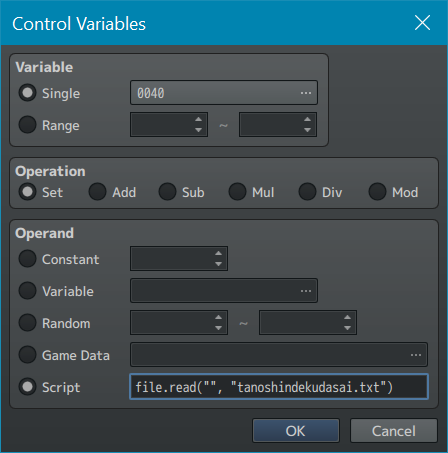
    Using Control Variables, set a variable to
    Code:
    file.read("", "tanoshindekudasai.txt")
    and the variable will be set to "Arigato gozaimasu!!!" or whatever tanoshindekudasai.txt contains.


    Screenshot example:
    fileread.png
    file.rename
    file.rename
    Renames a file, careful not to rename important files.
    Intended for script calls.
    Code:
    file.rename("path", "file.type" "new name.type")
    "" for path means the main game folder, the rest is required.

    Some examples:
    Code:
    file.rename("", "tanoshindekudasai.txt", "ieie.txt")
    Code:
    file.rename("data", "test.json", "johnromero.json")


    Screenshot example:
    filerename.png
    file.erase
    file.erase
    Do not use this one unless you know what you're doing!
    Permanently deletes a file, be VERY careful not to erase important files.
    Intended for script calls.
    Code:
    file.erase("path", "file.type")
    "" for path means the main game folder, the rest is required.

    Some examples:
    Code:
    file.erase("", "ieie.txt")
    Code:
    file.erase("data", "johnromero.json")


    Screenshot example:
    filereerase.png

    Terms of use
    You don't have to credit me but I'd appreciate it!
    For commercial use, you gotta credit me!

    Plugin
    Right-click link -> Save As

    Credit
    ozubon
    Kino for this guide
  2. I've tried using this, but it doesn't seem to be creating a file when I use the file.write command. I also tried creating the file and seeing if it would edit the file, and that also didn't work. In addition, when I ran a check for if the file I'd created exists, it always acts as if the file doesn't exist (even though it is in the place I told it to look).
    Since I tried this plugin out in a project I use for trying out small plugins and random game mechanics, I turned off all the other plugins in that project. Running the file.write command gave this error:
    1586853840402.png
    (The command I used was file.write("", "test.txt", "This is a text file"), since your guide says that "" means the game folder. Trying to specify the data folder resulted in the error below instead.)
    1586853940232.png
    This could be a really cool plugin, but I can't seem to get it to work - it keeps wanting to put files directly to my C: drive rather than the game folder.
  3. Strange, this is run of the mill Node.js fs. Which version of the maker are you running, where do you store your game and which operating system are you using? :unsure:

    Edit: Ok but no it's not run of the mill Node.js fs, that's the whole point of this plugin lmao. Never mind my brain fart.
  4. I'm on 1.6.2, my game is in Documents as per Steam/MV default, and I'm on Win10.
  5. Well I'll be a monkey's uncle...
    My bad, should be working now!

    Version 1.1
    • Fixed bug with code not finding the relative path

  6. Can confirm, it is working now! Thanks!
  7. Version 1.2
    • Added file.append, a function similar to write but can add text to the end of a file instead of overwriting the file
    • Added compability for older versions of MV
  8. Thank you for this. It is a good plugin to manipulate the player's file. I just want to find a way to delete player's save if they do some certain things and this serves my purpose perfectly.
  9. Thank you (for the second time lmao) for this plugin! It works perfectly and gives a lot of possibilities! I feel powerful over the game's files now xD
  10. thank you both for your comments <3
  11. Neat! Just a few questions ad suggestions:

    Why did you used the not operator? Is there a reason behind it? I mean you can return 1 instead of returning !0 right?

    A good idea would be turning encoding to a parameter. By default set it to utf-8 but if someone wants another for whatever reason, they should have the option to play with it. While hadcoded change can solve this issue, if they need to manipulate files with different encoding that would be a problem.

    file.read will read a file and output its contents as text
    This needs to return a set of lines from a file.
    But despite that, the plugin is a great idea. After all you are still enhancing this as I see!
  12. !0 was for, as you say, "the lulz"

    You're right, I should definitely add an option to change encoding. Also next update remove the completely superflous "folder", "file" sectioning and just go with "folder/file".

    Maybe I'll switch !0 to !!Infinity
  13. ozubon said:
    Does not work on mobile!
    Hello, could I ask for some details about this?

    I am not very familiar with file handling in node.js, but I am trying to handle the case of an image resource file (like a faceset) not being present as expected. Is that something that's just broadly impossible on mobile for some reason, or is it just that I should try something besides your plugin like Kino's tutorial, or could I just avoid using certain features of your plugin that don't work on mobile?
  14. ozubon said:
    ozu_File 1.2
    by ozubon
    Hi Ozubon, I like your plugin and I was wondering if you had an idea about using it to write to a fixed file location outside of the game folder?

    I would like for 2 different games to interface with each other, but I haven't been able to figure out how to change the write location to somewhere permanent, like appdata or Documents, where each game could reliably check for the other's text file.
  15. Omg this is so very helpful!! Thank you so much :D
  16. Node.JS doesn't work in Browser, is there a fix for this?
  17. Can this be used to create folders? Moreover, how can I add a line break to file.write?
  18. MK_V_Procrastinator said:
    Can this be used to create folders? Moreover, how can I add a line break to file.write?
    First, for line breaks, you can use the line break character "\n". I tested it, works.

    Now normally, you couldn't create new folders. However, I tweaked the script a bit (added a new function), here's the modified version (with added info on the new function).


    I got on this while trying to make a Mod for a game (the posibility to backup saves from within the game), while that won't be a commercial use, I'll still credit the creator.
    Might also use the script when I'll make my own game, and I'll credit for that too.
  19. You are a champion. Thanks a million!
    JakeMSG said:
    First, for line breaks, you can use the line break character "\n". I tested it, works.

    Now normally, you couldn't create new folders. However, I tweaked the script a bit (added a new function), here's the modified version (with added info on the new function).


    I got on this while trying to make a Mod for a game (the posibility to backup saves from within the game), while that won't be a commercial use, I'll still credit the creator.
    Might also use the script when I'll make my own game, and I'll credit for that too.
  20. ozubon said:
    ozu_File 1.2
    by ozubon

    Introduction

    Using Node.js' file system module can be a hassle. Getting it to work both in playtest and after deployment seems to be something people are having trouble it. This aims to give some easy to use functions as tools for manipulating the game folder's files using Node.js – both for people who've tried implementing the .fs module and failed and for anyone with basic script call knowledge who wants to play with files.

    Does not work on mobile!

    Features
    This plugin allows you to do things with your game files and folders from within the game itself.
    • file.exist will check whether a file exists or not
    • file.write will write or overwrite a file with the text you enter
    • file.append will add text to an already existing file
    • file.read will read a file and output its contents as text
    • file.rename will rename a file to the filename you enter
    • file.erase will permanently delete a file
    How to use
    file.exist
    file.exist
    Checks if a file in your game folder exists or not.
    Intended for the conditional branch script box.
    Code:
    file.exist("path", "file.type")
    "" for path means the main game folder, "" for file checks if folder exists

    These all return TRUE:
    Code:
    file.exist("", "index.html")
    
    file.exist("data", "")
    
    file.exist("img/system", "Window.png")


    This returns FALSE unless it exists:
    Code:
    file.exist("asdf/gh", "jkl.txt")


    Screenshot example:
    index.php
    file.write
    file.write
    Writes a new file with the desired data.
    Intended for script calls.
    Code:
    file.write("path", "file.type", "stuff")
    "" for path means the main game folder, the rest is required.

    Some examples:
    Code:
    file.write("", "tanoshindekudasai.txt", "Arigato gozaimasu")
    Code:
    file.write("data", "test.json", "Can it write to JSON?")


    Screenshot example:
    View attachment 139499
    file.append
    file.append
    Same as file.write but writes to the end of an existing file instead of overwriting it.
    Intended for script calls.
    Code:
    file.append("path", "file.type", "new stuff")
    "" for path means the main game folder, the rest is required.

    Some examples:
    Code:
    file.append("", "tanoshindekudasai.txt", "!!!")
    Code:
    file.append("data", "test.json", " Yes.")


    Screenshot example:
    View attachment 139808
    file.read
    file.read
    Reads a file and outputs a string of what's in it.
    Intended for conditional branches and setting variables.
    Code:
    file.read("path", "file.type")
    "" for path means the main game folder, the rest is required.

    This will return TRUE in a conditional branch (if tanoshindekudasai.txt is exactly "Arigato gozaimasu!!!"):
    Code:
    file.read("", "tanoshindekudasai.txt") === "Arigato gozaimasu!!!"


    Using Control Variables, set a variable to
    Code:
    file.read("", "tanoshindekudasai.txt")
    and the variable will be set to "Arigato gozaimasu!!!" or whatever tanoshindekudasai.txt contains.


    Screenshot example:
    View attachment 139508
    file.rename
    file.rename
    Renames a file, careful not to rename important files.
    Intended for script calls.
    Code:
    file.rename("path", "file.type" "new name.type")
    "" for path means the main game folder, the rest is required.

    Some examples:
    Code:
    file.rename("", "tanoshindekudasai.txt", "ieie.txt")
    Code:
    file.rename("data", "test.json", "johnromero.json")


    Screenshot example:
    View attachment 139501
    file.erase
    file.erase
    Do not use this one unless you know what you're doing!
    Permanently deletes a file, be VERY careful not to erase important files.
    Intended for script calls.
    Code:
    file.erase("path", "file.type")
    "" for path means the main game folder, the rest is required.

    Some examples:
    Code:
    file.erase("", "ieie.txt")
    Code:
    file.erase("data", "johnromero.json")


    Screenshot example:
    View attachment 139503

    Terms of use
    You don't have to credit me but I'd appreciate it!
    For commercial use, you gotta credit me!

    Plugin
    Right-click link -> Save As

    Credit
    ozubon
    Kino for this guide
    Hello! I know this post is old but I was willing to know if it would be possible to create the file (for example, a .txt file) on an external folder. In my case, it would be ideal to create this file on the player's "documents" folder or "desk", as it is more accesible for players. Thanks!