OcRam_Map_Editor (edit maps in-game!)

● ARCHIVED · READ-ONLY
Started by OcRam 13 posts View original ↗
  1. Introduction

    Unlike my other plugins this plugin won't need OcRam_Core in order to work.

    This plugin provides autotiling (and B-E tiling) in-game for your RPG Maker projects! Enable autosave/load for edited map data with 1 plugin parameter!

    OR then just do it with custom logics and disable autosave/load. Save map data with $gameMap.saveData() and load it with $gameMap.loadData()

    Edit tiles with $gameMap.setAutoTile(x, y, z, tile_idx, d4)
    x = X coordinate to paint
    y = Y coordinate to paint
    z = Layer to paint (starts with 0)
    tile_idx = Tile index from left-to-right (starts with 0)


    Tile indexes
    Indexes 0 to 127 are autotiles. Indexes 128 to 255 will be processed as 'Normal tiles' even if used 'setAutoTile'.
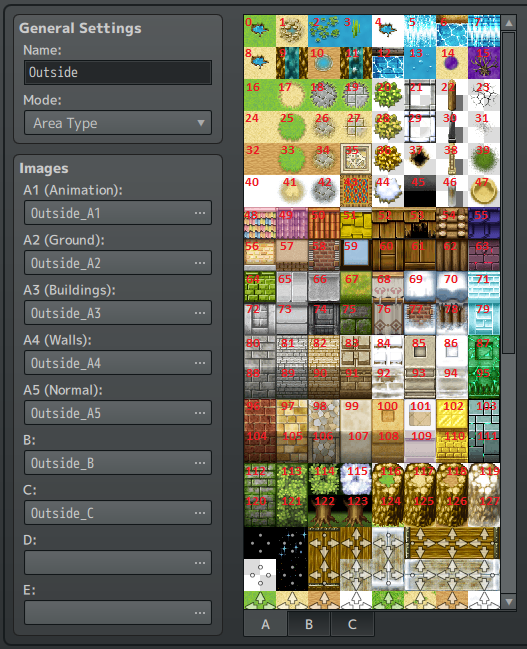
    tile_indexes.png

    And draw B-E tiles (or choose ANY shape from autotiles!)
    $gameMap.setNormalTile(x, y, z, tile_id)
    x = X coordinate to paint
    y = Y coordinate to paint
    tile_id = See spoiler


    Tile id help
    B = 0 to 255
    C = 256 to 511
    D = 512 to 767
    E = 768 to 1023
    A1 (Animations) = 2048 to 2815
    A2 (Ground) = 2816 to 4351
    A3 (Buildings) = 4352 to 5887
    A4 (Walls) = 5887 to 8191
    A5 = 1536 to 1663

    I've tested this also in MV and seems to work same way as in MZ.

    Terms of Use: Free to use with credits to 'OcRam'

    This plugin has no overwrites at all, so it should be placed bottom of your plugin list.

    Happy RPG Making!
  2. Looks really interesting, is there a chance to enter/exit from "edit mode" ingame? Can you bring a demo?
  3. Rex Tenebris said:
    Looks really interesting, is there a chance to enter/exit from "edit mode" ingame? Can you bring a demo?
    Thank you for the message,

    I'm thinking about to add some examples to my demo -project.

    This plugin only provides "API" to edit maps in-game and save map data (per save file). Execution for "edit mode" is up to users of this plugin.

    Personally I use it to shape maps based on some events (like water behind obstacle and when that obstacle is removed, water flows in map where it didn't flow earlier (or vice versa) or then some explosions that damages buildings and maybe even destroys them to ruins or perhaps building roads through forest when monsters in it has been wiped out! etc...).

    In my current project I had several maps for such events, but this plugin allows me to re-shape maps to what ever I like! And best part is that each save file can have different map data for same map!!!

    Latest event that I did was the bridge over the river was exploded and player had to repair it again so he could get over the river.

    Of course this plugin can be used for player to decorate hero's room or even build a town, but like said "edit mode" is up to you. I'd probably would do it with some events and JS provided by this plugin.
  4. Hello,

    I've made an update for this with following fixes:
    • Normal '8-dir' autotiling now connects to map edges
    • Water autotiles now connects to waterfall tiles
    • Improved plugin documentation
    • Z parameter now corresponds the layer in editor
      (meaning z-indexes starts from 1)
      map_editor_update2.png
    1. Map before edits (after certain event water starts to flow)
    2. Result before update (v1.00) (water tiles didn't connect to map edge and water didn't connect to waterfall)
    3. After update (to v1.01) all tiles will connect as expected
    map_editor_update.png
  5. I love this plugin, I've been thinking of making an in-game map editor so people can make custom campaigns for my game using the game itself.
  6. Thanks for the plugin!
  7. Amazing plugin!
  8. sorry but I don't get it tbh how to use it
  9. Could you, perhaps be a tad more specific?
    I see instructions on this thread.
  10. i just can see this
    Edit tiles with $gameMap.setAutoTile(x, y, z, tile_idx, d4)
    x = X coordinate to paint
    y = Y coordinate to paint
    z = Layer to paint (starts with 0)
    tile_idx = Tile index from left-to-right (starts with 0)

    but i dont know where to do this or how to use it
  11. #1: Make sure the plugin is in your project, and that check the help section.
    #2: Read the stuff in the spoilers
  12. Great plugin! I was wondering if there's a way to designate the coordinate of the tile you'd like to paint with variables, I tried and it didn't seem to work but I may have just done it wrong. (I'm new to JS). Thanks!
  13. ellidwe said:
    Great plugin! I was wondering if there's a way to designate the coordinate of the tile you'd like to paint with variables, I tried and it didn't seem to work but I may have just done it wrong. (I'm new to JS). Thanks!
    Never mind, I had set the variable wrong. Thanks again for this amazing plugin!