OcRam - Passages plugin (MZ/MV)

● ARCHIVED · READ-ONLY
Started by OcRam 20 posts View original ↗
  1. Introduction

    This plugin uses region IDs to determine a player 'floor level'. Even autotiles can be drawn ABOVE players (if player is on lower ground). I have tried to find this type of plugin for a long time, then decided to code one my self.

    I know you can use different tilesets or events to accomplish this, but this saves a lot of tiles in my tilesets. And no more event switches to toggle higher / lower ground.

    Use event comments <lower> or <higher> to assign event floor level. If autotiles A3 (roofs) or A4 (walltop) tiles are used "Auto-assign" (no comments found) will assign the event to higher floor level, else event is assigned to lower floor level.

    Also works (for example) with "OcRam_Local_Coop" and Yanfly engine -plugins (no issues known).

    ps. You can use this plugin indoors as door passages also (shown later).

    Here's what you need:
    1. "OcRam_Passages" -plugin

    2. Mark regions
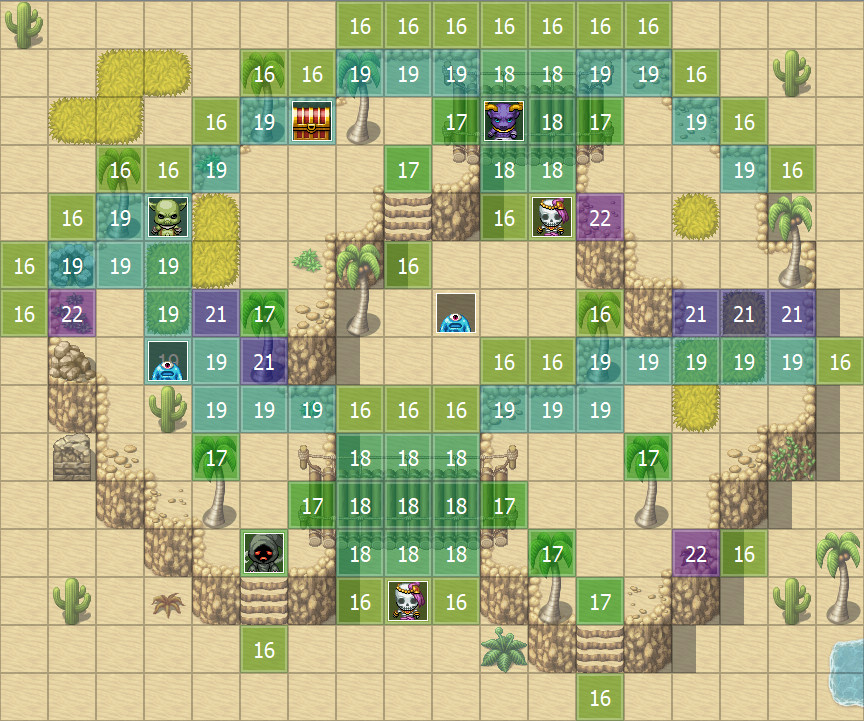
    • RegionID 16 = Underpassage (this will set player to lower ground)
    • RegionID 17 = Overpassage (this will set player to higher ground, also draws B-E layers)
    • RegionID 18 = Cover tile for tiles B-E (transparent background)
    • RegionID 19 = Autotile Cover for A tiles (opaque background)
    • RegionID 20 = Always block passage (for blocking ie. door way sides)
    • RegionID 21 = Block passage AND draw tiles ABOVE, if on lower floor
    • RegionID 22 = Block passage to underpassage region (can be used to fix RMMV core "bug" where passable tile, like "bush", allows passage over cliffs)
      is_this_bug.png
    Example outdoors
    Credits to PandaMaru for bridge tiles.
    passages_outdoors.png

    Example indoors
    passages_indoors.png

    3. Try it

    Video on YouTube (tutorial and demonstration)


    All OcRam -plugins now available at ocram-codes.net

    Please read:
    Terms of Use

    Latest version: Download from here

    All my plugins: Check 'em out!


    My (long-term) project
    banner.png
  2. Wow, this looks really amazing!
  3. mlogan said:
    Wow, this looks really amazing!
    +1 Yes, it looks quite amazing. Both:
    • In what it does;
    • but more importantly, in the very nice posting & pictures explaining what it does.
    Also reading the code, it looks well written, clear, concise & a reasonable amount of comments.

    ... Note sure if I could use it, though, due to commercial limitations ...
  4. This is so useful!
    I just re-did a bunch of my maps with this and tried to break it in any way possible, but as long as the regions are set up correctly it always worked for me!
  5. I get a crash at the begin:

    Spoiler
    Unbenannt.JPG

    Maybe you get it with this screenshot.

    But a very needfull plugin, i think.

    EDIT: Okay i found the troublemaker Plugin :D Its SAN_Analogmove plugin. If i dont use it, than it works :)
  6. Styx92,

    Can you please post a list of all your plugins you are using?

    Also can you start this with a new project, and see if you can reproduce the crash you are seeing?
    Thanks,

    Joy Diamond.

    NOTE: You can edit your previous message, easier for others than creating a new one. Thanks!
  7. styx92 said:
    I get a crash at the begin:

    Spoiler
    View attachment 77585

    Maybe you get it with this screenshot.

    But a very needfull plugin, i think.

    I took a look at the line 488 and the problem is that current scene (or it's childerens) are not initialized. As Joy Diamond asked I think I need plugins that are in use. Also the plugin order or updating this plugin (to v1.03) may solve this.

    EDIT: I managed to reproduce same error! I will try to make this plugin compatible with 'SAN_AnalogMove' -plugin. Thank you for the information.

    EDIT2: SceneManager.isCurrentSceneStarted() -function returns always false (even if _tilemap is ready), but only when using SAN_AnalogMove -plugin. I think that needs to be fixed first...
  8. Kudos both for the script and the detailed, concise description. You, Sir or Madam, deserve a cookie.
  9. Is there a way to solve this problem?
    Image
  10. Oh, cool! I'm likely going to be using this in every game I make.

    [mod]@styx92 and @OcRam Red, like blue, is a reserved color for moderators. I've edited it out of your posts.[/mod]
  11. wrap said:
    Is there a way to solve this problem?
    Image


    Yes, there are solutions (actually several ways to do it), but I think I'll implement new RegionID 21 (where passage is blocked AND tiles are draw above player). I will provide an example when new version is released (maybe later this week). Laters!

    Edit: Actually this was easy peasy and it's ready already. ENJOY! :)
  12. How I’ve longed for something like this, if only I knew JavaScript at all.

    Anyway, my eternal thanks, this pink marble is officially in love with you.
  13. I was late for noticing.
    You responded quickly and perfectly. OcRam, thank you very much!
  14. Really nice Plugin :)

    I found something: If you stay on the bridge and u use the touch interface from a smartphone, than u can jumpt from region tile 16 to region tile 17.

    Am I to stupid to use it right or is it like this?
  15. Rweinegger said:
    Really nice Plugin :)

    I found something: If you stay on the bridge and u use the touch interface from a smartphone, than u can jumpt from region tile 16 to region tile 17.

    Am I to stupid to use it right or is it like this?

    Thank you for your intrest towards this plugin. If I understood this correctly; please check that tileset passages are configured correctly (example below).
    bridge_support.png

    Please let me know if this was the answer you were looking for.
  16. Hey, I have a little problem with this plugin. I use this bridge as shown below and walking under works just fine but when you walk above it there is a wierd bug with the railing. I would like it to show above the player and not below. Hope you understand!

    CzZDpMw.png
  17. Nicke said:
    Hey, I have a little problem with this plugin. I use this bridge as shown below and walking under works just fine but when you walk above it there is a wierd bug with the railing. I would like it to show above the player and not below. Hope you understand!

    CzZDpMw.png

    Thank you for the message. Your post is clear and well explained. I'm fixing that to next release (v1.06 - maybe later this week).

    Edit: New version (v1.06) is now released where this issue has been fixed (hopefully). Please let me know if this patch fixed or didn't fix the problem :)
  18. Nicke said:
    Hey, I have a little problem with this plugin. I use this bridge as shown below and walking under works just fine but when you walk above it there is a wierd bug with the railing. I would like it to show above the player and not below. Hope you understand!

    CzZDpMw.png

    I’ve run into a similar issue, but I just countered it with Above Player events. It works perfectly, although it would be better to have a built in alternative. If you are stalling your map making due to this, I recommend using events until it’s fixed.
  19. OcRam said:
    Thank you for your intrest towards this plugin. If I understood this correctly; please check that tileset passages are configured correctly (example below).
    View attachment 78442

    Please let me know if this was the answer you were looking for.

    You had right! I'm Sorry xD
    But I'm wondering why before it works with the arrow keys, but when I use the Mouse then it won't work?
  20. Rweinegger said:
    You had right! I'm Sorry xD
    But I'm wondering why before it works with the arrow keys, but when I use the Mouse then it won't work?

    I think mouse/touch input is handled differently (if you press arrow key, only next tile passage is checked. But when you click somewhere on the map several tile passages are checked).