Hello fellow RPG Makers!
This update is mostly about OcRam Weather System and Title Screen (while there are some other important minor updates too)!
OcRam_Weather_System v1.05 has now TITLE WEATHERS and includes following pre-built weather effects:
- "Fireflies" each fly will have it's own "move route" and they blink to communicate!
- "Fireworks" to celebrate occasions - even if this ain't weather it's part of weather system now :)
- "Wind" to have debris blowing at the players face!
- "Falling" leaves for example?
- "Raising" magical field / bubbles / hot air lanterns for example
- ...And of course 3rd party plugin commands are still available (but remember that 3rd party weathers might not work in battle/title screen)
One really simple and mandatory update was "
Weather Conditions" for the dynamic weathers. Example fireflies at day time? Or sunrays at night? Or player just havn't progressed to the point where fieryrocks can rain from sky!?
In demo project there's also an example how use
OcRam_Layers to create "
sandstorm" effect.
This update also includes not one, but
TWO brand new title screen plugins! OcRam_Title_Shuffler (with customizable layers and random weathers)! When developing this plugin I just stared at title screen several minutes (maybe hours?! Am I crazy?) just for fun to wait what location comes next and how is the weather in there!
:)
Full video 04:01 - Includes plugin parameters
Plugin in Action - Skip boring stuff
OcRam_Title_Info will be my X-MAS gift for everyone (therefore free also for commercial use), this plugin will allow you to show various information in title screen.
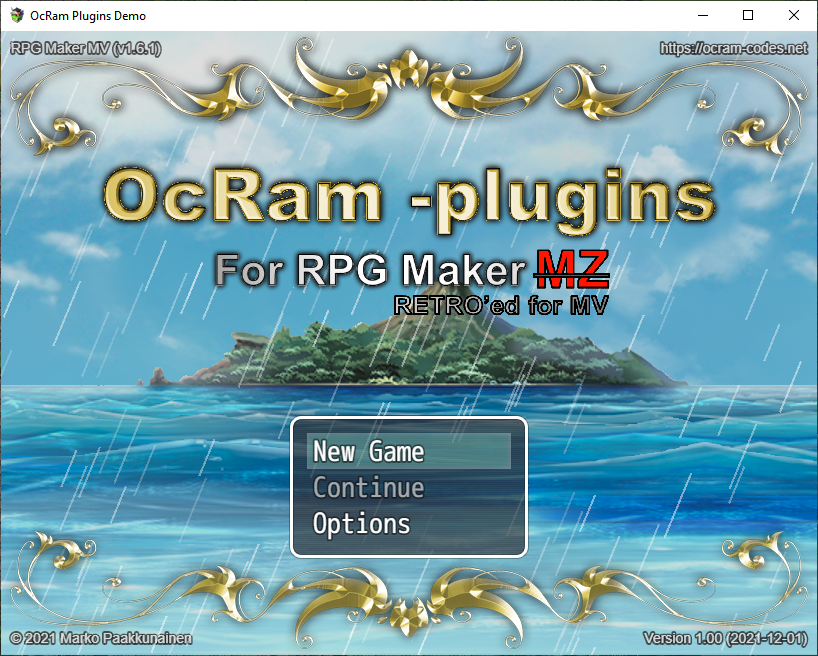
(Screenshot from RETRO demo project)
Best way to see and learn how OcRam -plugins work is studying demo project thus OcRam MZ Demo and OcRam MV RETRO projects has been also updated! Demo projects and all OcRam -plugins are downloadable from:
https://ocram-codes.net
REMINDER: When updating (or installing) ANY plugins, please remember to backup your project first!
If you are about to update any OcRam plugin please remember to update all OcRam plugins at the same time.
Parameter re-validation is required in some cases (especially new parameters) and it is done by clicking parameter then click "OK" button. Example: OcRam_Core "BGS2/3 Title Volume" is one of these parameters.
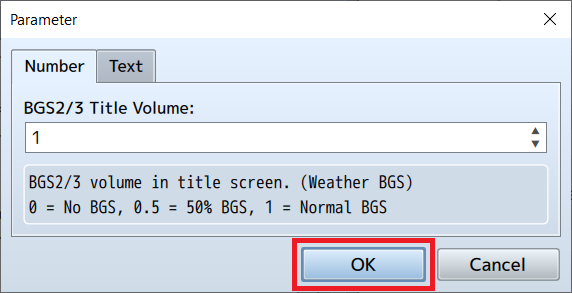
If you are encountering problems with update and you are not sure which parameters should be revalidated do it for ALL parameters or re-install the plugin.
More details inside this spoiler!
OcRam_Core v1.12
- New plugin parameter "Use spriteset in title" NOTE: Most of the OcRam title related stuff requires this parameter to be set "ON"
- OcRam.scene().isBattle() // Returns true if battle scene
- ImageManager.loadOcRamBitmap // Added onload callback
- getGameObjectId() // bug fix for airship/boat ids
- New plugin parameter to adjust BGS2/3 volume in title
OcRam_Battle_Core v1.01 - (no RETRO support yet)
- VisuMZ Battle Core compatibility patch. (NOTE: All overlapping features such as: Action Seq., sort by Y-axis and all popups at once will be disabled in OcRam_Battle_Core if VisuMZ Battle Core is used)
OcRam_Battle_Troops v1.00 - (no RETRO support yet) - No changes
Time_System v1.11
- Compatibilty patch with OcRam_Weather_System v1.05!
- OcRam.Time_System.dayPhase() 1:Night 2:Dawn 3:Day 4:Dusk
Weather_System v1.05
- New built-in weather types "*Fireflies", "*Fireworks", "Wind right", "Wind left", "Fall" and "Raise"! (customizable speed, rotation and particle bitmaps (* fireflies and fireworks has fixed parameters))
- Now weathers may have totally custom conditions !!! (only at night time/certain var must be something etc... eval is performed only for non-forced weathers)
- NEW feature added "Title weathers"!
- Fixed irrelevant warnings if dynamic weather plugin command had no arguments.
- Added snowflake rotation to make it "float with wind".
- WHEN UPDATING - PLEASE REMEMBER TO UPDATE ALL NEW PLUGIN PARAMETERS!
Movement v1.07
- Doesn't check diagonal start for autorun and parallel events anymore (prevented event start...)
Events v1.05
- Fixed some bugs in walkStairsDown/Up functionality.
- New event comment <no_autofill> to disable autofill feature while on this event page.
Followers v1.06
- Toggle actors > Character emotions works now as intended.
Audio v1.02 - No changes
Lights v1.11
- Map lights & battle lights are now public layers in scene spriteset (to allow fireflies/fireworks above light layer)!
- Fixed bug where terrain lights plugin commands weren't cleared after new game or load.
Layers v1.04
- Compatibilty patch with OcRam_Weather_System v1.05!
- Support for even more dynamic title layers! (used with OcRam_Weather_System for example)
- OcRam.Layers.findLayer(img, z) returns a layer for you to edit it's parameters (example scroll, loop etc...)
OcRam_Title_Info - NEW
This plugin will enable you to show various information in title screen! Example: Game version, Copyright info, web address and even allows JS eval and clickable URLS!
OcRam_Title_Shuffler - NEW
How cool would it be to show different locations from the game world in title screen?! OcRam_Layers and OcRam_Weather_System is highly recommended to utilize full potential of this plugin!
Indicators v1.03
- More font alignment issues fixed.
- NEW plugin parameters indicator text "Y offset" & "X offset"
Passages v1.12
- Fixed bug when airship was higher level even if placed on "underpass" region id (16 by default).
NPC_Scheduler v1.02 - No changes
OcRam_Star_Tile_Fix v1.03 - No changes
OcRam_Local_Coop v1.03 (pre-released 2021/10/26 - No changes after that)
- OcRam.Local_Coop.assignDevice(device_index) to assign new player via JS!
- NEW JS call: setForcedDevices(true/false) - Forces current devices to all players (join/drop are disabled)
- NEW plugin parameters "Init devices" and "Force devices" to assign (and force) devices to players! (Credits to @Ithariam )
Hi, is it possible to mark a certain coordinate on the screen where I can get a light? For example, I want to fix the light on a moon (and also stars) that are at the top, in the sky of a parallax background, and stay there even if the player moves, is there how?
Thank you for the message,
I'll check this before next update, but if lights should be behind tileset (like parallax image) - it might be tough one... But definitely would be cool effect to have!