OcRam - Lights plugin (MZ/MV)

● ARCHIVED · READ-ONLY
Started by OcRam 300 posts Page 1 of 15 View original ↗
  1. Introduction
    This plugin will add 1 layer for light sources. You may use event comments or plugin commands to control different type of light sources. Event comments are processed PER page so you can easily control different types of light sources on same event. You may have multiple different light sources declared in 1 event page!

    Light sources for player, followers and events are carried over save/load. Example if you change light source via plugin command it will be saved on game save - and when game is loaded - saved light data will persist!

    NOTE: If you use OcRam_Local_Coop/OcRam_Time_System make sure they are up-to-date and imported BEFORE OcRam_Lights -plugin.

    Here's what you need:
    1. This plugin
    2. Configure plugin parameters as you like
    3. Add event comments/plugin commands

    Tutorial and demo video


    Tutorial and demo video for v2.01 extensions


    Multiple lights per event (Credits to EthanFox)
    NOTE: Officially available only via EVENT comments!
    (or advanced JS - need to know basics at least)

    Event page setup for multiple lights and cycling colors
    Create some crazy looking stuff with kill switch on it!
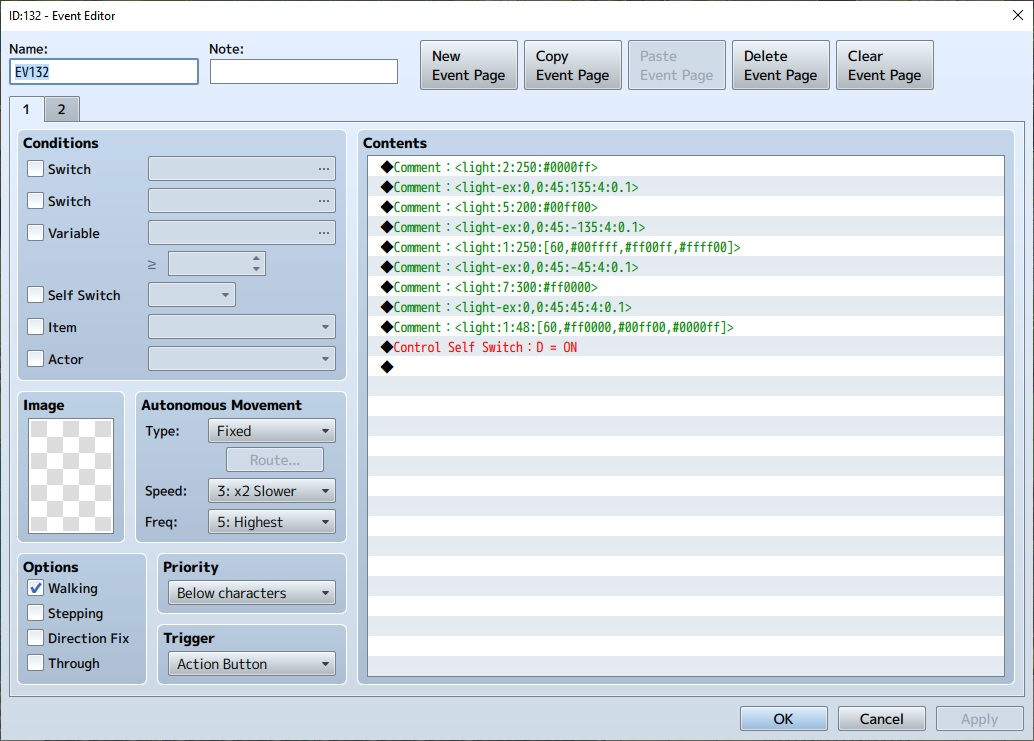
    multiple_lights.jpg
    On page 2:
    Trigger: Action Button
    Condition: "Self Switch D"
    * Comment * <light:0>
    Control Selft Switch : D = OFF

    Use JS conditional check to check in parallel event page if player is in radius.
    event_page_light_radius_check.jpg

    When player is not in event light radius.
    light_radius_check_not_in_sight.jpg

    When player is in event light radius.
    light_radius_check_in_sight.jpg

    Vibrant colors and new notation (light-ex)
    Vibrant colors + dynamic light cones with angle and possibility to rotate x degrees per frame!
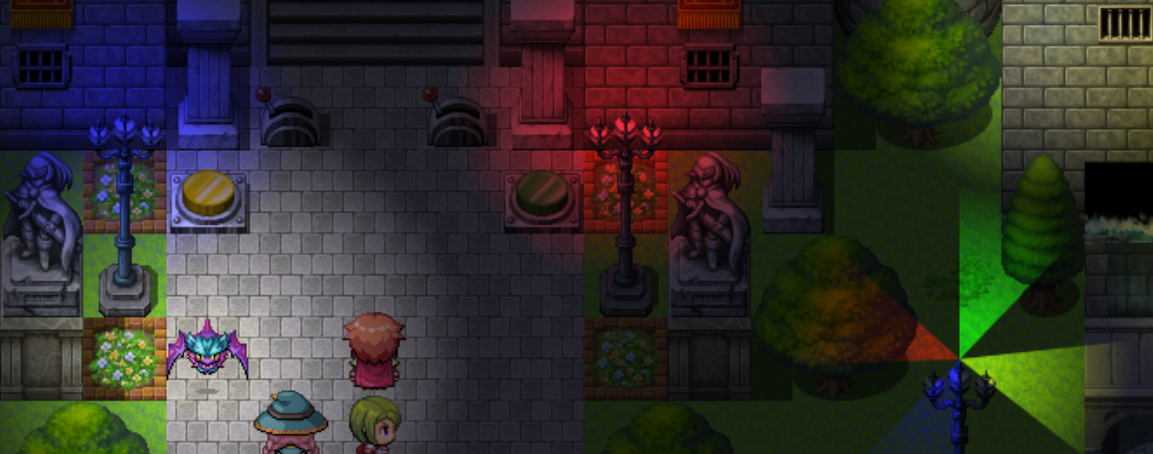
    lights2_vibrant.png

    New notation technique will give you possibility to combine new parameters with existing light types!
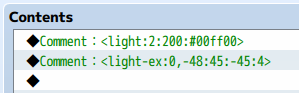
    lights2_light-ex.png

    All OcRam -plugins now available at ocram-codes.net

    Please read:
    Terms of Use

    Latest version: Download from here

    All my plugins: Check 'em out!
  2. perfect, cant wait to try it out!
  3. I'm trying to get it to work in a blank project, but nothing happens.
    Here's a screenshot:

    Capturar.JPG
  4. miani said:
    I'm trying to get it to work in a blank project, but nothing happens.

    @miani

    EDIT: So I found out why, it must be similar to terrax lightning where you have to control the background tint with the plugin first. So use ocrams 'light_bg' plugin command to set the background tint then you can use the various light comments/plugin commands.

    EXAMPLE: Make an autorun/parallel page that runs something like this in a plugin command first:
    Code:
    light_bg #ffaa80ff 12
    Your light comments and plugin commands should then begin working!
  5. This is excellent!
    Is the demo project available?
  6. bazrat said:
    @miani

    EDIT: So I found out why, it must be similar to terrax lightning where you have to control the background tint with the plugin first. So use ocrams 'light_bg' plugin command to set the background tint then you can use the various light comments/plugin commands.

    EXAMPLE: Make an autorun/parallel page that runs something like this in a plugin command first:
    Code:
    light_bg #ffaa80ff 12
    Your light comments and plugin commands should then begin working!

    BG tint is indeed required because it's the place all light sources are drawn with globalCompositeOperation = 'lighter'. And tint should called only once because plugin itself handles the tint fading. If you use it in parallel process make sure BG tint is called only once, otherwise it may cause some lag/fps drop.

    RunePotion said:
    This is excellent!
    Is the demo project available?

    I'm working hard ATM to make release for my demo project. But I have to decide which plugins to release before that and fix some minor compatibility issues between few plugins.
  7. Hey there @OcRam , wanted to bring up a screen tear issue we are having atm with this plugin. When we use shake screen, the edges of screen(specifically the left and top edges) flash a white line for a second.

    MV version: 1.6.2
    Screen resolution: 1280 x 720

    Video:
    Spoiler


    The first 5 seconds of video I'm using the normal screen shakes through the event commands, it shows the white line on the left edge of screen. After 5 seconds into the video, I'm using Theo's ShakeScreen(https://theoallen.itch.io/rmmv-screenshake) plugin and it shows a white line on top edge also.

    Hopefully there is a fix or a work around I don't know about. Thanks!
  8. bazrat said:
    Hey there @OcRam , wanted to bring up a screen tear issue we are having atm with this plugin. When we use shake screen, the edges of screen(specifically the left and top edges) flash a white line for a second.

    MV version: 1.6.2
    Screen resolution: 1280 x 720

    Video:
    Spoiler


    The first 5 seconds of video I'm using the normal screen shakes through the event commands, it shows the white line on the left edge of screen. After 5 seconds into the video, I'm using Theo's ShakeScreen(https://theoallen.itch.io/rmmv-screenshake) plugin and it shows a white line on top edge also.

    Hopefully there is a fix or a work around I don't know about. Thanks!

    Thank you for the message,

    I'll see what I can do about this.

    ATM light plugin draws foreground layer to fit only screen (where light sources are drawn). I need to test how big impact it would have on performance if it would be drawn to whole map... Other way would be to add new plugin parameter 'BG margin' this would draw foreground layer xx pixels over the screen (this shouldn't have much impact on performance).
  9. Latest version - v1.01 (released 2019/06/21)
    • Using OcRam_Time_System without actual JS file doesn't give error anymore
    • Added 'Viewbox margin' parameter to counter shake screen 'white line' issue
      Thanks for @bazrat for reporting this issue!
  10. OcRam said:
    Latest version - v1.01 (released 2019/06/21)
    • Using OcRam_Time_System without actual JS file doesn't give error anymore
    • Added 'Viewbox margin' parameter to counter shake screen 'white line' issue
      Thanks for @bazrat for reporting this issue!
    Works like a charm now, thanks!
  11. Okay, so I messed around with the plugin some more.

    bazrat is right--you really need to set the background tint in order for it to work. And you really need to set all 8 codes in the color, otherwise it'll crash. That's what I was doing wrong. I wasn't setting the alpha code. Once you do that, the plugin works quite seamlessly and unlike other lighting plugins, you have more control over your lighting features (which I appreciate).

    I'm going to mess around with it some more and if it works great for my game, I'll be sure to leave a donation to you for your hard work.
  12. rue669 said:
    Okay, so I messed around with the plugin some more.

    bazrat is right--you really need to set the background tint in order for it to work. And you really need to set all 8 codes in the color, otherwise it'll crash. That's what I was doing wrong. I wasn't setting the alpha code. Once you do that, the plugin works quite seamlessly and unlike other lighting plugins, you have more control over your lighting features (which I appreciate).

    I'm going to mess around with it some more and if it works great for my game, I'll be sure to leave a donation to you for your hard work.
    Yea something else that is really cool about ocrams plugin is its compatible with terrax lighting (just make sure terrax is above ocram). You can literally have 2 lighting methods working within same map lol. This is great cause terrax has options ocram doesnt have (like lights associated with terrain tags) and ocrams has cool methods that terrax does have (like lighting all same name events, more flexible lighting commands imo and the background layer isnt restricted to a radius).
  13. Hey again OcRam, found another bug with this plugin that actually crashes the game.

    I was able to narrow it down, if you don't set a light_bg plugin command at all and save game, when you go to load the game it crashes. Now, if you set a light_bg prior to saving then save/load it works as usual(I had one try where I set light_bg, then map transferred to another map that doesn't set a light_bg and was still able to load game normally).

    So a quick fix is in the autorun/parallel at start of game run a ```light_bg # duration``` plugin command to whatever tint you want at the time. It would be nice though to have it not crash in case dev's are unaware and forgets to set an initial light_bg for whatever reason. One possible solution would be to have a parameter setting the initial light_bg?

    MV: 1.6.2

    CRASH with error in new project:
    Spoiler


    FIX that worked in new project:
    Spoiler


    Thanks!

    EDIT: Tried the fix in our actual project that was crashing and it did not work. This error is popping up instead:
    Spoiler
    dERQvVr.png
    UD8rgpK.png
    62xmrAx.png
  14. Thank you for the report and work you have done for this. I will fix these ASAP.
  15. Is this work for Orange Overlay? and also Mog time system too ^_^

    I used MV 1.5.2 ^_^
  16. DarkHunter said:
    Is this work for Orange Overlay? and also Mog time system too ^_^

    I used MV 1.5.2 ^_^
    Thank you for the message,

    This plugin supports OcRam_Layers and OcRam_Time_System plugins. If any other layer / time system plugins are used, can't guarantee that they will work with this plugin.
  17. OcRam said:
    Thank you for the message,

    This plugin supports OcRam_Layers and OcRam_Time_System plugins. If any other layer / time system plugins are used, can't guarantee that they will work with this plugin.

    Ok, Thank you sir!. Please continue work this plugin ^_^
    As i support you :)
  18. Hello, when did give us to your demo? :rhappy:

    It's because we need know about "event common" like as your video :)
  19. Hello,

    At last found time to do these...

    Latest version - v1.02 (released 2019/08/03)
    • Undefined background colors shouldn't crash the game anymore
    • Save files saved before using this plugin should now load properly
  20. Thanks OcRam for the quick fixes.

    Is there anyway that you can add to the plugin if you don't have the transparency #'s in the plugin commands/comments that is defaults to ff? Because the hex pickers usually only give 6 digits and what ive come to realize is its mostly not having the transparency digits. Its more a quality of life thing, but when I first started it did confuse me, because it throws an error if you dont have all 8 digits. So it might help someone that are taking a look at your plugin for the first time :D

    EDIT: also i wish the color went out further in the light radius, the center is really colorful but then half way through its faded out.

    i feel like the color should be most of the radius fading out as it gets closer to the edge, as it is now it looks like it changes to normal ffffffff color about half way and then fades out

    Example using #DA4D1EFF for example
    Spoiler
    rHEbPgH.png