Im pretty sure that the line that needs to be edited is 71 of Window_ChoiceList. Unfortunately I have no idea how to make or edit scripts. I tried to do it by myself but I ended up with this:
Could You guys help me out with editing Window_Choicelist so all choices are centered in the window? I want it to look like here:

Im pretty sure that the line that needs to be edited is 71 of Window_ChoiceList. Unfortunately I have no idea how to make or edit scripts. I tried to do it by myself but I ended up with this:
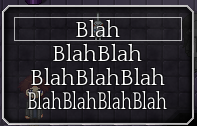 The longer the text the more squished and ?transparent? it is.
Im pretty sure that the line that needs to be edited is 71 of Window_ChoiceList. Unfortunately I have no idea how to make or edit scripts. I tried to do it by myself but I ended up with this: