Mythos: Reawakening Diagonal Movement

● ARCHIVED · READ-ONLY
Started by mlogan 10 posts View original ↗
  1. Hi Jesse! Trying to sort through how to use the characters with more animations. I've installed Galv's recommended plugins and have been working through how to set up character sheets for them. While I've overall gotten them to work, I've noticed that the diagonal walking and running sheets are not compatible with the Diagonal Movement plugin. What I mean is that the direction they are facing for each row is not the direction Galv's plugin uses. You can see here how your characters face different directions than Galv's template, which results in the character not facing the direction he is walking.
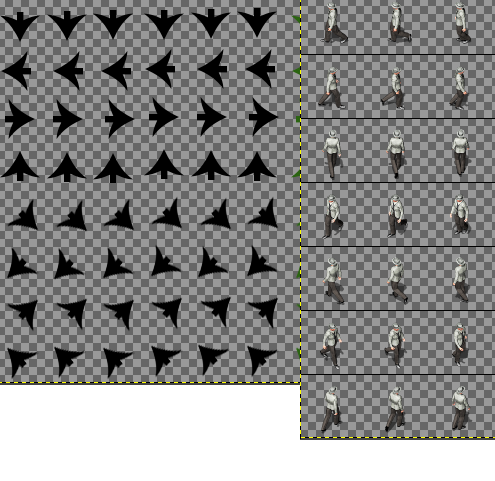
    mythos.png

    Did you intend for this to be used with a different plugin or will I need to go through and edit all character rows to face the correct directions to be used with this plugin?
  2. There is a simple solution to this. Create a blank (with transparency) sheet with the width and height of the columns and rows of your sprite sheet
    in your favorite graphics editor - (gimp, photoshop ect) and then also open up your (pvgames spritesheet) along with galv's directional sheet.
    With your 3 tabs open just follow the way galv has his setup and just copy and paste the same movements from your pvgames spritesheet into your blank one - done. With any plugin or script sometimes the creator has (his or her) own way or formatting sprites according to the way thier scripts/plugins are written - but commonly there is a sort of 'universal' format when it comes to animating sprites in rpg maker, it's been that way since rpg maker xp.
  3. Yes, I’m very aware that this can be done, however, if there is a much less time consuming solution, I would prefer it. Which is why I was hoping Jesse could chime in and state whether these were intended to be used with a different plugin or if it was an oversight.

    In addition, after speaking with Dekita, Galv’s plugin should be able to be modified to work with the sheets as they are, which is much preferable to editing every sheet - a tedious task. But again, I’d like to hear from Jesse first.
  4. @mlogan - The reason I made the animations on different sheets is because there are many plugins (and different pieces of software) that all do things different, and I figured having the individual animations broken up would allow for the most flexibility for the most users. If I made it so that each character sheet was set up for Galv's plugins specifically, I would hear no end to the questions as to why there are not individual sheets for walking, or running, or whatever else :) For Galv's plugins, as far as I recall, the diagonal/running stuff only tends to work for the main character (I think? I don't think I ever was able to make NPCs utilize diagonals or running without some workarounds). For that, I use this sheet as my go-to template:

    aK9VzqF.png

    You are welcome to utilize it as well, it is all laid out for Galv's plugins (idle, walking, running, diagonals for all three).

    As for the directional facings - as much as I have come to enjoy Galv's plugins specifically for MV, the directions the characters are facing on my sheets have been the same since the resources made for VX/Ace, and have remained consistent since (which was based around a different script at the time, but this was years ago). This pack, although distributed by Degica, is not specifically just for RPG Maker, and pretty much all other software out there worth a dang allows users to easily define their own spritesheets/animations (making this a non-issue, so I guess you could file it away as an oversight?).

    So to make the character work for Galv's plugin specifically, you would need to swap the diagonals around a bit, a few seconds of copy/pasting, and you should only need to do it for the one character that you control for the game (unless you have multiple controllable characters, in which case each of those would need their diagonals swapped).

    And indeed, Dekita can also probably swap it in the plugin itself, because that dude can do pretty much anything! :)
  5. @Jesse - PVGames Thanks for all of the info! I'm sure it will be helpful not only for myself but others as well. And I hope you didn't think I was complaining - I just wanted to make sure that I wasn't missing something before spending the time changing the spritesheets to work with this plugin. I'm pretty good at overlooking the obvious. :p

    And yes, between Dekita's knowledge and my testing, we were able to work out how to change the code to work with your diagonal spritesheets.

    For anyone else wondering how to do this, open Galv's Diagonal Movement Plugin and find this piece of code:
    Code:
    Galv.DM.diagRow = {
        3: 0,
        1: 1,
        9: 2,
        7: 3
    };

    and change it to this:
    Code:
    Galv.DM.diagRow = {
        3: 2,
        1: 0,
        9: 3,
        7: 1
    };

    Thanks again Jesse!
  6. I iz de mastur!
  7. Lol, course you are. And thanks to you too.
  8. Wait like...the default animation sheets will work with no changes if you just edit that piece of code?
  9. Yes, the code in Galv’s plugin.
  10. That's awesome! Y'all are brilliant. Saves a ton of time editing spritesheets too.