MV3D - 3D rendering for RMMV with Babylon.js

● ARCHIVED · READ-ONLY
Started by Cutievirus 1560 posts Page 31 of 78 View original ↗
  1. Zekken said:
    So what is the usage of the bird. It's just a normal bird that fly and give a realistic environment, or the bird is a enemy?

    Movement script for looks, chase as enemy to start battle, only looks really.

    I mean what looks better, boring
    Boring


    or superior random movement that isn't even optimized for each type of animal.
    Better
  2. I need a way I will lock the camera rotation. From the plugin command Is there a way to do it?
    For example, this map used is a scene that is currently being played Which the player can not press to spin anything
  3. @KaYsEr so, I just had an idea for a separate plugin expansion... one just for touch input while in 1st person view, based on your post earlier.
    You see, SRD years ago released a plugin that allows fordetecting swipes on input. That means my idea would take that.
    So... by using swipes for up and down to adjust the pitch, and left and right to either rotate or strife, and allowing the developer to set the position and size of the left, right, down, up and center presses (center can be both up and action depending on if action would do something) just in case they want a part of the screen for touchable images.
    I'm going to do it now. SRD's Swipe Input plugin will be needed though...

    @palatkorn from the github page, probably help file too:
    mv3d rotationMode <mode>

    Set the keyboard control mode for rotating the camera.

    Modes:

    • OFF - Can't rotate camera with keyboard.
    • AUTO - A&D while in 1st person mode. Otherwise Q&E.
    • Q&E - Rotate camera with Q&E keys.
    • A&D - Rotate camera with left & right or A&D. Move with Q&E.
    mv3d pitchMode <true/false>

    Allow player to control camera pitch with pageup and pagedown.
    So.. yeah, use "mv3d rotationMode OFF" and "mv3d pitchMode false" I guess
  4. Actually I don't think those commands work any more. I actually forgot about those. I'll have to re-implement them. I'll work on an update real quick.

    Update 0.4.4.4:
    New plugin commands:
    mv3d allowRotation <true/false>
    mv3d allowPitch <true/false>
    mv3d lockCamera <true/false>
    Old commands rotationMode and pitchMode will act as aliases to allowRotation and allowPitch.


    allowRotation and allowPitch are intended to set keyboard control for certain maps or areas. For cutscenes you should use lockCamera. LockCamera doesn't change allowRotation or allowPitch, so when you turn it off they will retain their previous values.
  5. Flock of Harolds taking a break.

    Spoiler


    Here's the movement script if anyone wants it, probably last one I'll post, guide above and this 2nd example should mean you can do it yourself easily.
    CODE
    Code:
    Game_Character.prototype.RandomTree = function() {
        switch (Math.randomInt(5)) {
        case 0: case 1:
            this.moveRandom();
            break;
        case 2: case 3: case 4:
            this.moveForward();
            break;
        }
        if (this.terrainTag() === 3) {
            this.setStepAnime(true);
            var fly = new Game_Interpreter()
            fly.pluginCommand('mv3d', ['@e' + this.eventId(), 'elevation', '-0.5', '0.853']);
            this._waitCount = 60 - 1;
        }
    };
    
    Game_Character.prototype.TreeRandom = function() {
        switch (Math.randomInt(8)) {
        case 0: case 1:
        if (this.z <= 3) {
            this.Treeascend();
            break;
        }
            this.Treedescend();
            break;
         case 2: case 3: case 4: case 5: case 6: case 7:
        if (this.z >= 5) {
            this.Treedescend();
            break;
        }
            this.Treeascend();
            break;
        }
    };
    
    Game_Character.prototype.Treeascend = function() {
        var fly = new Game_Interpreter()
        fly.pluginCommand('mv3d', ['@e' + this.eventId(), 'elevation', '+0.3', '0.853']);
    };
    
    Game_Character.prototype.Treedescend = function() {
        var fly = new Game_Interpreter()
        fly.pluginCommand('mv3d', ['@e' + this.eventId(), 'elevation', '--0.3', '0.853']);
    };
    
    Game_Character.prototype.TreeFix = function() {
        if (this.terrainTag() === 3) {
            this.setStepAnime(false);
            this._pattern = 2;
            this._waitCount = Math.randomInt(300 - 180) + 180;
        }
    };

    To use it I use this.RandomTree(); followed by this.TreeFix(); as I can't get the stepping part to work in the same movement, did them 4x into a TreeRandom();. I turn it to pattern 2 because most of the birds look more landed at 2, but you could always change the index of the picture instead to a landed bird. For notetags I have it set to z(2), so that it doesn't add to its height whatever is below it but through off so it doesn't fly through walls. But z is still pretty bugged I think ATM. Set them to below and stepping, why below, I forgot why I set it to below.

    Spoiler


    Oh and for the trees set the top part to terrain tag 3, that's how they know what to land on. I use this for tileset settings.
    B,5,11:shape(cross),pass(o)
    B,5,12:shape(cross),height(2)


  6. When can I wait until the update I want is a conflict with the rmv-chrono-engine plugin?

    RMV – Chrono Engine
  7. @seaotter
    that engine is in conflict with a bunch of plugins too, for example Yanfly's Event Spawner. This plugin having a conflict is not special. In fact, it is a very minor one, yanfly's event spawner can cause a game breaking error.
    as I said to you earlier, this problem is caused by the plugin using the map's original coordinates to see where the animations will be shot from and to make them move on the screen, probably direction too if you moved the camera for the same reason. As you can see, the "missile" animations are the only real problem there, the hit events have their "hit" animation on them perfectly.

    To be honest, I think you are expecting too much wanting the plugin to be automatically compatible with everything you want to use out of the box. I did a couple of compatibility patches already and I can say this is not just a simple work.

    Not only that, you never mentioned earlier what plugin you were using, only showed a video with this same problem and expected a fix to come soon. It is like wanting a new controller for a videogame but not telling anyone if it is an xbox or ps4.
    I remember I specifically asked what plugin you were using that was having this problem and you ignored me.
  8. The plugin also introduces WASD-movement. Is there a way to turn this off? (or comment out a piece of code if needed)?
  9. @gRaViJa not really, since the plugin is made in separate files then put together in a way that also minimizes it...
    but if you wait a bit, I'm making right now a 1st person touch control plugin extension and then I'll work on my plans for an input remap one.
  10. Waterguy said:
    @gRaViJa not really, since the plugin is made in separate files then put together in a way that also minimizes it...
    but if you wait a bit, I'm making right now a 1st person touch control plugin extension and then I'll work on my plans for an input remap one.
    That would be absolutely awesome :)
  11. I just noticed on my project that - with a large, max-size map and a large number of event definitions that are intended to prevent backward access to certain building types (when they don't make sense e.g. with the front door for the default temple sprite copied to a character sheet to work properly with the plugin thereby reappearing after walking in from behind) - there's a nasty slowdown that affects basically everything. Not sure if it's the plugin or not with that big a map (a smaller one that doesn't yet have all its events and locations decided on is't doing this, and that's maybe just a quarter percent of completion) but I'd look into investigating this.

    EDIT: Forgot to mention that I'm working off my notebook system and not the main development rig as I'm basically snowed in to a certain sense of the definition while visiting with family. (Actually it's sub-zero wind chills, but the idea's the same without regard for that.)
  12. BreakerZero said:
    I just noticed on my project that - with a large, max-size map and a large number of event definitions that are intended to prevent backward access to certain building types (when they don't make sense e.g. with the front door for the default temple sprite copied to a character sheet to work properly with the plugin thereby reappearing after walking in from behind) - there's a nasty slowdown that affects basically everything. Not sure if it's the plugin or not with that big a map (a smaller one that doesn't yet have all its events and locations decided on is't doing this, and that's maybe just a quarter percent of completion) but I'd look into investigating this.

    EDIT: Forgot to mention that I'm working off my notebook system and not the main development rig as I'm basically snowed in to a certain sense of the definition while visiting with family. (Actually it's sub-zero wind chills, but the idea's the same without regard for that.)

    Well the game is naturally going to take a lot more to run in 3D
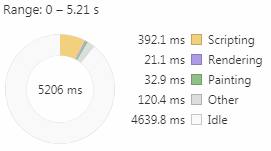
    No3D.png
    Without that plugin on in the demo map 7 with around 90 events.
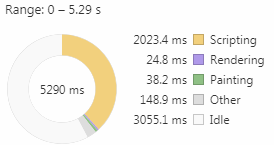
    35.png
    90 events on 7 with current update
    352.png
    Defaultish map 7 in demo with 35 events

    So if you had more events it would keep going, and they update at the same time so it would be even worse. Solution is to cut map smaller into more pieces or expect people to have a better computer than you tested with, I mean you shouldn't lag at all really, maybe I'll try spamming events until I lag and see how much it takes now.

    Ok I made a blank map 255x255 with only a floor and the chicken from demo with skip if cannot move turned on.
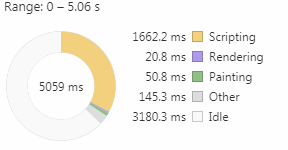
    200.png
    With 200 lag is better than 90 with weird tileset config.
    But with 400 I actually did start to lag slightly jittering between 56~60 FPS.
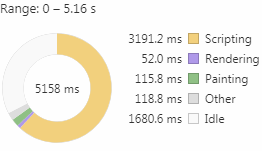
    400.png
    With 500 the lag was honestly the same, jittering between around the same numbers.
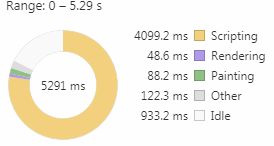
    500.png
    With 600 the lag was again the same but it took like a minute to enter the map so I thought it crashed.
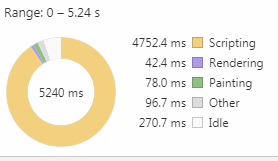
    600.png
    Not gonna test higher than that or I feel my computer would crash, already scripting nearly 24/7 at that point and definitely going to lag past that 0 idle. This is with a i5-2500k overclocked to 4ghz, probably lower end of CPUs nowadays.
    Couldn't stop myself from trying 700, lag was worse and it still took a minute to open, was jittering around 45~56 FPS and it felt like it was skipping frames.
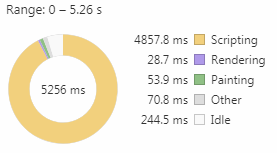
    700.png
    But this is nearly the same, but I don't know how it works anyways really, probably was skipping frames.

    800 it took even longer to open and I had 25~ FPS that gradually went up to ~40 when idle, moving it was around 30~, recording this video even less.
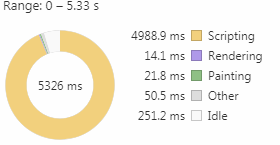
    800.png
    this is still the same so I know nothing about it.


    No more.

    Oh and I feel I should mention with 800 events on a 255x255 even the editor was laggy on that map or switching to it.
  13. As a tech-head myself I get that it can be taken into some rather extreme loads of that magnitude. But it wasn't the event load so much that as it is about the events themselves which I think could be rectified with a conditional load update (read: the game only processes the nearest set of events based on the directional radius of the player's location).
  14. Can you make it compatible with Galv's spritesheet plugins (Character Frames/Character Animations)?
  15. Hi guys!

    I bring you another video, showing the updates that have occurred since the last video shown here regarding the Environment System.
    It's the Smoothness and Battle update! As a result, the system gained more natural transitions between the phases of the day and also began to affect battles.

    Now I can say that the system is really ready, i just need to do the documentation to be able to release the demo here for you.

    Hope you like it!

  16. So I've been toying and trying a lot of things with the plugin and i think I know most of the ins and outs now. However, there are two thing I can't seem to get right:

    Screenshot 2020-01-18 at 13.51.56.png

    On the left, I try to make a house, and it almost works, except I have no idea how to copy the "roof edge", in game it looks like this (right) while it should be like the houses in the back. I'm pretty sure I used to same tiles:

    Screenshot 2020-01-18 at 13.53.43.png

    Secondly, the cliffs (see first screenshot again). This might be a more of a rmmv-thing than just the plugin. But I only used Tiled and parallax mapping in rmmv before, and whatever I try, I can't make the cliffs "layered" like in the demo. The pieces will always connect and become one cliff.

    Anyone here that can help me on my way? :)
  17. @gRaViJa
    The roofs, are actually an upper tile on the D tab. They are put over the original and have a short height and roof as sides, so you don't notice on the editor.

    The hills, the appearence of the top is set through shift-mapping, it is not really hard, there are a few tutorials explaining around, and the height is set through regions, the R tab. Their settings are done through the plugin parameters.
  18. gRaViJa said:
    So I've been toying and trying a lot of things with the plugin and i think I know most of the ins and outs now. However, there are two thing I can't seem to get right:

    View attachment 131435

    On the left, I try to make a house, and it almost works, except I have no idea how to copy the "roof edge", in game it looks like this (right) while it should be like the houses in the back. I'm pretty sure I used to same tiles:

    View attachment 131436

    Secondly, the cliffs (see first screenshot again). This might be a more of a rmmv-thing than just the plugin. But I only used Tiled and parallax mapping in rmmv before, and whatever I try, I can't make the cliffs "layered" like in the demo. The pieces will always connect and become one cliff.

    Anyone here that can help me on my way? :)
  19. Waterguy said:
    @gRaViJa
    The roofs, are actually an upper tile on the D tab. They are put over the original and have a short height and roof as sides, so you don't notice on the editor.

    The hills, the appearence of the top is set through shift-mapping, it is not really hard, there are a few tutorials explaining around, and the height is set through regions, the R tab. Their settings are done through the plugin parameters.
    Thanks about the roofs, should work fine from now on. For the cliffs: I tried shift-clicking, but it still doesn't work for me. i'll look for a tutorial. I do know about the regions setting the height :)
  20. When I initially load the demo it is 2d. I talk to the tutorial fairy, tried all 3 views, but no 3d.

    I thought I might need to update my editor from 1.52 to 1.62, but a moderator indicated that should not affect this.

    Is the demo setup to be 3d off the bat, or do I need to do something?

    Thanks =)