MV - MV Nova Lighting Plugin (For MV and MZ !!!)

● ARCHIVED · READ-ONLY
Started by KillerGin 164 posts Page 5 of 9 View original ↗
  1. PLUEVNR said:
    Hey, great plugin from what I've seen so far (haven't tested it yet, will do very soon)

    Is it possible to create a light beam with it ? like going from a source to a device with an angle and a range.
    If not, are you planning to implement it ?

    Other question, is it possible to change the width of the cone ?

    Thanks

    Hello, Im about to post an update to the help me file.

    Its possible to change the length and width and cones.

    There are no plans to implement a light source besides points and cones which is already implemented.
  2. @jcruise

    I updated the help me file to much.... better. lol

    Let me know what you think.
  3. KillerGin said:
    Hello, Im about to post an update to the help me file.

    Its possible to change the length and width and cones.

    There are no plans to implement a light source besides points and cones which is already implemented.
    Thanks !
  4. PLUEVNR said:
    Thanks !

    And the download and the help me file has been updated.Check the original post, the download, or the plugin for the updated Help me file.
  5. KillerGin said:
    And the download and the help me file has been updated.Check the original post, the download, or the plugin for the updated Help me file.

    Great! It definitely cleared some things up for me.
  6. Hello again,

    I'm having some trouble using your plugin and I don't understand well the help file :/


    First of all, how to de-activate the light around the player by default ?
    When I start the game, it's ON and I don't want to.

    I want the light to be ON only in certain maps (especially caves). How do I do that ? If I understood correctly I have to put a Light radius 150 #a25600 somewhere but I don't understand where.

    I want the map to be very dark but not in the radius of the player's light. But when I use the tint screen default command, it's way too dark and you don't see anything in the player's light radius. If I use the plugin command 'Tint set #333333' it doesn't change anything about the tint screen, like if the plugin command wasn't read. What am I doing wrong ?

    Sorry for these dumb questions as it seems to be the basics but I'm searching solutions for many hours now and I don't find any...

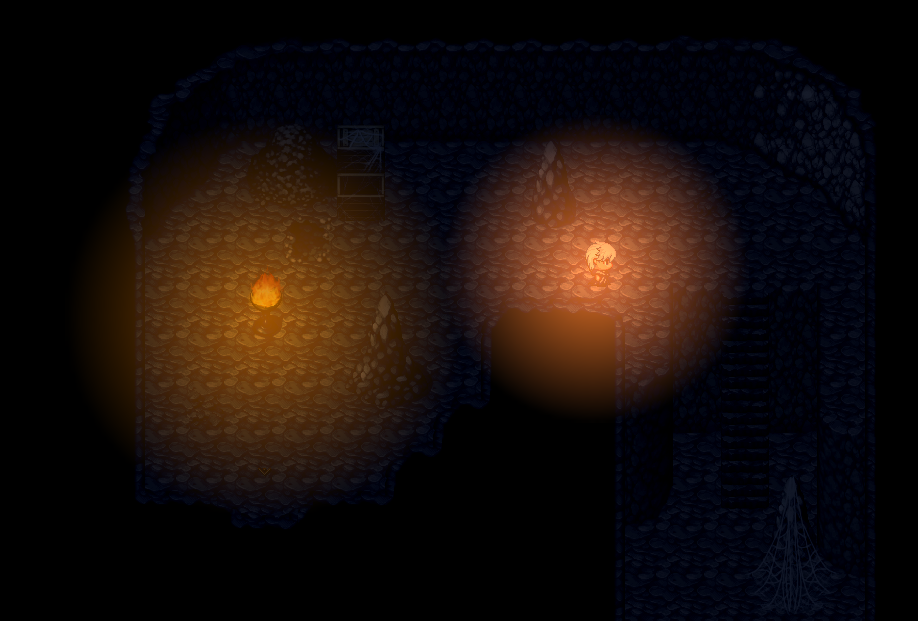
    edit : I fixed the tint screen for the cave maps but the light sources are not bright enough. (see screenshot)
    1602104171511.png
    How can I make it so it's bright near the light sources and dark (like it is actually) around

    Other issue, when I transfer to my outdoor map I'd like to reset the Tint set so it uses my Day/Night event Tint Screen default commandbut the transition isn't smooth during night time. It becomes light (just like in day time) and then slightly becomes darker.
    Is there a way to make the transition smoother ? Or do I have to replace all my Tint Screen commands by your Tint set plugin command ? If I do so, will it be smooth ?

    And finally (for the moment), when I'm in my outdoor map (parallax map 50x80) I have FPS drops (from 60 to 30) with your plugin ON and I don't with it OFF. Any ideas ?
  7. Hello,

    /////////////////////////////////

    To deactivate the light around the player by default, just call the player light calls.

    For example:

    Light radiusgrow 0 #a25600 (you can change color to anything you want). (call this in an event)

    The 0 is the magic number.

    ///////////////////////////////////

    You should make an Autorun for every map that corrects the lighting.

    So, if its outside and you dont want light, turn the lights off.

    If inside, turn the lights on.

    So basically every map has an autorun that corrects the lights.

    This is what I am suggesting in the write up.

    Sorry, I didnt get a chance to make a new video, the old videos are ok, but when I make the new ones, I will erase the olds ones.

    ///////////////////////////////////

    I cannot see the pic. But if the lights are not bright enough, check the intensity. If you are not altering the intensity then use a brighter color or just use awhite light #ffffff.

    White lights in default Nova are way too bright and I suggest lowering the intensity to .9

    so: Light radius 200 #FFFFFF -1 .9 (no ID, so on by default)

    if you are using Terrax Legacy lighting, I would not mess with intensity

    so: Light radius 200 #FFFFFF (no ID, so on by default)

    ///////////////////////////////////

    The set up really depends on how you are coding it...... you may be making the mistake of setting it to day time before you set it to the correct tint. I cant see the code so I am not sure. You can set up the lights so they dont go back to day before going back to a correct tint.

    ///////////////////////////////////

    Well, parallax and lighting engines can be costly. Rest assured Nova lighting is the lightest, if not one of the fastest and most efficient lighting solutions there are. If you are using any parallel events to control light (I dont use any parallels) it will slow your computer down. (Use autoruns and Common events to correct lights, NO parallels). Im not sure how powerful your computer is but based on your specs having parallaxes and Lights may be too much. (size of maps, number of events, number of scripts, number of parallels, all play a role in your computers FPS)

    ///////////////////////////////////

    Oh, and if you want to see a demonstration of nova lighting in action, look no farther than my game Killer Gin. I have a free demo link on STEAM (its on the far right side of the page I believe, or you can download the demo in ITCH). Once you make it past the intro, the game lets you pass time at will. and you can see the game transition from day to night, lights change when inside or outside, in caves or outside, etc. Killer Gin has fully realized light/time/weather mechanics with visible enemies with their own lights etc.
  8. I used the autorun with an erase event command for the player light and it works, thanks

    Btw, I still have a huge FPS drop on map. It lasts a split second but when you loss 30FPS, even in a split second you highly feel it.
    I've even removed all my events to check but I still have the FPS drop, with the plugin OFF I don't.
    Maybe there's some conflict with another plugin but based on my knowledge I really don't see where the error comes from...
    And I have a really good computer so that's not coming from here.
  9. @PLUEVNR

    Hmmmmm, Its possible that Nova is having a conflict with another plugin. It would be interesting to find out which one. Perhaps it has to do with the parallax plugin? I dont know what other scripts you have enabled in your game. If you find out which one and leave Nova on you will see that Nova is super efficient.

    Turning off all plugins and slowly turning them back on (with Nova on lol) would help you find it. I would start with the parallax plugin.
  10. KillerGin said:
    @PLUEVNR

    Hmmmmm, Its possible that Nova is having a conflict with another plugin. It would be interesting to find out which one. Perhaps it has to do with the parallax plugin? I dont know what other scripts you have enabled in your game. If you find out which one and leave Nova on you will see that Nova is super efficient.

    Turning off all plugins and slowly turning them back on (with Nova on lol) would help you find it. I would start with the parallax plugin.
    tested it in a blank project, on the same map, with and without the parallax plugin and it bugs anyway..
    I wonder if I'm doing something wrong...
    It's not bugging in my cave which is also a parallax map (but way smaller) nor in my test map (which is a normal map)
    The smallest map where I have FPS drops is 40x30 tiles. I always have the drop on largest maps and never on smallest.
  11. PLUEVNR said:
    tested it in a blank project, on the same map, with and without the parallax plugin and it bugs anyway..
    I wonder if I'm doing something wrong...
    It's not bugging in my cave which is also a parallax map (but way smaller) nor in my test map (which is a normal map)
    The smallest map where I have FPS drops is 40x30 tiles. I always have the drop on largest maps and never on smallest.

    It may not be the parallax plugin. It could be others.

    1) You updated your version of Pixi to at least 4.7.2? (This is the only requirement of the plugin)
    2) Nova is at the bottom of all your plugins?

    Finding out which plugins play well wit others can sometimes be tedious. First you start with only 0 plugins enabled...... see how it works...... turn on Nova..... see how it works.... turn on 1 more.... see how it works.... and continue this process until you find the two that seem to have issues.

    Are you using a mode 7 plugin by any chance?
  12. As I said, I tested it on the same map but in a blank project (so 0 plugin) so it comes either from my map or the Nova plugin
    1) 4.7.1, the one in the download
    2) yes it is

    what is a mode 7 plugin ?
  13. PLUEVNR said:
    As I said, I tested it on the same map but in a blank project (so 0 plugin) so it comes either from my map or the Nova plugin
    1) 4.7.1, the one in the download
    2) yes it is

    what is a mode 7 plugin ?

    Ah yes, 4.7.1 I guess that is a typo. Yes the one included is the one to use.

    Hmmmm, on a Blank project you are experiencing drops? Can you send me it? I would like to see it. thekillergin@gmail.com (Do you use parallel events?)

    Mode 7 is just a graphical script to simulate old school SNES graphics.
  14. so no, I don't use Mode 7

    Yes, blank project, 0 plugin (except parallax for test, but even off FPS drops), 0 event. Only the map and the nova plugin.
    Yeah sure, gimme a sec
  15. PLUEVNR said:
    so no, I don't use Mode 7

    Yes, blank project, 0 plugin (except parallax for test, but even off FPS drops), 0 event. Only the map and the nova plugin.
    Yeah sure, gimme a sec

    Hey hey!

    Ok, so I ran a few tests...... in an empty project Nova runs great. I run maps the size of 100 x 100 with 150+ events with 50+ being lights with no slow down. (on a mid range computer)

    However, Nova coupled with large parallaxes, there seems to be a hiccup.

    MV doesnt do well with large parallaxes in general, they are pretty tough for the engine, especially when the file sizes are large (try to tone down these file sizes). Parallax maps use lots of Vram and GPU power anyway. The rendering for Parallax and Lights are separated and unrelated.

    With that said, I will run some more tests and let you know what I come up with.

    I plan to introduce a couple more updates to the Nova LightingPlugin soon.
  16. Just realised I forgot to update the pixi in the blank project I sent you but I have fps drops anyway.
    I won't be able to run more tests until monday but I'll try again by compressing my parallax pictures (which are really heavy in fact).
    Thanks for trying
  17. Hello there!

    Will this plugin be compatible with MZ's Doodads?

    Thx for your time
  18. hey, im searching for a good and easy lightning plugin and that looks great!
    im a little bit scared to overwrite my pixi file .. bc i have many other plugins - sorry im a novice, so if you say all plugins work the same then its fine for me :)
  19. I compresses the parallax pictures (70% compression) anec I still have the FPS drop QQ

    I really have no idea why :/

    Did you managed to reproduce the bug with the project I sent you ?
  20. Has there been any updates on the MZ version? I am extremely excited to start working with this in game!