Ok, so basically I want to have a car sprite moving in one direction only, and when it reaches a wall, the event should reset and go back to it's starting point, for example - The event sprite will be against the left wall of the map, and it will move to the right side, but once it cannot move anymore it should go back to the left wall
How would I do this?
Moving Traffic / Other Question
● ARCHIVED · READ-ONLY
-
-
First, you make a "Set Move Route" command and you tell the event to move towards the direction you want. Then you click the boxes "Repeat Action" and "Skip if Cannot Move".
That way, the car will just perpetually move up until it comes against an obstacle.
It should be like this: (Instead of player, you should select "this event")
After that, select the "Set Event Location" Command and just place the car in the location you want it to spawn.

Set the Event Trigger to "Parallel Process", so it just happens automatically and you are good to go.

-
First, you make a "Set Move Route" command and you tell the event to move towards the direction you want. Then you click the boxes "Repeat Action" and "Skip if Cannot Move".
That way, the car will just perpetually move up until it comes against an obstacle.
It should be like this: (Instead of player, you should select "this event")
After that, select the "Set Event Location" Command and just place the car in the location you want it to spawn.
Set the Event Trigger to "Parallel Process", so it just happens automatically and you are good to go.
Thanks, I've done this, but the car doesn't seem to want to move at all.
Here's what it looks like:
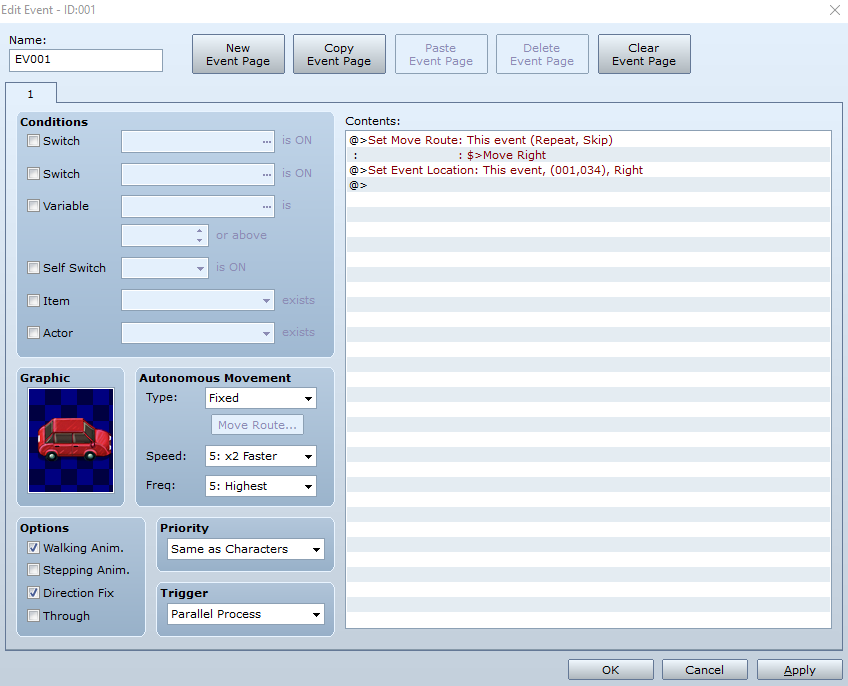
The car just stays still, I have tried with auto run as the trigger also -
@Calwa Is the floor walkable?
-
@KanaX Sorry, your solution cannot work because it has no way to detect when it should jump - it will jump back after only one or two steps (or even before making the first step if the event moves slowly).
I suggest testing before placing a solution for others. Besides - having a repeating set move route in a repeating parallel event will give the move command much too often and cause lag.
@Calwa
There are two different ways to solve this, each having it's advantages and disadvantages.
The simple way is to count the number of rights needed from the starting point and then place a jump back to the starting position after that. This however will not work if there are temporary stops or other events blocking the car.
The other solution needs a parallel process to check the current position, but independent of the move route.
Use autonomouse movement (NOT set move route) to set the move right with skip if blocked.
Have the page with that autonomouse movement on parallel process, containing only the following commands:
- control variable: game data : map x of this event
- conditional branch : var >= right border
--- set event location to left border at right border
-wait(10) after the conditional branch
You might have to experiment a bit on the wait number - if that is too low the map will lag, if it is too high the car might wait a while at the right border. -
@Andar I gravely apologize. I have fallen a bit out of practice lately.
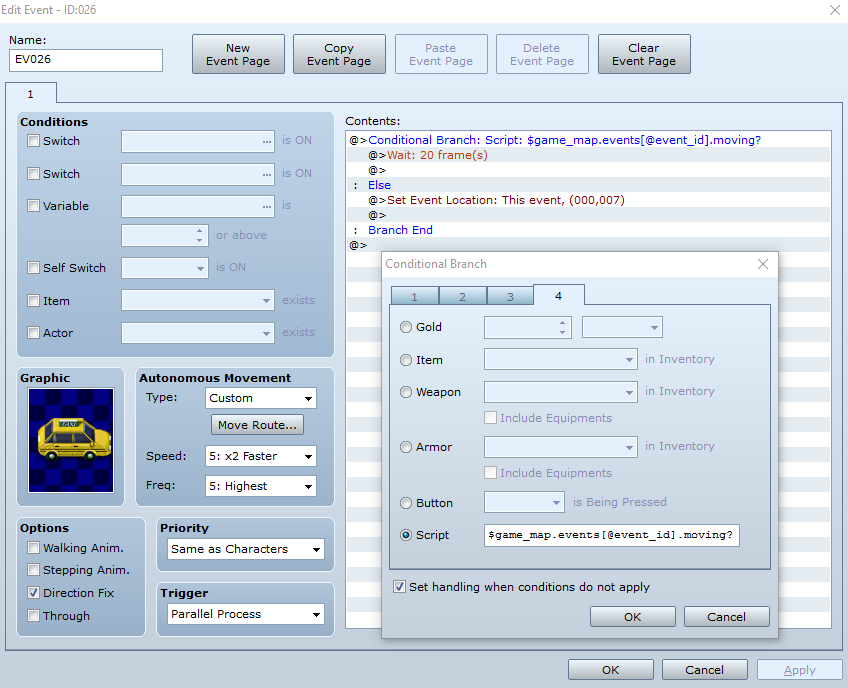
@CalwaAnother method you can try (if you don't want to mess around with variables) is to make a conditional branch like this one:
Spoiler
As Andar said, use Autonomous Movement to control the car. (Have it go right once and set it to Repeat Action). Create a conditional and use this script call:
$game_map.events[@event_id].moving?
Spoiler
As long as the car is moving, nothing will happen. When the car stops, it will reset back to its original position. This one has been tested. -
@Andar I gravely apologize. I have fallen a bit out of practice lately.
@CalwaAnother method you can try (if you don't want to mess around with variables) is to make a conditional branch like this one:
Spoiler
As Andar said, use Autonomous Movement to control the car. (Have it go right once and set it to Repeat Action). Create a conditional and use this script call:
$game_map.events[@event_id].moving?
Spoiler
As long as the car is moving, nothing will happen. When the car stops, it will reset back to its original position. This one has been tested.
This one doesn't work for me either, the car resets after it waits 10 frames, even if it is still moving